I've been using Cakewalk for years and more recently Pro Tools on both my desktop (home-assembled) and an older gaming laptop I use for a portable recording DAW. I've had no issues with Windows 10 (was able to record a set of drums with 12 mics on the laptop with no issues). I know the quality of the drivers of your interface can be a big factor though... I use an RME Fireface UFX that I've had for six or seven years and their drivers are rock solid and are still supported for this device. Our guitarist has a Focusrite 18i20 and it also works wonderfully. I had a MOTU 828mkII before the RME; The hardware was outstanding, but their Windows drivers weren't very good at the time.

Enjoy the benefits of a premium membership!
Upgrade Account
-
TalkBass has been independent since 1998. Add your voice.
Create a free account to reply to discussions, view embedded media, and browse with fewer display ads.
Join free Log in
Want zero display ads or expanded classifieds tools? Compare plans.
You are using an out of date browser. It may not display this or other websites correctly.
You should upgrade or use an alternative browser.
You should upgrade or use an alternative browser.
Windows working ok for those who use it for recording ?
- Thread starter pfschim
- Start date
More options
Who Replied?

Reading about some of the negative experiences with Windows seems to mainly (but not exclusively) be about potentially poorly made OEM drivers or processes imposed by companies other than MS itself (Intel is a big one as it relates to hyperthreading and power management).
i have two old (one was unusable chugging along in xp) windows machines I've returned to usefulness by installing lightweight ubuntu distros. if i could open pro tools sessions in reaper/another daw (without spending 200 bucks on aatranslator) I'd probably make the switch. i have ten years of sessions I'd like to be able to access
i might download ubuntu studio to confirm hardware compatibility and maybe mess around in reaper, maybe do a dual boot situation. i suppose $200 is what I'd have to pay for the "privilege" of converting my perpetual license of pro tools to a subscription were i ever to upgrade hardware and os. might be worth it to get rid of windows bloat and have a system that would stay relatively the same even when i do upgrade hardware
I'm just thinking out loud here
i might download ubuntu studio to confirm hardware compatibility and maybe mess around in reaper, maybe do a dual boot situation. i suppose $200 is what I'd have to pay for the "privilege" of converting my perpetual license of pro tools to a subscription were i ever to upgrade hardware and os. might be worth it to get rid of windows bloat and have a system that would stay relatively the same even when i do upgrade hardware
I'm just thinking out loud here
So, I'd guess that your answer to my original post/thread question would be that Windows does/did NOT work for you seeing as how you flipped the original XP machines to Linux. I do understand that Linux will generally live better on less specc'd up or older machines. All good, hope that's all working well for you.
Several years ago (10+) I got quite interested in open source and tried Linux for a number of things ... general purpose computing and music/audio applications, and found that it was just too fiddly for me. I recall Audio, network and video driver availability was limited and those that were available were pretty iffy or required a level of technical depth (and patience) that I did not have. I suspect that that environment has evolved significantly so perhaps it's on the same ease-of-use level for DAW/music production these days as Windows or MacOS seem to be.
Several years ago (10+) I got quite interested in open source and tried Linux for a number of things ... general purpose computing and music/audio applications, and found that it was just too fiddly for me. I recall Audio, network and video driver availability was limited and those that were available were pretty iffy or required a level of technical depth (and patience) that I did not have. I suspect that that environment has evolved significantly so perhaps it's on the same ease-of-use level for DAW/music production these days as Windows or MacOS seem to be.

Never had a problem that wasn't storage or processor related. I could get real close to 24 tracks then my processor would bug out on playback, so I would mix several tracks and 'bounce' or 'merge' them to stereo to free up processor for additional tracks.

Supadope
Supporting Member
- Nov 30, 2015
- 850
- 2,886
- Disclosures
- My goal is to leave the world a cooler place than when I arrived.
I'm late to the discussion, but I have been recording on Windows since Windows 95. My first PC was a pre-built unit that I found to be OK at best. After that I built my own systems that focused on audio performance. Windows 98SE was the first relatively problem free OS, and with XP I was able to configure the block size which was a game changer. Using the largest possible block size was inefficient for "normal" things because any file, even if it was only a few bytes would consume a 500kb block. But when your audio files are upwards of 50gb each, those large blocks translated to stellar performance. I remember almost 20 years ago being able to run 30 tracks.
My current setup is a Dell PowerEdge R730 server running Windows 10/Sonar. I have an RME RayDat PCIx card connected to 4 Behringer ADA8200's. This provides 32 channels of IO. So I get 28 channels in and I use 4 channels for monitoring. The SSDs in raid are just rediculously fast. I have no idea how many tracks they could support.
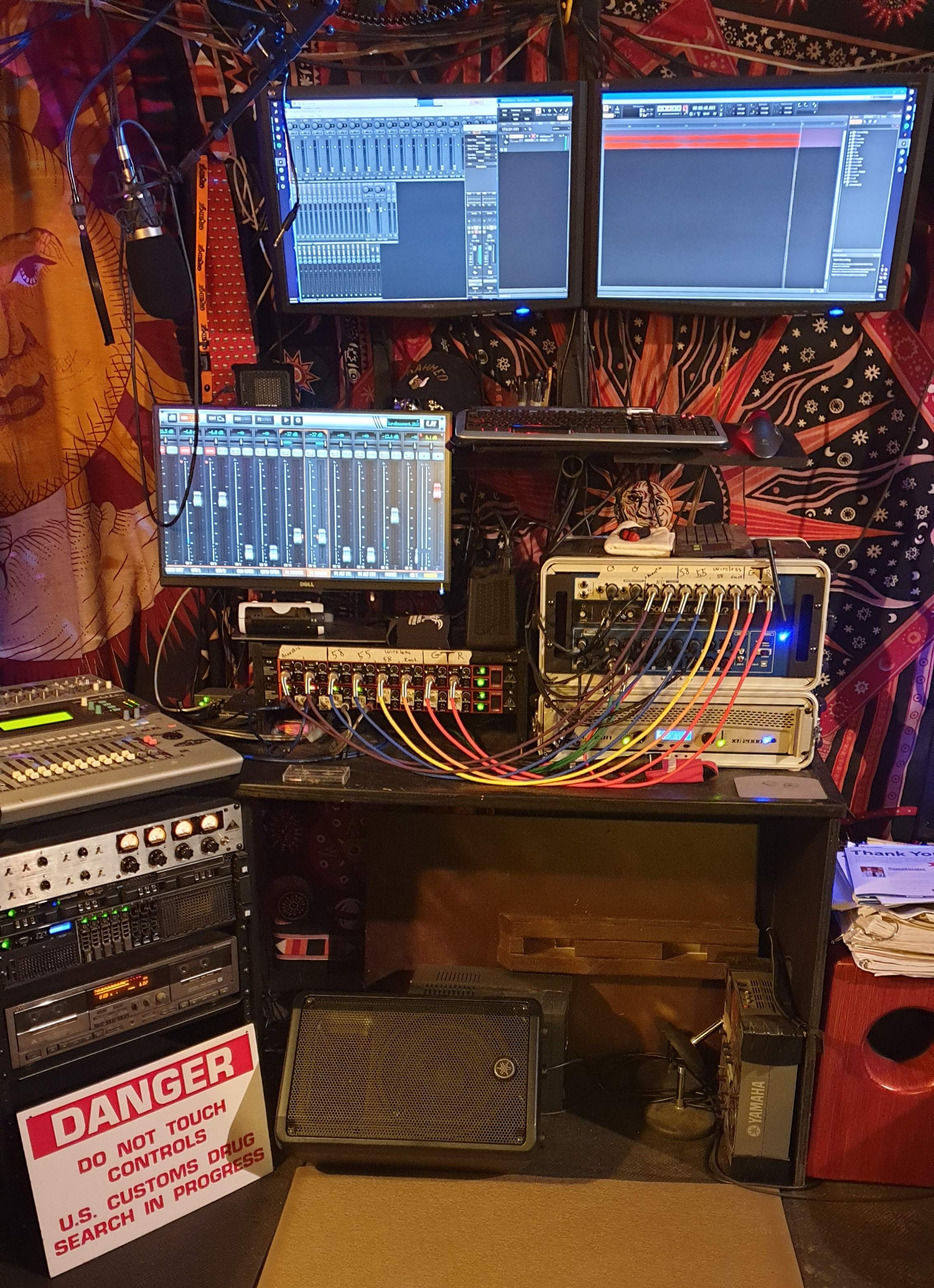
My current setup is a Dell PowerEdge R730 server running Windows 10/Sonar. I have an RME RayDat PCIx card connected to 4 Behringer ADA8200's. This provides 32 channels of IO. So I get 28 channels in and I use 4 channels for monitoring. The SSDs in raid are just rediculously fast. I have no idea how many tracks they could support.
great story really takes me back. I too started doing digital audio recording with Windows 95 using Cakewalk (all in green screen if I recall correctly). I never got quite as deep as you seem to have, but I do remember that it all worked pretty well for the 6 or 8 track projects I was doing at the time. I was even able to use MIDI with a Roland D-10 with that set-up.I'm late to the discussion, but I have been recording on Windows since Windows 95. My first PC was a pre-built unit that I found to be OK at best. After that I built my own systems that focused on audio performance. Windows 98SE was the first relatively problem free OS, and with XP I was able to configure the block size which was a game changer. Using the largest possible block size was inefficient for "normal" things because any file, even if it was only a few bytes would consume a 500kb block. But when your audio files are upwards of 50gb each, those large blocks translated to stellar performance. I remember almost 20 years ago being able to run 30 tracks.
My current setup is a Dell PowerEdge R730 server running Windows 10/Sonar. I have an RME RayDat PCIx card connected to 4 Behringer ADA8200's. This provides 32 channels of IO. So I get 28 channels in and I use 4 channels for monitoring. The SSDs in raid are just rediculously fast. I have no idea how many tracks they could support.
I also remember a buddy of mine (who went on to build and still runs a full on pro studio in the Boston area ... also based on Windows OS) telling me I was a fool not to be using an Amiga system which at the time was supposedly so much better for audio and other creative stuff. Great memories .. funny stuff to recall after all these years.
Last edited:

I got fed up with my recording setup and Win10. Turns out the computer I was using had WIn10 Home - YUCK! I have no idea why that OS was running. I must have been half asleep when I installed that crap.
Starting on Friday, I SCRAMMED the whole system (backed up and wiped the drive). I reinstalled Windows 10 LTSC (their stripped down system - i.e no Cortana or preloads). I did have purge to their antimalware stuff (Windows Defender) from the newer OS as well. I have spend the last couple of days reinstalling Pro Tools and all my plugins. So far working much better.
Starting on Friday, I SCRAMMED the whole system (backed up and wiped the drive). I reinstalled Windows 10 LTSC (their stripped down system - i.e no Cortana or preloads). I did have purge to their antimalware stuff (Windows Defender) from the newer OS as well. I have spend the last couple of days reinstalling Pro Tools and all my plugins. So far working much better.

Yep, exactly......the doo hickey with the thing-a mah jig.....don’t forget the plumbus!!!I've been researching this extensively over the past year. Mac user for daily driver (design work etc) and usually use Macs to record, but Windows machines are now perfectly capable.
Here's the main points I have gleaned:
- Most DAW software is not multithreaded. As we are now seeing an increasing number of consumer and workstation CPUs with more than 8 cores, this may change, but right now, realtime audio processing tends to be linear - it cannot effectively be parallel processed. Mixdowns may be a different story. (This matters for Windows if you plan on using a high-core-count / high speed workstation chip like the new Threadripper Pro, as you might need a Windows for Workstations license.)
- So, that means individual core speed is more important than number of cores, at least for now.
- Higher core speeds usually means a bigger processor with a higher TDP so you need a larger physical enclosure with better ventilation and cooling. (You may not need liquid cooling, but a big heatsink / fan combo helps.)
- Disk and memory access is crucial. The faster the bus you can use, and the faster the SSD, the better; and the more channels of RAM, the faster the CPU can read/write.
- Until very recently, AMD Ryzen and Threadripper chips based on the Zen 2 architecture had issues with running well at low audio buffer sizes, due to the way the cache was split between the core groups. It could be ameliorated by using 'AMD approved' high speed RAM and higher clock speeds. The Zen 3 architecture which debuted on the newest Ryzens solves this problem with a new unified cache, so that's probably a good choice if you're building a new computer.
- Consumer CPUs have limited numbers of PCIe lanes. If you are building from scratch and want more PCIe slots for things like extra USB, PCIe SSD carrier cards, FireWire etc, be sure to see how many lanes you really require. Nowadays motherboards come with 2-3 M.2 SSD slots (usually PCIe) so you can split your boot drive, scratch disk and storage between those, then add more storage on a PCIe card or traditional SATA SSDs for backups etc. If you want more PCIe slots/lanes, you have to look at workstation processors and motherboards like Intel Xeon, AMD Threadripper Pro and/or EPYC.
- If you use Universal Audio UAD-2 cards, be advised that most of their PCIe cards don't work in AMD systems except the Octo. AMD systems generally don't support Thunderbolt (though there are one or two motherboards that support it via an add-in card), but USB 3 / C is well supported, if you are looking at UAD external DSP modules or Apollo interfaces.
- As others have said, building from scratch or buying from a specialist audio workstation maker is probably a better way to make sure the system is optimized. (The weirdest things can happen, like your Windows Audio sample rate not matching your ASIO driver's...) There are tweaky things that can be done at the BIOS level to adjust memory timing and the like to eke out better performance, which I would leave to a trained professional to do. But eliminating bundleware / bloatware and disabling memory-hogging things that launch silently at startup is important.
- If it's a dedicated audio PC, you probably don't need a massive graphics card intended for gaming, certainly not one with big noisy fans onboard. Look at smaller, single-slot workstation graphics cards like the AMD Radeon Pro series. What you probably need is something that can drive larger displays but not at insanely high refresh rates. The WX 2100 can drive 2x 4K displays or 1x 5K display and it is very compact.
- If you want to drive extra-wide "5K2K" pro displays, you may need a higher-powered card like the WX4100 (which can support two of them!) and certified DisplayPort 1.4 cables.

Yep, exactly......the doo hickey with the thing-a mah jig.....don’t forget the plumbus!!!
How’s that wax cylinder recording working out for you?
Wax-ta-cu-larHow’s that wax cylinder recording working out for you?
It’s vintage, so it’s definitely cool.

After grabbing an RME RayDat and using my USB audio interfaces as converters instead of interfaces the performance on Windows has been blowing away my 2018 Mac Mini and 2020 Macbook Pro. My PC is running an 8800k with 64b of 3ghz memory, no overclocking or anything and I get latency numbers and realtime performance that blow away my UA + MacOS setups. This is even when accounting for latency added by the converters.In a recent thread there was a ... ummm ... lively discussion about how viable Windows is for home recording and general audio use. I have used various versions of Windows based systems for decades with very few issues, and with Windows 10 I have not experienced any BSOD's at all. But the discussion got me wondering if perhaps my experience was somehow unique. I'll add that this is not religion for me, I have used MacOS and Linux as well, but I'm just more comfortable with general work-flow in Windows.
So, I'm interested to hear from anyone using Windows for recording if its working well ... or not.
I'd like to keep this focused on Windows and not get into compares to other OS platforms ... and as always, I'd like to keep the discussion fact based and polite.
So, anyone want to share their experience with Windows and recording ?
thanks!
After grabbing an RME RayDat
This is the RayDat HDSPe PCI card solution? When you say ‘no longer using as interfaces’ do you mean you are just using them for A/D/A using ADAT optical to the cards?
I suppose your setup is a bit more demanding - you need to run more physical i/o?
I’m mostly dealing with in-the-box composing and at most one or two tracks of recording at a time, so most RME solutions are overkill for my situation (as nice as they are). So far I’m loving my Audient iD4 and SSL USB boxes, but that’s on Mac; I hope the experience on Windows will be comparable. (Is ASIO4ALL still necessary?)
The thing that I haven’t figured out is whether to go Intel for TB3 compatibility or AMD for faster cores / more PCIe lanes.
Threadripper Pro looks very compelling but I’m waiting on news of a Zen 3 version to overcome the cache design issue that was causing problems with recording at smaller buffer sizes. I may go with a 5950x Ryzen 9 and just live with fewer PCIe slots - originally I was debating using UAD-2s but I think I’ll be fine going native for plugins, and using expansion slots for PCIe SSDs instead.
Last edited:

This is the RayDat HDSPe PCI card solution? When you say ‘no longer using as interfaces’ do you mean you are just using them for A/D/A using ADAT optical to the cards?
I suppose your setup is a bit more demanding - you need to run more physical i/o?
I’m mostly dealing with in-the-box composing and at most one or two tracks of recording at a time, so most RME solutions are overkill for my situation (as nice as they are). So far I’m loving my Audient iD4 and SSL USB boxes, but that’s on Mac; I hope the experience on Windows will be comparable. (Is ASIO4ALL still necessary?)
The thing that I haven’t figured out is whether to go Intel for TB3 compatibility or AMD for faster cores / more PCIe lanes.
Threadripper Pro looks very compelling but I’m waiting on news of a Zen 3 version to overcome the cache design issue that was causing problems with recording at smaller buffer sizes. I may go with a 5950x Ryzen 9 and just live with fewer PCIe slots - originally I was debating using UAD-2s but I think I’ll be fine going native for plugins, and using expansion slots for PCIe SSDs instead.
Your audient and ssl boxes should work with windows, without ASIO4ALL. In 20yrs. I've never had to use asio4all for anything but the built-in sound on a computer. Every interface I've had came with asio, etc. drivers.
Honestly, the drivers are key, and imho, while there are lots of people using lots of different hardware, I've yet to have an interface that didn't sooner or later have driver issues. In fact, I've had one that never had completely working drivers (tascam). Which is why I recently got an old RME babyface, and it's flawless. Considering their history, I expect it to continue to be flawless, which is fricken' worth it.
I will note that I don't think it's reasonable to have to unplug the interface and plug it back in when it wakes from sleep, etc. Some people can live with those kinds of quirks, but I won't do it anymore.
For me, I was trying to get to a point where I could run a good bit of plugins in cubase and maintain <4ms of latency. RME's drivers are top notch, and PCI-E performance is insane.This is the RayDat HDSPe PCI card solution? When you say ‘no longer using as interfaces’ do you mean you are just using them for A/D/A using ADAT optical to the cards?
I suppose your setup is a bit more demanding - you need to run more physical i/o?
I’m mostly dealing with in-the-box composing and at most one or two tracks of recording at a time, so most RME solutions are overkill for my situation (as nice as they are). So far I’m loving my Audient iD4 and SSL USB boxes, but that’s on Mac; I hope the experience on Windows will be comparable. (Is ASIO4ALL still necessary?)
The thing that I haven’t figured out is whether to go Intel for TB3 compatibility or AMD for faster cores / more PCIe lanes.
Threadripper Pro looks very compelling but I’m waiting on news of a Zen 3 version to overcome the cache design issue that was causing problems with recording at smaller buffer sizes. I may go with a 5950x Ryzen 9 and just live with fewer PCIe slots - originally I was debating using UAD-2s but I think I’ll be fine going native for plugins, and using expansion slots for PCIe SSDs instead.

I'm on Win 10 Home in a Dell PC i3 Dual Core 3.40GHz 8GB/1TB internal HD, Tascam US-2x2 interface and Reaper.
Everything works smoothly. Though I usually only record 1 track at a time, I have played back and mixed up to 32 tracks with several FX on each with no glitches at all. That included several envelopes.
The only nit is the monthly Win 10 updates disable my interface driver - every month without fail. It's easy, though time consuming, to repair the driver, but having to stop everything for 5+ minutes when I'm all fired up to record is a PITA.
Everything works smoothly. Though I usually only record 1 track at a time, I have played back and mixed up to 32 tracks with several FX on each with no glitches at all. That included several envelopes.
The only nit is the monthly Win 10 updates disable my interface driver - every month without fail. It's easy, though time consuming, to repair the driver, but having to stop everything for 5+ minutes when I'm all fired up to record is a PITA.
interesting. every month a Windows 10 update cacks your Tascam interface driver ?I'm on Win 10 Home in a Dell PC i3 Dual Core 3.40GHz 8GB/1TB internal HD, Tascam US-2x2 interface and Reaper.
Everything works smoothly. Though I usually only record 1 track at a time, I have played back and mixed up to 32 tracks with several FX on each with no glitches at all. That included several envelopes.
The only nit is the monthly Win 10 updates disable my interface driver - every month without fail. It's easy, though time consuming, to repair the driver, but having to stop everything for 5+ minutes when I'm all fired up to record is a PITA.
I see some Win 10 updates for sure, and even some from Dell, but certainly not monthly, and they never break anything on my system.
dang! sorry to hear that.

So, I'm interested to hear from anyone using Windows for recording if its working well ... or not.
My home studio is Mac based, but for remote work I have a Windows laptop that runs Cubase. Been using it for a decade at least -- full disclosure: and I haven't updated the OS in all that time, it's still running Windows Vista v6.0! -- and never had any complaints, it works reliably and is very stable. Can easily record up to 8 tracks simultaneously. (The fact that I only use the Windows laptop for remote recording and never for mixing may have something to do with how reliable/stable it's been.)

Yeah, Windows can work pretty well for recording. I’ve had good results with it. I did run into some issues last year, though, and found that a factory reset helped clear things up. If you’re having trouble, this guide on resetting Windows 11 might be worth a look: https://operatingsystems.info/how-to-factory-reset-pc-windows-11/. It made a big difference for me and got my setup running smoothly again. Sometimes a fresh start can be all you need to get rid of those annoying glitches!


