• TalkBass has been independent since 1998. Add your voice.
    Create a free account to reply to discussions, view embedded media, and browse with fewer display ads.
    Join freeLog in
    Want zero display ads or expanded classifieds tools? Compare plans.

Behringer Bass V-AMP Pro - Part II: Get On Back, Jack, Do It Again...

I know it was mentioned quite a while ago, but I'm bringing it back up, because it's now relevant to me. Has anyone managed to get a really good setting to mimic "Hysteria" by Muse? I believe the one I'm currently using is 24-D with some tweaking and adjusting, sounded pretty good (not sure if that's it, I moved all my patches for easy access with the fcb1010). I think it'll definitely pass, but if anyone had anything that they really liked, I'd be interested in checking it out.

Also, any really good references on either the V-amp Pro or the FCB1010 computer software for modding with the midi connection? I picked that up a while back, but haven't really got into it that much. One particular thing is I can't find how to set what the expression pedals control on the FCB1010, default one is controlling master volume, the other is controlling mid range... I want the 2nd pedal to control the effect level, like for synth or wah and such.
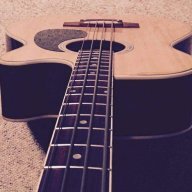
 
Re-arranged our stage a couple of weeks ago, and apparently because of the flip flop, my rig started puking out this nasty mid range resonant frequency that was just driving me crazy. I think I worked the various EQ settings in the BVAMPP enough to wear the knobs out, but the solution was way easier than I made it. I ended up having to abandon the SVT 2 preamp model and went with the Trace Elliot 80's and worked the EQ from there, and now I have to say I wish I'd tried it earlier. My Ibanez 5 string has never wowed me with its tone, but with this new amp model, it finally has a good bottom end tone, my mid issue is taken care of with some minor sweeping, and it sounds better than before.

That's great though, because I'm about to actually put it to use in the studio in the coming months, and I'm finally breaking this thing open and finding what I can do with it.
 
I was looking at different effects processors for a while. I'd sold a few things and wanted to get something that would make my Ibanez GSR200 sound a little better (as per the old adage, "you can't polish a turd, but you can roll it in sparkles"). Boss/Korg/Line 6 stuff was around AU$400 second-hand, I picked my V-amp up for AU$250 brand new.
The tipping point for me was reading these threads and realizing how much potential there was in the unit.
I also got a MIDI/USB interface, because the Behringer editing software is so much easier to use than going direct through the unit.

BUT...

I have Vista, which doesn't like MIDI devices much at all. It wouldn't install the drivers for the interface.

I found a solution here: Invalid Link Removed

as follows:

-Downloading driver from Invalid Link Removede . If the Link diverts it is the Vista driver for EMU x Midi 1x1 cable.
-Used WinRAR to extract the contents of this file (available from Invalid Link Removed) - Once WinRAR is installed right click the EXE file and choose extract option
-Plugged in the USB Midi Cable
-I then went to device manager - Type in devmgmt.msc then [enter] in the Start Search text box
-Sound, Video and Game Controllers was already expanded with VIEWCON having a yellow icon
-I right clicked VIEWCON and chose option UPDATE DRIVER SOFTWARE
-I then chose Browse My Computer for driver software
-I then chose Let me pick from a list of device drivers on my computer
-I chose the 'Have Disk' option and pointed it to the inf file in the folder I had extracted

i.e. \EmmP_PCDrv_L6_1_01_04\Binary\Drivers\driver\emuxmidi.inf

Midi device is now showing up in my applications as VIEWCON and is working.

I'm very impressed with this preamp, and I'm looking forward to recording some decent bass sounds through my M-box Mini:bassist:.

Thanks for all the support and advice on these threads. It's definitely come in handy!
 
Midi is the way to go with this thing. If only for the ability of backing up the settings you spend so much time tuning in. Its much easier to tweak In midi because you don't need two hands. Spend the $6 on amazon and do yourself a favor.

+1

But in no way should it be assumed that a computer or other MIDI interface is required to operate the Bass V-AMP effectively. The MIDI functionality is just icing on the cake for those who like to deep-dive into their gear. :D
 
I bought a V-amp Pro last week on the Dutch equivalent of eBay. I paid 66 Euro (= 90 USD), shipped. :D The guy even threw in the power cord.

I was planning on using it in my home recording studio for monitoring purposes. I like to record clean, but it's nice when the bassplayer (not me per defintion) hears a bass amp (simulation) during recording.

I found that the manual is useless. I went online to find some info and I stumbled upon this thread. Awesome work guys!!! :cool:

So far I'm impressed by the sound of the V-amp Pro. I'd dare to record the bass amp along with the DI signal. I'm looking forward to diving deeper in the V-amp Pro with the new aquired tips.

Now, I happen to have a old Crest power amp (fleamarket find for 10 Euro (= 14 USD) laying around. I'm thinking about putting this little rig together. The downside of that crest is the weight, 45 lbs. Well, I'll be thinking about this later. :)

CharlieC, could you hit me up with a Behringer V-AMP Squad Member number? I'd wear it with pride! :cool:
 
Thanks guys! :D

Another option. A Marshall Valvestate 8008 guitar power amp. Roughly 14 lbs - 2 x 80 watt @ 4 ohm Solid State. Probably loud enough to drive my SWR Henry Jr 4x8" in the home studio (read: pro soundproofed mancave I occasionally rent out). But probably not enough juice to use on stage.

@caeman... Will set it up in stereo. I have pleeeenty of inputs. :cool:
 
Well then! :D


Have fun with the experimenting.

If you haven't already, buy a USB-MIDI cable and download the V-Amp Design software. Controlling the unit through the PC is a lot easier. You also have access to additional settings for each effect not available through the front panel. Also, it is a quick way of backing up your preset. ALWAYS make a backup. ALWAYS.
 
So lately I've been running my V-AMP through my little 15-watt combo amp.

For some reason, the high F# on my bass was starting to make a distorted sound (and not the good kind). I messed with my string, making sure it was sitting right, that it was in-tune and intonated correctly.

Then I messed with the EQ a bit. Then, I set the EQ back to flat (which was how it was to begin with). The noise was gone. :confused:

Sound is weird.
 
Harmonics. That could be your problem. When you pluck that high F#, you might be getting a sympathetic F# an octave below.

Adjusting the pickup height might also fix the problem, but my money is on harmonics.
 
Then, I set the EQ back to flat (which was how it was to begin with). The noise was gone. :confused:

Sound is weird.

Weird, distorted V-AMP sounds are usually caused by clipping the input. Check the CLIP light and compensate preamp VOLUME (not the MASTER volume) accordingly.

Boosting EQ also causes a VOLUME boost. Flattening the EQ would reduce VOLUME and that may be why the problem then stopped. This directly supports my theory. Watch the CLIP light.

Cheers!
 
Weird, distorted V-AMP sounds are usually caused by clipping the input. Check the CLIP light and compensate preamp VOLUME (not the MASTER volume) accordingly.

Boosting EQ also causes a VOLUME boost. Flattening the EQ would reduce VOLUME and that may be why the problem then stopped. This directly supports my theory. Watch the CLIP light.

Cheers!

To date, I have never made that clip light go off with my P bass. It's hot, but not hot enough to overload that amp (I only run my gain at 12 o clock anyway).

I believe the issue was with the combo amp. I think I knocked something loose. And then re-knocked it later. That's the only explanation I can come up with, since I changed some settings, and then reset them back to how they originally were, thus changing nothing.
 
To date, I have never made that clip light go off with my P bass. It's hot, but not hot enough to overload that amp (I only run my gain at 12 o clock anyway).

I believe the issue was with the combo amp. I think I knocked something loose. And then re-knocked it later. That's the only explanation I can come up with, since I changed some settings, and then reset them back to how they originally were, thus changing nothing.

It is quite possible to unknowingly trip the V-AMP's CLIP light through heavy use of EQ and/or compression, even with a low output bass

Should the noise return, you might want to give a quick look to the CLIP light ;)