

Enjoy the benefits of a premium membership!
Upgrade Account
-
TalkBass has been independent since 1998. Add your voice.
Create a free account to reply to discussions, view embedded media, and browse with fewer display ads.
Join free Log in
Want zero display ads or expanded classifieds tools? Compare plans.
You are using an out of date browser. It may not display this or other websites correctly.
You should upgrade or use an alternative browser.
You should upgrade or use an alternative browser.
Behringer XR18 X-Air
- Thread starter jimfist
- Start date
More options
Who Replied?
The PC software is on the download pages for the XR series mixers. I'm a bit underwhelmed, sad to say. The Presonus Universal Control AI app is much more polished. Same goes for the Soundcaft UI HTML5 page running on my laptop. Its probably not fair to compare software for a $700 mixer to a $1400 mixer. But now I'm wondering if the Soundcraft UI16 with its smaller channel counts will support cascading as their SM Pro predecessors supposedly did. A 24 channel, 8 aux UI for $1100 sounds pretty attractive to me. Could this explain why the demo software is 24x8?

I just downloaded the new PC software for the XR18 X-Air from the Behringer website and gave it a quick look-see. The GUI for all of the software apps (PC/iPad/Android) isn't necessarily the slickest thing I've ever seen. Mackie has done a far better job refining their iPad/iPhone interface and made the most out of the firmware and feature set for their digital mixers. But the X-Air Edit is still in beta and will likely see some development along the way. A lot of my previous questions seem to have been answered just by tooling around with the software:
- YES !!! The channel sends to Aux Busses allow you to select from "Input, Pre EQ, Post EQ, Pre Fader, Post Fader and Sub Group". I'm not sure how the Sub Group function is supposed to work. Perhaps it allows you to sacrifice an Aux Bus to be repurposed as a Sub, which then assigns directly to the Mains L/R output? It's very unclear what this "Sub Group" assignment is all about, but at least it appears there is a way (perhaps a convoluted one) to use Aux Busses and the FX busses as a sort of Sub Group. Even if this is a clunky implementation, it's good news AFAIC. As of yet I've not seen a comprehensive user Manual that describes various specific aspects of this unit.
- Under the "Channel" tab, there is a Main Out section, under which there are the headings for: Fader Group, Auto Mix Group, Mute Group. Without having the mixer hooked up, these label/buttons have no function. Perhaps they are still features under development or need connectivity (???). The good news is that at least these are also on the radar.
- With the PC software, I've not yet figured out how to rearrange or combine the channel layouts into "DCA Groups" as you can do with the iPad software.
I'll reserve further opinions until I have the mixer in hand to use in conjunction with the software. Clunky interface and all, where it looks like the XR18 shines is in the number of available effects and processors in the FX busses. I had not anticipated such things as a Dual Channel Guitar amp with speaker emulation. Interested to see how that sounds and how it might be MIDI controllable. In conjunction with the loads of other compressors, EQs and Filters in this box, I may give it a whirl as a bona-fide bass rig (into full range cabinets).
The physical box is coming soon, so the real test will be in how the software integrates with the hardware in terms of wireless connectivity and sound quality. I've not yet gotten into the multitrack recording aspects of this thing yet. I can see myself getting an inexpensive touch screen tablet to operate this thing live. On my work screen, the GUI measures 15"+/- diagonally, and displays all channel, FX and Mains Faders without scrolling, and above the "virtual fader console", all of the advanced feature editing is displayed. Though the Mackie DL mixers have a great control app, screen real estate has always been an issue with me with the iPad, and this doesn't appear to be changing any time soon. If Behringer can refine their GUI a bit and tighten up a few features in the firmware, then I'm cautiously optimistic that the XR will be a great multi-purpose mixer for me moving forward.
- YES !!! The channel sends to Aux Busses allow you to select from "Input, Pre EQ, Post EQ, Pre Fader, Post Fader and Sub Group". I'm not sure how the Sub Group function is supposed to work. Perhaps it allows you to sacrifice an Aux Bus to be repurposed as a Sub, which then assigns directly to the Mains L/R output? It's very unclear what this "Sub Group" assignment is all about, but at least it appears there is a way (perhaps a convoluted one) to use Aux Busses and the FX busses as a sort of Sub Group. Even if this is a clunky implementation, it's good news AFAIC. As of yet I've not seen a comprehensive user Manual that describes various specific aspects of this unit.
- Under the "Channel" tab, there is a Main Out section, under which there are the headings for: Fader Group, Auto Mix Group, Mute Group. Without having the mixer hooked up, these label/buttons have no function. Perhaps they are still features under development or need connectivity (???). The good news is that at least these are also on the radar.
- With the PC software, I've not yet figured out how to rearrange or combine the channel layouts into "DCA Groups" as you can do with the iPad software.
I'll reserve further opinions until I have the mixer in hand to use in conjunction with the software. Clunky interface and all, where it looks like the XR18 shines is in the number of available effects and processors in the FX busses. I had not anticipated such things as a Dual Channel Guitar amp with speaker emulation. Interested to see how that sounds and how it might be MIDI controllable. In conjunction with the loads of other compressors, EQs and Filters in this box, I may give it a whirl as a bona-fide bass rig (into full range cabinets).
The physical box is coming soon, so the real test will be in how the software integrates with the hardware in terms of wireless connectivity and sound quality. I've not yet gotten into the multitrack recording aspects of this thing yet. I can see myself getting an inexpensive touch screen tablet to operate this thing live. On my work screen, the GUI measures 15"+/- diagonally, and displays all channel, FX and Mains Faders without scrolling, and above the "virtual fader console", all of the advanced feature editing is displayed. Though the Mackie DL mixers have a great control app, screen real estate has always been an issue with me with the iPad, and this doesn't appear to be changing any time soon. If Behringer can refine their GUI a bit and tighten up a few features in the firmware, then I'm cautiously optimistic that the XR will be a great multi-purpose mixer for me moving forward.

OK. Fired it last night and twiddled around for a couple hours. Yup. The thing works fine. Without a comprehensive owner's manual detailing features, and with the PC editor still in beta, I'm not sure if I want to say much more other than that. The input channel strips are as advertised with the full compliment of standard features. Nice difference with the XR18 is the side-chain key feature on dynamics, which you don't see on the Mackie 1608.
I love some things about it (4 fx busses/slots and wide choice of processors), but I'm totally vexxed by other things (why no discrete Subgroups, but instead, subgroups that "steal" an Aux Bus?). Regardless of the awkward implementation of Subgroups, I can deal with it in the hope they address the issue with a firmware update sometime. In general, I could probably do a basic club mixing gig with this as it stands, provided I had a touch screen PC to control it rather than laptop with mouse. I've grown to dislike iPad mixing, and am hoping this will get me away from it to a more comfortable touch screen solution.
Clearly, a few things still need to be sussed out with the XR18 X-Air, but so far things are looking pretty good. Being an early owner does have its pitfalls, for certain, and I'm in no real hurry or need to get this integrated for live mixing. Thus I can stick and move with the growing pains and progress of the XR18. So much relies on the GUI with these small format digital mixers, it's really hard to say anything conclusive until things are out of beta and have matured for a little bit.
so, yeah, the thing works and sounds good. What'll have me all Pete Carroll jacked-and-pumped is when I start doing live multitrack digital recordings and mixdowns with this thing, which is one of the main reasons I got it in the first place. Cautiously optimistic.
With the XR18 X-Air priced right along side the DL1608 (price dropped recently to $699), it's good to have choices. Mackie is a more mature product with a user friendly interface, but it is married to the iPad, which I dislike. Behringer packs a lot more features into the XR18 X-Air, allows for every conceivable type of wired/wireless control, but IMO suffers at the moment from being new to the market, in need of tweaking and feature adjustments.
If anyone has some specific questions, I'll be happy to try to give an answer based on the short time I've been using it.
I love some things about it (4 fx busses/slots and wide choice of processors), but I'm totally vexxed by other things (why no discrete Subgroups, but instead, subgroups that "steal" an Aux Bus?). Regardless of the awkward implementation of Subgroups, I can deal with it in the hope they address the issue with a firmware update sometime. In general, I could probably do a basic club mixing gig with this as it stands, provided I had a touch screen PC to control it rather than laptop with mouse. I've grown to dislike iPad mixing, and am hoping this will get me away from it to a more comfortable touch screen solution.
Clearly, a few things still need to be sussed out with the XR18 X-Air, but so far things are looking pretty good. Being an early owner does have its pitfalls, for certain, and I'm in no real hurry or need to get this integrated for live mixing. Thus I can stick and move with the growing pains and progress of the XR18. So much relies on the GUI with these small format digital mixers, it's really hard to say anything conclusive until things are out of beta and have matured for a little bit.
so, yeah, the thing works and sounds good. What'll have me all Pete Carroll jacked-and-pumped is when I start doing live multitrack digital recordings and mixdowns with this thing, which is one of the main reasons I got it in the first place. Cautiously optimistic.
With the XR18 X-Air priced right along side the DL1608 (price dropped recently to $699), it's good to have choices. Mackie is a more mature product with a user friendly interface, but it is married to the iPad, which I dislike. Behringer packs a lot more features into the XR18 X-Air, allows for every conceivable type of wired/wireless control, but IMO suffers at the moment from being new to the market, in need of tweaking and feature adjustments.
If anyone has some specific questions, I'll be happy to try to give an answer based on the short time I've been using it.

If anyone has some specific questions, I'll be happy to try to give an answer based on the short time I've been using it.
When you play north of Boston with this bad boy, gimmie a holla!

Sounds like great features and sound. The price/value looks great.
For recording, here's my hope
I've been keeping an eye on Waves Tracks Live
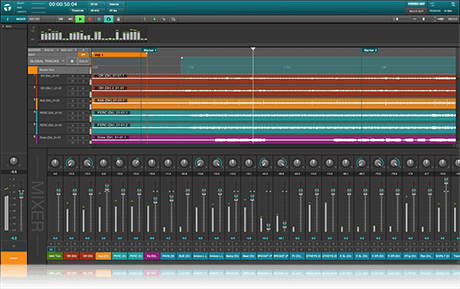
It should be just a single cable from the PC to the XR18
They just haven't announced a price yet.
I hope it comes in at a decent price, and their intro prices are usually half off.
It's not same market as regular DAW as it's really just about recording audio. It should really simplify recording live and in a studio. With a simple mix down and master, at least I hope.
At the same time you can use the same effects live and in the studio. "Waves" branded plugins, but they have a lot of great sounding plugins that work great with Behringer mixers.
For recording, here's my hope
I've been keeping an eye on Waves Tracks Live
It should be just a single cable from the PC to the XR18
They just haven't announced a price yet.
I hope it comes in at a decent price, and their intro prices are usually half off.
It's not same market as regular DAW as it's really just about recording audio. It should really simplify recording live and in a studio. With a simple mix down and master, at least I hope.
At the same time you can use the same effects live and in the studio. "Waves" branded plugins, but they have a lot of great sounding plugins that work great with Behringer mixers.
When you play north of Boston with this bad boy, gimmie a holla!
Sure thing!
I've just spent some time saving Scenes and Channels on my laptop using X-Air Edit. I'm noticing that the state of the mic input trims is not saving/recalling. Is this the desired behavior? I seemed to have assumed that mic input trim would have been saved with the scenes or channels for future recall. This isn't a dealbreaker necessarily, but one of the things I was looking forward to was the ability to have input trims set up for the various gigs I do and recording setups, with the various instrumentations, and not having to worry about input trim, as most if not all of the time the players are using the same gear and mics. It is a huge time saver to not need to re-confirm input trim, and just save a scene from the end of a gig and use it as the full starting point.
hmmmmmm.....
Anyone?
Mine has to deliver before I can use it!
LOL. I hear you. I'll be using this in the rehearsal studio, both to suss out the live sound aspects of it, but also b/c I currently have no decent multitrack DAW and I'm expecting the XR18 to serve as the dual threat that the 1608 will never be. Years ago I couldn't afford to be that patient, but these days I'm cool with it. This isn't going to make or break anyone's career, that's for sure.

That's the beauty of a small format digital mixer, one firmware update would conceivably correct all these little annoyances. Thanks for being a guinea pig jimfist. Looking forward to your recording experience with it, what DAW will you be using it with?

I'm contemplating using an XR12 as a bass preamp. My "big rig" is a pair of 4 ohm 212MBE's powered by a Behringer NU3000. It'd be nice to have a mic input for the kick for when a club only has a crappy vocals-only PA...
Sure thing!
I've just spent some time saving Scenes and Channels on my laptop using X-Air Edit. I'm noticing that the state of the mic input trims is not saving/recalling. Is this the desired behavior? I seemed to have assumed that mic input trim would have been saved with the scenes or channels for future recall. This isn't a dealbreaker necessarily, but one of the things I was looking forward to was the ability to have input trims set up for the various gigs I do and recording setups, with the various instrumentations, and not having to worry about input trim, as most if not all of the time the players are using the same gear and mics. It is a huge time saver to not need to re-confirm input trim, and just save a scene from the end of a gig and use it as the full starting point.
hmmmmmm.....
Anyone?
Totally makes sense that they should give you the option to save trim. Did you contact their support? I wonder if others are asking for the same.
Can you get to trim via MIDI, a workaround may be to send midi to adjust the trim while Behringer sorts this out.
That's the beauty of a small format digital mixer, one firmware update would conceivably correct all these little annoyances. Thanks for being a guinea pig jimfist. Looking forward to your recording experience with it, what DAW will you be using it with?
I enjoy the ride, especially when it all works out in the end. I've already tracked some of my issues as being user error, which is good news. The XR18 comes with a promotional free download of Tracktion 4 after registering the product. I'll start there and see how it works. Otherwise, I'll be asking for some DAW advice. LOL
I'm contemplating using an XR12 as a bass preamp. My "big rig" is a pair of 4 ohm 212MBE's powered by a Behringer NU3000. It'd be nice to have a mic input for the kick for when a club only has a crappy vocals-only PA...
I was able to get some pretty decent bass tones out if the XR18. The channel strip has the standard PEQ and Compressor, and with some creative routing using the FX buses, you could actually do quite a bit with the XR as a bass rig with a MIDI pedal that sends CC# and value, like the Behringer FCB1010 to change sounds and add effects.
Totally makes sense that they should give you the option to save trim. Did you contact their support? I wonder if others are asking for the same.
Can you get to trim via MIDI, a workaround may be to send midi to adjust the trim while Behringer sorts this out.
It wound up being my error with the store/recall of input trim using saved SCENES. I figured it all out and it does work as expected.
-------------------
I wound up confirming how the Bus Sends are designed to work, and evidently it is part of the convention Behringer uses with the X32 series. In the end, you have 6 Bus sends that are configurable - generally as either Sub Groups or as typical monitor sends (stage wedges, etc.). If you decide to employ using a Bus as a subgroup, it is then (obviously) not available for use as a stage monitor Aux send. The XR18 is configured as an 18x2 + 6 bus sends. You can configure it to be 18x2x2 with 4 aux Bus sends, or 18x4x2 with 2 bus sends.
The reason I'm comfortable with this is because you've also got 4 dedicated stereo FX sends that can be configured as psuedo-subgroups with, for example, a stereo reverb or compressor "baked" into the FX bus, and using wet/dry mix controls or other creative routing to accomplish much the same as you would with a dedicated bus (I hope that makes sense). Subgroups aren't entirely necessary in a lot of applications but I like using them for certain things. DCA groups work just as well for a lot of things. Oddly, the iPad app allows you to create DCA groupings, while I've not yet found that feature engaged on the PC software.
It's going to be a bit of a haul before things are fully in gear with the XR X-Air series, but I am encouraged by what I'm seeing so far.

we just had our first rehearsal with the xr18 today.
Great to be able to play around with it. I found I had to make really drastic adjustments to the feed into my in ears to make any difference.
Connecting to it was super easy, both with my android phone and the guitarists IPad.
I think the biggest adjustment will be not with the xr18 but the behringer active PA speakers and sub that the guitarist bought. They're plenty loud but kind of harsh. Next practice I'll have to look in to 1)eq'ing the mains.
2)fx on my IEM feed
3) compression for main vocals that doesn't affect the feed into the monitors. don't know if that's even possible
Great to be able to play around with it. I found I had to make really drastic adjustments to the feed into my in ears to make any difference.
Connecting to it was super easy, both with my android phone and the guitarists IPad.
I think the biggest adjustment will be not with the xr18 but the behringer active PA speakers and sub that the guitarist bought. They're plenty loud but kind of harsh. Next practice I'll have to look in to 1)eq'ing the mains.
2)fx on my IEM feed
3) compression for main vocals that doesn't affect the feed into the monitors. don't know if that's even possible
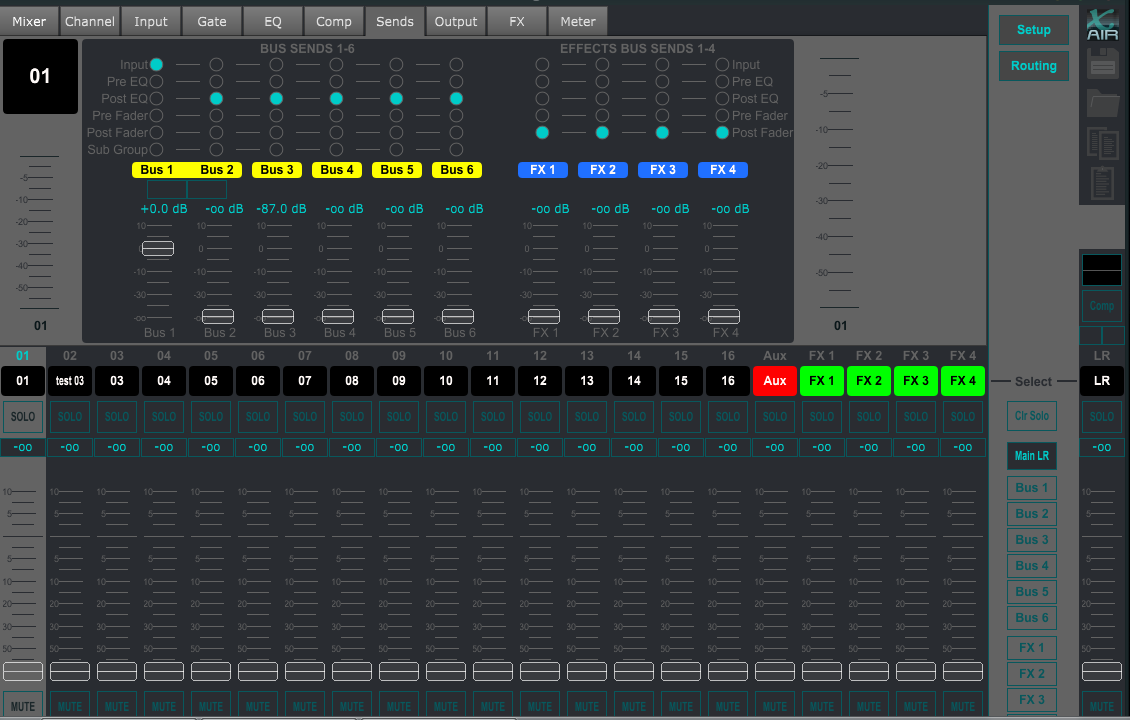
#3) you might need to hook up the PC software to make the adjustments you need to take a "tap" off of your monitor feed that doesn't have compression in it (if you have the comp engaged on your vocal channel strip. Here's a screenshot of the software with the SENDS tab for channel one input, and using BUS 1 as a monitor feed. Notice that this is assigned as "Input" being the location of the "tap" for that Bus send. At least, this is my assumptions since we don't have a manual to reference, and I've not yet had a chance to test this out myself to confirm. But that would be my guess that "Input" takes the tap straight off of the input, before EQ and other channel strip processing. Have you gone onto the Behringer X-Air forum? They just created it recently to field questions about the new line of mixers.
Hello all,
I just wanted to pop in to say thanks for sharing your experiences with the XR18. If you haven't checked it out, we have a whole new subforum on the X AIR products at our new forum location, forum.music-group.com under the BEHRINGER brand forums. There has already been a lot of action there and many issues discovered and resolved, so it's a good resource if you have questions. In addition, our CARE team is available to help with issues and questions as well, and can be contacted at [email protected] or by phone at +1-702-800-8290 (US) or +44 1562 732290 (UK). I hope you continue to enjoy your XR18s!
Best regards,
Sean Fairchild
Specialist, Customer Experience Engagement
MUSIC Group
BEHRINGER
I just wanted to pop in to say thanks for sharing your experiences with the XR18. If you haven't checked it out, we have a whole new subforum on the X AIR products at our new forum location, forum.music-group.com under the BEHRINGER brand forums. There has already been a lot of action there and many issues discovered and resolved, so it's a good resource if you have questions. In addition, our CARE team is available to help with issues and questions as well, and can be contacted at [email protected] or by phone at +1-702-800-8290 (US) or +44 1562 732290 (UK). I hope you continue to enjoy your XR18s!
Best regards,
Sean Fairchild
Specialist, Customer Experience Engagement
MUSIC Group
BEHRINGER
Just messing around here and there with the XR18, tooling around playing my bass, and I must say that it's a really good-sounding and fun little box. Once you get a hang of the PC software interface, it's not too bad. When some of the other updates drop (mute groups, etc.), things are going to get interesting.
One of my first experiments, once all of the features are in place, will be to mult a single bass input (channel 1) to 8 channels (ch1-8), and set up each channel with its own discrete set of tone and effects (whatever that may be, using the individual channel strips and a combination of insert FX/Processors and FX sends). Then I'll set about creating different scenarios whereby I'll use my FCB1010 to send MIDI CC to turn on/off individual Scenes, Mute Groups, Bus Sends and Channels, as well as use the 2 expression pedals for real time control over effects sends and returns.
The only thing the XR18 really needs is a viable bass amp & cab emulator (the Guitar amp sim is meh IMO so far, but I haven't spent a load of time tweaking it) and a tuner, and you could easily use this as an all-in-one bass preamp with wireless control over stuff on an iPad or Android. The various choices of "flavored" vintage compressors are pretty nice, though, and you can get things sounding pretty "amp-like" with a little effort.
Hmmmm....
Can't do any of that with my DL1608...which is exactly why I wanted to get into the XR18 early.
One of my first experiments, once all of the features are in place, will be to mult a single bass input (channel 1) to 8 channels (ch1-8), and set up each channel with its own discrete set of tone and effects (whatever that may be, using the individual channel strips and a combination of insert FX/Processors and FX sends). Then I'll set about creating different scenarios whereby I'll use my FCB1010 to send MIDI CC to turn on/off individual Scenes, Mute Groups, Bus Sends and Channels, as well as use the 2 expression pedals for real time control over effects sends and returns.
The only thing the XR18 really needs is a viable bass amp & cab emulator (the Guitar amp sim is meh IMO so far, but I haven't spent a load of time tweaking it) and a tuner, and you could easily use this as an all-in-one bass preamp with wireless control over stuff on an iPad or Android. The various choices of "flavored" vintage compressors are pretty nice, though, and you can get things sounding pretty "amp-like" with a little effort.
Hmmmm....
Can't do any of that with my DL1608...which is exactly why I wanted to get into the XR18 early.
I've already figured out to not name a channel that you want to copy and paste into another. For example, vocal compression and lowcut. Set channel one, then copy and paste that channel into 2-5. Go back and name the channels after the paste. Not a huge deal, but I would prefer to just copy EQ, DYN, Gate, etc. Not all of the channel parameters. Unless I'm doing it wrong. Highly likely... 
I've posted exactly this (better sim and tuner) over on Behringer's X-Air forum - plus the point that bass is a whole lot more likely to go direct than guitar at a gig, so having a bass amp sim makes more sense than having the guitar amp sims they already haveThe only thing the XR18 really needs is a viable bass amp & cab emulator (the Guitar amp sim is meh IMO so far, but I haven't spent a load of time tweaking it) and a tuner, and you could easily use this as an all-in-one bass preamp with wireless control over stuff on an iPad or Android. The various choices of "flavored" vintage compressors are pretty nice, though, and you can get things sounding pretty "amp-like" with a little effort.
 .
.


