• TalkBass has been independent since 1998. Add your voice.
    Create a free account to reply to discussions, view embedded media, and browse with fewer display ads.
    Join freeLog in
    Want zero display ads or expanded classifieds tools? Compare plans.

Darkglass Anagram Multi FX Announced


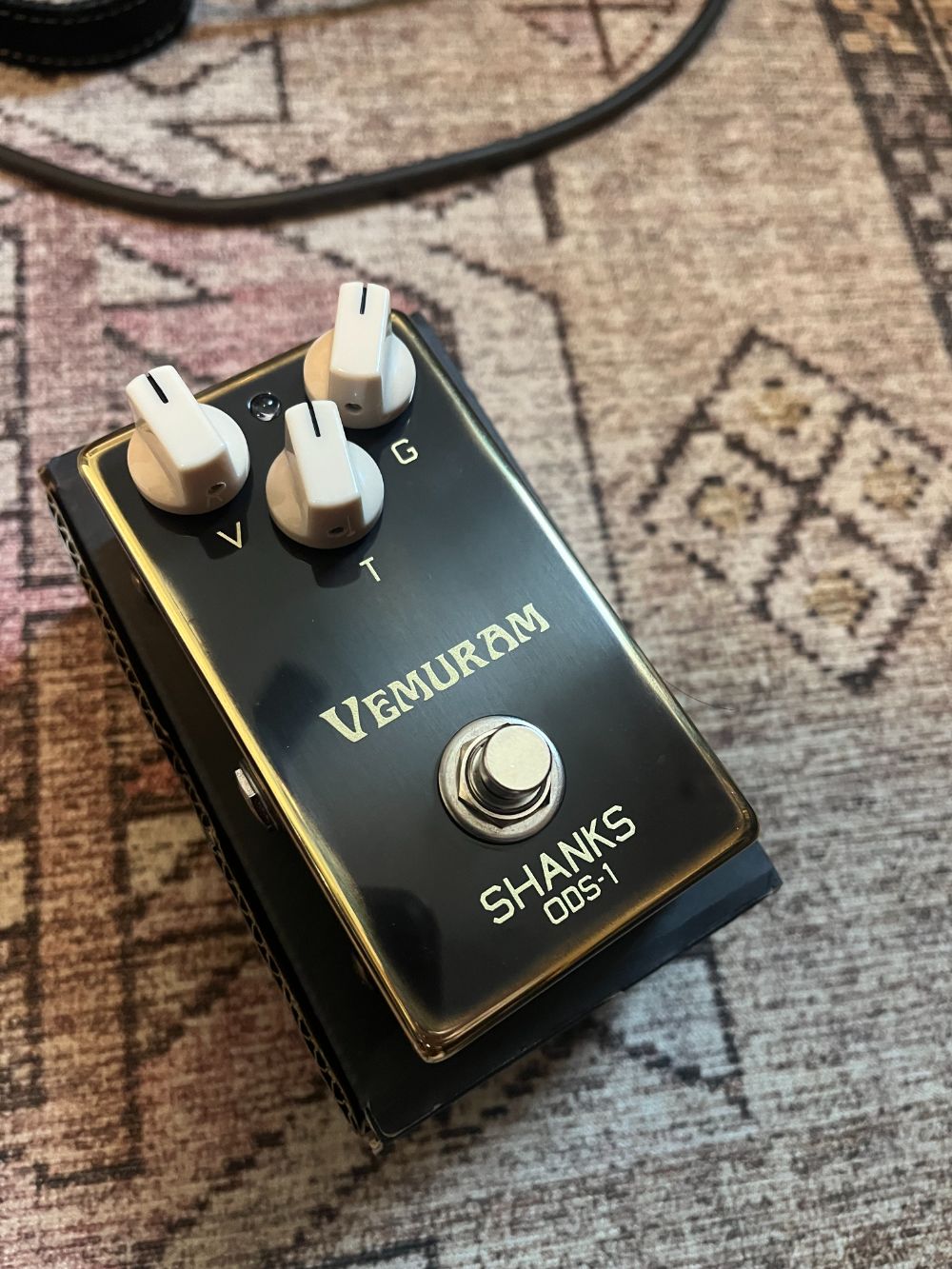
Also I listed my Vemuram Shanks on here but someone already bought it, if you'd like to use my capture it's right here! The gain at 10 setting is my preferred and max gain is pretty sick as well. I've found dropping the input 2 db and lowering the output 5 on the gain at 10 and by 10 with the max gain sounds great!
 
So yesterday at rehearsal I tried running the Anagram via 4-cable method with my MT500v2 and it was really something. Gives me the flexibility to get in there and adjust amp parameters on the fly instead of having to bend over like a fool each time. And the great thing is now I can do the same with my beloved Ashdown ABM 600 head - incorporate that goodness right wherever I want in the signal chain.

Wonderful setup in general, but the problem now is how do I use an expression pedal? Basically I want to use a volume pedal (I do a lot of swells and what have you in our shows - at rehearsal I was doing them with the volume knob on my bass and it wasn't great) but since the expression pedal input is one of the FX loop inputs, how do I fit it in? I know you can use a splitter cable on the Send, but that's not going to be feasible to use on stage with a head....

Any ideas from the hive mind?

What expression pedal do you use? I have the Dunlop DVP5, so I just used it as a volume pedal in front of the Anagram instead of an expression pedal connected to it.
 
What expression pedal do you use? I have the Dunlop DVP5, so I just used it as a volume pedal in front of the Anagram instead of an expression pedal connected to it.
I haven't gotten one yet (I was using my Boss GX10 multifx and before that a Boss GT1B, both of which have built-in expression pedals) but ideally I'd like one that is compact and doesn't need an external power source. Something like the Valeton EP-2 or similar. I borrowed a friend's Boss EX pedal to experiment with, it's good but way too bulky for me.

The problem I find with putting an EX pedal in front of the Anagram is because I use a lot of drive (and have NS accordingly) for many of my projects, the NS basically kills any sort of sound below a certain level, whereas if I have it in the signal chain after the drive/NS I find a much smoother response (and I can put it before the delay/reverb section as well contributing to a more immersive sound).
 
Last edited:
Got to thinking about this a bit... putting this in the effects loop you could still use the DI out; have a bunch of pre "amp modeling" effects going to the DI and then utilize the tube saturation before the amp models and out of the DI's built into the Anagram.. might have to try this. I also can't find a compressor to compete with my Cali76, so far using the listed attack and release times of the Cali with the Compressor/Limiter has given me the best results, how about you Ivan?
That's exactly what I intend to do with my Ashdown ABM. Use the Ashdown's amazing tube preamp with all the FX and modelling of the Anagram, and put the preamp exactly where you want it to be in the signal chain. Bonus is the amazing AB power section for stage volume. Best of all worlds.
 
Got to thinking about this a bit... putting this in the effects loop you could still use the DI out; have a bunch of pre "amp modeling" effects going to the DI and then utilize the tube saturation before the amp models and out of the DI's built into the Anagram.. might have to try this. I also can't find a compressor to compete with my Cali76, so far using the listed attack and release times of the Cali with the Compressor/Limiter has given me the best results, how about you Ivan?
Currently I still prefer the Cali76 over the Anagram comps. I’ve got the v2 and the metering is great.

However, I’ve gigged with the Anagram internal ones only and everything went smoothly, too :)
 
It may be unity gain, but compressor with medium to slow time accentuates attacks and that may help triggering envelope filter.
As i mentioned above, i have uploaded the preset to the hub and it was made to work without the Cali in the signal chain.

I just tested it again with my G&L P-bass, which is a very low-output bass and i can get all the filters to work. If you wanna check it out, it’s called “En El After Hub” :)

You probably need to increase the cut-off frequency for it to sound “more funky”, because it was dialed in for this tone:
 
I just tested it again with my G&L P-bass, which is a very low-output bass and i can get all the filters to work.
Out of curiosity; If you plug that bass into Anagram and play a few fingerstyle notes on the open E string, what does the input gain meter look like? Does it cross the halfway point of the meter under normal playing intensity with the volume on full?
 
  • Like
Reactions: Acebassmusic
Tonight I sat down with Anagram and had one goal: Make the envelope filters sound good. I’m happy to report that I was able to make it happen.

The trick, for every bass I own, was to stick a gain block in front of either filter option and crank the gain. Adding 20db of signal to the front of the filters makes them respond more like every analog envelope filter I’ve ever owned. [snip]

Care to show your entire chain?

I’m not quite ready to share anything yet.
I'll share mine :-)

It's called "Mooooer" and I just uploaded it into the preset hub. I wanted to take a minute and write down what it was like to make this because it validated my hope that I would be able to get my head around this device in a way that I couldn't with other all-in-ones.

Related to Silky Smoove's discovery that the m**erf**er block needs a high gain input (which I would consider a bug of sorts) I sandwiched it between two "Gain" blocks.

While in "Chain" view I spent some time dialing up the input gain, and dialing back the "output" gain until I had it where I wanted it.

Then I realized that in "Bindings" view I could assign one knob to *both* the input gain and the compensating output gain. Hit the "+", select the first gain block. Start value 0dB, end value 20dB. Then you can add *another* control to the same binding with the "+" at top right in the binding editor. Doing this adds another page and you can swipe between multiple pages for a given binding. Then I selected the second gain and inverted the start and end values! Start value 0dB, end value -20dB. Now that single dial jacks up the gain of the signal going into the mooer block while simultaneously reducing the gain on the output side. I know DG didn't invent this but the implementation is nice and easy to tweak to taste, even in a rehearsal or live setting. I named that knob "MOD SENS". Turn it up for more sensitive modulation without impacting overall gain, and edit the block itself to tweak the character of the modulation.

While I was at it I added a knob in the bindings view for the compressor threshold, and another for the compressor output gain. I also added a control on the right for an amp sim I like, so I can easily turn it on or off depending on what I'm playing into. Then I added a stomp control that activates and deactivates the mooer block *and* the two gain blocks to bypass that part of the chain, and named that stomp "MOD." While I was at it I added a chorus at the end, plus an octave in parallel to the mooer. Added stomp bindings to both of those and voila! I'm not an expert tone shaper or anything but I enjoyed playing through this patch at rehearsal last night.

I hope this helps those starting to dip their toes in. Really enjoying Anagram even at this early stage.

IMG_4192.jpg
 
Then I realized that in "Bindings" view I could assign one knob to *both* the input gain and the compensating output gain. Hit the "+", select the first gain block. Start value 0dB, end value 20dB. Then you can add *another* control to the same binding with the "+" at top right in the binding editor. Doing this adds another page and you can swipe between multiple pages for a given binding. Then I selected the second gain and inverted the start and end values! Start value 0dB, end value -20dB. Now that single dial jacks up the gain of the signal going into the mooer block while simultaneously reducing the gain on the output side.
I did this very thing while testing the envelope filters. It's a very slick way to achieve a boost into an effect followed by a compensation to retain unity gain. Incremental addition and subtraction of gain within a digital environment should be totally linear and Darkglass seems to have gotten that right. I've mentioned it before, but one of the best features of Anagram that I've not seen advertised anywhere is just how ridiculously easy it is to achieve unity gain across many processing blocks. I don't know if there's some level-matching processing going on under the hood, but unity gain feels so much easier to achieve on the Anagram than it ever did on my old HX Stomp, or any analog pedalboard I've ever built. It's really quite remarkable.
 
I'll share mine :-)

It's called "Mooooer" and I just uploaded it into the preset hub. I wanted to take a minute and write down what it was like to make this because it validated my hope that I would be able to get my head around this device in a way that I couldn't with other all-in-ones.

Related to Silky Smoove's discovery that the m**erf**er block needs a high gain input (which I would consider a bug of sorts) I sandwiched it between two "Gain" blocks.

While in "Chain" view I spent some time dialing up the input gain, and dialing back the "output" gain until I had it where I wanted it.

Then I realized that in "Bindings" view I could assign one knob to *both* the input gain and the compensating output gain. Hit the "+", select the first gain block. Start value 0dB, end value 20dB. Then you can add *another* control to the same binding with the "+" at top right in the binding editor. Doing this adds another page and you can swipe between multiple pages for a given binding. Then I selected the second gain and inverted the start and end values! Start value 0dB, end value -20dB. Now that single dial jacks up the gain of the signal going into the mooer block while simultaneously reducing the gain on the output side. I know DG didn't invent this but the implementation is nice and easy to tweak to taste, even in a rehearsal or live setting. I named that knob "MOD SENS". Turn it up for more sensitive modulation without impacting overall gain, and edit the block itself to tweak the character of the modulation.

While I was at it I added a knob in the bindings view for the compressor threshold, and another for the compressor output gain. I also added a control on the right for an amp sim I like, so I can easily turn it on or off depending on what I'm playing into. Then I added a stomp control that activates and deactivates the mooer block *and* the two gain blocks to bypass that part of the chain, and named that stomp "MOD." While I was at it I added a chorus at the end, plus an octave in parallel to the mooer. Added stomp bindings to both of those and voila! I'm not an expert tone shaper or anything but I enjoyed playing through this patch at rehearsal last night.

I hope this helps those starting to dip their toes in. Really enjoying Anagram even at this early stage.

View attachment 7260264
Woah that’s awesome
 
Don't know if this has already been asked, but is the tuner up to the same quality level as say a strobostomp?
I'm not a Strobostomp user, but I've been a Sonic Research user for many years, and it's another uber-high quality strobe tuner. Currently I'm using an ST-300 on my analog board. The Anagram's tuner is not up to that level in my estimation. That said, when comparing the Anagram's tuner to something like the HX Stomp's tuner, it's a noticeable increase in quality. If I had to use my ST-300 or the Anagram's tuner, I would use the ST-300 every time. That said, if I'm on a gig with only my Anagram, the tuner works very well, tracks down to a low B well enough, though admittedly a 12th fret harmonic on the B string works better than the open note. It's of sufficiently high quality that for live use I would not hesitate to use it. For fine detail work like setting an instrument's intonation my preference is a strobe tuner, but I'm sure the Anagram's would be fine enough to accomplish that task in all but the most clinical of applications.
 
To those building around the Anagram with external pedals, what are you guys using?

I've sold most of my pedals except my Empress and Doom2. I don't feel the comp kicking in like what I'm used to on my Empress with the internal comp of the Anagram. It works but it's not the best. For the Doom2, I manage to find a similar voiced NAM capture which is the Tech21 Red Ripper from Tone3000. I can still use the Anagram on it's own especially on quick gigs.

Planning my chain to be: <Anagram<Doom2(FX Loop)<Empress Comp<Bass

What are you guys using to power the Anagram with external pedals?

I'm on the fence of selling my Octabvre because the Octavers(Sub Lemon) in the Anagram sound fantastic! Do share you Anagram with external pedals!
 
Last edited:
To those building around the Anagram with external pedals, what are you guys using?

I've sold most of my pedals except my Empress and Doom2. I don't feel the comp settings I'm used to on my Empress with the internal comp of the Anagram. For the Doom2, I manage to find a similar voiced NAM block which is the Tech21 Red Ripper. I can still use the Anagram as it is on it's own especially on quick gigs.
Planning my chain to be <Anagram<Doom2(FX Loop)<Comp<Bass

What are you guys using to power the Anagram with external pedals?

I'm on the fence of selling my Octabvre because the Octaves in the Anagram sound fantastic! Do share you Anagram with external pedals!
I’m using a Cioks DC7 for this.
ICS03130.jpeg