• TalkBass has been independent since 1998. Add your voice.
    Create a free account to reply to discussions, view embedded media, and browse with fewer display ads.
    Join freeLog in
    Want zero display ads or expanded classifieds tools? Compare plans.

Digital Amp User Interface

I don’t care for digital amps, at all. But since I’m a professional web UX designer and amateur bassist, I can’t help trying to imagine the perfect user interface for a digital amp.

1.
The default view should look and feel like a classic amp…

upload_2024-5-18_15-53-1.png

  • Same controls as a classic amp: Gain, Bass, Low Mid, Hi Mid, Treble, Master
  • One physical for each control
  • Each knob is a rotary selector with led ring - so that when you recall a preset, each knob reflects the new setting, and you edit from there.
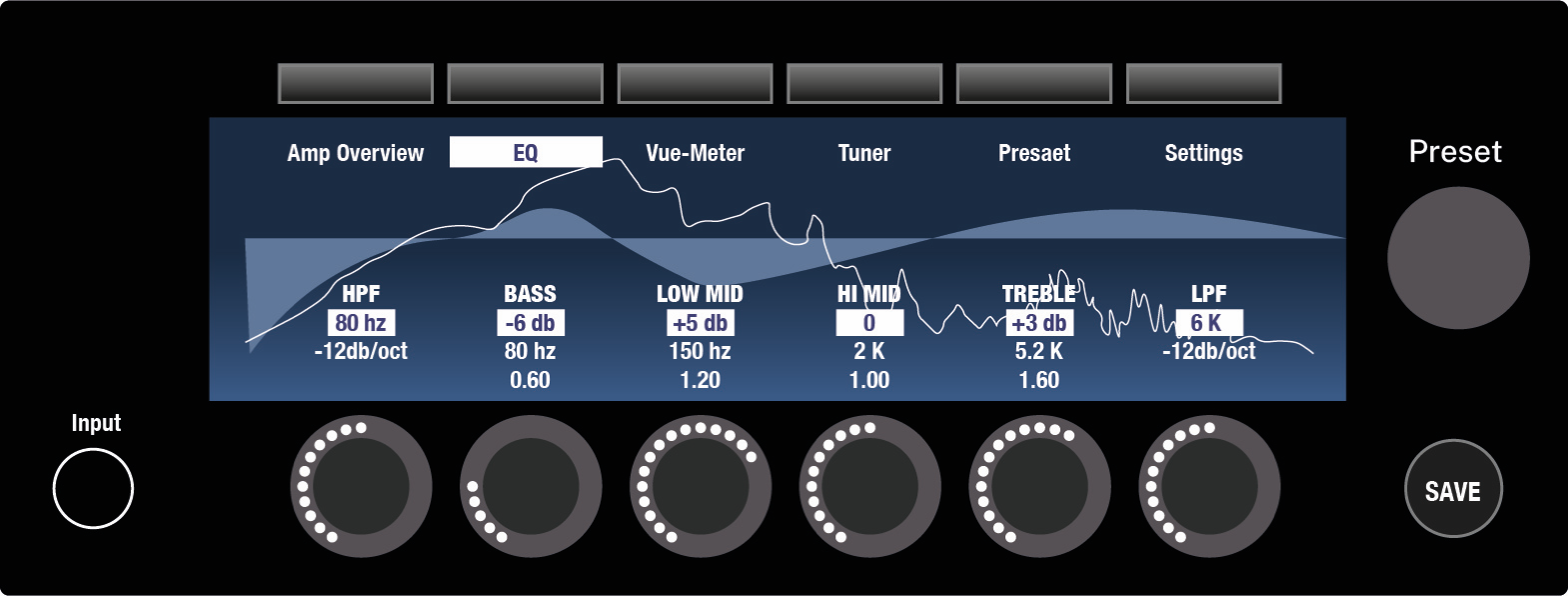
2. An « EQ » tab, with full control and computer style visualisation

upload_2024-5-18_15-53-10.png

  • Control of the HPF
  • Each band become parametric (same EQ than on tab 1, with added possibility to edit the frequency and the Q). You can press a knob in order to edit to the « Frequency » and the « Q » parameter of each EQ point.
  • Control of the LPF
…To be followed…
 
5. Preset view

upload_2024-5-18_15-55-11.png


UX inspired from Helix, with a big difference: each block can be « Global » or « Preset »
  • Global blocks are not affected by preset changes. You can change their parameters « once and for all » it won’t change if you load a new preset, only if you change it again.This is for live use, it corresponds to the « Global EQ » of the HX Stomp, but it can contain any kind of block at any position in the chain. Think about your normal amp, with permanent settings during all the show.
  • Presets can be loaded, modified, stored, like on a normal multi effect. Think about your pedalboard, with infinite combination of effects

Touch screen: if you touch any bloc, you edit the corresponding settings…

6. Edit a block

upload_2024-5-18_15-55-49.png


The knobs control the parameter of the selected pedal

----------
Thoughts?
----------
 
My gut reaction is that if an amp had a touch screen interface, I'd prefer sliders rather than rotary controls. The main benefit of a rotary knob is that you can anchor your hand on while you turn it. Also, you can look away once you've found the knob. On a touch screen, in a work setting, you're more likely to anchor your hand with a thumb or finger on the edge of the display. In fact there would have to be a raised ridge or edge for this purpose.

It's worth studying how digital interfaces are designed for scientific and industrial equipment.
 
I've got a Katana guitar amp and it's pretty good. My only real gripe with it (and with most digital amps) is that, unless you are connected to a computer or other device, when you switch patches you have no way of knowing where the knobs are set for each patch if you want to tweak it.
The pots need an LED strip around them showing their setting so you can physically tweak any setting on-the-fly as the sounds you set at home very rarely work at a venue at higher volumes.

I vaguely remember an amp years ago that had this kind of thing but the pots were surrounded by a ring of little LEDs....... modern strip lights would work even better.
 
  • Like
Reactions: gtirard
I vaguely remember an amp years ago that had this kind of thing but the pots were surrounded by a ring of little LEDs....... modern strip lights would work even better.

The TC RH series worked that way. Every knob except the Master knob was just an encoder dial that spun freely, and the "level" you set was represented by an array of LEDs around the knob.
 
  • Like
Reactions: gtirard
My gut reaction is that if an amp had a touch screen interface, I'd prefer sliders rather than rotary controls. The main benefit of a rotary knob is that you can anchor your hand on while you turn it. Also, you can look away once you've found the knob. On a touch screen, in a work setting, you're more likely to anchor your hand with a thumb or finger on the edge of the display. In fact there would have to be a raised ridge or edge for this purpose.

It's worth studying how digital interfaces are designed for scientific and industrial equipment.

I have touch screen interfaces that has what appears to be knobs. When you slide up or down over a knob, the value changes. Once you touch a knob, you can drag your finger anywhere on the screen, up down movements still control that knob setting.
 
The default view should look and feel like a classic amp…
I completely disagree with this. I loathe skeuomorphic design.

The best design for a user interface is the one that displays the most information the most clearly in the smallest physical space consistent with good visibility for people with presbyopia and easy operation of the physical controls for people with adult human sized hands, and the smallest memory footprint requiring the least amount of processor power to render.

On an actual physical device, the controls need to be a certain size in order for human fingers to grasp them. Once you transpose the device to the digital domain, this no longer applies, and it's not particularly useful to have visual representations of knobs on screens.
 
The interface you have designed above is essentially a somewhat improved version of the Boss GT-1000 & GT-1000Core interface. You have one more knob, a few more buttons, and a higher resolution display, but functionally, it's more or less identical.


gt-1000core_05_gal.png


The big GT-1000 has six knobs.

GT-1000_Top-1-1495380827.jpg
 
I completely disagree with this. I loathe skeuomorphic design.

The best design for a user interface is the one that displays the most information the most clearly in the smallest physical space consistent with good visibility for people with presbyopia and easy operation of the physical controls for people with adult human sized hands, and the smallest memory footprint requiring the least amount of processor power to render.

On an actual physical device, the controls need to be a certain size in order for human fingers to grasp them. Once you transpose the device to the digital domain, this no longer applies, and it's not particularly useful to have visual representations of knobs on screens.

I think you didn't understand my mockup, and you're probably not the only one so I guess my mockup is misleading: it's not virtual but physical knobs, rotary encoders with a led ring.

Like this.

upload_2024-5-19_5-36-20.jpeg


My amp would have 6 rotary encoder with led ring under a large screen.
These encoders would control gain, EQ and master most of the time, except when you edit an effect for example.

That would solve the issue you have for example with the Boss Katana 500, after loading a preset from memory, the physical knobs show a setting that is no longer true: how can you adjust from there?

cropped-katana-500-bass-head-500w-207233.jpeg


In my case, after loading a preset, the physical knobs display the new settings.

upload_2024-5-19_5-53-49.png
 
  • Like
Reactions: rstephens
Apple Logic Pro Channel EQ plug-in user interface. Rather than knobs, you just click on the numbers and move the mouse.

View attachment 5452295

Yeah, that's where I found my inspiration from.

But for a hardware amp used live, I want physical knobs.

So my second illustration represent an attempt of a "best of both worlds":
- For example by default, the second knob controls the bass cut / boost (-6 db in the mockup)
- I can press the knob once to adjust the frequency, or twice to adjust the Q

upload_2024-5-19_5-58-53.png
 
The interface you have designed above is essentially a somewhat improved version of the Boss GT-1000 & GT-1000Core interface. You have one more knob, a few more buttons, and a higher resolution display, but functionally, it's more or less identical.


View attachment 5452289

The big GT-1000 has six knobs.

View attachment 5452291

Yes exactly. 6 knobs like the GT-1000, and the display has the same width as the row of knobs so you can display the values of the knobs on top of them. But the LED ring help visualizing the current value of each knob.