• TalkBass has been independent since 1998. Add your voice.
    Create a free account to reply to discussions, view embedded media, and browse with fewer display ads.
    Join freeLog in
    Want zero display ads or expanded classifieds tools? Compare plans.

Digital Amp User Interface

I'm talking about a physical amp, not a plugin. It's an amp, with a class D power section, and a digital preamp (think HX Stomp).

This category of amps already exists, although there's no official name for it: Darkglass Exponent 500, Boss Katana 500 bass amp,…

It's funny that you are at least the second person who thought I was talking about a software. Probably because my mockup is too sketchy, or was the title of my thread misleading? How should I call it?

The confusion for me stems entirely from calling this a “digital amp”. For me, that terminology implies it’s a modeling device or a DAW plug-in. I’m not aware of any amps on the market that have 100% digital front ends. I don’t know that even the Katana amps are 100% digital.

That being said, if you are making a physical device, then everything I said before about physical controls applies. The optimal number of physical controls is approximately equivalent to “as many as will fit human fingers on the box”. How big should the box be? As small as is possible given adult human hand size, human eyesight at age 65 from 0-4 meters away, and the dimensions of commonly available Class D power amp modules.

The size of the Boss GT-1000Core’s main interface is a good place to start. You probably don’t want the box to be taller than 3.5” (2U), so it will fit into a rack, and no wider than 9.5”, so it fits in a half-rack width. By comparison, a Mesa D-800 is 3 1/8" H x 10 5/8" W x 11 1/4" D, and the Boss GT-1000Core is 6-13/16” wide, with the flat top of it (the main interface area) being 3.25” high. So, you should be able to fit into 3.5” x 9.5” x whatever depth is needed for the power amp, power supply, ventilation and connectors. You should also think about the logistics of airline baggage size restrictions in the EU, which are smaller than US restrictions.

I’ll say again that rotary LEDs on a physical device with a high resolution LCD display are superfluous, since you already have the ability to display the settings on the screen, and those LEDs would take up space better spent on a larger display. I think that the interface should be biased toward non-external editors. The GT-1000Core is best programmed with a computer, but you can actually get to all the settings from the front panel, if you have an abundance of patience. With the interface you are contemplating, you can fit more physical mode selection buttons, which would alleviate much of that, especially if you use rotary encoders with embedded push buttons, like the GT-1000Core does.

Bear in mind that the Boss GT-1000 is now about 8 years old, and due for replacement very soon. I expect that what Boss does for the GT-2000 is going to be much like what I am describing here. At the very least, we can expect a much nicer, color display, probably based on the GX-100’s interface, although I don’t like that one very much.

I am not going to share screenshots, because I honestly don’t want someone to steal my ideas, but I have been working on a smartphone clock/timer app for musicians, for repurposing older smartphones as a pedalboard mounted clock/timer that would also be useful for a variety of other purposes. I have an iPhone 6 that no longer runs the current version of iOS, but is otherwise perfectly functional, and there’s nothing I can find on the market that has the functionality I am looking for that is of a size that could be mounted to a pedalboard.

The concepts are so simple that anyone who has the ability to code smartphone apps could take one look at my design mockups and duplicate it quickly. I don’t have a Mac new enough to run the latest version of macOS or XCode or a spare $100/year to join Apple’s dev program. So, right now, all my design mockups are in Affinity Photo, only. I’ve worked out all the design paradigms with the main interface, and I’m very happy; I just need to finalize the settings interface.

Anyway, this is just to say that your project resonates with me. I’m currently in the process of going 100% digital with two Boss GT-1000Cores for guitar, and I am now looking at doing the same for bass, but with possibly only one GT-1000Core, since my bass needs are simpler than my guitar needs.

A GT-1000Core with a stereo DI box and a Class D power amp are capable of providing virtually every need I have for bass guitar. If that could all be put into one box (with an external foot controller), it would be pretty awesome. Even if I needed to add one of two external pedals (tc electronic Impulse is a prime candidate right now, for loading instrument IRs, but who knows what Boss will put in a GT-2000Core), it would still be an extremely compact rig.

The effects I personally use on bass guitar are instrument eq/acoustic sim/IR loader, comp, gate, boost, drive, amp sim, cab sim, room eq, and reverb.

Current main bass board:

photo mar 30, 20 26 23.jpeg


Working on my Core:

IMG_0647.jpeg
 
Last edited:
  • Like
Reactions: gtirard
I love the knobs of your onboard EQ, but it is precisely intended to have physical knob with infinite rotation and virtual position indicator by a LED ring, because for that application, the settings change each time we're going to load a preset.

For example, you set our amp to Gain 6, Bass 0, Low Mid +2, Hi Mid 0, and Treble +2
Then you load another preset, which as the settings: Gain 5, Bass +3, Low Mid +0, Hi Mid 1, and Treble 0
The LED ring of each knob will now reflect these new settings and you can edit from there.
Whereas with a classic knob, whatever the cool shape, when you load a new preset, and knobs show a wrong settings.

I see. A totally different use case than anything I would ever envision for myself at this time. ;)
 
Last edited:
  • Like
Reactions: agedhorse
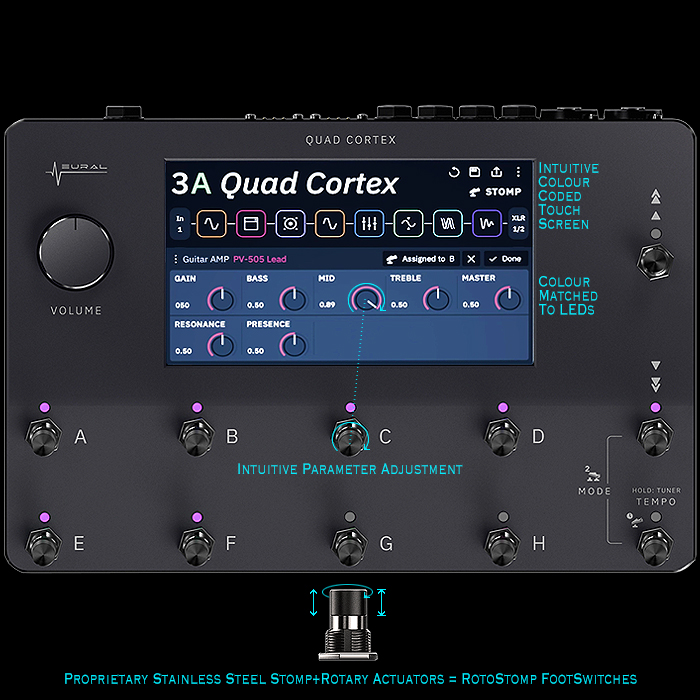
Here‘s a pretty good pic. It’s very easy to use.

2020GPXNeuralDSPQuadCore700.jpg

Yes, you can see it was one of my inspirations. I wanted to simplify and make it more intuitive by keeping the same layout as a classic amp, and show the value of each knob just above it, so that when you turn you amp on, you can use it like a normal amp, with the added possibility so save and load presets, like it you had the "total control" feature on a SSL mixing board, motorised faders without the motors.
 
Last edited:
Yes, you can see it was one of my inspirations. I wanted to simplify and make it more intuitive by keeping the same layout as a classic amp, and show the value of each knob just above it, so that when you turn you amp on, you can use it like a normal amp, with the added possibility so save and load presets, like it you had the "total control" feature on a SSL mixing board, motorised faders without the motors.

Have you used the Bergantino B-Amp?
 
Someone could design an amp with a built in looper that can be activated for dialing in the amp. Make the looper "smart"; able to generate loops in an array of play styles (pick+aggressive, slides, etc) or accept a player's sample. Give it an output jack that the player can optionally route to the front of their signal chain. Name the feature "Sound Check" or "Snoopy" or something.

Sure, a battery powered looper pedal with a library of presets could accomplish a similar thing, but the same could be said of many built-in amp effects.

And don't make me rub my finger tips across glass to make it work :laugh:
 
  • Like
Reactions: gtirard
@amper You are being somewhat dismissive and argumentative regarding your answers and comments, yet have no idea what a digital amp is in the context of this discussion.

There are indeed several digital bass amps on the market, the Bergantino B-amp (and its offshoot variations), as well as several Darkglass amps, the Boss Katana 500, Spark, and of course there’s the Kemper, Headrush, AxeFx, etc.

When you get into guitar specific amps, the Fender Tonemasters are the elephant in the room, but there are others as well.
 
  • Like
Reactions: JKos and Wasnex
I've thought for years that one of the great and outstandingly documented UIs is the original Macintosh. WIMP (Windows, Icons, Mouse, Pointer). It may be that some of the best interfaces have been designed and tested by people with a history of hallucinogenic use. No, really.

The best... They lend themselves to the tasks at hand. They reward inquisitiveness by being discoverable. They are approachable, learnable and are memorable on multiple levels. They are actually social.

And above all else, they are forgiving of error (I'm looking at you, the dozens of devices where I've saved one memory slot over another DOH!)

Many people have analogized electric music gear to tools and weaponry. Maybe a P bass is your weapon of choice to assault our ears. I'll add, with some irony, that stringed instruments themselves present a very challenging UI. Maybe musicians just like being challenged.

You want a good UI to mull over? A deck of playing cards. You could hand some people a pencil, paper, and scissors, and they could manufacture a functional deck in a half hour. Just don't make me play 52 Pickup during a session :woot:
 
Yes, you can see it was one of my inspirations. I wanted to simplify and make it more intuitive by keeping the same layout as a classic amp, and show the value of each knob just above it, so that when you turn you amp on, you can use it like a normal amp, with the added possibility so save and load presets, like it you had the "total control" feature on a SSL mixing board, motorised faders without the motors.

The digital interface I am used to is Yamaha LS9 and O1V mixers. These use selected channel functionality. In other words you push a button to select the channel, then you use the controls and display to make adjustments.

upload_2024-5-19_16-58-22.png

The display is fairly small and does not work as a touch screen. The physical control knobs are to the right of the display. Metering is also physical LEDs...however, there are extended metering options available that you can view on the display. The large shuttle wheel and navigation buttons are to the far right. These allow you to move around the display to select parameters to control.

These mixers have menus that are organized in layers, so a certain amount of navigation is required. Giving up the navigation makes the interface more intuitive but reduces the amount of features you can access...it's a trade off of sorts. ** see COMMENT at the bottom

The default EQ is setup with shelving bass, shelving treble, two bands of fully parametric mids, and a variable HPF. The bass and treble can also be changed to fully parametric.

Physical controls:
upload_2024-5-19_17-20-18.png

To adjust EQ you select the band, and the rotate the appropriate control. Note this panel includes most of the primary controls on an amp. The only thing that is missing IMHO is a Master.

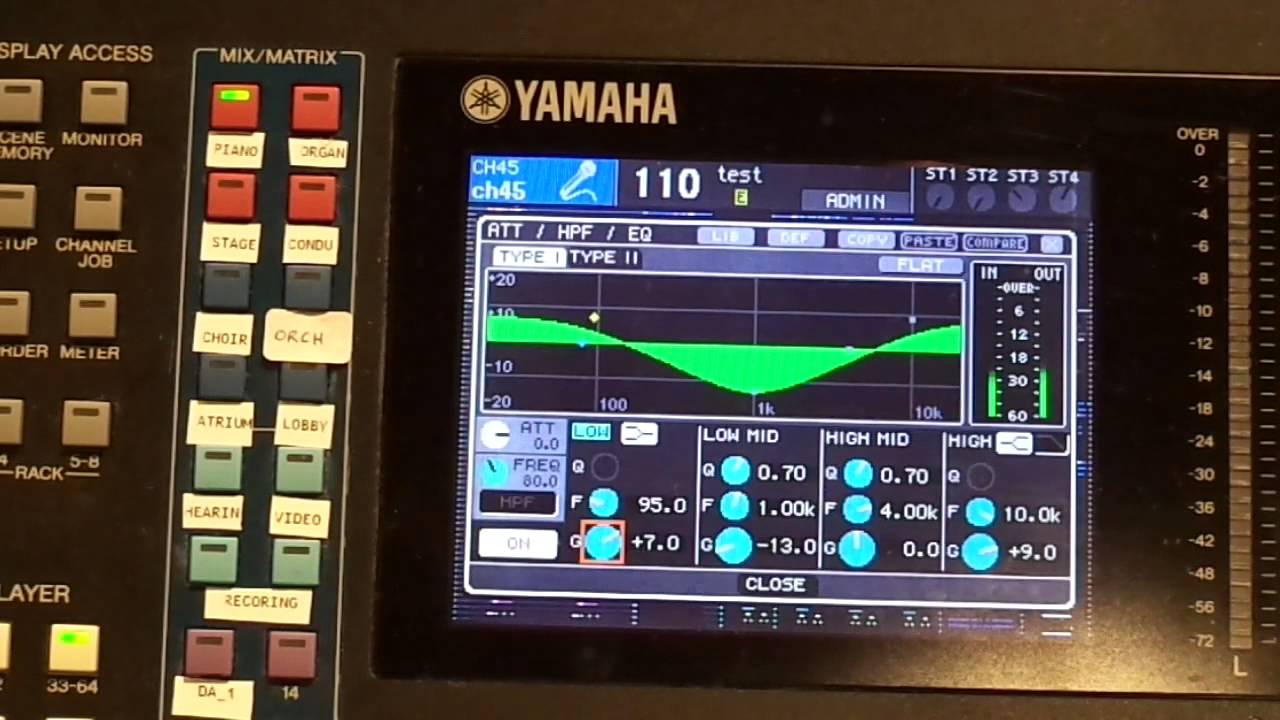
The display is adaptive and changes depending upon what you are adjusting. This is the popup display when you are adjusting a selected channel EQ...it's zoomed in on the EQ.
maxresdefault.jpg


** COMMENT: I don't see a point in making a digital amp just for the sake of making a digital amp. IMHO, the point is to make an amp with lot's of processing power. The trick is making the interface as intuitive and easy to navigate as possible.
 
  • Like
Reactions: gtirard
@amper You are being somewhat dismissive and argumentative regarding your answers and comments, yet have no idea what a digital amp is in the context of this discussion.

There are indeed several digital bass amps on the market, the Bergantino B-amp (and its offshoot variations), as well as several Darkglass amps, the Boss Katana 500, Spark, and of course there’s the Kemper, Headrush, AxeFx, etc.

When you get into guitar specific amps, the Fender Tonemasters are the elephant in the room, but there are others as well.

I think you are being a bit heavyhanded in your criticism of me, and not for the first time. I don’t agree that there is a consensus of what constitutes a “digital amp” in the current market. As I said, the term to me suggests a modeling device or a DAW plug-in. I don’t have difficulty with the idea that there is an emerging category of amps that has a digital front end, I’m saying I’m not aware of any, and I question whether even the Katana is such an amp, or whether it is is an analogue solid-state preamp with digital control and digital effects. I’m not privy to Boss’ design process, and while you might be in a position to have examined a Katana Bass head and analyzed it, I am not, and no stigma ought to attach to me for not being an industry insider with multiple companies funding my exploration.

I have no experience with Bergantino, and I don’t really regard the Headrush or Fractal modelers as being “amps” in the sense that I am not aware of any of their products incorporating power amplification. Kemper obviously does offer such a product, but I have never heard any refer to their products as “digital amps”. Again, this is terminology that is in flux in the industry, as far as I am concerned. You are positioned differently to me, as an industry insider, so perhaps you have already adopted this terminology as standard, but I won’t speak for you.

I don’t agree that I am being either dismissive or argumentative, at all. I approached the question with my assumptions, which appear to be not what the OP was intending to convey, and I think I’ve done a good job of acknowledging that fact and moving on to what the OP is actually talking about, while attempting to offer constructive criticism and realistic discussion of the facts of physical and graphic design, a subject in which I have some passing expertise.
 
Analog input, ADC, processing in the digital domain, DAC, analog output, in an instrument amp package.

If it meets these criteria, the industry in general accepts this as a digital amp.
 
Analog input, ADC, processing in the digital domain, DAC, analog output, in an instrument amp package.

If it meets these criteria, the industry in general accepts this as a digital amp.

You are obviously right (of course and as always), but I think it is somewhat interesting to analyse amper's misunderstanding, as I believe many end users may have the same point of view: for many users the UI seems to be more important than the underlying technology, which explains why the Katana is not percieved like a digital amp because there's no screen.

I suppose the Katana UI is designed to hide the underlying technology, probably because it's not desirable for an amp to look and feel like a computer. As a bass user I agree we must have physical knobs for the main features for instant editing, but I can't accept that the knobs show the wrong values when you load a new preset.

I can imagine my amp could look like this if I wanted it to look and feel exactly like a classic amp, with no LCD screen, but without the Katana's problem of knobs showing wrong values:

no-lcd@3x-80.jpg


It looks good, better than the version with the LCD screen, but it means you have to use your Smartphone if you want to use the digital features. And I don't want to use a smartphone during rehearsal or sound check.

If think it's a good idea to separate the features you need to access directly from the amp's hardware and allow for extra features you can unlock from your smartphone or computer, but I wouldn't put the separation where Boss did:
- Directly on the amp I need to access to all main settings for live use, without the help of a smartphone or computer
- It's ok to be able to use a smartphone or computer when you're at home and you prepare your set list: load new firmware, upload presets from the community, create advanced presets, rename and re-order presets for your next gig's set list…

So I prefer having a LCD screen, as long as you don't need to navigate through menus…
 
You are obviously right (of course and as always), but I think it is somewhat interesting to analyse amper's misunderstanding, as I believe many end users may have the same point of view: for many users the UI seems to be more important than the underlying technology, which explains why the Katana is not percieved like a digital amp because there's no screen.

I suppose the Katana UI is designed to hide the underlying technology, probably because it's not desirable for an amp to look and feel like a computer. As a bass user I agree we must have physical knobs for the main features for instant editing, but I can't accept that the knobs show the wrong values when you load a new preset.

I can imagine my amp could look like this if I wanted it to look and feel exactly like a classic amp, with no LCD screen, but without the Katana's problem of knobs showing wrong values:

View attachment 5453301

It looks good, better than the version with the LCD screen, but it means you have to use your Smartphone if you want to use the digital features. And I don't want to use a smartphone during rehearsal or sound check.

If think it's a good idea to separate the features you need to access directly from the amp's hardware and allow for extra features you can unlock from your smartphone or computer, but I wouldn't put the separation where Boss did:
- Directly on the amp I need to access to all main settings for live use, without the help of a smartphone or computer
- It's ok to be able to use a smartphone or computer when you're at home and you prepare your set list: load new firmware, upload presets from the community, create advanced presets, rename and re-order presets for your next gig's set list…

So I prefer having a LCD screen, as long as you don't need to navigate through menus…

I think to an extent, it comes down to preference, some people want the full amp's feature set at their disposal during gigging etc and are willing to cope with busier UI as a compromise. Others would rather have a more simplistic UI when gigging and leave the advanced tweaking to apps to declutter the front panel.

In a sense this mirrors discussions around internal trimpots (those intended to be twiddled by user ofc) on pedals.
 
  • Like
Reactions: gtirard
I think to an extent, it comes down to preference, some people want the full amp's feature set at their disposal during gigging etc and are willing to cope with busier UI as a compromise. Others would rather have a more simplistic UI when gigging and leave the advanced tweaking to apps to declutter the front panel.

In a sense this mirrors discussions around internal trimpots (those intended to be twiddled by user ofc) on pedals.
Exactly
 
  • Like
Reactions: YourGuitarist
Fender’s tonemaster amps are an example of a digital amp with a very traditional potentiometer-knob based (not encoder based) UI. The technology is very much hidden from the user.
 
  • Like
Reactions: gtirard
If think it's a good idea to separate the features you need to access directly from the amp's hardware and allow for extra features you can unlock from your smartphone or computer, but I wouldn't put the separation where Boss did:
- Directly on the amp I need to access to all main settings for live use, without the help of a smartphone or computer
- It's ok to be able to use a smartphone or computer when you're at home and you prepare your set list: load new firmware, upload presets from the community, create advanced presets, rename and re-order presets for your next gig's set list…

So I prefer having a LCD screen, as long as you don't need to navigate through menus…

I very much agree with this approach.

Live my head is in the performance. A single button pushed to get the settings for the next song (and a confirmation that the correct song is now keyed, i.e. title, and not just a number) is all I can do there. The rest of my mental bandwidth is in the show and the performance. I'd go so far as having two identical banks queued up if I wanted the same setting for two consecutive songs, just to be able to simply push that button on autopilot between songs. All the tweaking is homework. And then I want the comfort of my big monitor, keyboard, ..., not a small selection of buttons overloaded with context-dependent functionality that I'll need to remember. Horses for courses :thumbsup:.

And still, in many playing situations I appreciate the comfort of a physical knob to adjust the HPF, or some overall EQ for that specific gig on the fly, and have it remembered for the rest of the set even while the set changes from a reggae to a funk to a rock to a pop track, so this division of functionality to me is absolutely essential.
 
  • Like
Reactions: gtirard
Analog input, ADC, processing in the digital domain, DAC, analog output, in an instrument amp package.

If it meets these criteria, the industry in general accepts this as a digital amp.


for many users the UI seems to be more important than the underlying technology, which explains why the Katana is not percieved like a digital amp because there's no screen

If I don't recognize an amp such as Andy described above as a "digital amp", it's nothing to do with the interface and everything to do with whether or not I understand that the preamp function is a digital model or analogue circuitry.

To my mind, at least before today, an amp with an analogue preamp, built-in digital effects, and an analogue power amp isn't something I'd describe as a "digital amp", I would describe it as being no different to a regular analog amp with digital effects placed in an effects loop. I would call it an analogue amp with built-in digital effects that I can choose to use, or not.

But if the preamp is in fact all digital (aside from, of course, the input jack and possibly a few minor components ahead of the ADC), then there's no analogue domain, at all. My signal is always digital, just as it is when I am using my GT-1000Core, until it hits the power amp, if it ever actually does.

If the industry is calling amps with analogue preamps and digital effects "digital amps", well, then I need to understand that industry practice may be different from my personal perceptions. If all of the amps mentioned actually have no analogue preamps, at all, then that's something I didn't know before today. There are plenty of examples of analogue pedals that have digital controls, but whose signal chain is analogue. No biggie, technology moves on.