• TalkBass has been independent since 1998. Add your voice.
    Create a free account to reply to discussions, view embedded media, and browse with fewer display ads.
    Join freeLog in
    Want zero display ads or expanded classifieds tools? Compare plans.

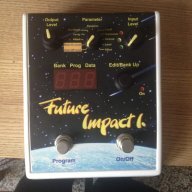
Future Impact now available!! WAS: deep impact reissue!!! interested?

Going off memory as it's been a while, but I thought when I tried Cutoff it worked a little non-standard. Value=64 was the Frequency set in the patch, and then you sweep to Value=127 and it didn't really open the Cutoff enough, certainly not the same as flicking the slider in the editor to Max. And going towards Value=0 was driving Frequency lower than the patch setting.

My experience with other gear is the Frequency in the patch was typically the Min value, then you'd use CC to only drive it higher so you'd have a wide sweep range.

Was hoping for some other opinions.
 
Going off memory as it's been a while, but I thought when I tried Cutoff it worked a little non-standard. Value=64 was the Frequency set in the patch, and then you sweep to Value=127 and it didn't really open the Cutoff enough, certainly not the same as flicking the slider in the editor to Max. And going towards Value=0 was driving Frequency lower than the patch setting.

My experience with other gear is the Frequency in the patch was typically the Min value, then you'd use CC to only drive it higher so you'd have a wide sweep range.

Was hoping for some other opinions.

I haven't explored it at that level, I was a little surprised you were asking, I guess I should have known better that you had tested it and were looking for more feedback.

I will say, the way you describe it makes it sound a lot like editing straight from the physical interface, that it's all relative to the values in the preset and not necessarily the full range of the parameter. I agree with you, I'm not sure if that makes total sense, but it is what it is.
 
Going off memory as it's been a while, but I thought when I tried Cutoff it worked a little non-standard. Value=64 was the Frequency set in the patch, and then you sweep to Value=127 and it didn't really open the Cutoff enough, certainly not the same as flicking the slider in the editor to Max. And going towards Value=0 was driving Frequency lower than the patch setting.

My experience with other gear is the Frequency in the patch was typically the Min value, then you'd use CC to only drive it higher so you'd have a wide sweep range.

Was hoping for some other opinions.
that is how it is implemented now, yes. the reason was to make the use of a foot pedal easy, as in a wah. but i agree (and also suggested it already) that it would be cooler to have a wider sweep. andras was hesitant because it is not that easy to set a range on every midi-footpedal, making it hard to get not so wide sweeps done. i don't mind setting the middle position with the slider...
 
Has anyone actually experimented with these yet?
Well, not with bass guitar but with an EWI MIDI wind controller, in this demo:

The breath part of the EWI controlled the volume and the cutoff, while a thumb controller on it controlled the modwheel (it controls the LFO's VCO and VCF amount of the FI parallel). Pitchbend and pitch vibrato was also used with bite control and a thumb plate. While pitch bend cannot be used in bass guitar mode, the other three can be applied with a programmable MIDI pedal.
 
Last edited:
that is how it is implemented now, yes. the reason was to make the use of a foot pedal easy, as in a wah. but i agree (and also suggested it already) that it would be cooler to have a wider sweep. andras was hesitant because it is not that easy to set a range on every midi-footpedal, making it hard to get not so wide sweeps done. i don't mind setting the middle position with the slider...

For my initial testing my goal was to provide a typical dubstep bass demo. However, the Frequency sweep range was way too narrow and it wasn't possible to drive the filter from a low double-digit Hz all the way up to the high squelchy frequency range. I wouldn't likely ever personally be doing dubstep sweeps, but there's plenty of users that would and a couple quality dubstep YouTube videos using just the FI would likely catch some eyes and ears.
 
Question for @Adamixoye.

I would have PM'd you this but I figured other users may want to know this as well.

As I stated earlier in the thread I've been messing with Midi Designer attempting to make an iOS interface for the FI. I was wondering how do you test that all of your parameters are working with the FI? I've confirmed with Midi monitor that messages are being sent with midi designer. Is it possible to change parameters in midi designer and see the movements in real time reflected in the OSX FI editor? This way there is visual confirmation that the control created in midi designer is working properly. Thanks.
 
Question for @Adamixoye.

I would have PM'd you this but I figured other users may want to know this as well.

As I stated earlier in the thread I've been messing with Midi Designer attempting to make an iOS interface for the FI. I was wondering how do you test that all of your parameters are working with the FI? I've confirmed with Midi monitor that messages are being sent with midi designer. Is it possible to change parameters in midi designer and see the movements in real time reflected in the OSX FI editor? This way there is visual confirmation that the control created in midi designer is working properly. Thanks.

I'm not entirely sure what you're saying. You're saying that you would have the FI connected to both MIDI Designer and the FI editor, and you could make changes in FI and see them reflected in the FI software? I have no idea if that would work or not.

As my MD layout currently stands, it's definitely only intended to be a one-way, "blind" editor. I have tested it and I can tell that certain things are definitely working, certain other things I guess it's hard to know for certain without listening carefully and double checking the other parameters (for example, if tweaking an oscillator, are you sure that oscillator is on?).
 
I'm not entirely sure what you're saying. You're saying that you would have the FI connected to both MIDI Designer and the FI editor, and you could make changes in FI and see them reflected in the FI software? I have no idea if that would work or not.

As my MD layout currently stands, it's definitely only intended to be a one-way, "blind" editor. I have tested it and I can tell that certain things are definitely working, certain other things I guess it's hard to know for certain without listening carefully and double checking the other parameters (for example, if tweaking an oscillator, are you sure that oscillator is on?).


Sorry that I wasn't clear. Let me try to re-phrase.

I'm wondering if you can test your iOS editor with the FI editor alone, without the FI pedal in the chain? Just to see if you make a parameter adjustment in your iOS editor will the same parameter move in the FI editor on the computer?
 
Sorry that I wasn't clear. Let me try to re-phrase.

I'm wondering if you can test your iOS editor with the FI editor alone, without the FI pedal in the chain? Just to see if you make a parameter adjustment in your iOS editor will the same parameter move in the FI editor on the computer?

(1) I'm not sure if the editor takes MIDI in like that
(2) The actual connection would be non-trivial, though I think I would have a way...
 
(1) I'm not sure if the editor takes MIDI in like that
(2) The actual connection would be non-trivial, though I think I would have a way...

Ok so I figured it out, although @Adamixoye you probably know this already. :)

You are correct in stating that midi designer movements will not move the parameters in the FI editor. However, it does work the other way. Basically I created a knob in midi designer, pressed "learn", and moved the appropriate parameter in the FI editor I wanted it to control. Then when I move the slider in the FI editor, it moves the knob in midi designer. Very cool. Perhaps this is a basic function or knowledge to all you midi designer folk, but I'm a newbie with this midi designer stuff so it's kinda exciting to me! LOL!
 
Ok so I figured it out, although @Adamixoye you probably know this already. :)

You are correct in stating that midi designer movements will not move the parameters in the FI editor. However, it does work the other way. Basically I created a knob in midi designer, pressed "learn", and moved the appropriate parameter in the FI editor I wanted it to control. Then when I move the slider in the FI editor, it moves the knob in midi designer. Very cool. Perhaps this is a basic function or knowledge to all you midi designer folk, but I'm a newbie with this midi designer stuff so it's kinda exciting to me! LOL!


I've never really used the "Learn" function, but that makes sense and is probably easier than what I did!

So you have your computer hooked up the MIDI In on the FI, then your iPad hooked up to MIDI Out?
 
No, I'm actually not using the FI pedal in the chain at all right now. My midi chain:

iPad -> Roland UMONE MK2 Midi in & Midi out -> into Focusrite Scarlett 18i8 midi in & out (hooked up to macbook usb) -> FI Editor

So after experimenting for the past 10 minutes some more it's kinda working, but there have been some hiccups. I've noticed sometimes moving one parameter is controlling two. So one thing I learned is that even though I'm using the "Learn" button it may not be perfect. But it also can be my lack of knowledge in the NRPN world. I did get better results when I set the Message type in midi designer to NRPN (0-127), but again I'm flying blind here. I am definitely not an expert, just a novice geek!

Probably the way you did it @Adamixoye is the best way, but I honestly was having trouble entering the NRPN information manually due to being a newbie.
 
No, I'm actually not using the FI pedal in the chain at all right now. My midi chain:

iPad -> Roland UMONE MK2 Midi in & Midi out -> into Focusrite Scarlett 18i8 midi in & out (hooked up to macbook usb) -> FI Editor

So after experimenting for the past 10 minutes some more it's kinda working, but there have been some hiccups. I've noticed sometimes moving one parameter is controlling two. So one thing I learned is that even though I'm using the "Learn" button it may not be perfect. But it also can be my lack of knowledge in the NRPN world. I did get better results when I set the Message type in midi designer to NRPN (0-127), but again I'm flying blind here. I am definitely not an expert, just a novice geek!

Probably the way you did it @Adamixoye is the best way, but I honestly was having trouble entering the NRPN information manually due to being a newbie.

Oh right, you said that already about going direct between the editor and MIDI Designer.

I had never used NRPN before this adventure so I'm still learning.
 
For my initial testing my goal was to provide a typical dubstep bass demo. However, the Frequency sweep range was way too narrow and it wasn't possible to drive the filter from a low double-digit Hz all the way up to the high squelchy frequency range. I wouldn't likely ever personally be doing dubstep sweeps, but there's plenty of users that would and a couple quality dubstep YouTube videos using just the FI would likely catch some eyes and ears.
my point exactly... let's see what happens. for now you have to change the cutoff via nrpn to get these results.
 
I thought it was provided if you're playing by MIDI notes rather than in bass mode? Or am I misremembering something?