• TalkBass has been independent since 1998. Add your voice.
    Create a free account to reply to discussions, view embedded media, and browse with fewer display ads.
    Join freeLog in
    Want zero display ads or expanded classifieds tools? Compare plans.

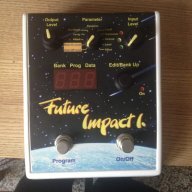
Future Impact now available!! WAS: deep impact reissue!!! interested?

Any way you can post some audio of what you are trying to achieve? Having a target sound might help others try to figure it out (myself included).

Honestly, I never had much success with the Markbass, which is why I am here with the FI. My SS will likely be for sale soon.

I do not have my pedal with me at the moment, but here is the song I recorded with the mark bass ss. the sound starts at roughly 23sec but really comes in strong at 38sec. I understand it isn't an isolated sound which I know makes it hard but for the time being it is all I have on me.

 
I do not have my pedal with me at the moment, but here is the song I recorded with the mark bass ss. the sound starts at roughly 23sec but really comes in strong at 38sec. I understand it isn't an isolated sound which I know makes it hard but for the time being it is all I have on me.

Cool song! At first it sounded almost like the Boogie On patch, just with a much longer decay on the envelope. I'll listen to it more later and see if I can come up with anything. Thanks for the vid.
 
I do not have my pedal with me at the moment, but here is the song I recorded with the mark bass ss. the sound starts at roughly 23sec but really comes in strong at 38sec. I understand it isn't an isolated sound which I know makes it hard but for the time being it is all I have on me.


The FI should definitely be able to get that sound; the markbass only had a saw wave. I listened for the bass in that tune but even with good phones I can't quite make it out (though at 1:07 I hear the decay clearly.) I'll mess around too and see what I come up with.
 
The FI should definitely be able to get that sound; the markbass only had a saw wave. I listened for the bass in that tune but even with good phones I can't quite make it out (though at 1:07 I hear the decay clearly.) I'll mess around too and see what I come up with.

yeah.. that's a good point. its the decay I am really needing help with. I have the sound just not the envelope sound to go with it. Thanks for the help. :)
 
Last edited:
I am interested as well. My guess is it's all in the envelope settings (frequency, slope, attack, decay), haven't had time to really explore it yet. Any ideas?

I posted this in the patch sharing thread as well, but does anyone know if it's possible to load a patch from the FI to the editor? I don't see a way to do it now, but maybe in a future update? That is my only complaint so far about the pedal. I put together a patch using the editor, play it in a live situation (or rehearsal), tweak it a little, and there is no way to save it back to the computer. You have to try to re-create your tweaks in the editor and save it that way if you want to keep it for future use/reference, which doesn't always work well (the parameters you can edit on the pedal itself don't always jive with what is in the editor). Anyone have any thoughts/info?

Thanks!
currently this is not possible with the latest firmware. i mentioned this to andras a long time ago, for the exact reasons you describe. theoretically it is possible, there is midi in and out and the f.i. does already send some midi data when uploading multiple presets at once.

one workaround for now would be to find out the range for each control on the pedal and then adjust the controls accordingly in the editor. maybe andras can jump in and publish a list of all the editable parameters and their ranges.
 
The FI should definitely be able to get that sound; the markbass only had a saw wave. I listened for the bass in that tune but even with good phones I can't quite make it out (though at 1:07 I hear the decay clearly.) I'll mess around too and see what I come up with.

yeah.. that's a good point. its the decay I am really needing help with. I have the sound just not the envelope sound to go with it. Thanks for the help. :)

I can't hear the decay clearly either, at any point other than at 1:07. I messed around a bit and came up with the sound at that point, but it doesn't sound right in the rest of the song. I detuned the VCO and played it up an octave (7th fret E on the A string) to get that slide down after the decay, sounded pretty cool, but doesn't work elsewhere. Is he using two different sounds? Maybe a more clean sound for the verse and kicking in the synth for the chorus? I'll keep playing with it and try to put up a patch next week (going away for the weekend).

currently this is not possible with the latest firmware. i mentioned this to andras a long time ago, for the exact reasons you describe. theoretically it is possible, there is midi in and out and the f.i. does already send some midi data when uploading multiple presets at once.

one workaround for now would be to find out the range for each control on the pedal and then adjust the controls accordingly in the editor. maybe andras can jump in and publish a list of all the editable parameters and their ranges.

Thanks, Lokki. I remember reading that (a long time ago, as you said). I wasn't sure if there had been an update since then that I wasn't aware of. A list of what parameters in the editor coincide with the ones adjustable via the parameter dial on the FI and their respective range would be great. Question about that: When you create a patch in the editor, save it to the FI, then scroll through the parameters on the FI, they are all at 5 like the stock presets were, except for note on/off, which are global. It sounds like that setting of 5 is the point at which you set the parameter in the editor, which doesn't necessarily give you the entire adjustable range at the pedal that you have in the editor. Each parameter in each patch is different depending on where it was set originally in the editor. The adjustable range on the pedal is smaller than in the editor and centered at the set point of the parameter. Does this sound right to anyone else in their experience or is it all in my head?o_O:D This isn't a complaint, BTW, just looking to better understand how things actually work. So by all means, correct/educate me if I'm wrong. :bookworm::)
 
  • Like
Reactions: Blu bro
I can't hear the decay clearly either, at any point other than at 1:07. I messed around a bit and came up with the sound at that point, but it doesn't sound right in the rest of the song. I detuned the VCO and played it up an octave (7th fret E on the A string) to get that slide down after the decay, sounded pretty cool, but doesn't work elsewhere. Is he using two different sounds? Maybe a more clean sound for the verse and kicking in the synth for the chorus? I'll keep playing with it and try to put up a patch next week (going away for the weekend).


Thanks, Lokki. I remember reading that (a long time ago, as you said). I wasn't sure if there had been an update since then that I wasn't aware of. A list of what parameters in the editor coincide with the ones adjustable via the parameter dial on the FI and their respective range would be great. Question about that: When you create a patch in the editor, save it to the FI, then scroll through the parameters on the FI, they are all at 5 like the stock presets were, except for note on/off, which are global. It sounds like that setting of 5 is the point at which you set the parameter in the editor, which doesn't necessarily give you the entire adjustable range at the pedal that you have in the editor. Each parameter in each patch is different depending on where it was set originally in the editor. The adjustable range on the pedal is smaller than in the editor and centered at the set point of the parameter. Does this sound right to anyone else in their experience or is it all in my head?o_O:D This isn't a complaint, BTW, just looking to better understand how things actually work. So by all means, correct/educate me if I'm wrong. :bookworm::)
this is how it works, yes! the saved parameter in the editor is the middle position for the adjustment on the f.i. also as you said note on/off value is global.
 
currently this is not possible with the latest firmware. i mentioned this to andras a long time ago, for the exact reasons you describe. theoretically it is possible, there is midi in and out and the f.i. does already send some midi data when uploading multiple presets at once.

one workaround for now would be to find out the range for each control on the pedal and then adjust the controls accordingly in the editor. maybe andras can jump in and publish a list of all the editable parameters and their ranges.

I'm not sure if Andras will do that. I had asked him that too. I wanted to be able to see changes in the editor if I moved a parameter in the pedal. He replied to me there is no need for that and that my request didnt make sense. I know my request goes a little further than your initial request but I think it would be great to have that communication as well.

At the very least I agree that you should at least be able to do a midi dump to the computer to back up your programs on your pedal. A dump that would separate patches, not just one global file.
 
I totally understand that frustration of the tweaks on the pedal vs what you create in the editor can sound worlds apart.

In regards to my question, I understand that it has everything to do with the envelope, but no matter how long I spend on tweaking this feature I cant get that slurpy funky filter I could on the MArkbass Supersynth.
I just recently struggled with this too trying to emulate Justin Timberlake's Can't Stop the feeling. The bass in the recording sounds like a P bass with an envelope filter and possibly a bit of phase or chorus. I tried to achieve this first with the FI but I couldn't seem to get the envelope to get that real funky filtered sound. I achieved some tones that were close and probably passable, but I couldn't nail it.

So after many hours I gave up and I wound up using a Digi synth wah envelope pedal combined with my zoom ms60b to achieve the sound.
 
  • Like
Reactions: Blu bro
I'm not sure if Andras will do that. I had asked him that too. I wanted to be able to see changes in the editor if I moved a parameter in the pedal. He replied to me there is no need for that and that my request didnt make sense. I know my request goes a little further than your initial request but I think it would be great to have that communication as well.

At the very least I agree that you should at least be able to do a midi dump to the computer to back up your programs on your pedal. A dump that would separate patches, not just one global file.

This is a pretty dumb question that I should know by now, but are the parameters on the face of the pedal in the main parameter list (e.g., note on, note off, etc.) directly represented anywhere in the main parameter list in the editor?
 
I'm not sure if Andras will do that. I had asked him that too. I wanted to be able to see changes in the editor if I moved a parameter in the pedal. He replied to me there is no need for that and that my request didnt make sense. I know my request goes a little further than your initial request but I think it would be great to have that communication as well.

At the very least I agree that you should at least be able to do a midi dump to the computer to back up your programs on your pedal. A dump that would separate patches, not just one global file.

For me, just being able to save a patch from the FI to computer would be enough. Here's another scenario: you have a patch either created with or edited on the FI (so no patch saved on a computer) and you want to rearrange patches for your next gig. I think you can move patches around on the pedal, but it's much easier to move multiple patches in the editor, except for that patch you edited on the pedal, because you don't have it in the editor. Maybe Andras will have a change of heart with some renewed interest in the FI-to-editor idea.
 
  • Like
Reactions: ficelles
Ok, so I lied (I think). I guess you can't move patches from one program slot/number to another on the FI without using the editor. Tried this morning to change a parameter on the pedal and then change the program number before saving it and it just changes program number, doesn't allow you to save the patch to the new number. You have to change the first two digits in your file name and re-load it to the pedal using the editor. I haven't changed my pedal to direct mode yet, but I don't see how it would work in that mode either. Not a big deal, just hadn't thought about it before. If anyone else knows it can be done and how, let me know.
 
I'm not sure if Andras will do that. I had asked him that too. I wanted to be able to see changes in the editor if I moved a parameter in the pedal. He replied to me there is no need for that and that my request didnt make sense.

I do not think that I ever said that. It would make sense, it is just not possible. The modifiers can typically (but mot always) multiply the given parameter with a factor between 0.5 and 2.0. So, to make it clear:
1: == 0.5
5: == 1.0
9: == 2.0
I think it is very obvious in the quickstart maunal which modifier acts on which parameter(s) of the editor. Probably one is not clear: DYNAMICS is ENV FOLLOWER.
Now, e.g. if you set DECAY to 127 on the editor, and you modify it with 9 on the FI, then the actual value will be something that cannot be represented in the editor at all.
 
I do not think that I ever said that. It would make sense, it is just not possible. The modifiers can typically (but mot always) multiply the given parameter with a factor between 0.5 and 2.0. So, to make it clear:
1: == 0.5
5: == 1.0
9: == 2.0
I think it is very obvious in the quickstart maunal which modifier acts on which parameter(s) of the editor. Probably one is not clear: DYNAMICS is ENV FOLLOWER.
Now, e.g. if you set DECAY to 127 on the editor, and you modify it with 9 on the FI, then the actual value will be something that cannot be represented in the editor at all.
that makes sense. still a sysex dump of the parameters with the modifiers included could be exported from the pedal and the editor could read those modifiers and display them. if the modified value is within the range of the editor give the possibility to translate it to the actual parameter, setting the modifier at zero again. or at least make it possible to read/send the modifiers values as well since it is really unfortunate, that you cannot save the exact sound that you created on the pedal for later use.

i actually think this is a "leftover" feature from the deep impact since there you could not load your own sounds and the modifiers were the only way to change a sound. with the future impact things are different of course. so the sensible way would be to rethink the modifiers ranges and make them so, that they always stay in the editor range and you can actually export a changed sound to the pc via sysex and read it in the editor. this of course makes parameters that are at maximum or minimum only reacting on one "side" of the modifier. but to me that would actually be much more logic then now.
 
Yes, I agree. It is unfortunate that you can't save a sound created/modified on the pedal for later use, even if it's just to be able to move it to a different program slot on the pedal. I don't know anything about the programing/software and/or the midi language, but it doesn't seem right that it isn't possible.

That said, thank you Andras for clarifying the modifiers and how they affect the parameters, and the dynamics = env. follower clarification. I will go back to the quickstart manual and review the rest of them so I can pair each to their respective parameters in the editor. At least with this info, I/we should be able to accurately recreate in the editor what we have modified on the pedal and save it.
 
so the sensible way would be to rethink the modifiers ranges and make them so, that they always stay in the editor range and you can actually export a changed sound to the pc via sysex and read it in the editor. this of course makes parameters that are at maximum or minimum only reacting on one "side" of the modifier. but to me that would actually be much more logic then now.

That sounds to me like it would be nightmarish from a usability point of view. I can conceive of it being done, but it would mean that in most patches that '5' is the 'as edited' value, in some it would be '1' or '9' and in a few (where near max or min) you'd have '7' or '3' or whatever being the 'neutral' value. That would be a pain to deal with surely, remembering which was which ?
 
So I'm not completely sure I understand the discussion here, so let me try to rephrase.

In a preset, does the FI retain the mid-point, '5' value even if the knobs have been turned to 7, 8, 9, etc.? Would it be possible to read those '5' values back to the editor even if, for example, the preset had a knob turned to '9', doubling the value out of its usable range?
 
So I'm not completely sure I understand the discussion here, so let me try to rephrase.

In a preset, does the FI retain the mid-point, '5' value even if the knobs have been turned to 7, 8, 9, etc.? Would it be possible to read those '5' values back to the editor even if, for example, the preset had a knob turned to '9', doubling the value out of its usable range?

If I understand it correctly, based on Andras' last post, when you save a patch to the FI, all the parameters are given a default setting of '5', which corresponds to where each parameter was set in the editor when you saved the patch. Then you can adjust up and down from there with the edit dial. If you click the edit dial to save your new setting, the 5 is gone, replaced with your new setting. The multipliers that Andras gave can be used to recreate your patch in the editor after modifying it on the pedal. Example: Your saved patch has Env. Follower set at 60, it will be given the number 5 when you look at it on the FI (Dynamics is the name on the FI). You play a bit and decide to adjust the number up to 7 on the FI and save it. To re-create that adjustment on your computer so you can save it, using Andras' modifiers, a jump from 5 to 7 would be a 1.5 modifier, which means the new value in the editor should be 90 (60x1.5 = 90). It seems to be the only way to circumvent the fact that you can't save from the pedal to the editor. I haven't actually tried it yet to see if the numbers work/make sense and if it does in fact make the sounds match (saved patch vs. edited patch on FI). And I'm not sure what happens if a parameter is set to max (127) in the editor, it still gets a designation of '5' but it can't be adjusted up any more, only down. I guess adjusting from 5-9 would have no effect, only from 5-1. I'll try some things/do a little testing and post an update in the next day or two.

AND, if I am way off base on any of this (I don't think so, but it's always possible!), someone correct me. :bag::)
 
That sounds to me like it would be nightmarish from a usability point of view. I can conceive of it being done, but it would mean that in most patches that '5' is the 'as edited' value, in some it would be '1' or '9' and in a few (where near max or min) you'd have '7' or '3' or whatever being the 'neutral' value. That would be a pain to deal with surely, remembering which was which ?
no you got me wrong there. the neutral position (as set in the editor) would always be 5. if the value is at the maximum already, turning it up from 5 to 6 or any higher value will have no effect. that way you can make sure you stay within the borders of the editor values. i think this would be very sensible and logic, but i can't speak for everyone obviously...
 
If I understand it correctly, based on Andras' last post, when you save a patch to the FI, all the parameters are given a default setting of '5', which corresponds to where each parameter was set in the editor when you saved the patch. Then you can adjust up and down from there with the edit dial. If you click the edit dial to save your new setting, the 5 is gone, replaced with your new setting. The multipliers that Andras gave can be used to recreate your patch in the editor after modifying it on the pedal. Example: Your saved patch has Env. Follower set at 60, it will be given the number 5 when you look at it on the FI (Dynamics is the name on the FI). You play a bit and decide to adjust the number up to 7 on the FI and save it. To re-create that adjustment on your computer so you can save it, using Andras' modifiers, a jump from 5 to 7 would be a 1.5 modifier, which means the new value in the editor should be 90 (60x1.5 = 90). It seems to be the only way to circumvent the fact that you can't save from the pedal to the editor. I haven't actually tried it yet to see if the numbers work/make sense and if it does in fact make the sounds match (saved patch vs. edited patch on FI). And I'm not sure what happens if a parameter is set to max (127) in the editor, it still gets a designation of '5' but it can't be adjusted up any more, only down. I guess adjusting from 5-9 would have no effect, only from 5-1. I'll try some things/do a little testing and post an update in the next day or two.

AND, if I am way off base on any of this (I don't think so, but it's always possible!), someone correct me. :bag::)
what you describe would be how i want it to be implemented. andras wrote a few posts earlier something different. if the value is at 127 the modifiers can still modify from 6 to 9, meaning that you can get values outside the editors range and therefore sounds you cannot get from the editor alone. this is a blessing and a curse of course, since it makes saving/rearranging those patches hard (you can write the modifiers values down, move your existing patch to the desired new location and then adjust the modifiers again as written down)