• TalkBass has been independent since 1998. Add your voice.
    Create a free account to reply to discussions, view embedded media, and browse with fewer display ads.
    Join freeLog in
    Want zero display ads or expanded classifieds tools? Compare plans.

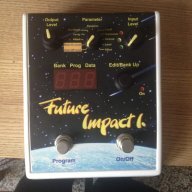
Future Impact now available!! WAS: deep impact reissue!!! interested?

Is there a list of midi #cc's for the parameters? I would like to be able to expression control filter cutoff, VCO pitch, etc etc with my MP-201's expression pedal. I've looked back through some of this thread and couldn't see anything, but I vaguely remember this being mentioned...unless I dreamt it.

There are only a few "regular" CCs, I believe they are listed in the manual. Everything else is by NRPN.
 
  • Like
Reactions: bassvirtuoso
Ok, I've never used NRPN, something to research. It's a pity more of the obvious stuff is not assigned a #cc, with 127 available it should be possible to have most of the major parameters accessible.

I still don't fully understand NRPN, though I've been able to program with it in MIDI Designer. I think it can essentially be done as two successive CCs? I also don't understand why this choice was made instead of regular CCs. I have the list of NRPNs somewhere, as do the principles involved, but I don't think it's in any of the manuals.
 
Ok, I've never used NRPN, something to research. It's a pity more of the obvious stuff is not assigned a #cc, with 127 available it should be possible to have most of the major parameters accessible.
it's not that simple. there are not 127 cc's "available" some of them have a special meaning (64,65,66,1, 2, 4, 10 etc.) nrpn is superior for synth programming via midi really. but for live use cc's are much easier of course. i agree there should be much more control via cc, but it seems hard to do in the firmware. it is an aspect andras is looking into.
 
it's not that simple. there are not 127 cc's "available" some of them have a special meaning (64,65,66,1, 2, 4, 10 etc.) nrpn is superior for synth programming via midi really. but for live use cc's are much easier of course. i agree there should be much more control via cc, but it seems hard to do in the firmware. it is an aspect andras is looking into.

I know how #cc's work, the point is this is a pedal that will primarily be a live tool, so the ability to modulate parameters via expression pedals etc would be brilliant. My brief research into NRPN this afternoon gave me little hope that I'll easily be able to do it with the MP-201 without some overly complicated programming. Either way the pedal is great, I'm very much enjoying programming it, even getting some sounds not so far away from what my Taurus III and Dominion 1 are capable of. So far the only thing I would change apart from the cc control is the LFO rate - it's slowest is still too fast for long evolving sounds - that should be a very easy fix for a firmware update.
 
Can someone from Panda respond regarding the editor? The inability to resize it means I cannot access the bottom section with the keyboard. This needs to be fixed asap. I've just received my FI1, and want to start creating patches.

You find it in the specification that you need a screen size of X>=1280 and Y>=900 in order to use the editor, this should not be a surprise. "Resizing" is not a possibility for an editor with this complexity. The majority of computers that you can get today in the shops have higher resolution than that. If we design the editor to run on out of date computers with a low resolution screen, it would be inconvenient for users with an up to date computer. But as an emergency solution, actually no very essential function of the editor requires the lower part of the screen. If you start the editor and shift it to the top, you only need 750 pixels to use all essential features of the editor.

Andras Szalay
 
i would also like this feature. but i don't know how much work it would be to separate clean blend from the synth-input (software wise). this could be quite a big change in the code...

i like the idea of selecting the input on a per patch-basis. will submit to andras :)

I will think about that.

Andras Szalay
 
  • Like
Reactions: ficelles
You find it in the specification that you need a screen size of X>=1280 and Y>=900 in order to use the editor, this should not be a surprise. "Resizing" is not a possibility for an editor with this complexity. The majority of computers that you can get today in the shops have higher resolution than that. If we design the editor to run on out of date computers with a low resolution screen, it would be inconvenient for users with an up to date computer. But as an emergency solution, actually no very essential function of the editor requires the lower part of the screen. If you start the editor and shift it to the top, you only need 750 pixels to use all essential features of the editor.

Andras Szalay

This is the only piece of software I have with this issue, and the only time I've ever encountered such a problem, so I don't understand why it can't be rectified? I have used it without the bottom portion, I just don't understand why it's so difficult to make something that works for everyone? It it not an 'out of date computer', it's a 2013 Macbook Air 11 inch, and it works perfectly well with every other piece of software I have! The pedal is great by the way, but this is quite frustrating.
 
Ok, I've never used NRPN, something to research. It's a pity more of the obvious stuff is not assigned a #cc, with 127 available it should be possible to have most of the major parameters accessible.

There are several reasons for that. Although there are physically 127 controllers available, most of them are restricted to use for specific purposes by the MIDI standard specification -- if we (or anybody else) would not keep these rules, that would be a disaster. The Future Impact uses currently 6 controllers, and this will be extended in the future. But there is another reason too. It makes a huge difference if a parameter can be changed from the editor, or if it can be changed live, as a controller. If you are editing a parameter you must not expect that the sound changes free of glitches. But if you use it live, and you change a parameter from a MIDI pedal, you expect that you do not hear series of glitches while you move the pedal. This requires serious extra processing power and memory, I will have to see how much of these can be squeezed in.

Andras Szalay
 
There are several reasons for that. Although there are physically 127 controllers available, most of them are restricted to use for specific purposes by the MIDI standard specification -- if we (or anybody else) would not keep these rules, that would be a disaster. The Future Impact uses currently 6 controllers, and this will be extended in the future. But there is another reason too. It makes a huge difference if a parameter can be changed from the editor, or if it can be changed live, as a controller. If you are editing a parameter you must not expect that the sound changes free of glitches. But if you use it live, and you change a parameter from a MIDI pedal, you expect that you do not hear series of glitches while you move the pedal. This requires serious extra processing power and memory, I will have to see how much of these can be squeezed in.

Andras Szalay

No problem - it's not a huge deal, there is quite a bit of control already, anything extra would be a bonus. As I mentioned above one thing I would like changed is the slowest frequency of the LFO, if it could be lower that would be great.
 
This is the only piece of software I have with this issue, and the only time I've ever encountered such a problem, so I don't understand why it can't be rectified? I have used it without the bottom portion, I just don't understand why it's so difficult to make something that works for everyone? It it not an 'out of date computer', it's a 2013 Macbook Air 11 inch, and it works perfectly well with every other piece of software I have! The pedal is great by the way, but this is quite frustrating.

I use the FI software on my 13" MacBook Pro but I have to hide the doc and the menu bar to use it but even then I don't see everything - my maximum resolution is 1280 x 800 so I lose 100 pixels off the bottom. I guess on an 11" screen you are a bit stuck unless there is some virtual screen app you could use?
 
I use the FI software on my 13" MacBook Pro but I have to hide the doc and the menu bar to use it but even then I don't see everything - my maximum resolution is 1280 x 800 so I lose 100 pixels off the bottom. I guess on an 11" screen you are a bit stuck unless there is some virtual screen app you could use?

My laptop is a 13" MacBook Air from 2010 (running Windows 7), it has 1440 * 900 pixels.

Andras Szalay
 
I use the FI software on my 13" MacBook Pro but I have to hide the doc and the menu bar to use it but even then I don't see everything - my maximum resolution is 1280 x 800 so I lose 100 pixels off the bottom. I guess on an 11" screen you are a bit stuck unless there is some virtual screen app you could use?

I oriented my external monitor 90 degrees...not exactly a solution, but at least I could see what I was missing. I might try it in Windows, although I don't see why the resolution would be any different. Either way it's annoying given that every other piece of software manages to deal with different resolutions.
 
I oriented my external monitor 90 degrees...not exactly a solution, but at least I could see what I was missing. I might try it in Windows, although I don't see why the resolution would be any different. Either way it's annoying given that every other piece of software manages to deal with different resolutions.

It can be a ton of work to implement reliable proportional resizing in an application, depending on which technology you are using of course. If there is plenty of available development resource to throw at it then fine, if Panda are quite logically putting the hardware and firmware first then that kind of nice-to-have probably goes to the back of the queue... the sounds are most important :)

It is irritating that Windows gets a better resolution on a Mac than OS X (apparently Linux does as well)... there are a couple of tweaks to try so if I get one to work I will post it in here.
 
It can be a ton of work to implement reliable proportional resizing in an application, depending on which technology you are using of course. If there is plenty of available development resource to throw at it then fine, if Panda are quite logically putting the hardware and firmware first then that kind of nice-to-have probably goes to the back of the queue... the sounds are most important :)

It is irritating that Windows gets a better resolution on a Mac than OS X (apparently Linux does as well)... there are a couple of tweaks to try so if I get one to work I will post it in here.
one thing you can do is to hide the menubar on top of the screen. there are several ways to do this, and they somewhat differ from OS X version to version. the resolution of the screen is the same on every operating system, you cannot get higher resolution with windows or linux then with OS X. what is different is the usage of the screen. OS X has by default a portion on top reserved for the menubar, this takes away more percentage of the screen on a macbook air because the screen is lower in resolution. btw, i also have a macbook air 11' and i can't see the bottom of the editor :-) i'dont mind, because it is just a keyboard and some copy paste functions that i don't need...
it is also not strictly true that no other software has problems with this low resolution. you have to adjust ableton live quite a bit to work nicely on the air 11. note that andras has a 13' air, not 11'
 
You'll have to excuse me because I'm very new to midi & midi programming language. I'm having a few issues setting up my future impact and source audio hub.

my setup is buzz electronics midi switcher ---> midi in of panda audio future impact --midi through--> soundblox hub ---> 2 source audio pedals

Here is the switcher I'm using: Link Removed

It says on that page "All 12 Switches can be programmed to engage any combination of the 12 loops, 128 MIDI Program Change Commands and the full range Control Change commands. Each command can be sent on a different MIDI channel"

The programming process is

step 1: set the pedals in the 12 loops (nothing to do with midi, just the 12 loops)

step 2: set the control change number (say 66 for On / Off Mode)
step 3: set the control change value (say 64 to turn FI on)
step 4: set the midi bank (not sure what this is)
step 5: set the program change number (99 sound selection for the FI)

I can get the future impact to work, turn on and off using control control changes & select patches using program changes but the SA hub doesnt connect at all .
Is it even possible change settings for the FI + 2 source adio pedals with just one click of the switcher?

I've read you have to set each device in a chain to a different midi channel? In which case how do you set the midi channel which i believe is 1-16? not 1-128? is that something to do with Midi bank?

Again, apologies I'm pretty new to all this.

Very confused! Can anyone help?
 
Similar to my setup. I may be able to help. Firstly connect the FI midi out to the hub midi in. When you change chanel on the FI the hub should switch channels also. This will check the connection between the FI and the hub. As the connection between the switcher and FI seems to be working.

Another thing to check is that you have scanned pedals. By pressing and holding one of the buttons on the hub.

With this type of setup, it's usually acceptable to have everything run on the same chanel. Use the looper function to switch pedals on and off.
 
  • Like
Reactions: honotron