• TalkBass has been independent since 1998. Add your voice.
    Create a free account to reply to discussions, view embedded media, and browse with fewer display ads.
    Join freeLog in
    Want zero display ads or expanded classifieds tools? Compare plans.

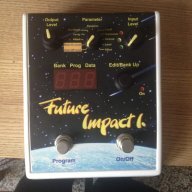
Future Impact now available!! WAS: deep impact reissue!!! interested?

Anyone got any experience with the FI,using a 5 string bass guitar?
How good is the tracking on the B string?

When I got mine at first, I plugged it in and thought that the tracking on my B string was a little lacking, especially when open. Then I checked my tuning and realized that I was at least a half-step flat. After tuning, the tracking improved significantly, again, especially when open. I don't know if a low B is the limit, or if there was anything weird going on with the harmonics and such (I play a Stingray and run it pretty flat coming from the onboard preamp). Since then, playing in tune, the tracking is good and I would endorse it on a 5- or 6-string. But I might include that caveat for anyone who plays downtuned.
 
Thank you Mr Graham....

I love this pedal, but there is definitely a lot of drift in the lower frequencies when any of the pitch sliders are used (Fine slider & Beat slider). These sliders are so important for patch density and character, but not at the cost of irregular volume response. The Waveform interaction causes the low frequency swell/drift to randomly increase by as much as 6db on many patches! Providing my pedal is not defective - I think there needs to be some kind of oscillator 'hard-sync' implemented in an update to stop/reduce these random frequency dips & swells.... :thumbsup:
.

There are two possibilities. Either you need and use the drifting sounds of unison unsynced oscillators, and then you take into account that the level may fluctuate. Of course, if you use more than two oscillators for this then you can reduce the fluctuation. Or you want a stable sound without fluctuations, and then you use just one oscillator on any one frequency. Hard syncing unison oscillators makes no sense, since it is identical with having just one oscillator.

Andras Szalay
 
  • Like
Reactions: Kubicki Fan
If there is another free CC it would be nice to have one that toggles the on/off state rather than requiring a certain value to be "on" and another to be "off." For example, CC#100, any value > 0 would be equivalent to hitting the right footswitch.

I thought about that before, but I did not think that anybody really needs it. Can you explain why do you want to have it?
I will implement it in the next release. I wrote the following specification:
Effect on-off flip through MIDI: Control 69 (Hold 2) is used for this. The third byte can be any value, a message will always flip between on and off.

Andras Szalay
 
yeah, believe me i would be excited for new features as well, but i haven't heard anything from andras the last couple of months. there was mentioning of an update to the firmware at some point, but nothing concrete. maybe he can chime in and tell us about the state of things...

Lokki, did you change your e-mail address? I sent you several weeks ago a beta release of new features for testing but I still got no reply at all. Didn't you get this?

Andras Szalay
 
Probably a dumb question but have been searching everywhere..... does the future impact have a tuner built in? If not can this be added via update? Would be super handy

It is a good question. This was part of my plan, but there were several reason why it is not yet implemented.
1. Ideally, the best tuners that I ever designed use PWM LEDs (brightness modulation), which is not possible on the FI hardware. But a good implementation can be made without PWM as well.
2. When the FI was ready with software 1.01 the program memory was almost full. During the while I optimized the memory to win some more place, as new features were implemented. I want to keep the rest of the current memory for very important new features that may come soon. If there will be enough space after that, then I will definitely implement a tuner as well.

Andras Szalay
 
I thought about that before, but I did not think that anybody really needs it. Can you explain why do you want to have it?
I will implement it in the next release. I wrote the following specification:
Effect on-off flip through MIDI: Control 69 (Hold 2) is used for this. The third byte can be any value, a message will always flip between on and off.

Andras Szalay

The way I would use it is the following. I have a MIDI controller that does not know what state the FI is in. If there is a MIDI command that toggles the on/off state I can use one button to go back and forth. As it is, my options are: (1) use two buttons on my MIDI controller, one for "on" and one for "off" or (2) use a button that has its own toggle between the two states, but in this case I may need to hit it twice in order to "sync" it with the state of the FI.

For other purposes I like the existing implementation, so it is ideal to have both options.
 
The way I would use it is the following. I have a MIDI controller that does not know what state the FI is in. If there is a MIDI command that toggles the on/off state I can use one button to go back and forth. As it is, my options are: (1) use two buttons on my MIDI controller, one for "on" and one for "off" or (2) use a button that has its own toggle between the two states, but in this case I may need to hit it twice in order to "sync" it with the state of the FI.

For other purposes I like the existing implementation, so it is ideal to have both options.
OK, I agree. I will do that.

Andras Szalay
 
the more I try to make synthy sounds with ye olde octavers and filters and such, the more I realize that my ideal synth sounds are the really simple ones, like the West End Girls sound, and I think something like this is just the only real answer. So I started watching FI demos. Not that I have 4-500 for a pedal anytime soon, but you know how it is.

Questions:
- can it do just a straight octaver? If so, what's it sound like?
- can you program the left switch to literally just step through 2 or 3 sounds instead of a whole 10-bank? I would program literally maybe 3 sounds and that would be the entirety of my usage.
---- (and I assume any sound can be assigned to any patch number, yeah?)
- is there an easy way to compare levels audibly between patches, so that switching the effect on isn't too loud or soft relative to dry tone and/or to other patches?
 
Questions:
- can it do just a straight octaver? If so, what's it sound like?

I have some BOSS OC-2 emulation attempts on my page here: pandaMidi Future Impact bass synth sound samples and patches - cgraham.com


---- (and I assume any sound can be assigned to any patch number, yeah?)
- is there an easy way to compare levels audibly between patches, so that switching the effect on isn't too loud or soft relative to dry tone and/or to other patches?

I'm probably not understanding the question. You'd approach this the same as with any other FX box. Just toggle the bypass, or load various patches to compare patch-to-patch FX volume.
 
- can you program the left switch to literally just step through 2 or 3 sounds instead of a whole 10-bank? I would program literally maybe 3 sounds and that would be the entirety of my usage.

I'm not sure of the specific answer to your question, but it's worth noting that a double-tap on the left switch will go back down. All tap+hold will scroll up fast and double-tap+hold will scroll down fast. So there are ways to navigate easily between just a few patches.
 
- can you program the left switch to literally just step through 2 or 3 sounds instead of a whole 10-bank? I would program literally maybe 3 sounds and that would be the entirety of my usage.
---- (and I assume any sound can be assigned to any patch number, yeah?)

E.g. if you find that your favorite patches are 15, 24 and 83, and this is all what you want to use, you can place them to locations 1,2,3 with help of the computer editor.

Andras Szalay
 
E.g. if you find that your favorite patches are 15, 24 and 83, and this is all what you want to use, you can place them to locations 1,2,3 with help of the computer editor.

Andras Szalay
Thanks Andras - I assumed so. Now, can one get the left switch to just go 1-2-3-1-2-3? or does it have to always go all the way around the 10 programs in the bank?
 
I'm probably not understanding the question. You'd approach this the same as with any other FX box. Just toggle the bypass, or load various patches to compare patch-to-patch FX volume.

Well, what I mean is setting the volume level for each patch, especially with the computer editor - how is that done without "Wild guess, set in editor, load to pedal, test by playing a bit, repeat"? And that would go for setting the volume against bypass for each patch (in a roundabout way that would also mean patch against patch, too)
 
Well, what I mean is setting the volume level for each patch, especially with the computer editor - how is that done without "Wild guess, set in editor, load to pedal, test by playing a bit, repeat"? And that would go for setting the volume against bypass for each patch (in a roundabout way that would also mean patch against patch, too)
well if you are in the editor and adjust volume, you can always bypass the pedal without loosing the edited changes, so you can check easily against your bypass volume. but since there is an output volume (physical knob) it is far easier to adjust all your sounds to the same volume and then do the levelling with bypassed signal via the output volume knob. levelling the individual patches does take some time, but i don't see how that could be made easier.
 
  • Like
Reactions: maisbass
Thanks Andras - I assumed so. Now, can one get the left switch to just go 1-2-3-1-2-3? or does it have to always go all the way around the 10 programs in the bank?
it's always around the 10... but as has been stated before you can double click on the program switch to decrease by one. so if you just have three sounds, this works really well.
 

Latest posts