• TalkBass has been independent since 1998. Add your voice.
    Create a free account to reply to discussions, view embedded media, and browse with fewer display ads.
    Join freeLog in
    Want zero display ads or expanded classifieds tools? Compare plans.

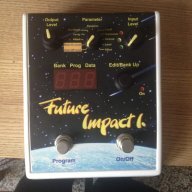
Future Impact now available!! WAS: deep impact reissue!!! interested?

All new devices that we deliver out since about October last year are 1.30, but we did not publish that yet, since it was not important for the users, normally it affects only the manufacturing process. We found that the manufacturer of the PARAMETER potentiometer (the middle one) did not keep the technical parameters of the potentiometer tight enough. This resulted that the second position (NOTE ON LEVEL) and the tenth position (LEVEL) was not always aligned exactly with the position as it is printed on the scale. Now, in the new devices the printed scale is a bit tighter (the angles are a little bit less), and every position is manually calibrated during the manufacturing. However, older devices with the wider print will work just as well with any new software. The only thing that you must not do is to downgrade from 1.30 to a lower software (but I see this is exactly what somebody did here). In this case you may read values that do not belong to the parameter that the knob points to. Gabor will publish now a new online software update method that became ready just now. This will include 1.30.

Andras Szalay

this
 
  • Like
Reactions: Jonny5bass
Tonight's setup. FretTraX system in da house!! It's unbelievable once you get adjusted to it. FYI I am presently not triggering the FI with it yet.

And yes once I have more time with the system I will elaborate on a new thread. I will tell ya this, it is a blast to play with and the tracking is sick!!

IMG_4755.JPG
 
Tonight's setup. FretTraX system in da house!! It's unbelievable once you get adjusted to it. FYI I am presently not triggering the FI with it yet.

And yes once I have more time with the system I will elaborate on a new thread. I will tell ya this, it is a blast to play with and the tracking is sick!!

View attachment 1113314

Isn't the FretTrax system the same as the old Peavey MidiBase system? Same as the Industrial Radio Midi Bass system, which also ended up in a few Wal basses? I had the Peavey version and the midi tracking was awesome, and polyphonic.
 
Isn't the FretTrax system the same as the old Peavey MidiBase system? Same as the Industrial Radio Midi Bass system, which also ended up in a few Wal basses? I had the Peavey version and the midi tracking was awesome, and polyphonic.
Not exactly. The major difference is that you can have the FretTraX system retrofitted into your own bass. For me that was a huge plus.

I never tried the IR system but I did own the original white Peavey midi bass back in the 90's. That bass tracked well but it did false trigger quite a bit, and the bass wasn't the greatest playing bass either.

The FretTraX system is extremely customizable with many modes st your fingertips. There are some other discrepancies as well but I will get into that at a later date.
 
  • Like
Reactions: Jonny5bass
Tonight's setup. FretTraX system in da house!! It's unbelievable once you get adjusted to it. FYI I am presently not triggering the FI with it yet.

And yes once I have more time with the system I will elaborate on a new thread. I will tell ya this, it is a blast to play with and the tracking is sick!!

View attachment 1113314

Please do so! How expensive was it to install?
 
that seems awfully long. does the midi interface work with the editor firmware update utility? (the way it was done before the web tool?) are you using chrome browser?

Yes I upgraded to 1.22 with the same MIDI interface (iConnectMIDI2+). I'm also noting another odd behavior, I tried to upload just the first 10 patches, I even get the message with the option of filling with the default or skipping, but when the edito finish the transfer the pedal has the 99 patches as I had them before the upload.
 
Yes I upgraded to 1.22 with the same MIDI interface (iConnectMIDI2+). I'm also noting another odd behavior, I tried to upload just the first 10 patches, I even get the message with the option of filling with the default or skipping, but when the edito finish the transfer the pedal has the 99 patches as I had them before the upload.
what 10 patches? also from the default patches? if you hit skipping it will not override the other patches, so patch 10 to 99 will be the same as before. if the first ten are also from the default patches you will not notice a difference.
 
what 10 patches? also from the default patches? if you hit skipping it will not override the other patches, so patch 10 to 99 will be the same as before. if the first ten are also from the default patches you will not notice a difference.

The first 10 patches from the default. But if the patches are overwritten the parameter value would be 5 in everyone and that was not the case.
 
Hey guys, I just got my FI and it sure sounds great, so phat and creamy!
So far I've been able to do almost everything I wanted on it: editing patches, exporting them into the FI, no problems at all. However, I am trying to control patch changes on the FI with a midi controller (One Control Gecko MKII) and I'm finding some problems.
I can change the patch on the FI screen perfectly to the patches I want, but the fx is always the same. AND now the same thing happens when I try to change programs manually on the FI as well, even if there's nothing connected on the MIDI IN/OUT of the FI.
I have tried to change the Default/Direct Mode several times and the MIDI Channel I send patch changes through (even if the patches change on the screen of the FI when I use the MIDI Controller), I have even tried to reset to default settings and re-exporting the custom sound patches I had done, but the problem persists..
Have you heard of such a problem? Thanks in advance
 
Hey guys, I just got my FI and it sure sounds great, so phat and creamy!
So far I've been able to do almost everything I wanted on it: editing patches, exporting them into the FI, no problems at all. However, I am trying to control patch changes on the FI with a midi controller (One Control Gecko MKII) and I'm finding some problems.
I can change the patch on the FI screen perfectly to the patches I want, but the fx is always the same. AND now the same thing happens when I try to change programs manually on the FI as well, even if there's nothing connected on the MIDI IN/OUT of the FI.
I have tried to change the Default/Direct Mode several times and the MIDI Channel I send patch changes through (even if the patches change on the screen of the FI when I use the MIDI Controller), I have even tried to reset to default settings and re-exporting the custom sound patches I had done, but the problem persists..
Have you heard of such a problem? Thanks in advance
never ever heard something like that. i can only think of one thing, did you by accident fill all the slots on the f.i. with the same sound?
 
Yeah, I think that was it, I had like 5 custom sounds on a folder and when I tried to export them all at once to the FI, the editor actually the assigned the settings that were displayed to all of the patches, when it was supposed to just replace some of the sounds. So I re-exported the 99 default patches and re-exported my custom sounds one by one and it all works flawlessly now. Thanks!
 
  • Like
Reactions: lokki

Latest posts