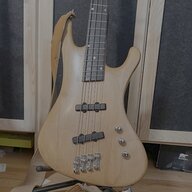
Anyone else seeing anything like this when they download the file?
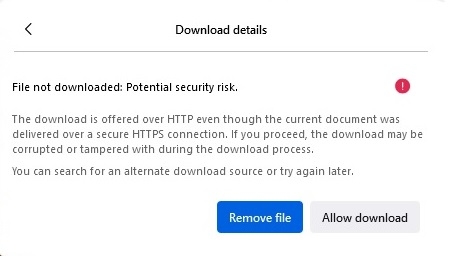
Apprently gg.index.hu isn't on https
Apprently gg.index.hu isn't on https
Last edited:

TalkBass has been independent since 1998. Add your voice.
Create a free account to reply to discussions, view embedded media, and browse with fewer display ads.
Join free Log in
Want zero display ads or expanded classifieds tools? Compare plans.

Yeah, there’s some issue. I’ve just reported it.Anyone else seeing anything like this when they download the file?
View attachment 7064151
Apprently gg.index.hu isn't on https
Not at the same time; they are separate modes. Also, it’s monophonic so can only play one note at a time anyway.Can I set it to both send MIDI notes from my bass AND to accept MIDI notes via MIDI in from my sequencer?
I believe the FI has to restart to change modes (audio triggered vs MIDI triggered).Possible to have a midi command that changes instrument mode to Synth? I don't see it in the manual, but if possible, that would solve it.
So yes, you could use the bass to send MIDI notes into a sequencer, stepwise or in real time. (However, you could easily do this with a small keyboard plugged into either the FI or sequencer.)Ah that's a shame.
I don't understand the second sentence. I want to use my bass to trigger midi note creation. The only way to convert bass pitch to midi is through FI4. So I could certainly play through to record midi notes to sequencer, but then the sequencer would only be able to sequence the external synth and not the FI itself, which would be my preference.
Monophonic is totally fine here. I wouldn't play on top of the sequence. I'd put the bass down and fiddle with knobs.
Possible to have a midi command that changes instrument mode to Synth? I don't see it in the manual, but if possible, that would solve it.
Thanks. Will try this approach first.If you then wanted to trigger the FI from the sequencer, you’d need to put the FI into Synth mode. You can do this reasonably quickly using the “quick” method of entering the global menu (as described in the user manual).
You can already do dry/wet mix via expression on the FI: CC2 for synth, CC7 for overall (midi) output and CC92 for dry.Thanks. Will try this approach first.
It would be amazing to be able to do this more seamlessly. I imagine the cool trick playing live where you split the signal between FI4 and dry, then on the summing box have an expression pedal that controls mix. You start with mix of synth at 0 while you record the loop into the sequencer, then when the music revs up, you put expression/synth mix at max and put your bass guitar down. Audience has no idea you were playing into a loop all along and have no idea where the big synth sounds are coming from. I know I could do that with an external synth - was just hoping to pack light. Active splitter before the FI and Dreadbox psyclop after to sum the signals would do it.
FYI. The app has been updated. It now populates the controller with the FI's parameter settings when a patch is loaded and you can save an edited patch to the FI. In some ways it is an alternative to the stand alone editor in that it provides hands on control of parameters via knobs and buttons rather than a mouse. I have already found it very useful for tweaking patch settings in real time when performing with keys or my midi bass. However, it isn't a substitute for the editor - especially the librarian/patch manager function, and of course it only works with the Electra One controller. Here is the link: Electra One appNot sure if anyone here uses the Electra One midi controller (Electra One), but I have programmed up a preset for it that provides pretty comprehensive control of the synth engine parameters of the Future Impact. For those who like to turn physical knobs rather than use a mouse this could be a useful tool for dialing in of sounds. I have all my synths controlled from the Electra One. Here is the link to the FI preset Electra One App

Check out Arturia’s Keystep 37.Got my Morningstar MC-6 MK II ==>FI4 ==>Moog Minitaur rig working nicely this weekend, Really liking that rig. Thanks as usual to QM for advice and support! I do think I'll add a small keyboard controller in for sound development. I'll try using my Yamaha first but it's 49 keys. I'm thinking a 25 key and pads Akai might be the thing in my small space.

I love using my Arturia Keystep 37 with my FI3 and B2600.Got my Morningstar MC-6 MK II ==>FI4 ==>Moog Minitaur rig working nicely this weekend, Really liking that rig. Thanks as usual to QM for advice and support! I do think I'll add a small keyboard controller in for sound development. I'll try using my Yamaha first but it's 49 keys. I'm thinking a 25 key and pads Akai might be the thing in my small space.
The original and 37 (non-pro) are pretty much the same if I recall correctly. Probably best to check the specs just in case there’s anything different with power etc or stuff under the hood.Thise Keysteps look nice. Other than the 5 keys... any real difference between the 32 and 37... We just downsized and my music / project space is less than a quarter of what it used to be... so space is at a premium these days...
I'm no keyboard player, that's for sure. I'm really just wanting to have nothing in my hands while working on a synth patch. I suppose I could do a loop or something but a little keyboard off to the side seems pretty easy and convenient.The original and 37 (non-pro) are pretty much the same if I recall correctly. Probably best to check the specs just in case there’s anything different with power etc or stuff under the hood.
Personally 37 keys is my bare minimum a for monosynth, but others seem more adept at making use of octave switching buttons.
You might consider something like the launchpad pro mk3 if you are looking for something small for sound design.I'm no keyboard player, that's for sure. I'm really just wanting to have nothing in my hands while working on a synth patch. I suppose I could do a loop or something but a little keyboard off to the side seems pretty easy and convenient.
IIRC the 37 has more automated controls, like one-key chords and strum modeThise Keysteps look nice. Other than the 5 keys... any real difference between the 32 and 37... We just downsized and my music / project space is less than a quarter of what it used to be... so space is at a premium these days...