
Enjoy the benefits of a premium membership!
Upgrade Account
-
TalkBass has been independent since 1998. Add your voice.
Create a free account to reply to discussions, view embedded media, and browse with fewer display ads.
Join free Log in
Want zero display ads or expanded classifieds tools? Compare plans.
You are using an out of date browser. It may not display this or other websites correctly.
You should upgrade or use an alternative browser.
You should upgrade or use an alternative browser.
HOW TO INSTALL UBUNTU STUDIO 9.10 WITHOUT HAVING THE INSTALL #%$&%# FAIL!:
- Thread starter MIJ-VI
- Start date
More options
Who Replied?Already running Ubuntu and want upgrade to Ubuntu Studio without reinstalling? Here's how:
https://help.ubuntu.com/community/Ubuntu%20Studio%20Upgrade%20from%20Ubuntu
https://help.ubuntu.com/community/Ubuntu%20Studio%20Upgrade%20from%20Ubuntu

First, let me say that I am perfectly happy using a Windows Vista laptop as my DAW platform.
But, I do have every machine in my possession set-up as dual-boot (or multiboot) with either Ubuntu and/or OpenSuse 11.1, and Windows Vista (at the moment). The result of this is that I am at least functional on Linux and, over the years, have navigated some of the issues (ALSA, wireless LAN, network printing, GRUB etc.) that Linux presents to non-super tech end users. Personally, I have reached a "take-it or leave-it" position on Linux. It works fine once correctly set up, and I can use it for most of the work I need to do. But for me (and this is just IMO/IME .. not a flame ) it does not offer anything particularly better than Windows
So, having said all that, my question is: I have started to use virtualization (virtualbox) and generally like it better than dual booting (IME, it's much easier/faster once set up), so; will Ubuntu Studio run ok in a virtual machine environment or is that just asking too much of the current technology.
inquiring minds want to know
But, I do have every machine in my possession set-up as dual-boot (or multiboot) with either Ubuntu and/or OpenSuse 11.1, and Windows Vista (at the moment). The result of this is that I am at least functional on Linux and, over the years, have navigated some of the issues (ALSA, wireless LAN, network printing, GRUB etc.) that Linux presents to non-super tech end users. Personally, I have reached a "take-it or leave-it" position on Linux. It works fine once correctly set up, and I can use it for most of the work I need to do. But for me (and this is just IMO/IME .. not a flame
) it does not offer anything particularly better than Windows So, having said all that, my question is: I have started to use virtualization (virtualbox) and generally like it better than dual booting (IME, it's much easier/faster once set up), so; will Ubuntu Studio run ok in a virtual machine environment or is that just asking too much of the current technology.
inquiring minds want to know
First, let me say that I am perfectly happy using a Windows Vista laptop as my DAW platform.
But, I do have every machine in my possession set-up as dual-boot (or multiboot) with either Ubuntu and/or OpenSuse 11.1, and Windows Vista (at the moment). The result of this is that I am at least functional on Linux and, over the years, have navigated some of the issues (ALSA, wireless LAN, network printing, GRUB etc.) that Linux presents to non-super tech end users. Personally, I have reached a "take-it or leave-it" position on Linux. It works fine once correctly set up, and I can use it for most of the work I need to do. But for me (and this is just IMO/IME .. not a flame
So, having said all that, my question is: I have started to use virtualization (virtualbox) and generally like it better than dual booting (IME, it's much easier/faster once set up), so; will Ubuntu Studio run ok in a virtual machine environment or is that just asking too much of the current technology.
inquiring minds want to know
Hi pfschim.
First off, +1 on VirtualBox. Secondly, it's my understanding that virtual machines are only useful for running applications which do not require direct access to the host machine's I/O ports (eg office programs, web browsers, and such).
Unfortunately audio/video apps. need to communicate directly with USB, FireWire, SCSI, and ESATA ports to do their work.
As well, even when using processors which support Intel's VT, or AMD's AMD-V technology, virtualization still imposes a disk access-related performance penalty on virtual machines/'guest' operating systems because they run from within a disk image instead of directly from the host PC's hard drive.
IMO anyone who is in the market for a new notebook or desktop PC would do well to research whether or not the prospective machine's CPU supports virtualization. It's my understanding that the Windows 7 Ultimate (I believe) XP Mode only runs on processors which support it.
While going to Intel's or AMD's web site for this info would be prudent, here's an overview:
Which Intel CPUs Support XP Mode Virtualization?
Which AMD CPUs Support XP Mode Virtualization?
--------
BTW, if anyone is thinking of picking up a new net/notebook soon...
[Invalid or Expired Link Removed]
Hi pfschim.
First off, +1 on VirtualBox. Secondly, it's my understanding that virtual machines are only useful for running applications which do not require direct access to the host machine's I/O ports (eg office programs, web browsers, and such).
Unfortunately audio/video apps. need to communicate directly with USB, FireWire, SCSI, and ESATA ports to do their work.
As well, even when using processors which support Intel's VT, or AMD's AMD-V technology, virtualization still imposes a disk access-related performance penalty on virtual machines/'guest' operating systems because they run from within a disk image instead of directly from the host PC's hard drive.
IMO anyone who is in the market for a new notebook or desktop PC would do well to research whether or not the prospective machine's CPU supports virtualization. It's my understanding that the Windows 7 Ultimate (I believe) XP Mode only runs on processors which support it.
While going to Intel's or AMD's web site for this info would be prudent, here's an overview:
Which Intel CPUs Support XP Mode Virtualization?
Which AMD CPUs Support XP Mode Virtualization?
--------
BTW, if anyone is thinking of picking up a new net/notebook soon...
[Invalid or Expired Link Removed]
Hey MIJ-VI, thanks for the reply. As far as the hardware/port access, I should have thought of that before asking, OTOH I have been able to access USB ports without issue on *nix OSes running in virtual machines, so maybe it's not hopeless. (although recording is much more demanding on hardware ports than simple data transfer between USB storage devices).
Also, to your point about XP mode support, I believe that I read an article on Toms last week (great site) that said that Win7 XP mode no longer required hardware virtualization support. So, I'll have to go back to Toms and look that up for reference.
thanks
Courtesy of Ubuntu Forum member M4st0d0n: a further insight into avoiding an Ubuntu Studio 9.10 installation failure on a PC which is not wired to the Internet...
"Hello,
I had the same problem with the installation on my PC. A glowing red screen during the "Install Selected Software". The cause was that I was running the installation with a fresh ISO (not upgrading) and no wired connection (only wireless, not recognized during the install process). You may find this link useful :
http://www.talkbass.com/forum/showthread.php?p=8238590
Apparently, because some lib files are non-free, the installation program must load them from a wired connection to the internet.
So first, I pressed F6 and cross the "only free software" case of the menu of the install launcher (when it asks for the language and propose to use memtest), then, with the minimal ubuntustudio session loaded with my wifi network working, I used synaptic, as described in the link, to install all the packages.
Hope this helps."
http://www.talkbass.com/forum/showthread.php?p=8238590
If the next version of Ubuntu Studio (10.04) also includes the default installation of non-free software via a wired Internet connection, then M4st0d0n's tip about pressing F6 and choosing 'only free software' will be worth keeping in mind.
"Hello,
I had the same problem with the installation on my PC. A glowing red screen during the "Install Selected Software". The cause was that I was running the installation with a fresh ISO (not upgrading) and no wired connection (only wireless, not recognized during the install process). You may find this link useful :
http://www.talkbass.com/forum/showthread.php?p=8238590
Apparently, because some lib files are non-free, the installation program must load them from a wired connection to the internet.
So first, I pressed F6 and cross the "only free software" case of the menu of the install launcher (when it asks for the language and propose to use memtest), then, with the minimal ubuntustudio session loaded with my wifi network working, I used synaptic, as described in the link, to install all the packages.
Hope this helps."
http://www.talkbass.com/forum/showthread.php?p=8238590
If the next version of Ubuntu Studio (10.04) also includes the default installation of non-free software via a wired Internet connection, then M4st0d0n's tip about pressing F6 and choosing 'only free software' will be worth keeping in mind.
Win7 XP Mode Drops Virtualization Hardware Need
"...Up until today, those who wanted to run XP Mode in their modern OS would be required to have hardware virtualization support through Intel VT or AMD-V. Now that requirement has been lifted, though those with virtualization hardware will still see better performance..."
http://www.tomshardware.com/news/windows-7-xp-mode-virtualization-intel-vt-amd-v,9933.html
"...Up until today, those who wanted to run XP Mode in their modern OS would be required to have hardware virtualization support through Intel VT or AMD-V. Now that requirement has been lifted, though those with virtualization hardware will still see better performance..."
http://www.tomshardware.com/news/windows-7-xp-mode-virtualization-intel-vt-amd-v,9933.html
Thinking of building a PC to run Ubuntu Studio?
Then there's bound to be useful tips here:
Homebuilt Systems Forum
http://www.tomshardware.com/forum/forum-31.html
Then there's bound to be useful tips here:
Homebuilt Systems Forum
http://www.tomshardware.com/forum/forum-31.html
Your Recommended FireWire Adaptor Cards
http://www.soundonsound.com/forum/s...=741181&page=0&view=collapsed&sb=5&o=&fpart=1
An except from a post by Sound On Sound Forum member Hypagen:
"1. FireWire Audio Device: Focusrite Saphire 10 I/O (Focusrite recommend having this device on its own bus. In order for this device to have it's own firewire bus, it is necessary to install a PCI firewire card with only this device attached.)
2. Adaptor Make & Model: Dynamode PCI-3PFW
3. Card Format & Ports: PCI, External 3 x 400 (1 of which is 4 pin) Internal 1 x FireWire interconnect Port for connecting to PC Case FireWire output port if required.
4. Adaptor Controller: *VIA VT6306 (Recommended by Focusrite along with TI TSB43AB22 & **NEC uPD72874. Any card used by the Saphire must be OHCI compliant and type 1394a).
5. Rating: Excellent had no problems."
*The VIA VT6306 is used in the ASUS Invalid Link Removed (a Socket 478 Pentium 4 motherboard, I've got one).
This was a popular high performance 'board in its day (PATA and/or SATA hard drives with support for RAID 0, 1, and 0+1) which even now forms a good starting point (when loaded with a 3 GHz, or 3.2 GHz, or 3.4 GHz P4 + 2 GB or more of DDR 266, or DDR 333, or DDR 400 RAM) for throwing together an Ubuntu Studio rig on the cheap. Here's what they look like:
[Invalid or Expired Link Removed]
The stock CPU cooling fan on the Socket 478 Pentium 4 is VERY noisy. A good after-market replacement like the now discontinued (but still found in many computer shops) Zalman CNPS7000A-AlCu Ultra-Quiet CPU Cooler (I've got one. It works well) is a must-have for any S478 Pentium 4.
Link Removed
And since there's a YouTube video for seemingly everything...
BTW. Please avoid the all-copper version of this cooler as it is too heavy for the S478 cooling fan's plastic mounting bracket.
EDIT:
Various issues with Windows 7 on an Asus P4P800E-Deluxe..
http://social.technet.microsoft.com...e/thread/dc3b85bc-e0cd-459a-9c5e-9126331148a6
I just checked ASUS' web site. The newest Microsoft OS they support for the P4P800-E Deluxe is Windows 2003.
So far Ubuntu Studio 9.10 supports the ASUS P4P800-E Deluxe just fine.
--------
**The NEC uPD72874 is used in the Invalid Link Removed.
--------
Some good performing, affordable (~$100 CND new), and passively cooled (quiet) nVidia GeForce 7600GS + HSI chipset-based (ATI AGP cards are generally not Linux-friendly and thus should be avoided) AGP 3.0 (8x) display cards which can still be found in some computer shops:
- the Invalid Link Removed
Link Removed
- the ASUS N7600GS 256MB SILENT/HTD/256M
[Invalid or Expired Link Removed]
--------
An affordable (~$100 CND), quiet ATX case which sports good hard drive and graphics (etc) card cooling:
- the Antec [Invalid or Expired Link Removed]
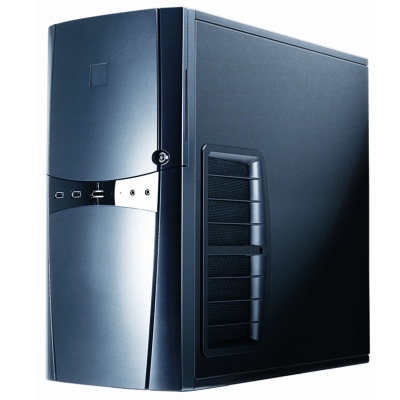
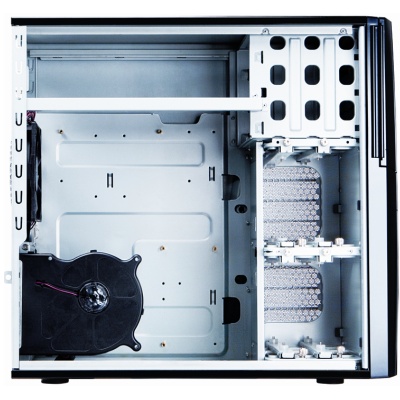
--------
A Linux-compatible, 2-Port eSATA II-150 PCI Host Card, the [Invalid or Expired Link Removed]:
[Invalid or Expired Link Removed]
System Requirements:
Pentium® or Equivalent PC with One Available PCI Slot
Microsoft Windows 98SE/ME/2000/XP
Supports 64bit/32bit Windows Vista
Linux kernel version of 2.4.18-14 or later
--------
Two tools to help one choose a good quality power supply:
Link Removed
Link Removed
BTW. Buying a p/s which offers more wattage and connectors than your current motherboard needs will ensure that it can properly power a faster m/b should you choose to upgrade later on.
Please note: motherboards like the one above require a 20 pin power connector whereas the more recent DDR2, SATA II, PCIx-era 'boards want a 24 pin connector. Many modern power supplies have a 20+4 pin connector (a 4 pin section can be removed to accommodate 20 pin motherboards).
--------
Re choosing hard drives:
PATA (Parallel ATA, 40 pin connectors, 80 conductor ribbon cables) 33, 66, 100, or 133 hard drives are generally quite compatible with most motherboards. As long as a PATA drive is functioning properly it'll work (IMO 7,200 RPM PATA 100 OR 133 hard drives are the practical minimum for half decent computer performance on a high-end AGP 3.0, DDR 400-era desktop PC motherboard like the ASUS P4P800-E Deluxe).
However, PATA drives are no longer worth buying for motherboards which can also take and boot from SATA I 150 (Serial ATA 150 Mb/sec transfer rate, 7 conductor cables) hard drives because the PATA units now cost more and are slower than their SATA I and SATA II (300 Mb/sec) counterparts.
The hard drive(s) of choice for a motherboard similar to the one pictured above are now SATA II (which are frequently backwards compatible with SATA I hard drive controllers) units--*as long as said SATA II drives are known to be compatible with the hard drive controller(s) found on a particular motherboard (or on a SATA/eSATA expansion card like the Vantec model pictured above).
The idea of buying compatible SATA II (again, 300 Mb/sec) hard drives for use with a SATA I (150 Mb/sec)-era motherboard is that the faster drives can be migrated to a SATA II-era 'board later on as one's finances allow.
The potential 'gotcha' here is that SATA hard drive/controller compatibility isn't as slam dunk as it is for PATA drives & controllers.
Hence *identifying the Southbridge on one's motherboard (on the ASUS P4P800-E Deluxe it's an Intel ICH5/ICH5R) and/or any RAID controllers the 'board may have (on the P4P800-E Deluxe it's a Promise FastTrak 378/SATA 378), and then then matching that info to a resource like Western Digital's Invalid Link Removed is a good way of ensuring SATA hard drive/controller compatibility.
Please note: SATA III (600 Mb/sec.) hard drives are now available at a GigaByte-per-buck cost ~= to that of SATA II drives. IIRC some of these new, higher-performance-than-ever units can be jumpered to work with SATA I controllers BUT no hard drive manufacturer has tested these speedy new hard drives with any now-obsolete hard drive controllers, and they're not likely to.
SATA III hard drives are only worth considering if one plans on upgrading to what is currently a bleeding edge SATA III, USB 3.0, DDR3, quad or six core CPU-capable motherboard in the future--after these new technologies are proven to be stable (especially under Linux) and affordable.
If you want to [Invalid or Expired Link Removed] on installing a SATA III drive on a SATA I-era motherboard (or expansion card), then please do exhaustive research first and buy your new hard drive from a good local computer shop after making arrangements with someone in authority to possibly exchange it for a SATA II unit which your research has indicated will indeed be compatible.
EDIT: I couldn't find any clear evidence to confirm (or disprove) that SATA III hard drives are compatible with SATA I controllers so I've e-mailed the folks at Western Digital as to whether or not their new Invalid Link Removed (1 TB, SATA 6 Gb/s, 64 MB Cache, 7200 RPM) will work with the Intel ICH5/ICH5R and the Promise FastTrak 378/SATA 378 found on the ASUS P4P800-E Deluxe.
Well, WD just got back to me, and darn quick too!
"Thank you for contacting Western Digital Customer Service and Support. My name is Pablo R.
I apologize for the inconvenience, unfortunately this drive will not work with your SATA controller, the device cannot make the automatic downgrade speed from 6 Gb/sec to 1.5 Gb/sec.
I hope that we have met your expectations today and that you are satisfied with our service. If you have any further questions, please reply to this email and we will be happy to assist you further."
Sincerely,
Pablo R.
Western Digital Service and Support
Invalid Link Removed
--------
No matter. As it is their Invalid Link Removed (500 GB, SATA 3 Gb/s, 16 MB Cache, 7200 RPM) is officially supported on, and works fine with the P4P800-E Deluxe (I've got one and it's been running trouble-free for nearly 6 months).
--------
BTW, anyone considering Western Digital's attractively priced Green series of hard drives would do well to read this before buying one:
Caviar Green 1.5TB drives - problem with new firmware
[Invalid or Expired Link Removed]
It's best to stick with Western Digital's WD Caviar Blue, or WD Caviar Black (the SATA 3 Gb/s models) hard drives or go with a different brand like Seagate.
http://www.soundonsound.com/forum/s...=741181&page=0&view=collapsed&sb=5&o=&fpart=1
An except from a post by Sound On Sound Forum member Hypagen:
"1. FireWire Audio Device: Focusrite Saphire 10 I/O (Focusrite recommend having this device on its own bus. In order for this device to have it's own firewire bus, it is necessary to install a PCI firewire card with only this device attached.)
2. Adaptor Make & Model: Dynamode PCI-3PFW
3. Card Format & Ports: PCI, External 3 x 400 (1 of which is 4 pin) Internal 1 x FireWire interconnect Port for connecting to PC Case FireWire output port if required.
4. Adaptor Controller: *VIA VT6306 (Recommended by Focusrite along with TI TSB43AB22 & **NEC uPD72874. Any card used by the Saphire must be OHCI compliant and type 1394a).
5. Rating: Excellent had no problems."
*The VIA VT6306 is used in the ASUS Invalid Link Removed (a Socket 478 Pentium 4 motherboard, I've got one).
This was a popular high performance 'board in its day (PATA and/or SATA hard drives with support for RAID 0, 1, and 0+1) which even now forms a good starting point (when loaded with a 3 GHz, or 3.2 GHz, or 3.4 GHz P4 + 2 GB or more of DDR 266, or DDR 333, or DDR 400 RAM) for throwing together an Ubuntu Studio rig on the cheap. Here's what they look like:
[Invalid or Expired Link Removed]
The stock CPU cooling fan on the Socket 478 Pentium 4 is VERY noisy. A good after-market replacement like the now discontinued (but still found in many computer shops) Zalman CNPS7000A-AlCu Ultra-Quiet CPU Cooler (I've got one. It works well) is a must-have for any S478 Pentium 4.
Link Removed
And since there's a YouTube video for seemingly everything...
BTW. Please avoid the all-copper version of this cooler as it is too heavy for the S478 cooling fan's plastic mounting bracket.
EDIT:
Various issues with Windows 7 on an Asus P4P800E-Deluxe..
http://social.technet.microsoft.com...e/thread/dc3b85bc-e0cd-459a-9c5e-9126331148a6
I just checked ASUS' web site. The newest Microsoft OS they support for the P4P800-E Deluxe is Windows 2003.
So far Ubuntu Studio 9.10 supports the ASUS P4P800-E Deluxe just fine.
--------
**The NEC uPD72874 is used in the Invalid Link Removed.
--------
Some good performing, affordable (~$100 CND new), and passively cooled (quiet) nVidia GeForce 7600GS + HSI chipset-based (ATI AGP cards are generally not Linux-friendly and thus should be avoided) AGP 3.0 (8x) display cards which can still be found in some computer shops:
- the Invalid Link Removed
Link Removed
- the ASUS N7600GS 256MB SILENT/HTD/256M
[Invalid or Expired Link Removed]
--------
An affordable (~$100 CND), quiet ATX case which sports good hard drive and graphics (etc) card cooling:
- the Antec [Invalid or Expired Link Removed]
--------
A Linux-compatible, 2-Port eSATA II-150 PCI Host Card, the [Invalid or Expired Link Removed]:
[Invalid or Expired Link Removed]
System Requirements:
Pentium® or Equivalent PC with One Available PCI Slot
Microsoft Windows 98SE/ME/2000/XP
Supports 64bit/32bit Windows Vista
Linux kernel version of 2.4.18-14 or later
--------
Two tools to help one choose a good quality power supply:
Link Removed
Link Removed
BTW. Buying a p/s which offers more wattage and connectors than your current motherboard needs will ensure that it can properly power a faster m/b should you choose to upgrade later on.
Please note: motherboards like the one above require a 20 pin power connector whereas the more recent DDR2, SATA II, PCIx-era 'boards want a 24 pin connector. Many modern power supplies have a 20+4 pin connector (a 4 pin section can be removed to accommodate 20 pin motherboards).
--------
Re choosing hard drives:
PATA (Parallel ATA, 40 pin connectors, 80 conductor ribbon cables) 33, 66, 100, or 133 hard drives are generally quite compatible with most motherboards. As long as a PATA drive is functioning properly it'll work (IMO 7,200 RPM PATA 100 OR 133 hard drives are the practical minimum for half decent computer performance on a high-end AGP 3.0, DDR 400-era desktop PC motherboard like the ASUS P4P800-E Deluxe).
However, PATA drives are no longer worth buying for motherboards which can also take and boot from SATA I 150 (Serial ATA 150 Mb/sec transfer rate, 7 conductor cables) hard drives because the PATA units now cost more and are slower than their SATA I and SATA II (300 Mb/sec) counterparts.
The hard drive(s) of choice for a motherboard similar to the one pictured above are now SATA II (which are frequently backwards compatible with SATA I hard drive controllers) units--*as long as said SATA II drives are known to be compatible with the hard drive controller(s) found on a particular motherboard (or on a SATA/eSATA expansion card like the Vantec model pictured above).
The idea of buying compatible SATA II (again, 300 Mb/sec) hard drives for use with a SATA I (150 Mb/sec)-era motherboard is that the faster drives can be migrated to a SATA II-era 'board later on as one's finances allow.
The potential 'gotcha' here is that SATA hard drive/controller compatibility isn't as slam dunk as it is for PATA drives & controllers.
Hence *identifying the Southbridge on one's motherboard (on the ASUS P4P800-E Deluxe it's an Intel ICH5/ICH5R) and/or any RAID controllers the 'board may have (on the P4P800-E Deluxe it's a Promise FastTrak 378/SATA 378), and then then matching that info to a resource like Western Digital's Invalid Link Removed is a good way of ensuring SATA hard drive/controller compatibility.
Please note: SATA III (600 Mb/sec.
) hard drives are now available at a GigaByte-per-buck cost ~= to that of SATA II drives. IIRC some of these new, higher-performance-than-ever units can be jumpered to work with SATA I controllers BUT no hard drive manufacturer has tested these speedy new hard drives with any now-obsolete hard drive controllers, and they're not likely to.SATA III hard drives are only worth considering if one plans on upgrading to what is currently a bleeding edge SATA III, USB 3.0, DDR3, quad or six core CPU-capable motherboard in the future--after these new technologies are proven to be stable (especially under Linux) and affordable.
If you want to [Invalid or Expired Link Removed] on installing a SATA III drive on a SATA I-era motherboard (or expansion card), then please do exhaustive research first and buy your new hard drive from a good local computer shop after making arrangements with someone in authority to possibly exchange it for a SATA II unit which your research has indicated will indeed be compatible.
EDIT: I couldn't find any clear evidence to confirm (or disprove) that SATA III hard drives are compatible with SATA I controllers so I've e-mailed the folks at Western Digital as to whether or not their new Invalid Link Removed (1 TB, SATA 6 Gb/s, 64 MB Cache, 7200 RPM) will work with the Intel ICH5/ICH5R and the Promise FastTrak 378/SATA 378 found on the ASUS P4P800-E Deluxe.
Well, WD just got back to me, and darn quick too!
"Thank you for contacting Western Digital Customer Service and Support. My name is Pablo R.
I apologize for the inconvenience, unfortunately this drive will not work with your SATA controller, the device cannot make the automatic downgrade speed from 6 Gb/sec to 1.5 Gb/sec.
I hope that we have met your expectations today and that you are satisfied with our service. If you have any further questions, please reply to this email and we will be happy to assist you further."
Sincerely,
Pablo R.
Western Digital Service and Support
Invalid Link Removed
--------
No matter. As it is their Invalid Link Removed (500 GB, SATA 3 Gb/s, 16 MB Cache, 7200 RPM) is officially supported on, and works fine with the P4P800-E Deluxe (I've got one and it's been running trouble-free for nearly 6 months).
--------
BTW, anyone considering Western Digital's attractively priced Green series of hard drives would do well to read this before buying one:
Caviar Green 1.5TB drives - problem with new firmware
[Invalid or Expired Link Removed]
It's best to stick with Western Digital's WD Caviar Blue, or WD Caviar Black (the SATA 3 Gb/s models) hard drives or go with a different brand like Seagate.

Win7 XP Mode Drops Virtualization Hardware Need
"...Up until today, those who wanted to run XP Mode in their modern OS would be required to have hardware virtualization support through Intel VT or AMD-V. Now that requirement has been lifted, though those with virtualization hardware will still see better performance..."
http://www.tomshardware.com/news/windows-7-xp-mode-virtualization-intel-vt-amd-v,9933.html
Sun Virtual Box (free) will both run XP, Win7, or Linux in a virtual machine - but you have to have the license for the OS on the virtual machine.
http://www.virtualbox.org/
It might be a nice short cut to cutting your teeth on Linux without actually having to dedicate a computer to it.
Cool thread - keep it going.
For those who are using a high-end Windows XP-era machine which isn't supported under Windows 7...
"Support is ending for some versions of Windows
* Support for Windows Vista without any service packs will end on April 13, 2010.
* Support for Windows XP with Service Pack 2 (SP2) will end on July 13, 2010.
If you're running one of these versions after support ends, you won't get security updates for Windows..."
http://windows.microsoft.com/en-us/...-windows-vista-without-service-packs?os=other
...the next release of Ubuntu Studio (version 10.04) will be on April 29th.
"Support is ending for some versions of Windows
* Support for Windows Vista without any service packs will end on April 13, 2010.
* Support for Windows XP with Service Pack 2 (SP2) will end on July 13, 2010.
If you're running one of these versions after support ends, you won't get security updates for Windows..."
http://windows.microsoft.com/en-us/...-windows-vista-without-service-packs?os=other
...the next release of Ubuntu Studio (version 10.04) will be on April 29th.
So I just spent the past while doing a fresh install of Windows XP Pro SP3 onto a spare 40 GB hard drive so that I could run the Windows7UpgradeAdvisorSetup.exe to find out what would no longer work on an ASUS P4P800-E Deluxe under Windows 7.
Here are the results:
View attachment Windows 7 Upgrade Advisor Report.pdf
Computer Name:
Operating System: Windows XP Professional
CPU: Intel(R) Pentium(R) 4 CPU 3.20GHz
Memory: 3.0 GB
System
Details
Custom installation required
You'll need to perform a custom installation of 32-bit Windows 7 and then reinstall your programs. Make sure to back up your files before you begin.
Go online to get important information about installing Windows 7 on a PC running Windows XP
Outlook Express
This program is no longer included in Windows 7. You can get similar programs for Windows 7 from other software manufacturers.
Go to the Microsoft website to learn more
Windows Aero support
Your graphics adapter supports the Windows Aero user interface.
Go online to learn more about Windows Aero
CPU speed: 3.2 GHz
Your CPU meets the 1 GHz minimum requirement.
3.0 GB of RAM
Your PC meets the 1 GB minimum requirement.
27.1 GB free space available on C:
Your hard disk meets the minimum requirement of 16 GB free space for 32-bit Windows 7.
Devices
Status
Details
Creative SBLive! Gameport
Creative
Not compatible
The driver installed for this device is not compatible with Windows 7.
WinXP Promise FastTrak 378 (tm) Controller
Promise Technology
Not compatible
The driver installed for this device is not compatible with Windows 7.
(ZD1211B)IEEE 802.11 b+g USB Adapter
ZyDAS
Action recommended
Before installing Windows 7, go to the device manufacturer's website to download the latest driver for this device. After installing Windows 7, install the saved driver.
Creative SB Live! Value (WDM)
Creative
Unknown
We don't have compatibility information about this device.
Intel(R) 82801EB Ultra ATA Storage Controllers - 24DB
Intel
Compatible
This device is compatible with Windows 7.
Intel(R) 82801EB USB Universal Host Controller - 24D2
Intel
Compatible
This device is compatible with Windows 7.
Intel(R) 82801EB USB Universal Host Controller - 24D4
Intel
Compatible
This device is compatible with Windows 7.
Intel(R) 82801EB USB Universal Host Controller - 24D7
Intel
Compatible
This device is compatible with Windows 7.
Intel(R) 82801EB USB Universal Host Controller - 24DE
Intel
Compatible
This device is compatible with Windows 7.
Intel(R) 82801EB USB2 Enhanced Host Controller - 24DD
Intel
Compatible *
This device is compatible with Windows 7. *
Marvell Yukon Gigabit Ethernet 10/100/1000Base-T Adapter, Copper RJ-45
Marvell
Compatible
This device is compatible with Windows 7.
NVIDIA GeForce 6200
NVIDIA
Compatible
This device is compatible with Windows 7.
Realtek AC'97 Audio
Realtek
Check Windows Update **
Check Windows Update after installing Windows 7 to make sure you have the latest driver for this device, otherwise it may not work. **
VIA OHCI Compliant IEEE 1394 Host Controller
VIA
Compatible
This device is compatible with Windows 7.
Programs
Status
Details
Microsoft .NET Framework 1.1
Not compatible
This version of the program will not work on Windows 7.
Adobe AIR
version 1.0.4990
Adobe Systems Inc.
Free update available
We don't have compatibility information about this version of the program.
Get a free update to a compatible version
Windows 7 Upgrade Advisor
version 2.0.5000.0
Microsoft Corporation
Compatible with Windows 7
This program has earned Microsoft's Compatible with Windows 7 logo.
Learn more about the Compatible with Windows 7 logo
Microsoft .NET Framework 2.0
version 2.0
Microsoft Corporation
Compatible
This program is compatible with Windows 7.
Windows XP Mode is an optional feature available in Windows 7 Professional and Windows 7 Ultimate that has extra system requirements.
Visit the Windows XP Mode website for more information
Requirement
Details
Virtualization technology not supported
Your PC does not support hardware assisted virtualization technology.
3.0 GB of RAM
Your PC memory meets the 2 GB requirement for running Windows XP Mode on 32-bit Windows 7.
Extra 15 GB of free space
For best performance, make sure your PC has 15 GB of free space before installing Windows XP Mode.
--------
* I've seen a report that only USB 1.1 speed is supported on the P4P800-E Deluxe under Windows 7.
** I've seen a report that said 'board's on-board audio doesn't work at all under Windows 7.
No RAID?! No WAY I'd spend dough to reduce my powerhouse PC's overall functionality to that of a mere 'home computer'! 
I checked Promise's web site. They don't support their RAID controllers if they are embedded in another manufacturer's product (like ASUS' motherboards). In this case ASUS would have to provide Windows 7 support for their own 'board and they're not going to.
--------
BTW. My now five month old Ubuntu Studio 9.10 install (which supports every hardware feature of the P4P800-E Deluxe I've tested so far, and which is heavily larded with all manner of 'hmm... I-wonder-what-this-program-does installations) utterly SMOKES a fresh, no frills added Windows XP Pro SP3 install in the speed department.
--------
EDIT: Various issues with Windows 7 on an Asus P4P800E-Deluxe..
Here are the results:
View attachment Windows 7 Upgrade Advisor Report.pdf
Computer Name:
Operating System: Windows XP Professional
CPU: Intel(R) Pentium(R) 4 CPU 3.20GHz
Memory: 3.0 GB
System
Details
Custom installation required
You'll need to perform a custom installation of 32-bit Windows 7 and then reinstall your programs. Make sure to back up your files before you begin.
Go online to get important information about installing Windows 7 on a PC running Windows XP
Outlook Express
This program is no longer included in Windows 7. You can get similar programs for Windows 7 from other software manufacturers.
Go to the Microsoft website to learn more
Windows Aero support
Your graphics adapter supports the Windows Aero user interface.
Go online to learn more about Windows Aero
CPU speed: 3.2 GHz
Your CPU meets the 1 GHz minimum requirement.
3.0 GB of RAM
Your PC meets the 1 GB minimum requirement.
27.1 GB free space available on C:
Your hard disk meets the minimum requirement of 16 GB free space for 32-bit Windows 7.
Devices
Status
Details
Creative SBLive! Gameport
Creative
Not compatible
The driver installed for this device is not compatible with Windows 7.
WinXP Promise FastTrak 378 (tm) Controller
Promise Technology
Not compatible
The driver installed for this device is not compatible with Windows 7.
(ZD1211B)IEEE 802.11 b+g USB Adapter
ZyDAS
Action recommended
Before installing Windows 7, go to the device manufacturer's website to download the latest driver for this device. After installing Windows 7, install the saved driver.
Creative SB Live! Value (WDM)
Creative
Unknown
We don't have compatibility information about this device.
Intel(R) 82801EB Ultra ATA Storage Controllers - 24DB
Intel
Compatible
This device is compatible with Windows 7.
Intel(R) 82801EB USB Universal Host Controller - 24D2
Intel
Compatible
This device is compatible with Windows 7.
Intel(R) 82801EB USB Universal Host Controller - 24D4
Intel
Compatible
This device is compatible with Windows 7.
Intel(R) 82801EB USB Universal Host Controller - 24D7
Intel
Compatible
This device is compatible with Windows 7.
Intel(R) 82801EB USB Universal Host Controller - 24DE
Intel
Compatible
This device is compatible with Windows 7.
Intel(R) 82801EB USB2 Enhanced Host Controller - 24DD
Intel
Compatible *
This device is compatible with Windows 7. *
Marvell Yukon Gigabit Ethernet 10/100/1000Base-T Adapter, Copper RJ-45
Marvell
Compatible
This device is compatible with Windows 7.
NVIDIA GeForce 6200
NVIDIA
Compatible
This device is compatible with Windows 7.
Realtek AC'97 Audio
Realtek
Check Windows Update
**Check Windows Update after installing Windows 7 to make sure you have the latest driver for this device, otherwise it may not work.
**VIA OHCI Compliant IEEE 1394 Host Controller
VIA
Compatible
This device is compatible with Windows 7.
Programs
Status
Details
Microsoft .NET Framework 1.1
Not compatible
This version of the program will not work on Windows 7.
Adobe AIR
version 1.0.4990
Adobe Systems Inc.
Free update available
We don't have compatibility information about this version of the program.
Get a free update to a compatible version
Windows 7 Upgrade Advisor
version 2.0.5000.0
Microsoft Corporation
Compatible with Windows 7
This program has earned Microsoft's Compatible with Windows 7 logo.
Learn more about the Compatible with Windows 7 logo
Microsoft .NET Framework 2.0
version 2.0
Microsoft Corporation
Compatible
This program is compatible with Windows 7.
Windows XP Mode is an optional feature available in Windows 7 Professional and Windows 7 Ultimate that has extra system requirements.
Visit the Windows XP Mode website for more information
Requirement
Details
Virtualization technology not supported
Your PC does not support hardware assisted virtualization technology.
3.0 GB of RAM
Your PC memory meets the 2 GB requirement for running Windows XP Mode on 32-bit Windows 7.
Extra 15 GB of free space
For best performance, make sure your PC has 15 GB of free space before installing Windows XP Mode.
--------
* I've seen a report that only USB 1.1 speed is supported on the P4P800-E Deluxe under Windows 7.
** I've seen a report that said 'board's on-board audio doesn't work at all under Windows 7.
No RAID?! No WAY I'd spend dough to reduce my powerhouse PC's overall functionality to that of a mere 'home computer'! I checked Promise's web site. They don't support their RAID controllers if they are embedded in another manufacturer's product (like ASUS' motherboards). In this case ASUS would have to provide Windows 7 support for their own 'board and they're not going to.
--------
BTW. My now five month old Ubuntu Studio 9.10 install (which supports every hardware feature of the P4P800-E Deluxe I've tested so far, and which is heavily larded with all manner of 'hmm... I-wonder-what-this-program-does installations) utterly SMOKES a fresh, no frills added Windows XP Pro SP3 install in the speed department.
--------
EDIT: Various issues with Windows 7 on an Asus P4P800E-Deluxe..
Ardour 101 by Andrew Johnston:
Ardour 101 - Getting Audio Into Ardour
Ardour 101 - Editing, Routing and Mixing Audio
Ardour 101 - Editing, Routing and Mixing Audio (Part 2)
http://vimeo.com/2867399
EDIT:
To archive Andrew Johnston's series of informative Ardour how-to videos on your PC's hard drive for later viewing...
- Play a video in full.
- Open the *tmp folder (since I've modified Ubuntu Studio's desktop to look like that found on regular Ubuntu, from the menu bar: Places-->Computer-->Filesystem-->tmp).
*Please note: The tmp folder is where Firefox temporarily caches flash videos etc so don't quit Foxfox or navigate to a different Firefox window (starting or switching to a new tab is OK) until after you've rescued the desired video etc from the tmp folder.
- Drag the cached video out onto the desktop (it'll be copied to the desktop).
- Rename the video to its proper title and add the suffix .flv
- Repeat this process for each video in turn.
Ardour 101 - Getting Audio Into Ardour
Ardour 101 - Editing, Routing and Mixing Audio
Ardour 101 - Editing, Routing and Mixing Audio (Part 2)
http://vimeo.com/2867399
EDIT:
To archive Andrew Johnston's series of informative Ardour how-to videos on your PC's hard drive for later viewing...
- Play a video in full.
- Open the *tmp folder (since I've modified Ubuntu Studio's desktop to look like that found on regular Ubuntu, from the menu bar: Places-->Computer-->Filesystem-->tmp).
*Please note: The tmp folder is where Firefox temporarily caches flash videos etc so don't quit Foxfox or navigate to a different Firefox window (starting or switching to a new tab is OK) until after you've rescued the desired video etc from the tmp folder.
- Drag the cached video out onto the desktop (it'll be copied to the desktop).
- Rename the video to its proper title and add the suffix .flv
- Repeat this process for each video in turn.
A few Ubuntu Studio user-relevant articles from the single largest storehouse of varied knowledge (Linux, Mac, Windows, Electronics, Multimedia, and even Parenting etc etc) I've come across on the Internet so far:
BRIGHT HUB, The Hub For Bright Minds
How to Dual Boot Linux and Windows 7
Invalid Link Removed
Using Windows Software with Linux
http://www.brighthub.com/computing/linux/articles/34403.aspx
Boost Linux Performance by Turning Off Unneeded Daemons
http://www.brighthub.com/computing/linux/articles/24423.aspx#ixzz0kUchxWRv
Fstab Demystified: How to Add Partitions
http://www.brighthub.com/computing/linux/articles/13750.aspx
Is GNOME Bloated?
http://www.brighthub.com/computing/linux/articles/50162.aspx
Open Source Disk Clone Utilities
http://www.brighthub.com/computing/linux/articles/49463.aspx
How to Extend the Size of a Linux Logical Volume
http://www.brighthub.com/computing/linux/articles/48452.aspx#ixzz0kUiuLXu0
How to Install Ubuntu on an External Hard Drive
Invalid Link Removed
Why is Linux the Fastest OS?
http://www.brighthub.com/computing/linux/articles/43096.aspx
BRIGHT HUB, The Hub For Bright Minds
How to Dual Boot Linux and Windows 7
Invalid Link Removed
Using Windows Software with Linux
http://www.brighthub.com/computing/linux/articles/34403.aspx
Boost Linux Performance by Turning Off Unneeded Daemons
http://www.brighthub.com/computing/linux/articles/24423.aspx#ixzz0kUchxWRv
Fstab Demystified: How to Add Partitions
http://www.brighthub.com/computing/linux/articles/13750.aspx
Is GNOME Bloated?
http://www.brighthub.com/computing/linux/articles/50162.aspx
Open Source Disk Clone Utilities
http://www.brighthub.com/computing/linux/articles/49463.aspx
How to Extend the Size of a Linux Logical Volume
http://www.brighthub.com/computing/linux/articles/48452.aspx#ixzz0kUiuLXu0
How to Install Ubuntu on an External Hard Drive
Invalid Link Removed
Why is Linux the Fastest OS?
http://www.brighthub.com/computing/linux/articles/43096.aspx
More insight for a DIY DAW:
Choosing the right motherboard
http://en.kioskea.net/faq/1876-choosing-the-right-motherboard
Choosing the right motherboard
http://en.kioskea.net/faq/1876-choosing-the-right-motherboard
In case you're wondering if your computer's (or prospective) motherboard is compatible with Debian-based Ubuntu...
Debian GNU/Linux device driver check & report:
http://kmuto.jp/debian/hcl/ASUS
Debian GNU/Linux device driver check & report:
http://kmuto.jp/debian/hcl/ASUS


