• TalkBass has been independent since 1998. Add your voice.
    Create a free account to reply to discussions, view embedded media, and browse with fewer display ads.
    Join freeLog in
    Want zero display ads or expanded classifieds tools? Compare plans.

Midi Setup Help

SirMjac28

Patiently Waiting For The Next British Invasion
Aug 25, 2010
15,583
13,427
The Great Midwest
I need help with my midi setup I used to be able to figure this stuff out but I just can't wrap my head around things anymore and I want to make sure I'm doing it right? So I have the following gear:

Kilpatrick Carbon sequencer ( it has midi in and 2 out)
AKAI MPC Studio ( it has midi in and out)
Roland SPD- SX ( it has midi in and out)
Boss Dr. Sample 303 ( it only has midi in)
Studiologic Numa Compact 2x ( it has midi in and out)
Doremidi (1-in 6-out MIDI Thru Box)

I want the Carbon to be able to control all the other devices for sequencer recording. I was told I should go from the Carbon out to the Doremidi in then connect everything else with the midi through inputs of the Doremidi? Something doesn't sound right don't I need to use the Carbon (midi in) for something? Thanks in advance for any help.
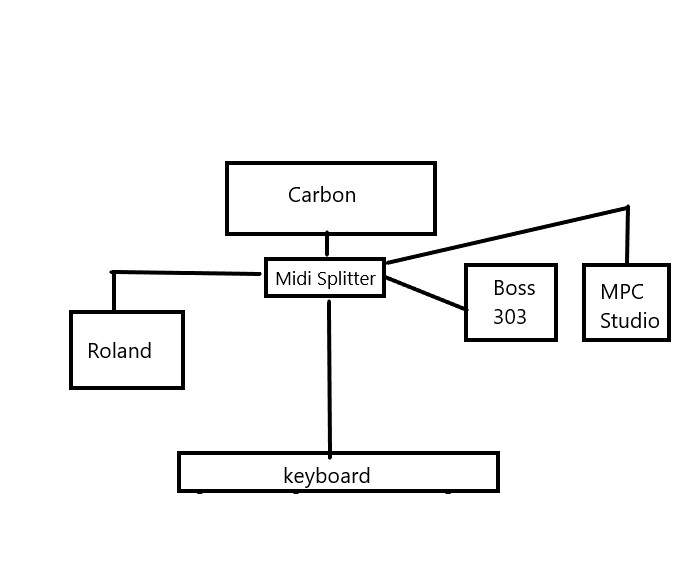
midi.jpg
 
Is your drawing Midi outs from the KB, Roland, ... to the Carbon?
Now you need to draw in your OUTs from the Carbon back to the KB, Roland, ... so they play sound.

Many times the Midi IN/Out includes a Thru function for channels the particular piece of gear doesn't respond to.

You can maybe figure out how to chain the midi out from the Carbon serially through all KB, Roland, ... ending up on the Boss.

Looks like the Carbon also do USB Host and "PC" type IN/OUT

Drums usually respond on Channel 10 so I hope the drum modules allow you to switch this to other midi.
 
  • Like
Reactions: SirMjac28
What exactly are you trying to do?

A : trigger all devices (including the keyboard) from the Carbon sequencer.

B : use the keyboard & the sequencer to trigger other devices.


If it's A, then just connect the MIDI Out of the Carbon sequencer to the In of the DoReMIDI. Then connect the Thru of the DoReMIDI to the In of all other devices.

If it's B, then you'll also need a MIDI Merge box (with 2 inputs, and 1 output), connect the MIDI Out of both the keyboard and the Carbon Sequencer to the In of the Merge box. Then connect the Out of the Merge box to the In of the DoReMIDI, and connect the Thru of the DoReMIDI to the In of all other devices.
 
  • Like
Reactions: SirMjac28
What exactly are you trying to do?

A : trigger all devices (including the keyboard) from the Carbon sequencer.

B : use the keyboard & the sequencer to trigger other devices.


If it's A, then just connect the MIDI Out of the Carbon sequencer to the In of the DoReMIDI. Then connect the Thru of the DoReMIDI to the In of all other devices.

If it's B, then you'll also need a MIDI Merge box (with 2 inputs, and 1 output), connect the MIDI Out of both the keyboard and the Carbon Sequencer to the In of the Merge box. Then connect the Out of the Merge box to the In of the DoReMIDI, and connect the Thru of the DoReMIDI to the In of all other devices.
Thank you for the help I really appreciate it. I just want to be able to record a keyboard part and have that playing on a track of the sequencer then play a drum part on another track and so on to build a song. I've worked with midi for a long time it's just the last year or two I find it hard to wrap my head around stuff anymore.
 
What exactly are you trying to do?

A : trigger all devices (including the keyboard) from the Carbon sequencer.

B : use the keyboard & the sequencer to trigger other devices.


If it's A, then just connect the MIDI Out of the Carbon sequencer to the In of the DoReMIDI. Then connect the Thru of the DoReMIDI to the In of all other devices.

If it's B, then you'll also need a MIDI Merge box (with 2 inputs, and 1 output), connect the MIDI Out of both the keyboard and the Carbon Sequencer to the In of the Merge box. Then connect the Out of the Merge box to the In of the DoReMIDI, and connect the Thru of the DoReMIDI to the In of all other devices.

Do I need to have a way for all of the "outs" of the midi devices to find a way back to the "in" of the Carbon sequencer? is that where the midi merge device comes in?
 
Thank you for the help I really appreciate it. I just want to be able to record a keyboard part and have that playing on a track of the sequencer then play a drum part on another track and so on to build a song. I've worked with midi for a long time it's just the last year or two I find it hard to wrap my head around stuff anymore.


In that case :

Keyboard MIDI Out to Carbon Sequencer In.
Then connect the Carbon Sequencer Out to the DoReMIDI In, and the DoReMIDI Thru to each device.

But : the problem with this setup is that if the Carbon Sequencer doesn't have a provision for MIDI monitoring (that is to say, if it doesn't transmit the incoming data from the keyboard directly to the sequencer output) you won't hear what you're playing on the other devices (i.e. the performance you're recording on the sequencer) until you initiate playback from the sequencer.


If that's the case, then during MIDI recording to the Carbon Sequencer, it would be best to change the order of the devices to Keyboard Out -> DoReMIDI In.

DoReMIDI Thru -> Carbon Sequencer In and whichever MIDI device you're about to record a sequence for.

Carbon Sequencer Out -> to any MIDI device that you have already recorded a sequence for (If any of these devices have a MIDI Thru port, then daisy chain your remaining devices Thru -> In).

If none of your other devices feature a MIDI Thru port, then when you record the sequence for an additional device, you'll have to utilise the second MIDI output on the Carbon Sequencer, so that outputs 1 & 2 are triggering devices that you've already recorded sequences for, and your keyboard is simultaneously being recorded to the sequencer, and linking thru to the device you're currently working on.

For playback, revert back to Carbon Sequencer -> DoReMIDI -> all other devices.

Either that minor headache, or you'd have to use the keyboards built-in sounds to guide you, whilst you recorded the MIDI to the sequencer, and then playback would work as originally intended.

If the Carbon Sequencer can monitor input directly to output, then this isn't a problem.
 
Last edited:
  • Like
Reactions: SirMjac28
Do I need to have a way for all of the "outs" of the midi devices to find a way back to the "in" of the Carbon sequencer? is that where the midi merge device comes in?


No.

You only really need bi-directional communication if you're doing a MIDI data dump between devices. You don't need it for this application (unless you want to use the keyboard to program sequences, and then have the sequencer playback sound on the keyboard itself).

The MIDI Merge box solved the problem that the Thru box only has one input, but you simultaneously need to feed it data from the sequencer, and your live keyboard (which it seems you don't actually need to do, so don't worry about it).
 
  • Like
Reactions: SirMjac28
I need help with my midi setup I used to be able to figure this stuff out but I just can't wrap my head around things anymore and I want to make sure I'm doing it right? So I have the following gear:

Kilpatrick Carbon sequencer ( it has midi in and 2 out)
AKAI MPC Studio ( it has midi in and out)
Roland SPD- SX ( it has midi in and out)
Boss Dr. Sample 303 ( it only has midi in)
Studiologic Numa Compact 2x ( it has midi in and out)
Doremidi (1-in 6-out MIDI Thru Box)

I want the Carbon to be able to control all the other devices for sequencer recording. I was told I should go from the Carbon out to the Doremidi in then connect everything else with the midi through inputs of the Doremidi? Something doesn't sound right don't I need to use the Carbon (midi in) for something? Thanks in advance for any help.

View attachment 4641813

Life used to be so-more-simpler, eh?

Since I have no life I recently bought one of these. Learning how to use it may take a while, or not. YMMV

iConnectivity mioXL 8x12 USB-MIDI, DIN-MIDI, RTP Network-MIDI Interface
 
Life used to be so-more-simpler, eh?

Since I have no life I recently bought one of these. Learning how to use it may take a while, or not. YMMV

iConnectivity mioXL 8x12 USB-MIDI, DIN-MIDI, RTP Network-MIDI Interface

iConnectivity is an excellent interface! I have an older but still fully functional iConnectAudio4+ that works with IOS and PC at the same time. It also works as a standalone mixer when I need it. Top quality sound, midi, and drivers.

For when I midi only, mainly for percussion, I don't have not problem stringing midi devices serially as they all seem to have options to let midi in/out also perform as midi through. Not much need a midi splitter for me.
 
  • Like
Reactions: SirMjac28
What @Wood and Wire said. The way you have designed (could be helpful to add Midi in, Midi out to your drawing) all is controlled from the Carbon through the splitter.

Now, I wonder if you were also intended for the keyboard to activate sounds on some of these devices… the way you have this setup, you keyboard will be a slave of the Carbon and only serve as a sound module. If you want the keyboard to send midi, you may want to connect its midi out somewhere
 
  • Like
Reactions: SirMjac28
Left a message on this video


Judging by that video, he has :

Two keyboards outputting MIDI to a MIDI Merge box, which then goes to the input of the Carbon Sequencer.

Clearly the sequencer does indeed transmit / monitor incoming data directly to the output (so you're good to go with your setup).

The sequencer MIDI output is then connected to a MIDI Thru box, which distributes the data to all the other devices (including the two master keyboards he's using as controllers).

I would suggest you go with plan A that I outlined in my original post, but in addition connect the MIDI Out of the keyboard to the MIDI In of the Carbon Sequencer (that way you can record keyboard performance data to the sequencer, and trigger all your devices, including the keyboard).
 
  • Like
Reactions: SirMjac28
I would suggest you go with plan [B said:
A[/B] that I outlined in my original post, but in addition connect the MIDI Out of the keyboard to the MIDI In of the Carbon Sequencer (that way you can record keyboard performance data to the sequencer, and trigger all your devices, including the keyboard).

So by connecting the midi out to record keyboard performance data would I also be able to record performance
data from the Boss and the Roland drum pads? or would I need a midi merger to connect those other devices so they can find a way back to the carbon's input? I think they have to be on separate channels that way I don't trigger them all at the same time I think? Thank you for your patience.
 
So by connecting the midi out to record keyboard performance data would I also be able to record performance
data from the Boss and the Roland drum pads? or would I need a midi merger to connect those other devices so they can find a way back to the carbon's input? I think they have to be on separate channels that way I don't trigger them all at the same time I think? Thank you for your patience.


You've got the choice of either buying a MIDI Merge box (with as many inputs as devices you need to use as controllers - which could get pricey), or just plugging the MIDI Out of whichever device you want to record data from (keyboard / drum pads) to the MIDI In of the Carbon Sequencer as and when you need to.

Yeah, you'll generally put each device on a unique MIDI channel, but if any of your devices are multitimbral, you'll want to put each voice on a separate MIDI channel.

The Carbon Sequencer has 2 MIDI outputs, so it almost certainly has 2 separate MIDI banks of 16 channels.

Even if you go crazy layering up multitimbral sounds on each device simultaneously, you're not going to use up 32 MIDI channels.
 
  • Like
Reactions: SirMjac28
You've got the choice of either buying a MIDI Merge box (with as many inputs as devices you need to use as controllers - which could get pricey), or just plugging the MIDI Out of whichever device you want to record data from (keyboard / drum pads) to the MIDI In of the Carbon Sequencer as and when you need to.

Yeah, you'll generally put each device on a unique MIDI channel, but if any of your devices are multitimbral, you'll want to put each voice on a separate MIDI channel.

The Carbon Sequencer has 2 MIDI outputs, so it almost certainly has 2 separate MIDI banks of 16 channels.

Even if you go crazy layering up multitimbral sounds on each device simultaneously, you're not going to use up 32 MIDI channels.
You are awesome love the TB community!!! so I got it today I have been getting the hang of it I just have my
midi keyboard hooked up to it and I can't hear any sound unless I hook the midi out of the keyboard into the midi in of the Carbon so I'm going to get the midi merge box so I can just set it and forget it. The only curveball is the Boss 303 it only has midi in? I also want to add a Moog Minitaur to the setup but it also only has midi but it does have midi over USB.

ABUIABACGAAgiuXT9gUo1MnExwIwoAY4oAY.jpg


elmejaho3dbgu1gmhvzv.jpg
 
  • Like
Reactions: Wood and Wire
You are awesome love the TB community!!! so I got it today I have been getting the hang of it I just have my
midi keyboard hooked up to it and I can't hear any sound unless I hook the midi out of the keyboard into the midi in of the Carbon so I'm going to get the midi merge box so I can just set it and forget it. The only curveball is the Boss 303 it only has midi in? I also want to add a Moog Minitaur to the setup but it also only has midi but it does have midi over USB.

View attachment 4644413

View attachment 4644414


The MIDI Merge diagram is correct (unless there's some quirk with unit whereby you have to use input #1).

The diagram for the DoReMIDI would be easier to grasp the signal flow if you reversed the direction of all the arrows except for the one labelled "Carbon" ( as that's the only one where that data is going in to the device. At all other ports it is sending the data out).
 
  • Like
Reactions: SirMjac28
I just have my midi keyboard hooked up to it and I can't hear any sound unless I hook the midi out of the keyboard into the midi in of the Carbon so I'm going to get the midi merge box so I can just set it and forget it. The only curveball is the Boss 303 it only has midi in? I also want to add a Moog Minitaur to the setup but it also only has midi but it does have midi over USB.

If you're only using the keyboard at the moment, you should be able to connect the keyboard MIDI Out to the Carbon Sequencer In, and the Carbon Sequencer Out to the keyboard MIDI In.

That would enable you to record your performance to the sequencer, and play it back - and in both instances you should hear audio (just double check how the MIDI monitoring is set up in the Carbon, and that the keyboard is receiving that data on the correct channel).

From there, you can insert the DoReMIDI at the output of the sequencer, and connect all remaining devices (including the keyboard).

If you look back at that video you posted, that guy was programming his drums on the Arturia Drum Brute, and using the Carbon Sequencer to trigger those patterns (the kick, snare etc sequence was not in Carbon, it was in the Drum Brute).

That's how you would use the Roland 303.
Or alternatively, you would use your master keyboard as a controller, and perform / program the sequence in to Carbon.

Similarly, the Moog (I'm assuming you meant it only has MIDI In).
You're basically using them as sound modules, controlled by the keyboard, and by Carbon Sequencer.

MIDI over USB works great, but if you wanted to take advantage of that you're either incorporating a computer, or purchasing a 5 pin din MIDI to USB converter, or doing both.
 
  • Like
Reactions: SirMjac28

Latest posts