

Enjoy the benefits of a premium membership!
Upgrade Account
-
TalkBass has been independent since 1998. Add your voice.
Create a free account to reply to discussions, view embedded media, and browse with fewer display ads.
Join free Log in
Want zero display ads or expanded classifieds tools? Compare plans.
You are using an out of date browser. It may not display this or other websites correctly.
You should upgrade or use an alternative browser.
You should upgrade or use an alternative browser.
New Amplitube 5 Coming Soon!
- Thread starter Briton
- Start date
More options
Who Replied?

From what I've read and seen on IK's site this appears to be a really nice upgrade, but it appears to be less about more "equipment" options and more about overall appearance, functionality and "more accurate" sounds.
For me, there's too much overlap of models with Amplitube 4, which I'm currently using and am very happy with. I can't see laying out even $99 on sale.. I would pay $49, though.
For me, there's too much overlap of models with Amplitube 4, which I'm currently using and am very happy with. I can't see laying out even $99 on sale.. I would pay $49, though.
For me, the Jimi Hendrix package would be a better choice for $99.
IK Multimedia - AT Jimi Hendrix™Anniversary Collection
IK Multimedia - AT Jimi Hendrix™Anniversary Collection
I already own all of the Bass amps and Cabs available, but I am looking forward to how the re voicing of those amps and cabs are along with the new mic technology the new routing options and the re designed interface. I had 206 jam points in the bank which enabled me to get 45 quid off the discounted price which is good for me. All of this will be available before the 31st of December.

- Oct 7, 2000
- 18,619
- 38,939
- Disclosures
- Endorsing artist: Musicman basses
Yes I used to use Gearbox with my Line 6 black plastic interface which I still have somewhere, but technology has changed a lot since then and I personally have tried the majority of amp sim software but I always come back to Amplitube. And regarding interfaces if you are looking for a new interface check out IK Multimedias Axe I/O which works brilliantly with their own product Amplitube. It is a interface specifically made for guitarists and has some great features that other interfaces do not have.They have a discounted deal if you buy both together which would obviously be a cheaper investment in the long run.Thanks. I need to finally do this. I'm still using Line6 Gearbox that stopped updating about 10 years ago. I'm shocked that it still even works.
- Oct 7, 2000
- 18,619
- 38,939
- Disclosures
- Endorsing artist: Musicman basses
I don't believe that you don't work for themYes I used to use Gearbox with my Line 6 black plastic interface which I still have somewhere, but technology has changed a lot since then and I personally have tried the majority of amp sim software but I always come back to Amplitube. And regarding interfaces if you are looking for a new interface check out IK Multimedias Axe I/O which works brilliantly with their own product Amplitube. It is a interface specifically made for guitarists and has some great features that other interfaces do not have.They have a discounted deal if you buy both together which would obviously be a cheaper investment in the long run.
.Just kidding... Yeah, I am considering upgrading all around. I'm a little concerned about running into some brick walls trying to get Amplitube to function with my Toneport.
I'm assuming the "specifically made for guitarists," thing includes bass players
? I don't really know a whole lot about the program and haven't checked it out today cuz I"m working. I do know that its the software the people I respect most, use. That's what has me sold at the moment. Any additional info is appreciated.
I don't believe that you don't work for them
Just kidding... Yeah, I am considering upgrading all around. I'm a little concerned about running into some brick walls trying to get Amplitube to function with my Toneport.
I'm assuming the "specifically made for guitarists," thing includes bass players
LOL......That is right I don't work for them and have no affiliation whatsoever with them as I think that they are based in Italy and I am in the UK. And yes it is made specifically for both guitarists and Bassists. From what I can remember Toneport is like Amplitube being an amp/cab simulator so I don't think you could use both, but it will work with any interface. Anyway you would immediately ditch Line 6's Toneport once you get Amplitube as there is no comparison between the two. But you can try Amplitube for free for 14 days if you are unsure.
- Oct 7, 2000
- 18,619
- 38,939
- Disclosures
- Endorsing artist: Musicman basses
This post is costing me $700, lol. But its something that I've needed to do for a long time.
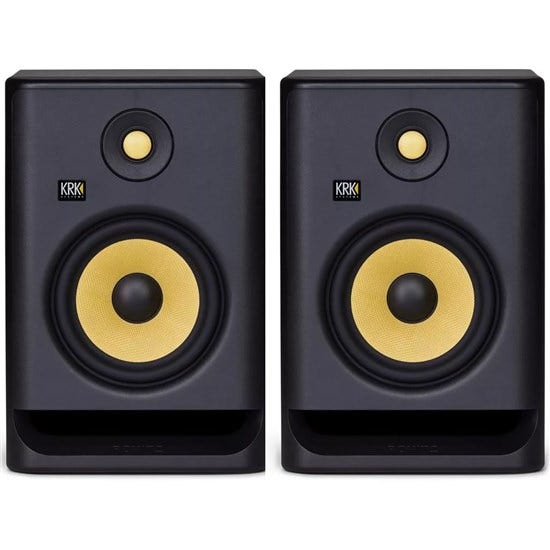
I just ordered the AXE solo Amplitude package for $299... plus now I'm about to order these. I may check for deals and recommendations first though.
@Briton Thanks. I think .
I just ordered the AXE solo Amplitude package for $299... plus now I'm about to order these. I may check for deals and recommendations first though.
@Briton Thanks. I think
.
Good decision Joe, you wont regret it! And as a plus with the package you get Amplitube 5 thrown in too which is a great deal. So many amp/cabs,pedals, mics and racks to try out for free for 14 days which is not a bad thing and the accumulation of Jam points that you can use to buy whatever gear is available through the Custom Shop.I don't know what amp/cabs you get with that package Joe but the Ampeg options is a must try for any bassist, as it offers a b-15,SVT Classic, SVT VR, SVT V4-b,SVT 4 Pro,BA 500 combo and the b-15 Heritage.If you need any help once you get it Buddy just leave a post on this thread and I will help you out, but everything is fairly straight forward. As for the studio monitors you cannot really go wrong with KRK they are quality gear and I have the Rokit 5's which are bang on.......Happy Days!This post is costing me $700, lol. But its something that I've needed to do for a long time.
I just ordered the AXE solo Amplitude package for $299... plus now I'm about to order these. I may check for deals and recommendations first though.
View attachment 4047734
@Briton Thanks. I think
The release date for the new Amplitube 5 is confirmed as the 15th December 2020.

Don't panic, you are still covered!I hope they continue to let cheapskates like me DL a bare version for free.
It's my '2nd amp', sounds fan-bloody-tastic on my Bose kit.
- Oct 7, 2000
- 18,619
- 38,939
- Disclosures
- Endorsing artist: Musicman basses
Me too.I bought the AXE IO and Amp5 Max bundle. Sadly the Amp5 isn't out yet. I have Amp4 Deluxe with SVX 1&2 and like it. Hope the Amp5 is worth it and released soon.
I'm having some issues after hooking up the AXE IO that I haven't yet had time to work out. I'm brand new to Amplitube too, so yeah...
My recordings are cracking and popping and breaking up. Hoping its cuz I was messing with the buffer size before putting it through Cubase. If anybody has any fix suggestions, I'd be happy to hear em for when I get a chance to dive in again.
Open Amplitube then top left click on settings>audio midi set up>buffer size click on drop down menu then select your buffer size. I run mine at 512 with a sample rate of 44.1 khzMe too.
I'm having some issues after hooking up the AXE IO that I haven't yet had time to work out. I'm brand new to Amplitube too, so yeah...
My recordings are cracking and popping and breaking up. Hoping its cuz I was messing with the buffer size before putting it through Cubase. If anybody has any fix suggestions, I'd be happy to hear em for when I get a chance to dive in again.
Make sure the Axe control panel, DAW and amplitube are all set the same sample rate.Me too.
I'm having some issues after hooking up the AXE IO that I haven't yet had time to work out. I'm brand new to Amplitube too, so yeah...
My recordings are cracking and popping and breaking up. Hoping its cuz I was messing with the buffer size before putting it through Cubase. If anybody has any fix suggestions, I'd be happy to hear em for when I get a chance to dive in again.
- Oct 7, 2000
- 18,619
- 38,939
- Disclosures
- Endorsing artist: Musicman basses
Open Amplitube then top left click on settings>audio midi set up>buffer size click on drop down menu then select your buffer size. I run mine at 512 with a sample rate of 44.1 khz
Make sure the Axe control panel, DAW and amplitube are all set the same sample rate.
Thanks guys.
I did all that... but its still happening, and I'm getting nervous that I just dropped a few hundred bucks to make it so I can't record anymore. I got rid of all my obsolete software that I was comfortable using (so it wouldn't interfere) and can't turn back.
Any ideas what else might be the problem before I start calling IK? I set both Cubase and AXE to 44.1 and I've tried several different buffer sizes.
Also, I can only adjust the buffer size on the standalone Amplitube. I'm assuming that goes over to whatever is popping up in the Cubase insert (which is I hope how I'm supposed to be using it?).
Any other thoughts or ideas?
I would try a different DAW and see if you experience the same noise before returning the AXE. Could be a ASIO driver issue. Uninstall and reinstall the AXE driver. Make sure you are using the right driver. I have a focusrite solo and axe, so sometimes when i open up the DAW it defaults to focusrite drivers and i change it right away to the Axe ASIO drivers. Do you have same noise using Amp4 in standalone? You could download Reaper DAW and see if you get noise on another DAW. My axe is working pretty good in standalone, Mixbus and Reaper so far. I have Cubase elements LE and will try it later today. Also make sure you open up Axe control panel to verify your settings.Any other thoughts or ideas?


