• TalkBass has been independent since 1998. Add your voice.
    Create a free account to reply to discussions, view embedded media, and browse with fewer display ads.
    Join freeLog in
    Want zero display ads or expanded classifieds tools? Compare plans.

New: Zoom B3n Multi-Effects

Salud!

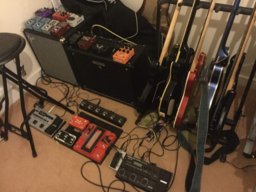
Mine is set, ready to rumble...

20170415_131105.jpg
 
I know this is different from the whine issue I've been fighting and recently won, but I have a similar setup without the whine you're describing. My tuner and B3n are powered separately as described here and when I'm at home my B3n's output goes into my B3, just so I can record from the B3n into my computer. The B3 sends its analog signal to my MicroMark and gets power from a USB hub, 20 feet from my computer. No whine in my amp or in my recordings (example). Both the B3 and the B3n are connected to the same USB hub.

Not sure this helps except to assert that it is possible to live a life free from whine! :)

Thanks for telling. But it seems to me you are using a different setup, since you describe in the referenced contribution that you use a battery to power the B3n and that you use the B3 only for recording. Thus it might be that our systems differ in terms of powering. My board on which I have the B3 with the whine looks like this overview and is wired as shown here Wiring diagram. I use a 1 SPOT® Power Supply to power the entire as described here with several devices. BTW, there is no ground loop, since I use the 1 SPOT® Power Supply on the same power outlet as the overview, including the Mac and the involved USB hubs power supply. The unbalanced (mono) output of the B3 goes to a patch bay (passive, Wiring diagram) and from there to my Invalid Link Removed audio interface. The latter is connected to my Invalid Link Removed via firewire (firewire hub, powered via its own power supply). The very annoying whine starts as soon as I plug the USB cable into the B3 and I found so far no remedy to avoid that whine except disconnecting the B3 from the USB cable.
 
This bypass situation is an important one for me. I bought the B3 as soon as they came out some years back and I was hoping to use it with my Rob Allen fretless, along with my other basses. An occasional touch of reverb or chorus or delay here and there on the fretless. Unfortunately, most of the unique timbre of that fretless bass was lost just plugging it into the B3...a real tone suck. With most of my other basses I am using a more powerful array of effects/patches, therefore it goes mostly unnoticed, although it still there influencing the tone. In my experience many, if not most, pedals suffer from some form of this issue...As much as I like the B3, its bypass ability sucks...literally. I hope this fix was addressed in Zooms list of improvements for the B3n.

Have you made sure all settings are optimal? Unity gain ensured in the B3? No impedance issue? Is the fretless passive? If yes, have you tried using going through a high quality DI first before the B3? Does the loss really still persist?
 
Salud!

What's the signal chain exactly? Is it bass -> tuner -> B3n -> DI -> ? (XLR out to power amp?)

Yes, bass -> tuner (I want/need a fast mute) -> Zoom -> DI. At home and with the regular band, DI's thru to monitor amp and DI's XLR to the patchbay-FOH. When playing Rocky Horror Show (in ear monitoring), DI's XLR to FOH and DI's thru to a PowerPlay (Invalid Link Removed) input, so I can balance it with the general mix.

I started using battery packs because I had severe hum problems with the lightning circuits (and could not always plug into a different circuit), and now I'm sold. Love it.
 
Last edited:
I can't hear any frequencies being lost on my B1on. Are you sure it's not a cable (or some other) problem?

No wire problem and input volume, to my ears the sound of a bass attached to b1on zoom becomes like plastic and is unusable in front of the amp. I also have a line6 m5, absolutely no problem in bypass.


In all fairness, the B1on sells for less than $50 USD and shortcomings such as this do exist and should not be surprising.

Should these same shortcomings not be noticed, consider this an envious state of bliss. ;)
 
  • Like
Reactions: jfh2112
I must have a B1on "Gold Edition" then as I've just tried it through both a Rumble 40 practice amp and a very clean & transparent PA with a sub and tops and both sound great, bypassed or not.

State of bliss for me then :)

Maybe it's the power supply. When I used to run it on batteries I wasn't that impressed (some strange artefacts on some effects), but I'm currently using a USB power supply and it sounds great.

If the B3n is better than this then i'm expecting very great things indeed!:hyper:
 
Couldn't take it any more. Stopped by Guitar Center on the way home and applied for my membership card. Should be here in a few days. And I'm supposed to get forty "GC bucks" around the end of May and a whole two weeks in June to spend them before they turn to pumpkins. Looking forward to enjoying the new Zoom box first rather than second hand, although you all have done a fine job of letting us bask in the glow of your joy!
 
So in considering an uber set up I have just created a patch labelled #2. This would be the 2nd B3n and would handle amp and cabinet sims. To start with I have this chain:
SVT Sim>Bass Pre>Splitter>LM 76>8x10 Cab Sim>Pedal Volume (Controlled by an expression pedal)
The Bass Pre has a large treble and bass boost with a slight mid cut. This is for instant slap happiness.
The Splitter has a large bass boost and moderate highs. This is for instant reggae goodness.
The LM 76 is set to limit mode, (20:1 gain reduction) to counter extremes in volume created by the slap/reggae EQ's or by filter effects.
The screen can be scrolled to a position that allows me instant access to the SVT Solo Boost, the Bass Pre and the Splitter.
B3n #1 would provide filter, modulation and drive effects.
I would add an expression pedal through a Mission Engineering Expessionator which would allow me to control either the Pedal Volume from B3n #2 or another Pedal Effect from B3n #1 with a single pedal.
Add in a tuner for fast/easy tuning or muting, a DI (Stereo?) and my battery pack with suitable isolation and I think I would have a killer system with a relatively small footprint.
Your esteemed thoughts?
 
The ZNR was one of my favorite parts of the B3, and it's been significantly upgraded in the B3n. Problem is, I'm having a hard time understanding the description. It's a subtle effect so any help would be appreciated in understanding what each parameter does.

Screen Shot 2017-04-15 at 10.06.12 AM.png


I get more of a clamp effect when depth and threshold are up, but I'm not hearing much of a difference with decay, especially when depth and threshold up high. Is 0 allow for more decay or less?

What is meant by "depth of noise reduction"?
 
Last edited:
Salud!

By the way, in case it helps anyone, I use a Rockboard LT XL powerbank and with my previous setup, EBS Microbass II + Boss TU3, I could go on for loooong hours with one charge (I charged it once a week, just in case). With the B3n + Boss TU3 (both continuously on, although in real use the TU3 will be off 99% of the time, of course), a charge has lasted some 7 hours. More than enough for a show, but way less than before.
 
  • Like
Reactions: CharlieC
The ZNR was one of my favorite parts of the B3, and it's been significantly upgraded in the B3n. Problem is, I'm having a hard time understanding the description. It's a subtle effect so any help would be appreciated in understanding what each parameter does.

View attachment 1107271

I get more of a clamp effect when depth and threshold are up, but I'm not hearing much of a difference with decay, especially when depth and threshold up high. Is 0 allow for more decay or less?

What is meant by "depth of noise reduction"?

Here's how I see this:
DETCT = Instrument or "line" level. (Anyone's guess what they're calling line level) = Overall sensitivity
Depth = Amount of supression = "x"dB below threshold point
THRSH = Threshold = point at which the circuit kicks in. Set it so it doesn't clip the tail of decaying notes.
Decay = Length of time it takes the circuit to disengage after the threshold is initially hit
Edit: Please see charlie C's post below. The DTCT function controls the placement of the effect . Either after the input (GTRIN) or post effects (EFXIN. This allows you to use effects like deay or reverb without chopping off their tails.
 
Last edited:
  • Like
Reactions: Eli_Kyiv