• TalkBass has been independent since 1998. Add your voice.
    Create a free account to reply to discussions, view embedded media, and browse with fewer display ads.
    Join freeLog in
    Want zero display ads or expanded classifieds tools? Compare plans.

New: Zoom B3n Multi-Effects

Here's how I see this:
DETCT = Instrument or "line" level. (Anyone's guess what they're calling line level) = Overall sensitivity
Depth = Amount of supression = "x"dB below threshold point
THRSH = Threshold = point at which the circuit kicks in. Set it so it doesn't clip the tail of decaying notes.
Decay = Length of time it takes the circuit to disengage after the threshold is initially hit

Both Zoom's description of DETCT and your guess of what it does are both inaccurate. ;)

DETCT is the place where the ZNR effect listens to determine if it should be applied or released.

Most people (myself included) place the ZNR as first effect in the chain. With this said, the virtual input jack of the effect (EFXIN) and the physical instrument input jack on the B3n (GTRIN) are exactly the same place. If one toggles DETCT to either setting there is no operational difference.

Now let us suppose that placement of the ZNR is at the end of a chain after a long Hall Reverb. If one wants to hear the tail of the reverb before ZNR kicks in, DETCT must be set to EFXIN because the ZNR must listen to the reverb effect. If DETCT is set to GTRIN and one mutes their ringing strings, the ZNR will kick in and prematurely cut-off the reverb tail because the ZNR is listening to the instrument jack (GTRIN) and not the reverb effect.

Different strokes, but that is how DETCT works.

Cheers!
 
A few guitarists who use the G5n with high gain amp settings have said they've had good luck placing the ZNR after the amp modeling and before the cab sim, with GUIT IN as the Detector. Point being that for anything with a lot of distortion, placing it after those sources with that setting can give a nice result.

Yeah, I tried it before the amp sims and there wasn't actually much difference, but after was noticeable AND still controllable.

EDIT: I also have a subtle noise gate always on in the Zoom MS 60B
 
Last edited:
The ZNR was one of my favorite parts of the B3, and it's been significantly upgraded in the B3n. Problem is, I'm having a hard time understanding the description. It's a subtle effect so any help would be appreciated in understanding what each parameter does.

View attachment 1107271

I get more of a clamp effect when depth and threshold are up, but I'm not hearing much of a difference with decay, especially when depth and threshold up high. Is 0 allow for more decay or less?

What is meant by "depth of noise reduction"?
Wondering what you think has been upgraded in it?


I felt that the ZNR in the previous generation for guitar and bass was superior to any noise gate/suppression pedal (I actually sold a noise gate that costs more than any of the previous generation zoom products, that I was using for guitar with lots of noisy high gain pedals, after hearing the ZNR on the MS60B and trying it with the guitar rig, immediately ordering the G3!) I've ever heard, and can't imagine anything being better so I can't imagine how it would have been improved in this generation. Granted the previous generation solved all my noise issues and so does the B3n ZNR so I notice no differenc, what difference to you perceive / know of?


I don't doubt that it's improved if you say so, the b3n is amazing! I'm just curious as to how it actually possibly could be improved!
 
  • Like
Reactions: BrentSimons
Wondering what you think has been upgraded in it?


I felt that the ZNR in the previous generation for guitar and bass was superior to any noise gate/suppression pedal (I actually sold a noise gate that costs more than any of the previous generation zoom products, that I was using for guitar with lots of noisy high gain pedals, after hearing the ZNR on the MS60B and trying it with the guitar rig, immediately ordering the G3!) I've ever heard, and can't imagine anything being better so I can't imagine how it would have been improved in this generation. Granted the previous generation solved all my noise issues and so does the B3n ZNR so I notice no differenc, what difference to you perceive / know of?


I don't doubt that it's improved if you say so, the b3n is amazing! I'm just curious as to how it actually possibly could be improved!

Yeah, the B3n has definitely eliminated my need to buy a dedicated noise gate/suppressor, which if you've waded through forum pages about the best noise gate you know how little consensus there is about operation.

To start, the B3 only had Threshold, Detect, and Output levels. So, essentially only one control (threshold) over the noise gate quality. By contrast, the B3n has three (Depth, which controls the -dB amount according to a TBer above; Threshold; and then Decay). Those are significant upgrades right there.

On top of that, I play pretty high gain stuff and it just feels...better? More three dimensional somehow? Compared to the B3 there were times when I felt like I was fighting against it in a way, or at least I definitely noticed when it was working. So far I haven't noticed the B3n's ZNR until I turn it off.
 
I have not yet come to learn its value. Can you help me understand why the splitter exists?
Try turing up the lows all the way and leave the highs at the midpoint or lower then spin the Frequency control while playing. It emphasizes the entire spectrum of frequencies above or below the crossover point. A shelving tone control will roll off the spectrum below or above it's knee point on a ramp therefore skew the relationship across this range. A peaking control will affect the frequencies around it's center point on a bell curve (or sharper depending on it's Q). Both of these upset the balance of the frequencies affected while the splitter does not. It simply makes everything above or below softer or louder so it can be used to change the overall tone while retaining your inherent sound. Once you hear how it works you can choose different crossover points and mixes of highs and lows while controlling the overall volume. Useful to me for reggae, dub, slap, lo-fi, hi-fi sounds and more I'm sure. Try using it to go from full range to lo-fi such as emulating an older 15 or 18 inch cab without tweeters while your base sound is modern Can be done on the fly in any preset. These are the type of uses that I am thinking of . Hope this helps!
 
Last edited:
I found this bag at the local dollar store. It is a 10 inch tablet sleeve and the B3n fits in it. Doesn't offer much protection but it the price is right and it's better than nothing if throwing it in a case or gear bag. N bag.jpg
 

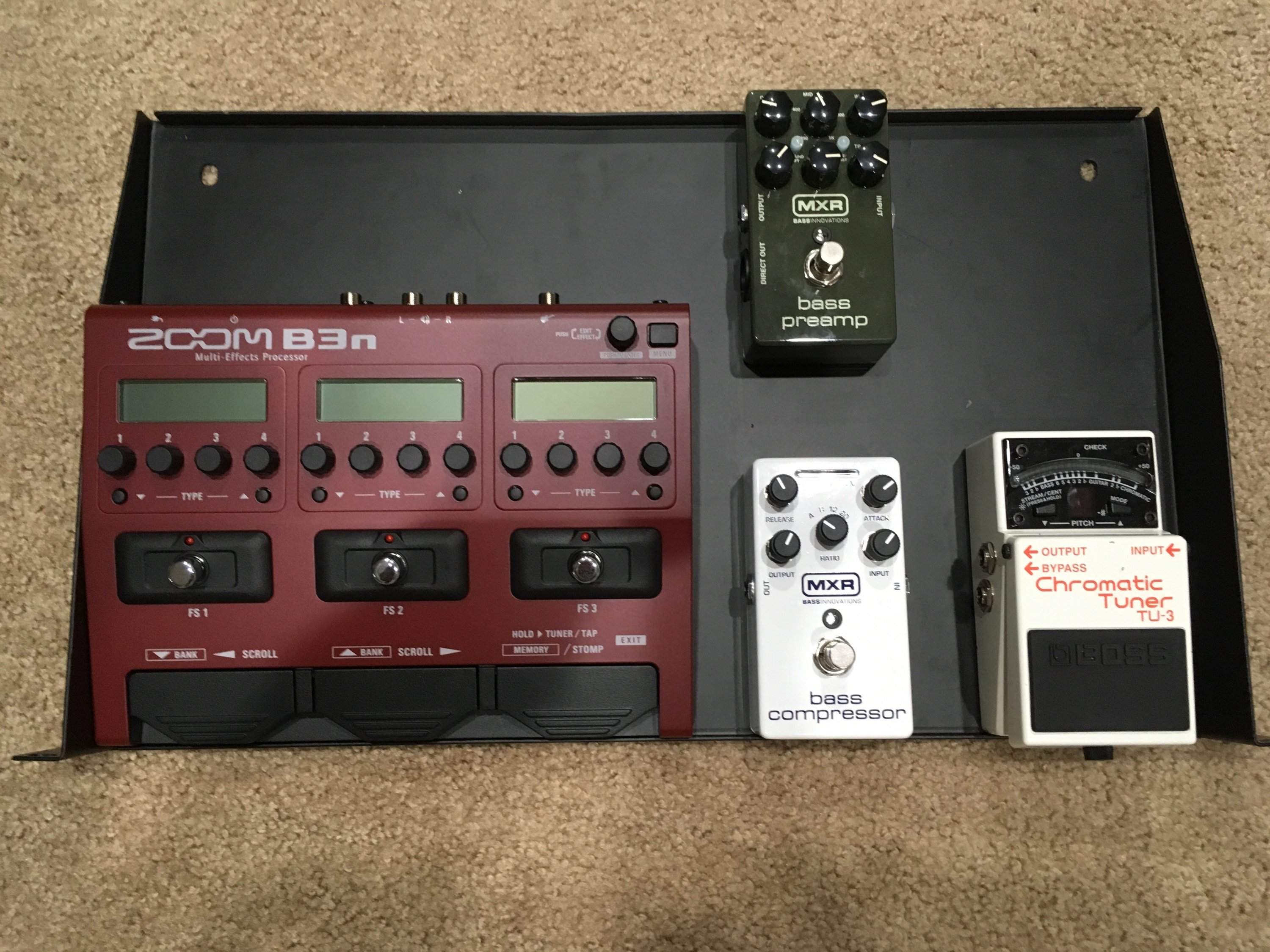
Fits nicely on rack shelf. Need to add power strip, DI box (Radial) and wireless then mount all to a pedal board that I can easily stow in the rack. Not sure that I need the Preamp/DI or the compressor but I figure it might be a good idea to keep them as a back up just in case.
 
A few guitarists who use the G5n with high gain amp settings have said they've had good luck placing the ZNR after the amp modeling and before the cab sim, with GUIT IN as the Detector. Point being that for anything with a lot of distortion, placing it after those sources with that setting can give a nice result.

Yeah, I tried it before the amp sims and there wasn't actually much difference, but after was noticeable AND still controllable.

I've always used the ZNR in front of everything (BEFORE anything that amplifies noise, to cut unwanted noise out before it hits them)(, with the GTR input set, but I've noticed that a lot of presets for the latest generation ones have it placed in other positions with great results. I need to experiment more with it, like people have said here, it seems to have been upgraded :)
 
I've always used the ZNR in front of everything (BEFORE anything that amplifies noise, to cut unwanted noise out before it hits them)(, with the GTR input set, but I've noticed that a lot of presets for the latest generation ones have it placed in other positions with great results. I need to experiment more with it, like people have said here, it seems to have been upgraded :)

I really should have included that I also have a slight noise gate before distortion also, original post edited
 

Fits nicely on rack shelf. Need to add power strip, DI box (Radial) and wireless then mount all to a pedal board that I can easily stow in the rack. Not sure that I need the Preamp/DI or the compressor but I figure it might be a good idea to keep them as a back up just in case.

I'd love to hear how the B3n compressors compare to the MXR. My MXR stopped working when I unplugged it to plug in the Zoom. I was hoping to compare myself because I was thinking of keeping it around.
 
  • Like
Reactions: Das Jugghead
I'd love to hear how the B3n compressors compare to the MXR. My MXR stopped working when I unplugged it to plug in the Zoom. I was hoping to compare myself because I was thinking of keeping it around.

I think the only thing you'd miss from the MXR Bass Comp is the METER that shows gain reduction. I think that most any of the B3n comps *can* be set to sound appropriate/good, but it is tricky since there are not meters to guide you in setting threshold or gain reduction. Thus it is pretty much adjustment "by ear". This can be a problem because generally if you can hear the compressor working, you may be using too much of it, and many times a proper comp setting will result in very little audible difference which can trick you into thinking it's not doing anything.
 
I'd love to hear how the B3n compressors compare to the MXR. My MXR stopped working when I unplugged it to plug in the Zoom. I was hoping to compare myself because I was thinking of keeping it around.

I will see what I can do to compare them but it may be a bit as I am currently slammed on the work schedule. At this stage I am lucky to run a few scales and try out a few patches.
 
  • Like
Reactions: Danielz
I think the only thing you'd miss from the MXR Bass Comp is the METER that shows gain reduction. I think that most any of the B3n comps *can* be set to sound appropriate/good, but it is tricky since there are not meters to guide you in setting threshold or gain reduction. Thus it is pretty much adjustment "by ear". This can be a problem because generally if you can hear the compressor working, you may be using too much of it, and many times a proper comp setting will result in very little audible difference which can trick you into thinking it's not doing anything.
Agreed. I'm thinking it may be useful to tune patches while monitoring through a DAW; it's what I use my B3 for nowadays. I had to do this to get the limiter right in the last patch I posted in the library thread. Watching frequencies and levels on a computer is a poor substitute for real time gain redirection feedback but it may help.
 
Agreed. I'm thinking it may be useful to tune patches while monitoring through a DAW; it's what I use my B3 for nowadays. I had to do this to get the limiter right in the last patch I posted in the library thread. Watching frequencies and levels on a computer is a poor substitute for real time gain redirection feedback but it may help.

I've also considered running a dry signal into my digi mixer along with a parallel wet feed with only the comp engaged from the B3n in order to zoom in on the level meter and RTA analysis discrepancies in order to get a better read on the gain reduction and tonal impact. Even though I've been listening to Comps for years, this is one area where I'd like my eyes to confirm what my ears are telling me.
 
Last edited:
I've also considered running a dry signal into my digi mixer along with a parallel wet feed with only the comp engaged from the B3n in order to zoom in on the level meter and RTA analysis discrepancies in order to get a better read on the gain reduction and tonal impact. Even though I've been listening to Comps for years, this is one area where I'd like my eyes to confirm what my ears are telling me.
The ears don't lie.
 
B3n Level PSA

While on the subject of lack of metering in the B3n and using one's ears, I would like to share the following tips of mine regarding signal levels.

To avoid internal unwanted B3n clipping, strive to keep unity gain within a patch at individual effect level. In other words, where possible, set the VOL parameter of each effect to yield the same signal level when the effect is switched On and Off. This principle will not only correct overly hot levels, but will also correct cases where effect level is too low (e.g. the B3n's cabinet sims.)

From there, the resulting signal chain level is then under management by the Patch level parameter, and further to that, the Master B3n output level.

For your first patch, set Patch level volume to 100, and then as necessary for each subsequent patch, nudge those respective Patch levels up/down until volume is consistent between patches.

For Master output level, set and forget at 100 (unity) and then globally nudge only if necessary.

Cheers!