• TalkBass has been independent since 1998. Add your voice.
    Create a free account to reply to discussions, view embedded media, and browse with fewer display ads.
    Join freeLog in
    Want zero display ads or expanded classifieds tools? Compare plans.

Source Audio Sorcerers Society (S.A.S.S) Part 3

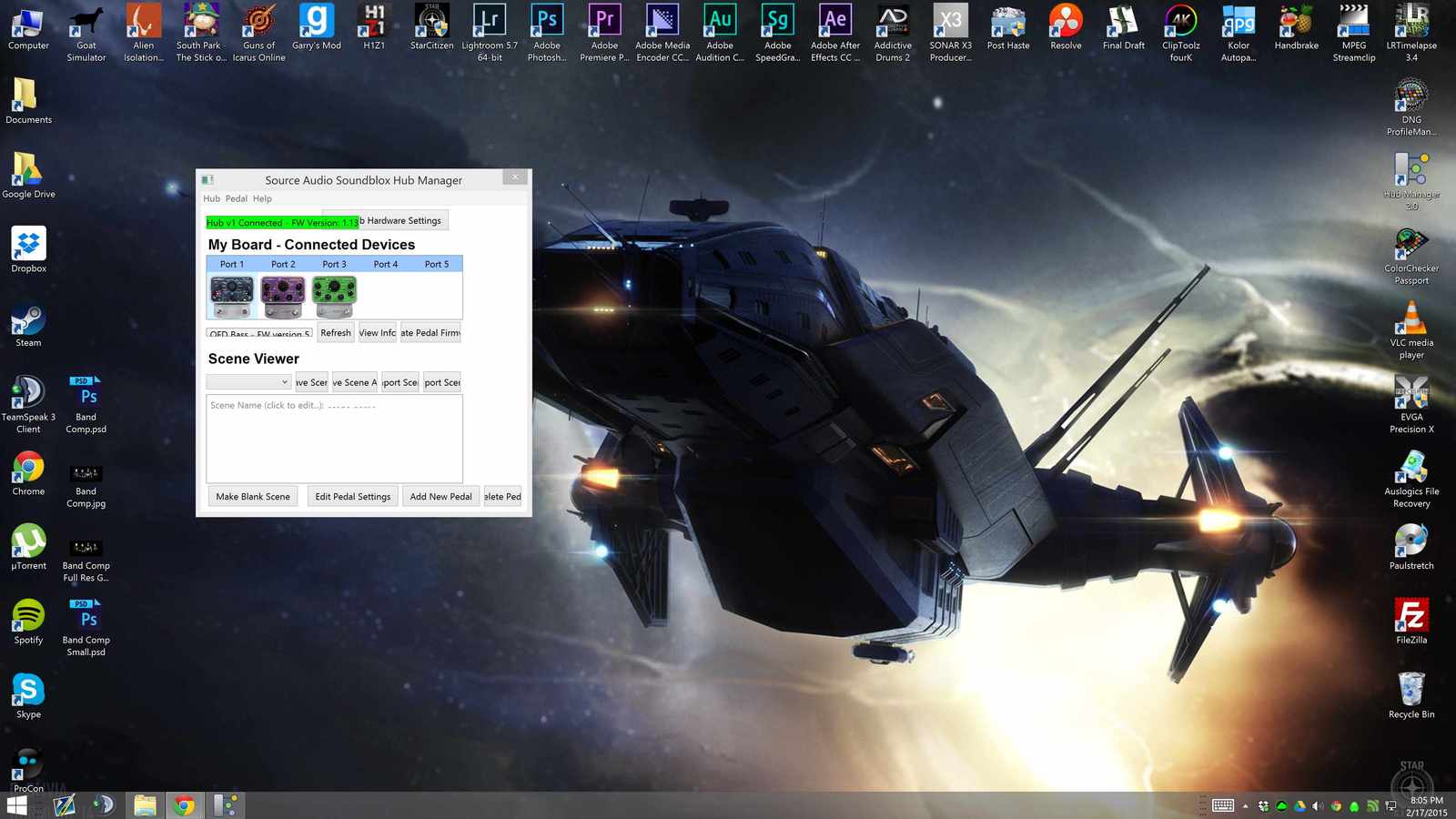
Not terribly important as I don't use the Hub Manager other than to back up or update firmware, but for us 4K display users the DPI scaling could use some lovin' :) Some menus pull up fine but anything lengthy gets hard to figure out.
dca892b894b9c48989a2b41404d7900c.jpg


Also would loove to see a changelog on the firmware for pedals!
 
  • Like
Reactions: nshuman
Please let me know if updating the Hub Firmware helps. If not I will pass this along to one of our engineers to figure this out. [email protected]

Tried this. I think my Manta has been bricked through this process.

I updated the firmware on the Hub successfully. Then I tried to update the Manta firmware to Version 8. It failed, it said try again. So I did. Then it failed again and the Manta lights started flashing erratically, and the Manta disappeared from being recognized by the Hub. The lights have continued to do this even after power cycling. The actual audio signal cuts in and out.

Help?
 
I may as well be added here. :)

BEF Pro, Bass Multiwave Distortion, Programmable EQ

Also, have to say that the company is great. I bought my distortion used and it was having a small issue with input signal. They let me ship it to them and fixed it for free!

How hard is it to get a battery cover for the EQ? Mine is... um.. gone somewhere. Don't know where.
 
Yes, me too. I hope this gets sorted soon.

Yours is utterly bricked like mine or functional but not working properly?

(I guess maybe mine's not "technically" bricked since it's powering up and lights are coming on. But it is nonresponsive and worthless right now.)
 
Much less important than getting my Manta functional, but still important, is that the Hub Manager and Hub firmware updates did not fix my other issues---the Hub Manager still shows only blank scenes even though I've clearly got scenes stored in my Hub.
 
Yours is utterly bricked like mine or functional but not working properly?

(I guess maybe mine's not "technically" bricked since it's powering up and lights are coming on. But it is nonresponsive and worthless right now.)
Nothing as bad as that for me luckily; I couldn't even start the Hub Manager so I never got to updating the firmware in the pedals. I hope you don't have to send the pedal in.
 
You should use the firmware recovery. In the Hub Mananger under Pedal->Firmware Recovery
And follow the instructions.
Even when they are “bricked” they are never truly bricked.

Is this for the Hub or the pedals?

And will it work even if the Hub Manager is not recognizing the pedal? (I'm not at home to try it right now.)
 
Sorry to be a pain, but one follow-up question---is there a specific version of the firmware I should use during the recovery? And/or if I'm successful, do I dare attempt to update to Version 8?
 
  • Like
Reactions: jaysbass2002
Well I'll definitely have to try out this tonight.

Separate issue: The fact that the Hub Manager does not recognize the scenes stored in my Hub even with the updated firmware---any thoughts on that?
 
  • Like
Reactions: jaysbass2002
Well I'll definitely have to try out this tonight.

Separate issue: The fact that the Hub Manager does not recognize the scenes stored in my Hub even with the updated firmware---any thoughts on that?


This happened to me a lot a few weeks ago. It was not seeing any of the scenes anymore. Just restarted the hub manager (no power cycling or any actions beyond that). It happened like 2-3 times in a row and never after that.

No special changes on any of my computer setup or anything.
 
Okay. I will try it again. However, it's failed to read my scenes multiple times in a row now---I don't remember exactly, but a bare minimum of 2-3 times total, and at least once with the old and once with the new Hub Manager versions.
 
  • Like
Reactions: jaysbass2002
@ncabral

Good news:
---Manta is functional again, and allegedly on Version 8
---Power cycling the Hub while connected to my laptop did allow the Hub Manager to recognize scenes (does the Hub need to be powered off when you connect the USB cords, before you power it on?)

Bad news:
---The Hub Manager repeatedly told me the update was failing. It wasn't until I just went ahead and checked that I saw it was up and running. So something is weird there.
---The Manta still does not respond to control from the Hub Manager (it won't even engage/disengage). I did not test 3rd party MIDI control.
---I no longer have a copy of Version 6 to revert to, which was functional for me with regard to the previous point.

So what does this seem like---a problem with my particular Manta or a firmware issue?

By the way, if you want to keep this conversation off-line, we can do that. However, since it concerns the newest firmware I thought other people might be interested.
 
@ncabral

Good news:
---Manta is functional again, and allegedly on Version 8
---Power cycling the Hub while connected to my laptop did allow the Hub Manager to recognize scenes (does the Hub need to be powered off when you connect the USB cords, before you power it on?)

Bad news:
---The Hub Manager repeatedly told me the update was failing. It wasn't until I just went ahead and checked that I saw it was up and running. So something is weird there.
---The Manta still does not respond to control from the Hub Manager (it won't even engage/disengage). I did not test 3rd party MIDI control.
---I no longer have a copy of Version 6 to revert to, which was functional for me with regard to the previous point.

So what does this seem like---a problem with my particular Manta or a firmware issue?

By the way, if you want to keep this conversation off-line, we can do that. However, since it concerns the newest firmware I thought other people might be interested.


Manta version 6 if you want to try it:

Dropbox - SA223_6_firmware.hex.zip
 
@ncabral

Good news:
---Manta is functional again, and allegedly on Version 8
---Power cycling the Hub while connected to my laptop did allow the Hub Manager to recognize scenes (does the Hub need to be powered off when you connect the USB cords, before you power it on?)

Bad news:
---The Hub Manager repeatedly told me the update was failing. It wasn't until I just went ahead and checked that I saw it was up and running. So something is weird there.
---The Manta still does not respond to control from the Hub Manager (it won't even engage/disengage). I did not test 3rd party MIDI control.
---I no longer have a copy of Version 6 to revert to, which was functional for me with regard to the previous point.

So what does this seem like---a problem with my particular Manta or a firmware issue?

By the way, if you want to keep this conversation off-line, we can do that. However, since it concerns the newest firmware I thought other people might be interested.


I'm not positive on the failing problem, it could be a cable issue. We can send you an extra if you need it. Also try a different port Hub. It sounds like it’s probably working but then the error check at the end of the update is giving the wrong result.

An important note about the recent updates. Per request from many users, you can now set MIDI channels in multiple places.

Each bit of scene data must have the same MIDI Channel (set in the Additional Control area of the pedal editor) and this much match the pedal’s MIDI channel. You can view the MIDI channel of the pedal by clicking “View Info” when the pedal is highlighted in the “Connected Devices” area.

let me know, here or email is ok - this is important information for us to improve on our products.
 
  • Like
Reactions: Nic.