Well. Now I don't know if I should invest in a soleman now or wait and see if a mysterious new platform would be the better choice.

Enjoy the benefits of a premium membership!
Upgrade Account
-
TalkBass has been independent since 1998. Add your voice.
Create a free account to reply to discussions, view embedded media, and browse with fewer display ads.
Join free Log in
Want zero display ads or expanded classifieds tools? Compare plans.
You are using an out of date browser. It may not display this or other websites correctly.
You should upgrade or use an alternative browser.
You should upgrade or use an alternative browser.
Source Audio Sorcerers Society (S.A.S.S) Part 3
- Thread starter gregmon79
- Start date
More options
Who Replied?

Adamixoye
A PT Pro is cool for worship, right?
- Apr 9, 2012
- 18,158
- 69,338
- Disclosures
- Occasional Beta Tester for Confusion Studios, Singular Sound, and Source Audio
I've been slowly converting my setup to WIDI bluetooth devices for my MIDI needs. I don't use the Hub much, but I also have a Hot Hand 3 (HH3). So my ideal was:
- WIDI device connected to the Hub
- MIDI in --> Hub for scene and other control, connected to my Aftershock by TRRS
- Hub --> MIDI out to output the expression and/or HH3 signals by MIDI
- WIDI device connected to something that will take care of all the routing
- If MIDI in/out works over USB, I could do it with a WIDI UHost connected to the USB port. If not, then I could use a WIDI Jack over the regular 5-pin ports.
fyi a new Hub is very unlikely as the new, mysterious upcoming hardware platform will erase the need for a Hub (though, will likely still support the existing one, which will in turn still support the One Series!)
Any chance I could still get answers to the above?
Sorry, I don't know enough about WIDI to answer this at this time. It's not something we officially support, but some users have had success with it.Any chance I could still get answers to the above?

Gibs210
Commercial User
- Aug 31, 2019
- 850
- 875
- Disclosures
- Part time Tech Support for Source Audio effects
Midi expression through requires setting the hub to midi out and not through, then you can set midi CCs in the neuro app in the global settings. 1 for expression, 1 for y axis and one for x axis on the hot hand jack. So if your willing to loose midi control, or use a merge box to go around the hub, that’s how midi expression works from the hub. A midi controller is probably a better solution though. This was dreamed up for the hub long before one series and soleman. I would think usb midi would be no directional, but not sure how easy it is to implement. My knowledge with midi is mostly in the hardware/pedalboard realm. Usb midi I know opens up a can of worms in a lot of situations.
Gibs210
Commercial User
- Aug 31, 2019
- 850
- 875
- Disclosures
- Part time Tech Support for Source Audio effects
We’ve used the WIDI jack, but none of us have gotten our hands on the uhost yet to know if it will work or not with our devices, I’m curious if it would work with the mobile app and one series to be honest.Sorry, I don't know enough about WIDI to answer this at this time. It's not something we officially support, but some users have had success with it.
Adamixoye
A PT Pro is cool for worship, right?
- Apr 9, 2012
- 18,158
- 69,338
- Disclosures
- Occasional Beta Tester for Confusion Studios, Singular Sound, and Source Audio
Yes, I would have it set to Out and not Thru, that would not be a problem for my wiring. The Hub would get what it needs, pass it to the Aftershock, then output its own MIDI to to the out which gets wired back to where I need it.Midi expression through requires setting the hub to midi out and not through, then you can set midi CCs in the neuro app in the global settings. 1 for expression, 1 for y axis and one for x axis on the hot hand jack. So if your willing to loose midi control, or use a merge box to go around the hub, that’s how midi expression works from the hub. A midi controller is probably a better solution though. This was dreamed up for the hub long before one series and soleman. I would think usb midi would be no directional, but not sure how easy it is to implement. My knowledge with midi is mostly in the hardware/pedalboard realm. Usb midi I know opens up a can of worms in a lot of situations.
Now the question is whether I can get it to work with the UHost or not.
I’ve used Uhost on the hub and on the C4 and it works perfectlyWe’ve used the WIDI jack, but none of us have gotten our hands on the uhost yet to know if it will work or not with our devices, I’m curious if it would work with the mobile app and one series to be honest.
Adamixoye
A PT Pro is cool for worship, right?
- Apr 9, 2012
- 18,158
- 69,338
- Disclosures
- Occasional Beta Tester for Confusion Studios, Singular Sound, and Source Audio
Do you get 2-way MIDI over USB using the UHost?I’ve used Uhost on the hub and on the C4 and it works perfectly
I only tried it once because I ended up using the Widi the the hubDo you get 2-way MIDI over USB using the UHost?
gonna test again and let you know
By the way , if anyone can help
what the Midi message to get a specific preset on the C4
I’ve tried sending out PC with number but nothings happening
Once I figure that out , I think I’m gonna use the Uhost and take the hub off my board

If you are directly connected to the C4 you should be able to use PCs. If you are going through the Hub you will need to use CC104 (default MIDI map is in the manual).I only tried it once because I ended up using the Widi the the hub
gonna test again and let you know
By the way , if anyone can help
what the Midi message to get a specific preset on the C4
I’ve tried sending out PC with number but nothings happening
Once I figure that out , I think I’m gonna use the Uhost and take the hub off my board
ThanksIf you are directly connected to the C4 you should be able to use PCs. If you are going through the Hub you will need to use CC104 (default MIDI map is in the manual).
While we’re at itIf you are directly connected to the C4 you should be able to use PCs. If you are going through the Hub you will need to use CC104 (default MIDI map is in the manual).
How would you recall a preset on the AFTERSHOCK ?
Gibs210
Commercial User
- Aug 31, 2019
- 850
- 875
- Disclosures
- Part time Tech Support for Source Audio effects
Currently you can’t, it’s an older design before midi usb became a possible control point for a lot of pedals with hardware controllers. The new dongle is the only way to access presets on the older pedals.While we’re at it
How would you recall a preset on the AFTERSHOCK ?
Currently you can’t, it’s an older design before midi usb became a possible control point for a lot of pedals with hardware controllers. The new dongle is the only way to access presets on the older pedals.
That’s funny Cause I tested it with the WIDI Uhost and all the midi control works , the only thing I couldn’t figure out is the preset recall
Gibs210
Commercial User
- Aug 31, 2019
- 850
- 875
- Disclosures
- Part time Tech Support for Source Audio effects
Midi cc works, but PC was never integrated as we figured the neuro hub would be the primary means of midi control, so no need to access the presets by midi, since PC messages were never meant for the hub to pass on.That’s funny Cause I tested it with the WIDI Uhost and all the midi control works , the only thing I couldn’t figure out is the preset recall

fyi a new Hub is very unlikely as the new, mysterious upcoming hardware platform will erase the need for a Hub (though, will likely still support the existing one, which will in turn still support the One Series!)
Wait... what?
I just got this spaghetti bowl all plugged in!
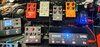
And the Atlas should be here tomorrow...

Welp... now my Aftershock is doing something funky. Like all kinds of funky. Already tried a factory reset and it's still happening so I thought I'd see if anyone else had this issue. Maybe I'm missing a setting or something.. 
All of a sudden I am unable to keep Preset Mode enabled. When I'm working on the desktop app I'll save a preset, move to a different preset, try to go back to the other preset and it will *sometimes* be what I just saved; OR it will reflect what the knobs are doing. I never know which it will be.
If I save a preset to the pedal using the app - even with preset mode enabled - when i disconnect the pedal, the pedal goes out of preset mode and I get what the knobs are doing. None of my presets sound like what was saved. Nothing will keep the preset mode enabled. The app also will put the asterisk next to the preset when I select one, like I've made changes to the preset even though I did nothing to it.
I was super stoked on the Low OD preset I found and was bummed I had to substitute something on the UW for my audition the other night. It sounded fine, but I really want that Low OD on the Aftershock to work..
User error or...?
All of a sudden I am unable to keep Preset Mode enabled. When I'm working on the desktop app I'll save a preset, move to a different preset, try to go back to the other preset and it will *sometimes* be what I just saved; OR it will reflect what the knobs are doing. I never know which it will be.
If I save a preset to the pedal using the app - even with preset mode enabled - when i disconnect the pedal, the pedal goes out of preset mode and I get what the knobs are doing. None of my presets sound like what was saved. Nothing will keep the preset mode enabled. The app also will put the asterisk next to the preset when I select one, like I've made changes to the preset even though I did nothing to it.
I was super stoked on the Low OD preset I found and was bummed I had to substitute something on the UW for my audition the other night. It sounded fine, but I really want that Low OD on the Aftershock to work..
User error or...?
Midi cc works, but PC was never integrated as we figured the neuro hub would be the primary means of midi control, so no need to access the presets by midi, since PC messages were never meant for the hub to pass on.
So no hope of retiring the hub ?

- May 16, 2007
- 3,395
- 4,869
- Disclosures
- Volunteer developer/beta tester with Source Audio, Morningstar Engineering & MORTRIX
Did you underpower it at any point? Power starving does crazy stuff to digital pedals. Try a factory reset.Welp... now my Aftershock is doing something funky. Like all kinds of funky. Already tried a factory reset and it's still happening so I thought I'd see if anyone else had this issue. Maybe I'm missing a setting or something..
All of a sudden I am unable to keep Preset Mode enabled. When I'm working on the desktop app I'll save a preset, move to a different preset, try to go back to the other preset and it will *sometimes* be what I just saved; OR it will reflect what the knobs are doing. I never know which it will be.
If I save a preset to the pedal using the app - even with preset mode enabled - when i disconnect the pedal, the pedal goes out of preset mode and I get what the knobs are doing. None of my presets sound like what was saved. Nothing will keep the preset mode enabled. The app also will put the asterisk next to the preset when I select one, like I've made changes to the preset even though I did nothing to it.
I was super stoked on the Low OD preset I found and was bummed I had to substitute something on the UW for my audition the other night. It sounded fine, but I really want that Low OD on the Aftershock to work..
User error or...?
Did you underpower it at any point? Power starving does crazy stuff to digital pedals. Try a factory reset.
Yup third sentence.. "Already tried a factory reset and it's still happening...."
 - thank you for the suggestion though!
I contacted tech support a couple of days ago, my first thought was doing the reset and he agreed. No luck with that though..

That's why I posted the issue here, in case it happened to someone else and they maybe had a different suggestion/solution.
I'll try the reset again anyway.. can't hurt


