@odarellmc
As I previously mentioned the Soleman can do what you want but it takes a little extra programming to achieve. Fortunately I have all of the pedals you have so I was able to make some time to figure out a quick and dirty method to accomplish what you want.
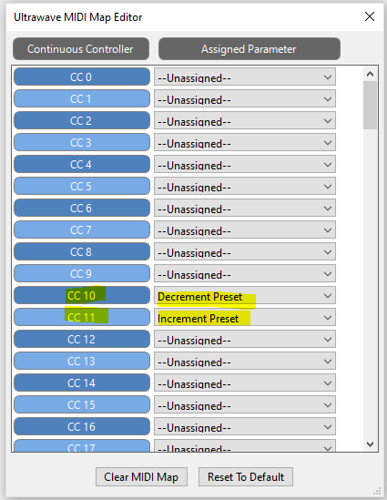
Set the midi channel on the device you want to control through the neuro editor. In the neuro editor midi map for each pedal, set a midi CC for increment and decrement presets.
In this example I set the midi channel and CC as follows:
Ultrawave = channel 4
C4 = Channel 3
increment preset = cc11
decrement preset = cc10
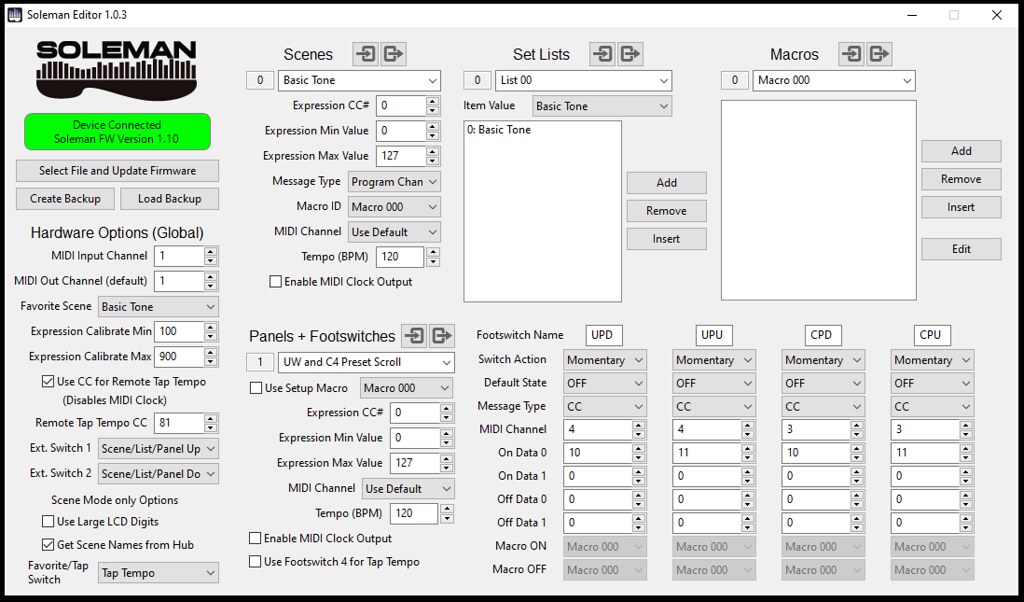
In the soleman editor, select a panel and assign the switches as follows
Switch 1 - Ultrawave Preset Down (I named it UPD) = Momentary, CC, midi channel 4 (for the UW) On data 10
Switch 2 - Ultrawave Preset Up (UPU) = Momentary, CC, midi channel 4, On data 11
Switch 3 - C4 Preset Down (CPD) = Momentary, CC, midi channel 3 (for the C4) On data 10
Switch 4 - C4 Preset Down (CPU) = Momentary, CC, midi channel 3, On data 11
This will allow you to scroll up and down through the presets on the UW and C4 on the same panel. If you have the pedals connected to the PC neuro editor you will see it scroll through the presets to confirm it works. The big challenge here is that there is no visual indication on the Soleman or the pedal as to what preset the pedal is in at any given time uless connected to the neuro editor.
To change panels press both button 1&2 together to scroll down to the previous panel and 3&4 together to scroll up to the next panel.
For sure the Disaster Area products are great at this and support pretty much exactly what you want to do out of the box. I have the micro and the DMC4 and use/used them specifically for this purpose. As you have discovered, they are limited to the number of devices that they can communicate with over midi and so are not the best solution with a larger midi set up like what you have.


) but I've already spent the money if I don't get the soleman to work, it's a paper weight.