

Check youtube out, depending on what OSX you're running I'm sure that you'll find a tutorial. Basically, interface into the mac via USB. Plug your bass into the interface, and plug your headphones or monitors in, and set all of your levels on your interface. Next, check your garageband preferences, make sure your ins and outs are all good (you can also hook up your interface and send all of your computer signal through the interface if you like, but that's another story). Make sure you set the levels on the interface for the right input you have your bass plugged into, and click the record button at the bottom. You should be getting a level in your phones at that point. From there on, it's basically experimenting.
When I was in HS I was working a lot with Garageband in my early music production courses, but we were running on older systems. When I got my new iMac, the garageband was totally different. It took a little while to get it down, but it's very handy to be able to use.
You can also record bass parts at home and send them to your fellow band mates, etc. Record rough guitar, bass and vocal tracks, it's just awesome.
Oh, that is a great idea. I never even thought about checking Youtube out for help videos. I do have a Garageband dummies like book but it doesn't really cover what I want to do with it which is record bass over MP3's so I kind of lost interest real quick. It's more for making your own music but that is a great suggestion.
I am still running Snow Leopard since I really didn't see much of a reason to buy Lion but is there a new version in Lion? Maybe it's time I just bite the bullet and upgrade since I am sure they have ironed out any issues if there were any.
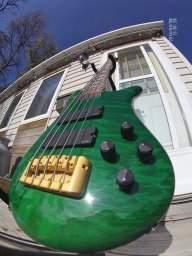








 style.


