Im trying to access Genome. As a Opus user, I understand I'm entitled to a lifetime license for the standard Genome. I downloaded it and signed into Genome with the two notes account my Opus is registered on but I'm offered a 14 day trial or I have to buy the license. There isn't any way to claim the free license. Am I missing something? Thanks in advance.

Enjoy the benefits of a premium membership!
Upgrade Account
-
TalkBass has been independent since 1998. Add your voice.
Create a free account to reply to discussions, view embedded media, and browse with fewer display ads.
Join free Log in
Want zero display ads or expanded classifieds tools? Compare plans.
You are using an out of date browser. It may not display this or other websites correctly.
You should upgrade or use an alternative browser.
You should upgrade or use an alternative browser.
Two Notes Audio User Group
- Thread starter John D Harris
- Start date
More options
Who Replied?

Paging @Ross Davies ...Im trying to access Genome. As a Opus user, I understand I'm entitled to a lifetime license for the standard Genome. I downloaded it and signed into Genome with the two notes account my Opus is registered on but I'm offered a 14 day trial or I have to buy the license. There isn't any way to claim the free license. Am I missing something? Thanks in advance.
I installed Genome and looked around, but I don't really need its features, so I deleted it.
Ross would be the expert, though any other Genome users could chime in.
He might be in a different time zone than you, so hang on, he'll respond when he can.
[Or you could submit a ticket to the Two Notes Helpdesk.]

Thanks for getting in touch. As a registered OPUS user, you are indeed entitled to a complementary copy of GENOME. It sounds like there might be a licensing issue here — as such, can I ask that you contact our support desk at Support.Two-notes.com; they will be able to look into your account and make sure all licenses are correctly assigned! If you let me know your ticket number once submitted, I can get this fast tracked for you!Im trying to access Genome. As a Opus user, I understand I'm entitled to a lifetime license for the standard Genome. I downloaded it and signed into Genome with the two notes account my Opus is registered on but I'm offered a 14 day trial or I have to buy the license. There isn't any way to claim the free license. Am I missing something? Thanks in advance.
Thanks, my ticket number is 7200. I was hoping to take advantage of the summer sale and upgrade to the suite. I like what I see so far.Thanks for getting in touch. As a registered OPUS user, you are indeed entitled to a complementary copy of GENOME. It sounds like there might be a licensing issue here — as such, can I ask that you contact our support desk at Support.Two-notes.com; they will be able to look into your account and make sure all licenses are correctly assigned! If you let me know your ticket number once submitted, I can get this fast tracked for you!
Thanks so much for that! I have let the team know now and they will be jumping on this ASAP! If you need anything else — or if you have any questions about GENOME Suite — let me know!Thanks, my ticket number is 7200. I was hoping to take advantage of the summer sale and upgrade to the suite. I like what I see so far.
Thanks @Ross Davies all sorted. I bought the suite upgrade as well for GENOME. Loved the UI and sounds so far.Thanks so much for that! I have let the team know now and they will be jumping on this ASAP! If you need anything else — or if you have any questions about GENOME Suite — let me know!
Awesome! So pleased to hear that! If you need anything else, let me know!Thanks @Ross Davies all sorted. I bought the suite upgrade as well for GENOME. Loved the UI and sounds so far.

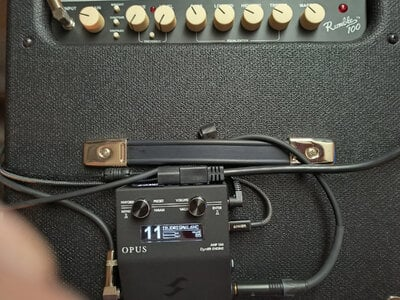
A couple of days ago, I decided to plug my Opus into the Instrument Input on my Fender Rumble 100 combo - HOLY MOLY!!!
Just running a Showman modeled Preamp and a 6L6 modeled Power Amp and no cab sim - J-Juice!
Man, it sounded great!
The settings on the R100c were just me spitballing what I thought would sound good with a balanced setting on the Opus - I was right!
[I have the 4 Ohm drivered version of the R100c and it is a bit over accentuated in the mid-upper mids. I have a new driver headed my way that I hope will be more balanced.]
Moral of the story - don't make assumptions regarding what you think will work best and what won't work - EXPERIMENT!
Just running a Showman modeled Preamp and a 6L6 modeled Power Amp and no cab sim - J-Juice!
Man, it sounded great!
The settings on the R100c were just me spitballing what I thought would sound good with a balanced setting on the Opus - I was right!
[I have the 4 Ohm drivered version of the R100c and it is a bit over accentuated in the mid-upper mids. I have a new driver headed my way that I hope will be more balanced.]
Moral of the story - don't make assumptions regarding what you think will work best and what won't work - EXPERIMENT!
Last edited:

Sage Advice right here! Awesome to hear this all worked well for you John!A couple of days ago, I decided to plug my Opus into the Instrument Input on my Fender Rumble 100 combo - HOLY MOLY!!!
Just running a Showman modeled Preamp and a 6L6 modeled Power Amp and no cab sim - J-Juice!
Man, it sounded great!
The settings on the R100c were just me spitballing what I thought would sound good with a balanced setting on the Opus - I was right!
[I have the 4 Ohm drivered version of the R100c and it is a bit over accentuated in the mid-upper mids. I have a new driver headed my way that I hope will be more balanced.]
Moral of the story - don't make assumptions regarding what you think will work best and what won't work - EXPERIMENT!
View attachment 7299108
I bought and installed a Celestion BN12-300S (4) driver replacing the stock 4 Ohm driver.
Observations so far in a bit over a day's worth of playing with it:
Even though it still seems like a fairly bright driver, the upper mids are not nearly as harsh sounding to my ears as the stock driver.
It is more efficient than the stock driver.
It has at least as good a low end (down to low 'B') as the stock driver, possibly better at higher volumes.
I have run my Cort B5 Element into the Instrument Input, set the combo's EQ fairly flat and then used my B5's onboard preamp to EQ a very good tone.
I have run the B5 in passive mode into my Two Notes Opus and then into the combo's FX Return and EQ'ed a killer tone using the Opus' processing.
I have run the B5 in passive mode into my Two Notes Opus and then into the combo's Instrument Input and EQ'ed a killer tone using the Opus' processing.
I greatly prefer the Opus generated tones into the R100c without any Cab Sim - which makes sense - less muddling up the tone.
I created 6 different presets so far - two for each of the above routing options (one Fender Showman type Preamp setting and one Fender Bassman type Preamp setting), none using anything than the Preamp types and the Custom 5-band parametric EQ + HPF & LPF (no Power Amp model).
[I also created two Presets on the Opus similar to the above but intended for a post EQ / post processing DI out signal, tweaked using my Sennheiser Headphones alone.]
After all of this, in hindsight (20/20 right), I'd have saved up and bought a good quality active PA cab or something like the GRBass Active cabinets.
I still do really like the R100c, especially the fact that it is really easy for me to move around with my bad back and the Opus can make it sound like a thousand dollar rig (at least in that neighborhood)!
Observations so far in a bit over a day's worth of playing with it:
Even though it still seems like a fairly bright driver, the upper mids are not nearly as harsh sounding to my ears as the stock driver.
It is more efficient than the stock driver.
It has at least as good a low end (down to low 'B') as the stock driver, possibly better at higher volumes.
I have run my Cort B5 Element into the Instrument Input, set the combo's EQ fairly flat and then used my B5's onboard preamp to EQ a very good tone.
I have run the B5 in passive mode into my Two Notes Opus and then into the combo's FX Return and EQ'ed a killer tone using the Opus' processing.
I have run the B5 in passive mode into my Two Notes Opus and then into the combo's Instrument Input and EQ'ed a killer tone using the Opus' processing.
I greatly prefer the Opus generated tones into the R100c without any Cab Sim - which makes sense - less muddling up the tone.
I created 6 different presets so far - two for each of the above routing options (one Fender Showman type Preamp setting and one Fender Bassman type Preamp setting), none using anything than the Preamp types and the Custom 5-band parametric EQ + HPF & LPF (no Power Amp model).
[I also created two Presets on the Opus similar to the above but intended for a post EQ / post processing DI out signal, tweaked using my Sennheiser Headphones alone.]
After all of this, in hindsight (20/20 right), I'd have saved up and bought a good quality active PA cab or something like the GRBass Active cabinets.
I still do really like the R100c, especially the fact that it is really easy for me to move around with my bad back and the Opus can make it sound like a thousand dollar rig (at least in that neighborhood)!
I bought and installed a Celestion BN12-300S (4) driver replacing the stock 4 Ohm driver.
Observations so far in a bit over a day's worth of playing with it:
Even though it still seems like a fairly bright driver, the upper mids are not nearly as harsh sounding to my ears as the stock driver.
It is more efficient than the stock driver.
It has at least as good a low end (down to low 'B') as the stock driver, possibly better at higher volumes.
I have run my Cort B5 Element into the Instrument Input, set the combo's EQ fairly flat and then used my B5's onboard preamp to EQ a very good tone.
I have run the B5 in passive mode into my Two Notes Opus and then into the combo's FX Return and EQ'ed a killer tone using the Opus' processing.
I have run the B5 in passive mode into my Two Notes Opus and then into the combo's Instrument Input and EQ'ed a killer tone using the Opus' processing.
I greatly prefer the Opus generated tones into the R100c without any Cab Sim - which makes sense - less muddling up the tone.
I created 6 different presets so far - two for each of the above routing options (one Fender Showman type Preamp setting and one Fender Bassman type Preamp setting), none using anything than the Preamp types and the Custom 5-band parametric EQ + HPF & LPF (no Power Amp model).
[I also created two Presets on the Opus similar to the above but intended for a post EQ / post processing DI out signal, tweaked using my Sennheiser Headphones alone.]
After all of this, in hindsight (20/20 right), I'd have saved up and bought a good quality active PA cab or something like the GRBass Active cabinets.
I still do really like the R100c, especially the fact that it is really easy for me to move around with my bad back and the Opus can make it sound like a thousand dollar rig (at least in that neighborhood)!
Thanks for this summary John — from my perspective, PA wedges have been a go to for some time for me — I have tried running cab emulations into cabs before and sadly stacking the filters (which is essentially what a DynIR and a speaker cabinet are) has always resulted in some harsh frequencies. However I do understand the R100C as a portable tool for sure!
Yes, basically with a colored amp/speaker you lose the cleanness of using one Preset for stage & FOH (creating the need of two routing paths within the Opus) unless you are willing to have sub-optimal sound on stage.Thanks for this summary John — from my perspective, PA wedges have been a go to for some time for me — I have tried running cab emulations into cabs before and sadly stacking the filters (which is essentially what a DynIR and a speaker cabinet are) has always resulted in some harsh frequencies. However I do understand the R100C as a portable tool for sure!
Between the new driver and new strings, I think it's gotten close enough to work for both stage and FOH without changing the signal routing (I still need to create some more Presets that use the DynIR Cabs and see how that works).
I don't have any gigs at the moment, so being able to optimize Presets for either way of practicing - Headphones or R100c, is still great!
I have both sounding awesome and I haven't spent much time tweaking them yet.
Great product!
Awesome, sounds like a good plan John and if you need any support for the split signal routing, let me know — I have done this many times before and can certainly assist with this!Yes, basically with a colored amp/speaker you lose the cleanness of using one Preset for stage & FOH (creating the need of two routing paths within the Opus) unless you are willing to have sub-optimal sound on stage.
Between the new driver and new strings, I think it's gotten close enough to work for both stage and FOH without changing the signal routing (I still need to create some more Presets that use the DynIR Cabs and see how that works).
I don't have any gigs at the moment, so being able to optimize Presets for either way of practicing - Headphones or R100c, is still great!
I have both sounding awesome and I haven't spent much time tweaking them yet.
Great product!
Hey guys, just picked up an opus today. I was messing with it trying to figure out a workable sound. I have a Broughton SV-Pre before it that I'm using for the preamp. I have 3 stages of drive before and a micro synth. I really only play at church nowadays. I'm trying to see if anyone has a similar setup that can help to dial in a good sound. I'm going for a sound like lucascorts on IG.
I don't use much overdrive and I don't stack other pedals (just lusting for a good compressor pedal), so I'm probably not going to be much help.Hey guys, just picked up an opus today. I was messing with it trying to figure out a workable sound. I have a Broughton SV-Pre before it that I'm using for the preamp. I have 3 stages of drive before and a micro synth. I really only play at church nowadays. I'm trying to see if anyone has a similar setup that can help to dial in a good sound. I'm going for a sound like lucascorts on IG.
I would suggest that you just hook up the Opus without anything else and see what you can dial in with that, trying the different Preamp models at different Gain levels, and (optionally) Power Amp models, with a good Cab Sim (like the Standard Powerhouse 2x12 - purchased separately for small price).
The only preamp model that doesn't really do overdrive is the Gemini, but the others will go into OD at very different levels.
I suggest using the Custom EQ even if you only use the LPF and the 3K to 12K filter - to dial back the higher frequencies that can be harsh with OD.
After you get a feel for what the Opus can do, then decide on what you want it to contribute to the tone, as it can do as much or as little as you want, for instance, Cab Sim only, or Cab Sim + EQ only, really any combination of the sections within the Opus.
Hopefully, someone with more pedal and OD experience will chime in.
Also, you might want to ask the same question on the 2 Notes Opus Thread as well.
So far I like the picktastic preset with the preamp off. I know there's an app for it but haven't messed with it yet. I run a compressor between the Broughton and the opus. I'm liking that so far.I don't use much overdrive and I don't stack other pedals (just lusting for a good compressor pedal), so I'm probably not going to be much help.
I would suggest that you just hook up the Opus without anything else and see what you can dial in with that, trying the different Preamp models at different Gain levels, and (optionally) Power Amp models, with a good Cab Sim (like the Standard Powerhouse 2x12 - purchased separately for small price).
The only preamp model that doesn't really do overdrive is the Gemini, but the others will go into OD at very different levels.
I suggest using the Custom EQ even if you only use the LPF and the 3K to 12K filter - to dial back the higher frequencies that can be harsh with OD.
After you get a feel for what the Opus can do, then decide on what you want it to contribute to the tone, as it can do as much or as little as you want, for instance, Cab Sim only, or Cab Sim + EQ only, really any combination of the sections within the Opus.
Hopefully, someone with more pedal and OD experience will chime in.
Also, you might want to ask the same question on the 2 Notes Opus Thread as well.
Unless you just have money to burn, I'd suggest previewing them through Invalid Link Removed and then add the ones you wish to buy.If I buy some packs, how do I install them into the opus, through the app?
During the purchase process, after you buy them, they will give you a download link (or links - I forget).
I always us the Torpedo Remote on my PC, after downloading them you need to exit and then restart your Torpedo Remote and it will update you license file to include the new Cab Sims, they will show up in your Cabinet Manager Tab on the Left side, if you want to narrow down what is on the left deselect the Guitar button at the top of the left side, the greyed-out listings are already loaded.
The unloaded ones will have a Load label you can click on and after you do, they will show up on the Right side and be available for use.
Not simple, but not rocket surgery.
Paging @Ross Davies - just to double-check my instructions, it has been a few since I bought my last cabs (this might be on the help desk in a searchable situation, not sure) - ideally, it should be in the Opus Owners Manual.
When I purchased from Sweetwater, it included a pack. Would I load those the same way?Unless you just have money to burn, I'd suggest previewing them through Invalid Link Removed and then add the ones you wish to buy.
During the purchase process, after you buy them, they will give you a download link (or links - I forget).
I always us the Torpedo Remote on my PC, after downloading them you need to exit and then restart your Torpedo Remote and it will update you license file to include the new Cab Sims, they will show up in your Cabinet Manager Tab on the Left side, if you want to narrow down what is on the left deselect the Guitar button at the top of the left side, the greyed-out listings are already loaded.
The unloaded ones will have a Load label you can click on and after you do, they will show up on the Right side and be available for use.
Not simple, but not rocket surgery.
Paging @Ross Davies - just to double-check my instructions, it has been a few since I bought my last cabs (this might be on the help desk in a searchable situation, not sure) - ideally, it should be in the Opus Owners Manual.
I haven't bought a pack before, I would think there is a license # that was provided or a link.When I purchased from Sweetwater, it included a pack. Would I load those the same way?
I don't see this referenced in their Knowledge Base, you should create a ticket at the online help desk.


