• TalkBass has been independent since 1998. Add your voice.
    Create a free account to reply to discussions, view embedded media, and browse with fewer display ads.
    Join freeLog in
    Want zero display ads or expanded classifieds tools? Compare plans.

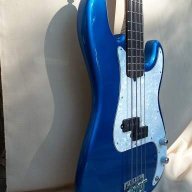
100 year old Pine P bass build

Did you upload the pixs to a web page from the command at the bottom of the Picasa3 program in your computer first? They HAVE to be on your webpage to show them.

That's the best part - they aren't stored on your computer for your webpage - but at Google somewhere in the cosmos - so the only place they actually exist is there and in Picas3 on your machine.
 
Did you upload the pixs to a web page from the command at the bottom of the Picasa3 program in your computer first? They HAVE to be on your webpage to show them.

That's the best part - they aren't stored on your computer for your webpage - but at Google somewhere in the cosmos - so the only place they actually exist is there and in Picas3 on your machine.

Yep. And in Picasa3 on my machine, those two pics are highlighted in green. When I right click on them, it will give me the URL for them. But the pics won't show. I even switched to public. No dice.
 
Are you saying that you are trying to show them here from Picasa3 in your machine? It won't work that way unless we all have access to your computer and the passwords.

Look at the bottom of the Picasa album, and you'll see the UPLOAD icon, and from there you can send the pixs that are highlighted blue or green to your webpage.

You are seeing the internal URL of your computer and the name of the pix (file) NOT the URL address of the web page.
 
Here they are:::

100_0038.png


100_0039.png
 
[Invalid or Expired Link Removed]
I used the link on the right where it says"Link to this album". It gives you the options 'Paste link in email or IM" or "Psaste HTML to imbed in website." I used the first one.
Here, i right clicked and copied shortcut.
[Invalid or Expired Link Removed]
Neither does me any good. I haven't a clue why. Gonna try to quote your messga and copy the link, if i can. see if that works.
 
Time to move on to finishing the body. Firstly, there were a lot of people who wanted me to finish this in a transparent finish. To those people, i'm sorry i could not accomodate you. For a lot of reasons, but mainly because of cost. I can do a solid color for $40-$60. Transparent or tinted would cost me 2-3X that. Bottom line? I could not afford it. <SNIP>

I'm extremely curious to learn about the products you intended to use for the transparent finish, versus the products you're using for your solid color finish, and the method you used to arrive at your cost estimates - especially if your estimates are predicated on you doing the work yourself.

I'm not questioning your credibility, just curious about the specific finishing products used to compile your estimates. :)
 
I think you're trying to post the pixs via the url of the file itself.

Go back to the file and left click on one of the pixs until it's at full size, then right click on IT and COPY IMAGE LOCATION and post that between the commands:::

where XXX is the url of the address you paste there from your internal buffer.

When I do that, it gives me copy, but no copy image location. It used to give me copy shortcut, which I tried, but now it won't even give me that. Don't know what's going on, but I'm done with Picasa. Thanks for all you tried to do.
 
JazzDog, tinted would have to be aerosol, and that's either Rereach, StewMac or LMI. They all want $13-$16 a can. And then there's shipping.
Duplicolor, on the other hand, is local, and costs $7 a can ( 2 primer $11, 2 cans of paint $14, 3 cans of clear$15, total $40 ).Believe me, I've counted it up over and over and over. Tints will cost me $100 or better( sealer 2 cans $20, 1 can of black $10, 1 can each of transparent $30, 3 cans of clear $30. Around $90 plus shipping)
Some may quibble with me over the number of cans of finish, sealer, etc. But i've found, for me and the way I work, that this is minimum what i need.
 
Yeah, i'd lov to have a compressor. Maybe some day. Right now, it's nowhere close to in the budget. An example of my budget is that the wood used to build this bass was given to me. That's the budget I had(and usually have).
One of the reasons I build the way I do is bacause I can afford to. Can't afford a shop, or all the other tools most folks, even hobby builders, find nearly indespensible. But I love building, so i find a way. A lot of folk would say that with all the money I spend on rattle cans, i could outfit myself with a compressor and everything else I need. But it's a lot easier to come up with a little money here and there to finish with aerosols than it is to save the money for a compressor, gun, lacquer, tints, dyes, etc.. Especially when, if i have anything saved up, something inevitably comes along and scarfs it up before building does, lol.
 
100_0038.png

Ok, got it sorted. I used the HTML link to the right in my web album, and cropped out everything but the image location, and wrapped that in the img tags.Don't know why the direct link does not work for me, nor why i can't get "copy image location" when I right click, but i found a way to make it work.

100_0039.png
 
What size are you uploading the pixs as?

You have a few choices - and it looks like you're using thumbnails. If you're worried about speed from a dial-up, you can click the 'Save Bandwidth' option in Picasa3 when you upload the pixs.

The size for the uploads is in your Picasa3 on your machine in Picasa3>>TOOLS>>OPTIONS>>WEB ALBUMS>>DEFAULT UPLOAD SIZE and drop down to find a good size for yourself. I'd go with the legacy settings though.

So-o-o many options!
 
100_0038.png

Yeah, i had it set for thumbnail. Didn't see the size options there. As for the settings in Picasa# on my machine, the drop down menu gives me a choice of Original size, 1600 pixels, 1024 pixels, and 640 pixels. Maybe my version is different than yours, but I don't see the legacy setting.
 
Ahem! Yeah - that's confusing.

'Legacy' means what it will start out as, and the 'legacy' is just the original setting, that's all. In other words, it means as originally set by the manufacturer.

Once you get Picasa wired, you're gonna like it more and more.

There are all kinds of options on the bottom of the viewing page, and of course, you can always add another screen name to the account - I have over ten at the moment. That gives me 800Gig of storage, and I'll prolly never use that much in this lifetime.

You can also set your name on the bottom of your pictures or a copyright symbol, etc, to signify that you actually created and own the rights to the pixs.
 
Joe, I like it already. The upload speed is much, much faster than anything else I've used. I'll just have to get used to using it.
I don't understand why I can't use the link provided by the web album, or why I can't right click and "copy file location". The way i do it is right click, go to properties, and copy the file location/url there. No big deal, and works just fine, so I don't care.
About the "legacy" setting. Is there any way I can revert the program back to that? Also, is there an online user's manual or help menu for the web album/website?

P.S.: Found it online.
 
Since Google got control of Picasa3 and a lot of other stuff, there has been some updates and changes - and it's always good to let Picasa seek it's own updates.

Anyway - - the Legacy settings are addressable by using the RESET button on any of the OPTIONS>>SETTINGS area.

Once you set YOUR desires, Picasa will hold them until further notice if you decide to change them.

Your:
I don't understand why I can't use the link provided by the web album, or why I can't right click and "copy file location". The way i do it is right click, go to properties, and copy the file location/url there. No big deal, and works just fine, so I don't care.

I think you are perhaps trying to load or post a full folder/album to an online site (here at TB) and that is just to be used in an IM or an EMail or perhaps to allow someone access to your folder, since they will then have the URL of it from it's online storage.

You can use the HTML webpage code, but I don't think TB allows that sort of a hot-link - I dunnow, never tried it here.

I just view the single pix I want to post, then right click on IT and copy the location - which then is stored in your buffer/notepad, and then paste it here between the HTML code commands. Invalid Link Removed
 
Thanks, Joe. Dunno what I was doing wrong, but i'm certain it's OE (operator error).
By the way, what OS are you running? I'm running XP. If you're running Vista(or other), perhaps that's the reason I don't get "copy file location" when i right click. Doesn't matter. I can get it by right click/properties/Address/URL. Highlight in blue. copy, then paste. Works just fine.