The channel split and merge points don't move (as such) but the effects are placed before or after them instead.

TalkBass has been independent since 1998. Add your voice.
Create a free account to reply to discussions, view embedded media, and browse with fewer display ads.
Join free Log in
Want zero display ads or expanded classifieds tools? Compare plans.

In Gumtown's software editor you just drag and drop it.
wow! I just downloaded the software and linked it to my gt-10b. I have to stop now or I'll be awake all night. I'll have to reread this thread again and find all the great tricks. Another reason I love this place. thanks so much. Marry me gumtown!!!!
BTW: you can use the GT-10 guitar version patches in this too, it will load GT-10 patches and convert the preamps & stuff to a GT-10B equivalent.
Possum:
When I first got started with the 10B, there was something that mucked me up for the longest time, so I'm gonna share it here in the hope that it will save you some grief.
When it comes to assigning functions to the control pedals (CTRL 1&2), there are 2 different assign sections . (I may be not be using the correct terminology.) But, anyway, there are what I'll call a "primary assign" and then several "secondary assigns". So, what I call the primary assign is accessed by double clicking the pedal module (see the red arrow below).

And, then, the secondary assigns are accessed by clicking the tabs circled in red below.
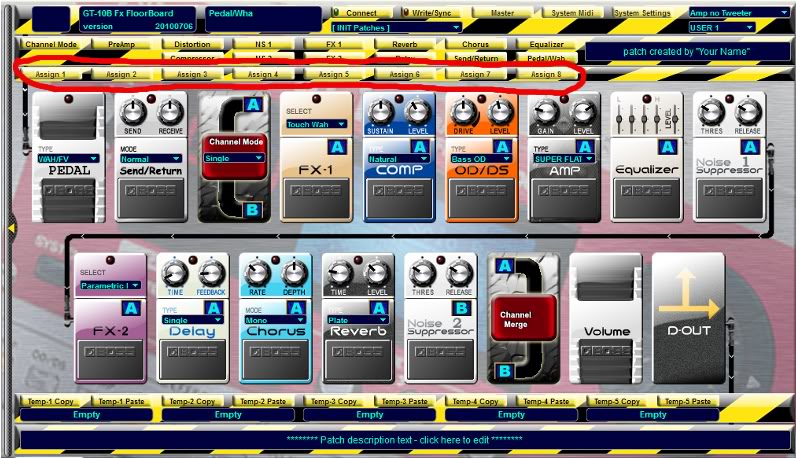
In my experience, I would set these "secondary assigns" the way I wanted them, but would then be dumb-founded when I stepped on the CTRL pedal and some additional parameter would change.
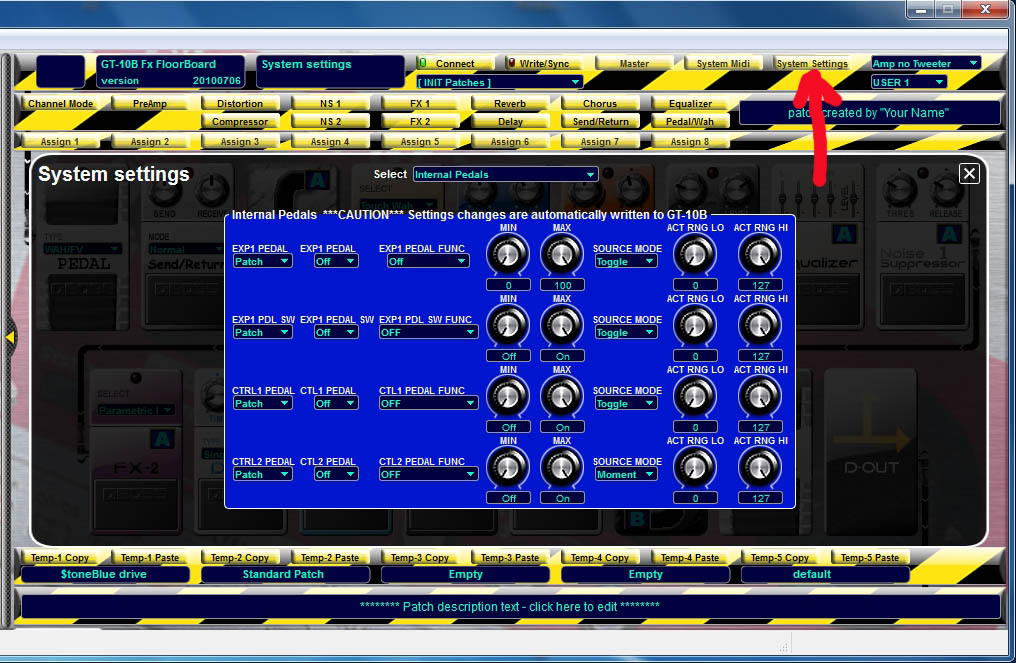
and to add further confusion, there is a third option to control the GT-10B pedals. In the SYSTEM area, is a Pedal Global control, which is little known about, and overrides the other two Pedal settings places.
This is if you want a pedal to operate with the same function across ALL PATCHES.

any of the assignable pedals can be set to switch 'to' manual mode, once in manual mode, the pedal is in manual mode and does not switch back (bwhaahaa).
Unless you use extra CTL3 or CTL4 pedals.

I don't think this is quite accurate. If you were to assign NUM PED(al) (the pedal for the current selected patch) to manual mode, then when you wanted to exit manual mode, that pedal would be assigned to something else - and would not be functional to exit manual mode.
Manual mode only affects pedals 1-4, and the bank up and down pedals. So assigning ctrl1, ctrl2, the Exp. pedal sw., or some state of the expression pedal (fully raised, for e.g.) to manual mode (and of course ctrl's 3 & 4, like you wrote) works just peachy, since getting into manual mode doesn't change the function of those pedals.
Long story short: you can use, say, ctrl2 to get in and out of manual mode, no problem.
hi guys
I have two quick questions I hope y'all can help me with.
Q1. I've got a patch that I'm trying to use the Hold effect with. I assigned it to Ctr 1. and the this will turn FX1 on and off. When the Hold effect is turned on there is a Hold switch to the left in the display that needs to be toggled On for the effect to work. I can't toggle it on unless I do this manually. How can I do it with the pedals.
Q2. In the floorboard editor how do I arrange patches in the order that I want to?
thanks for all the help y'all have given me on the this great device.
@gumtown can you send me download link for your program, I can't open Link Removed