• TalkBass has been independent since 1998. Add your voice.
    Create a free account to reply to discussions, view embedded media, and browse with fewer display ads.
    Join freeLog in
    Want zero display ads or expanded classifieds tools? Compare plans.

Darkglass Anagram Multi FX Announced

Couple things now that I’m a few days into the anagram

This is what I’ve settled on for my Nano board.
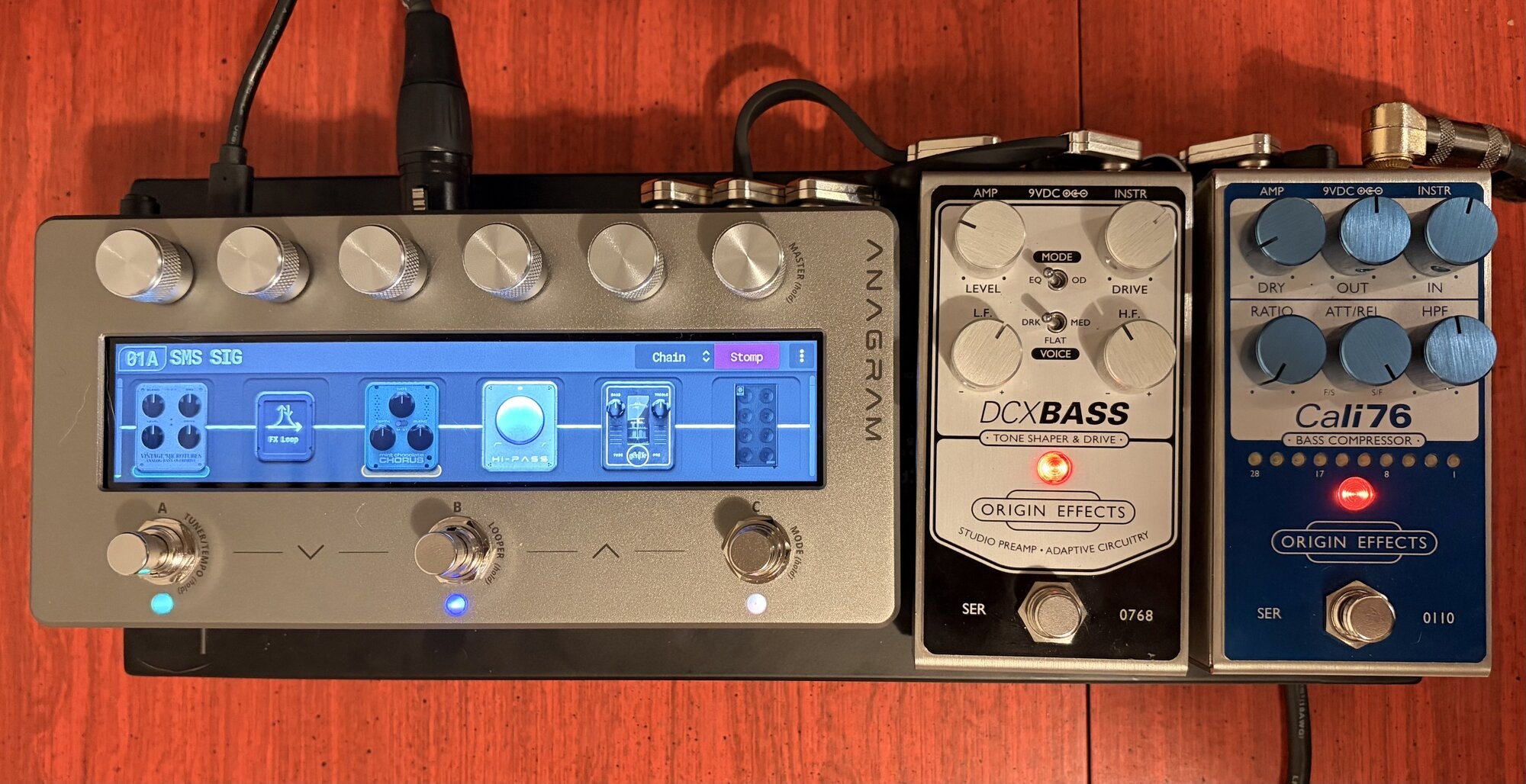
IMG_0408.jpeg


The DCX in the fx loop gives me a ton of options. For my main preset I’m using it as a first gain stage with the atomic sans after it for extra drive.

Coming from the stomp, it’s so nice to have an fx loop with zero level balancing issues regardless of what’s on or off in it.

The 24db high pass is so cool. It makes a really punchy tone and I’ve set it to turn off when the sub octave is engaged.
 
Last edited:
Just got the Anagram today, soundwise I feel it has more bottom end extention and clarity than QC and other digital pedals I tried, which pushed me to buy it. The blocks are all very useful. Would really like to see the attack cut/boost option on the B3k and VMT(I know its pre-eq but still..), which I used alot on the Ultras.

But I realized scrolling through the cabs, that it doesn't include all of the cabs found on the other DG pedals?
For example the DG810,DG112 and the X analog cabinet which I used alot in the past.
Went to DG website and compared the cab list of anagram to other pedals, and there are indeed quiet a few missing. Any idea as to why and when they might become available?
As a side note, I really like how the NDSP Darkglass DG210C Cab implementation sounds, hopefully we can get a DG210 in anagram someday.
 
I realized scrolling through the cabs, that it doesn't include all of the cabs found on the other DG pedals?

That is the benefit of being able to use NAM blocks - you don't have to have all of the emulations 'in the box' supplied from the vendor.
Go to TONE3000 · Neural Amp Modeler (NAM) Profiles and Impulse Responses (IR's) and you'll find no shortage of NAM captures of other cabs, amps, and combos to complement the default Anagram blocks.
You'll also find plenty of User uploaded Presets in the Presets Hub in the Darkglass Suite that include NAM captures.
 
That is the benefit of being able to use NAM blocks
Hmm, I suppose, I did find a few nice Ampeg captures on tone3000, alot of guitar contents, but not alot for bass.
My main gripe is, if they are just Cab IRs(DG's own cabs even), what's preventing DG just simply loading the missing Cabs into Anagram like any other IR. Unless theres some sort of difference between the missing cabs and existing ones in Anagram which cause DG to leave them out.
 
missing cabs
That's pretty subjective - how many are 'missing'. Everyone will have a view on that, and then for the ones that are in the box, people will still make/use NAM capture of the exact same cabs done by others.

Don't get me wrong, I agree that it is a little weird that they haven't got all of their own physical cabs emulated in the Anagram! :) I mean, yes, more important that they have a strong cross-section of common/famous cabs from the outset to represent that strong cross-sections of tones across various decades. Maybe they still want to make sure we buy some of their cabs :P

Prior to the last update that gave us the Phaser, Parametric EQ, Trem, and Vibrato, there was probably more feedback across socials and forums about some of the gaps in the effects blocks offerings (in particular the Phaser) so they are likely focused on plugging the bigger gaps in the Anagram's blocks offerings and general functionality before they start to circle back and add Bass Cabinet number 22+ (yes, there are 21 bass cabs from 10 different manufacturers already).

With the cabs in the Anagram, make sure you take the time to play around with different mic selections, mic positioning, etc. as that changes the tone of each cab quite a bit.
 
That's pretty subjective - how many are 'missing'.

I'm not asking them to add "new" cabs, just the existing ones that are already available on all there other pedals, and its really just the DG specific cabs in the example I've mentioned, since I've used two of them extensively(analog cab and DG412) on my Ultras.(I know I'm drilling into this😅)

But I do agree everything else you mentioned and probably most others that it is a priority for them to focus on adding more effect/amp blocks than more unreleased Cabs:).
 
@IvanBassist wondering if you can ask the techy’s how much power out I can pass through the usb c port? I didn’t hammer it but I ran the standard power supply and then usb c out to my cioks 4.

Device rebooted but everything powered, but wondering how much current it’s passing.

Also still doesn’t work as an audio interface with the iPad.

😇

That’s all for now
 
wondering if you can ask the techy’s how much power out I can pass through the usb c port?
Anecdotally, I’m powering mine with three taps from a Cioks Sol with a West Coast Pedalboards current tripler, thus resulting in 1,980mA of current. I’m using the USB-C port to communicate with and power a Judahs Kedem 4 which has a stated current draw of 250mA, leaving 1,730mA for Anagram. That setup has been rock solid without issue.
 
  • Like
Reactions: Bodhi46
@IvanBassist wondering if you can ask the techy’s how much power out I can pass through the usb c port? I didn’t hammer it but I ran the standard power supply and then usb c out to my cioks 4.

Device rebooted but everything powered, but wondering how much current it’s passing.

Also still doesn’t work as an audio interface with the iPad.

😇

That’s all for now
I’ll ask the team about the power delivery :)
 
Anecdotally, I’m powering mine with three taps from a Cioks Sol with a West Coast Pedalboards current tripler, thus resulting in 1,980mA of current. I’m using the USB-C port to communicate with and power a Judahs Kedem 4 which has a stated current draw of 250mA, leaving 1,730mA for Anagram. That setup has been rock solid without issue.

Nice, I have a GigRig Generator which is 5000ma, I think I can only pass 1000ma via the usb c into a cioks 4 but just want to make sure that’s not going to fry the Anagram with long term use.
 
I just thought it'd be super helpful if we were able to switch the knobs for scenes and then I simply tried to drag and drop them. What seemed promising, didn't really work out though. Did I stumble upon a bug or is this not supposed to work (yet)?
 

Attachments

  • InShot_20251116_130555337.gif
    InShot_20251116_130555337.gif
    9.2 MB · Views: 26
I just thought it'd be super helpful if we were able to switch the knobs for scenes and then I simply tried to drag and drop them. What seemed promising, didn't really work out though. Did I stumble upon a bug or is this not supposed to work (yet)?
Huh.... well, that's interesting. For those playing along, we're in Scene mode -> Bindings.
Yes, I can see/do the same.

I would assume that is to allow you to re-assign a scene to a different footswitch but either
1. doesn't work, or
2. isn't actually implemented (fully) yet (i.e. labels move initially when dragged but snap back when released), or
3. does work ( i.e. the scene config moves) but the label does not (i.e. bug?)

I guess we'll wait until we hear back from our good friend Ivan! :)
 
Last edited:
  • Like
Reactions: jjo161
Just wanted to share my nifty Anagram desktop stand which I bought from a nice seller locally. I was going to build a mini board around the Anagram but I think I will just let it sit on my desk for awhile! Happy Monday! View attachment 7369987
I know it 'works' the same as the plastic 3D printed ones that you can also get, but the timber, smoothed edges, bolts holding the cross braces just look so much nicer! Does that maker/seller have an on-line store to purchase from?
 
I just thought it'd be super helpful if we were able to switch the knobs for scenes and then I simply tried to drag and drop them. What seemed promising, didn't really work out though. Did I stumble upon a bug or is this not supposed to work (yet)?
I've just tried this by selecting "Binding" view and I can move the pedal switch icons like you can and they stay wherever I move them! I need to save the preset afterwards to lock this in as you would expect. The only difference I can see from your video is that you are "Controlling Active Scene".