• TalkBass has been independent since 1998. Add your voice.
    Create a free account to reply to discussions, view embedded media, and browse with fewer display ads.
    Join freeLog in
    Want zero display ads or expanded classifieds tools? Compare plans.

Fender Rumble Club

I have a Fender Rumble 800 Stage and I was setting up to record tonight and ran into problems. At first I ran an xlr from the "post" out to my apogee element, but when I played, the volume was incredibly low. If I crank the gain in the Apogee preamp, its just raising the noise floor and barely raising the signal. I checked global settings on the Rumble, added more gain to the USB/Line out gain, still no difference. I switched to the usb out and plugged it into my iMac directly, nothing. It isn't even being seen or recognized to choose as an option. Really perplexed. Been using it fine for jamming and practice for a few months now. Never had any other issues with the amp (love the amp). This is the first time I have tried to record it, and it seems I am missing a setting or something. For example, the signal coming from the xlr out was lower than the signal from my SM7B mic (notoriously low gain). Something seems off, any ideas?
 
image.jpg
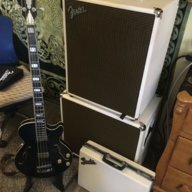
Hey y’all, been a while since my last post. Anywho, decided that my rumble 500 combo setup just wasn’t THAT cool and like many of you I’m sure, I wondered what it would be like for a rumble to have a cream/oxblood look to match my guitarists matching tweed reverbs. Well, if you were wondering, here you go. I’ve thrown in my matching pedal case and my D’Angelico for style points. Soon I’ll repaint and regrill the 115 extension cab and I’ll post that on here as well once I complete it.
 
View attachment 3809819 Hey y’all, been a while since my last post. Anywho, decided that my rumble 500 combo setup just wasn’t THAT cool and like many of you I’m sure, I wondered what it would be like for a rumble to have a cream/oxblood look to match my guitarists matching tweed reverbs. Well, if you were wondering, here you go. I’ve thrown in my matching pedal case and my D’Angelico for style points. Soon I’ll repaint and regrill the 115 extension cab and I’ll post that on here as well once I complete it.
Wow! Great job! :thumbsup:What paint did you use? Thanks. :thumbsup:
 
  • Like
Reactions: chupacerveza
Happy Fender um, uh, ... Thursday?


Cool! Jino, you're a genuine Fender celebrity!! And such prestigious exposure, too! :cool:


It's a real honor to have you with us, Jino. Got any special Fender tips to share? :smug:

Jino, you might want to join the TalkBass Fender Bassman Club, too.
.


descender, you ain't kiddin' the Rumble 800 HD is no joke! It's a bona fide professional head.

Man, you should join the TalkBass Fender Bassman Club, with those cabs. I'd love to see a pic of your Rumble 800 with the Bassman 610 & 115, though I'd really rather hear it! :drool: Awesome!


Both of you, gentlemen, should . . . .

BE The Bassman and Rumble On!
.
I get you pics as soon as I can. The 610 is currently at my parents house. I’m in the process of converting a room into a studio so I dropped it off there over a month ago. With this virus I haven’t been over there. The 115 neo is at GC. I just purchased that. I actually had it on layaway. I got it brand new at clearance price for $429.99. They closed their doors and I have no way of picking it up. I’m pissed cause I had one payment of 75$ to pick it up. It’s cool though cause I’m not jamming with a band or gigging at the monent
 
  • Like
Reactions: G-Dog
.
Attention: Rumble Club Wiki Edit Alert!


Thank you, @dcgriggs79 and @RmbleRightously, for sharing your cosmetic makeovers of your Rumble combos! griggsy, your thread of your now Blackfaced Rumble Stage 800, and Rmble, your post of your now cream/oxblood Rumble 500 combo, have both been linked on the Rumble Club Wiki page near the middle of the Rumble Modifications section, with other mods. These are great examples of a fun, and beautiful, amp cosmetic makeovers that are sure to be the envy of many a bassist.

Thanks, griggsy and Rmble, for your sharing. :thumbsup:

Rumble On!
.
 
  • Like
Reactions: chupacerveza
Guys, have any of you tried using an iPad based modeler (AmpliTube or BIAS) with a Rumble Studio ? I’m learning bass and don’t have an app right now, only headphones connected to my iRig. I wonder how much the sound from the modeler changes when going from the iPad to the Rumble, specifically the Studio 40 which is the one I have in mind. Is there such a thing as “Clean” settings in the rumble that would not change or keep the tone change to the minimum ? I know for Rumble Studio lover it might be a blasphemy to plug another Modeler behind it.
 
Am I crazy, or is Joe using a Rumble in this video?


Either way, it’s hella funky! Happy Fender Friday!


Yep. All the guitar amps look to be Fenders! But, funkiest of all (IMO), all the guitars seem to be mounted on stands! So, even as the camera moves, and the bass man shakes his head, the guitars always stay lined up! :woot:
.
 
  • Like
Reactions: alanloomis1980
Yep. All the guitar amps look to be Fenders! But, funkiest of all (IMO), all the guitars seem to be mounted on stands! So, even as the camera moves, and the bass man shakes his head, the guitars always stay lined up! :woot:
.
I always like seeing “cheap” Rumbles in high profile situations like this. Especially someone like Joe with so much stank in his tone- nothing “muddy” about that! :D

they use those stands in a lot of their videos. I wonder if Joe’s bobbing knocked the bass off the strap one too many times! :roflmao: Yeah, it’s a cool visual, they clearly have a thing for symmetry!
 
I have a Fender Rumble 800 Stage and I was setting up to record tonight and ran into problems. At first I ran an xlr from the "post" out to my apogee element, but when I played, the volume was incredibly low. If I crank the gain in the Apogee preamp, its just raising the noise floor and barely raising the signal. I checked global settings on the Rumble, added more gain to the USB/Line out gain, still no difference. I switched to the usb out and plugged it into my iMac directly, nothing. It isn't even being seen or recognized to choose as an option. Really perplexed. Been using it fine for jamming and practice for a few months now. Never had any other issues with the amp (love the amp). This is the first time I have tried to record it, and it seems I am missing a setting or something. For example, the signal coming from the xlr out was lower than the signal from my SM7B mic (notoriously low gain). Something seems off, any ideas?

According to my friends at Fender:

"The stereo USB output follows the Line Outputs and the default is PRE/POST setting (as found in the Menu), so default USB output is PRE (direct signal, and generally very low output relative to POST). Change that menu option to Stereo to get the full amp processing (all except MASTER). Most DAWs can process stereo outs, or just mix to mono, which is what the POST XLR output does (convenient for most applications)."

Hope this helps, Tom.
 
According to my friends at Fender:

"The stereo USB output follows the Line Outputs and the default is PRE/POST setting (as found in the Menu), so default USB output is PRE (direct signal, and generally very low output relative to POST). Change that menu option to Stereo to get the full amp processing (all except MASTER). Most DAWs can process stereo outs, or just mix to mono, which is what the POST XLR output does (convenient for most applications)."

Hope this helps, Tom.

Great response Tom. I kind of knew there was an answer but don't know enough to put it into words. Glad you have friends at Fender!
 
  • Like
Reactions: tombowlus
.
Attention: Rumble Club Wiki Edit Alert!

Thank you, again, @tombowlus. A link to your post describing the USB Output Options has been added to the Rumble Club Wiki page near the bottom of the Stage & Studio Links section. That's a very useful piece of information that our Stage & Studio owners need to know. So, it's captured here for posterity.

Thanks very much, again and again, tommy, for sharing this. :thumbsup:
.
 
I searched, but can't seem to find a club for those of us who use and love the Fender Rumble series of amps. Any interest?

I've been playing at home with my Rumble 30 since late January and it seems to me like this amp puts out a good share for being so small! Originally I was looking at the Rumble 15 but went with the 30 because of the extra input jack, more wattage, and I read online reviews which said the 30 would be good enough to play with a band in a small venue even versus the 15 which didn't have as much bang.

Hope to hear form some fellow Rumble fans soon! :D

So this makes me the founding member, #1? I feel this is a big honor for someone so new on the forum!
I have a Fender Rumble 500
 

Attachments

  • F7C71932-63FB-40C6-B1F7-BEDDCF8EF935.jpeg
    F7C71932-63FB-40C6-B1F7-BEDDCF8EF935.jpeg
    791.1 KB · Views: 139
  • Like
Reactions: TheMaartian
According to my friends at Fender:

"The stereo USB output follows the Line Outputs and the default is PRE/POST setting (as found in the Menu), so default USB output is PRE (direct signal, and generally very low output relative to POST). Change that menu option to Stereo to get the full amp processing (all except MASTER). Most DAWs can process stereo outs, or just mix to mono, which is what the POST XLR output does (convenient for most applications)."

Hope this helps, Tom.
Tom, this is very interesting and helpful information. Thanks for sharing.
I just tested this in my DAW. Here are some further details.

With the "Line Out Options" set to PRE/POST:
USB Input 1 contains the POST signal.
USB Input 2 contains the PRE signal.
Note: This is the case even if you setup your DAW to record a stereo track using Inputs 1-2 as a linked pair of inputs. You basically get an unbalanced signal with POST on the LEFT and PRE on the right.

With the "Line Out Options" set to STEREO:
USB Inputs 1 and 2 contain the LEFT and RIGHT stereo channels, respectively.​

I think that it is good that Fender put POST on USB Input 1. This way, if you're recording in mono, you are only going to get the PRE signal if you specifically set the track to use USB Input 2.

I wonder what this means for @JBoogy's level issue then. I would think he would have defaulted to using USB Input 1. @JBoogy, what USB Input are you using, and what is the Line Out/USB gain set to? I believe the default setting is +6.0 (at least that's what mine is set to).