• TalkBass has been independent since 1998. Add your voice.
    Create a free account to reply to discussions, view embedded media, and browse with fewer display ads.
    Join freeLog in
    Want zero display ads or expanded classifieds tools? Compare plans.

Fender Rumble LT25, Studio 40 & Stage 800

I wonder if I can dissemble Studi from housing and use it without speaker as a preamp

Is there a dummy load I must use? I can remember I could use MosFet and bipolar amps without load, is this a case with D-class?


EDIT
I googled right after I posted and found the answer
I should be using dummy load for D-Class
Like this:
https://www.thomann.de/pl/harley_benton_pa_100_power_attenuator.htm

I run my studio40 direct to the board with the master at 0 at church all the time and have not had any issue.
 
  • Like
Reactions: ricardol
Can some one tell me at what volume level all the presets on a Rumble Stage 800 were designed for being used at??

I'm curios as it seems to me that going up to near 12 o'clock on the volume for many of them that the low bass EQ needs some dial back to reduce the lows and preserve the power efficiency of the amp and speaker pairing, even when using the tandem 2 x 10 cab for the full rig of the 4 x 10s in a stack.
Am I incorrect in this? It just seems to me that using those presets as is and trying to simply crank up the volume to any level things get kind of muddy and I sense the amp is loosing clear wattage efficiency translated into added clean clear db output, as though the presets were somehow designed for bedroom practice rather than at stage volumes in stage use.

For example, say I pick the Flip Top amp and the B15 cab selections and use the default settings for them, at what volume level is that going to replicate the truest B15 sound?
 
Last edited:
Can some one tell me at what volume level all the presets on a Rumble Stage 800 were designed for being used at??

I'm curios as it seems to me that going up to near 12 o'clock on the volume for many of them that the low bass EQ needs some dial back to reduce the lows and preserve the power efficiency of the amp and speaker pairing, even when using the tandem 2 x 10 cab for the full rig of the 4 x 10s in a stack.
Am I incorrect in this? It just seems to me that using those presets as is and trying to simply crank up the volume to any level things get kind of muddy and I sense the amp is loosing clear wattage efficiency translated into added clean clear db output, as though the presets were somehow designed for bedroom practice rather than at stage volumes in stage use.

For example, say I pick the Flip Top amp and the B15 cab selections and use the default settings for them, at what volume level is that going to replicate the truest B15 sound?



Have you not browsed The Droopy_TX Preset Experience under the Fender TONE App Support section of your Rumble Club Wiki page? The Rumble Stock Presets (Rumble 40_Stage 800).xlsx spreadsheet shows EQ details and Volume settings for each preset. It would be my guess those settings would viable for the broadest range of Master volume settings for each amp. :thumbsup:

Although, I recall at least one modeling Rumbler who felt he needed to increase the volume settings on the presets he used most to get their best sound. Perhaps you feel a similar need for such tweaking? :whistle:
\
 
Last edited:
I finally had enough with the sticky knobs on my Rumble 500 and figured I'd try to clean them and if I ruined them I'd get after-market replacements.

I used non-acetone nail polish remover and a rag. The nail polish remover softened the gooey-rubberized paint enough that I could rub it off with the rag. It was kind of like getting label residue off of a jar. I wet the rag with the remover and used my thumbnail to push the rag through each of the flutes on each knob. I then rinsed all the knobs in water to wash off the remover and dried them.

Seems to have worked. A few days later and the knobs still feel like hard plastic, not the rubberized feel they had when new, but they are no longer sticky. Plus the knobs don't seem to have suffered - they look fine, the painted indicators were unaffected.


Attention: Rumble Club Wiki Edit Alert!

Thank you, @SamBassPlayer, for sharing this. Sammy, your tip has been linked on the Rumble Club Wiki page near the top of the Rumble Modifications section, fifth link down, right under bdplaid's knobs replacement link. This is a great addition to the Rumble Wiki in general, and the advancement of Rumbles in particular!

Thanks, Samwise, for your technical expertise and for sharing with our great community. :thumbsup:

Rumble On!
.
 
Hi fellow Rumblers..I have a query for you guys as I'm not very tech savvy lol..I want to connect speakers to my Studios 40.. nothing huge, just a couple of pc monitors etc..I love having the headphones connected to the 40 when I'm creating music in glorious stereo..It's just sometimes when I have a looping stereo soundscape ir pad going,I sometimes take out the headphones and listen through 40's speaker but obviously its not as dynamic or stereo this way...How do I connect the speakers to the 40?I'm unsure where to connect things up(wires,leads etc..
 
Hi fellow Rumblers..I have a query for you guys as I'm not very tech savvy lol..I want to connect speakers to my Studios 40.. nothing huge, just a couple of pc monitors etc..I love having the headphones connected to the 40 when I'm creating music in glorious stereo..It's just sometimes when I have a looping stereo soundscape ir pad going,I sometimes take out the headphones and listen through 40's speaker but obviously its not as dynamic or stereo this way...How do I connect the speakers to the 40?I'm unsure where to connect things up(wires,leads etc..


Basically, Buzzy, you're gonna need some stereo amplification for the signals from your Studio 40. The type of amplification depends on whether you wanna use the signals from the FX Sends, the stereo XLR Outs, the USB or the Headphone jack, and how loud your speakers can go. ;)

For my own stereo rig I connected my Studio's FX Sends to the Inputs of my Rumble 500 combo and my Bassman 500 w/115 half-stack 'ause that's what I had on hand (and can give stage volume). Or connect your USB to your PC with your monitors connected there too, to use what you already have. And there are probably all kinds of devices you could buy for connecting the Headphone jack or the XLR Outs to the speakers. A mini powered mixer comes to mind for the XLR Outs. The same might even handle the Headphone output, too. :thumbsup:

Good luck, and let us know how it goes for you. :D
.
 
  • Like
Reactions: Dookieshoes
He he good stuff G-Dog..I already have an 18 pedal pedalboard going through the effects loop..I have a good few stereo pedals for glorious stereo through my headphones...I just want to connect some type of speakers for non headphone listening etc..I guess I connect the speakers to the headphones jack just like the headphones..I'm wondering in what port on the speakers I connect to...The ones I'm looking at have aux and headphone jacks just like the 40..
Ps;My Ambient Mothership pedalboard supported by the magnificent 40,!!As you can see I don't have any dirt or distortion pedals because I use the ones in the 40 which are awesome..
IMG_20240321_204925.jpg
 
He he good stuff G-Dog..I already have an 18 pedal pedalboard going through the effects loop..I have a good few stereo pedals for glorious stereo through my headphones...I just want to connect some type of speakers for non headphone listening etc..I guess I connect the speakers to the headphones jack just like the headphones..I'm wondering in what port on the speakers I connect to...The ones I'm looking at have aux and headphone jacks just like the 40.. ... ... ...


Do you have, or tried googling for, instructions to your speakers? Otherwise, if the speakers have Headphones and Aux jacks, I would guess the Aux on the speakers would be input(s) you could try connecting the amp's Headphones output into. I'd expect the speakers' Headphones jack(s) to be output(s). I dunno for sure, but it's possible that the stereo headphones amp inside the Studio 40 might not put a lot of power into those PC speakers that way. Let us know, eh? :smug:
.
 
Studio 40:
By default recorded signal from internal looper does not go through preamp.
Any way to make it go through preamp?

Hmmm, soko, here's a similar previous looper question about this that indicates your answer is "no". Do you want to add different effects to the already recorded loop, like @Swamptractor did?

As back then, almost 2 years ago, I still don't really know for sure. But it seems for this you would need a Pre/Post switch on the looper to play through the preamp, or not. Perhaps it can be added to a future version of the amp.
.
 
  • Like
Reactions: Darrell Vachon
Anyone knows what's the USB interface latency of Studio 40?

I will probably need to play covid style rehearsals, i. e. remotely and wonder if I don't need to invest in separate preamp with interface
Yes, there is latency. No, I don't know how much. But that's not the biggest issue. I don't know about direct connection to a Mac, but Windows users have had problems. Fender's ASIO driver for the Studio 40 is broken and they have been recommending ASIO4ALL, but that brings its own set of problems. Consider the following two forum threads. The first is from BassBuzz, the home of the excellent Beginner to Badass training course. The second is from TalkBass.

Using Rumble 40 Studio USB out with DAW

https://www.talkbass.com/threads/fender-rumble-studio-40-for-recording.1498178/

If you don't have an audio interface for your computer, I would highly recommend that you consider one. If you have headphones, you won't need to buy monitors (powered speakers) right away. I will post two options of the many that are available. I have been using PreSonus audio interfaces for a long time. The only trouble I had with them was when Windows 10 was released. Once they got the driver issues fixed, I have had zero problems. I will link to the Thomann website in Germany, which will probably be easier for you to use than the Thomann site for France that I use. The Audiobox 96 is less expensive (99 €) than the Studio 24c (on sale for 125 € from 149 €), but I highly recommend the Studio 24c, since it also supports Line level inputs and has better mic preamps. Both include Studio One v6 Artist, about 100 € alone, which makes them an especially good value. Both support mic and instrument inputs, so you can plug your bass directly into the audio interface. I do that all the time with my Studio 1810c. The ASIO drivers install along with the Universal Control app (I recommend deselecting all but the one driver you need). You can configure Windows to use the audio interface as its audio source. Note that both of these are buss-powered. They should work fine plugged into any USB port on the PC/laptop, but will likely need to be plugged into a USB2 port that provides full power or into a powered USB hub if you use a condenser mic that requires phantom 48 VDC power from the audio interface. Also note that you can configure Windows to use the ASIO driver for the audio output (to speakers or headphones plugged into the audio interface), but still use the mic built into your laptop. That's what I do. If you want your bass to be the audio source, you can select that input instead of the mic.

[Invalid or Expired Link Removed]

[Invalid or Expired Link Removed]

Finally, you might want to check out Jamkazam for online group practices over the internet. They are really good and mostly free.

JamKazam | Live, In-Sync Music Jamming Over the Internet

I hope this helps.
 
Last edited:
Question on Rumble Grill cloth: ... ... the grill cloth is stretched out in spots. Looks like it had been stored on its back and something sat on the cloth for a long time. ... ...
1) I'm thinking there's a lot of synthetic material here and it may not like heat (as in an IRON). But maybe if I hit it with hot air from a hair drier.
2) If that doesn't work. Spray it lightly with water.... getting just the affected parts wet...... rapid dry it with the hair drier

Any thoughts??? Or experiences with attempted repairs?
View attachment 5415541 View attachment 5415542

For plastic-based cloth like this, no water, just apply heat. Go easy, back off if it’s getting really hot to the touch. Water & heat would be for tweed, cane-based, etc. grills.
I only tried this once, years ago, but it was based on advice in an amp builders’ forum.

Yahtzee..... that actually worked. So I used a heat gun just cause I'd bought one last year and need to justify the expense by using it every blue moon. But I'm positive the wife hair drier would've done the trick as well. The grill comes off (velcro) and I just kept the heat moving while constantly checking my progress. I had my hand on the backside of the material so I could gauge how hot it got. It started to shrink almost right away. Not a problem.... just keep the heat moving.
View attachment 5415547 View attachment 5415549


OutSTANDING! Thanks for sharing, Doc! And thanks to Miley for his expert advice! I love it when a new problem gets fixed so quickly. :D:thumbsup::smug:
.

.

Attention: Rumble Club Wiki Edit Alert!

Thank you, @DrBnz and @Miles_ONeal, for cooperating & sharing How to Shrink Stretched Out Grill Cloth. This tip has been linked on the Rumble Club Wiki page near the top of the Rumble Modifications section, right above Steam Crow's '50s Style Rumble link. This is a great addition to the Rumble Wiki in general, and the advancement of Rumbles in particular!

Thanks, Doc, for asking and sharing. Thanks, Miley, for your technical expertise and for your continuing support of our great community. :thumbsup:

Rumble On!
.
 
Attention: Rumble Club Wiki Edit Alert!

Hi from Pflugerville, TX! Here’s my Rumble 800 combo with custom badge. ... ... ....
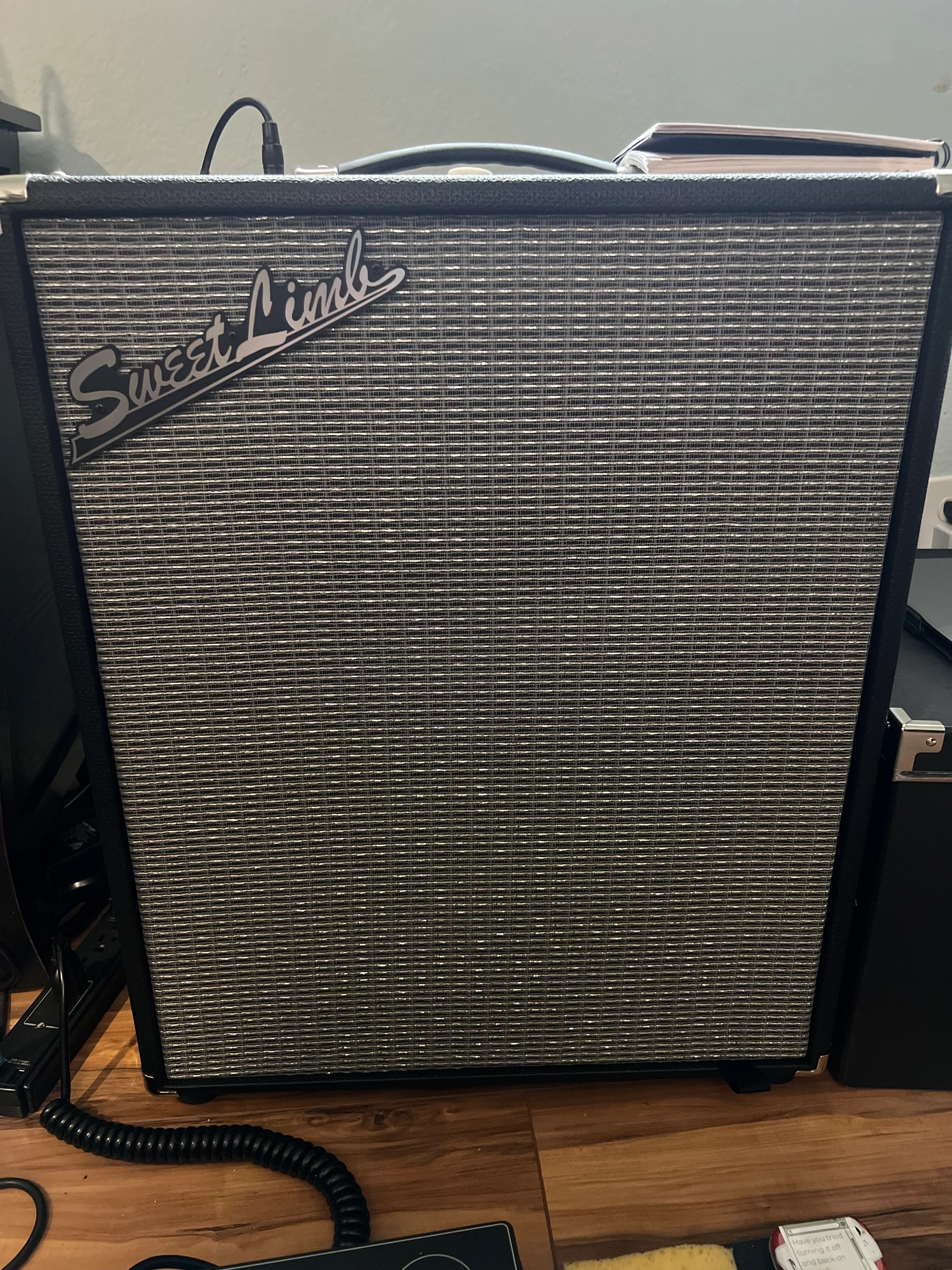
IMG_9395.jpeg-01.jpeg

... ... ... I bought the badge on Etsy.

Here is a link: the Rumble Modifications section

.
Thanks, @patzilla83. A link to this post containing a photo of your custom badge, & the source link, has been added to the Rumble Club Wiki page in the middle part of the Rumble Modifications section. That's some helpful information that many may want to know, so I hope this captures it for future use.

Thank you, very much, Patrick, for sharing your information. :thumbsup:
.
 
Last edited:
Have another gig tomorrow night. I'll be using my Stage 800 without my 210 extension cabinet again, as I did Saturday. I wasn't thrilled with it Saturday (I like it so much better with the extension cab), but this isn't a big enough venue to require the additional cab. Just using the amp on a stand.

I've made some tweaks (removed some of the Polyfill I put in .. it was pretty well stuffed!), adjusted some settings, etc. I may need to back off the bass on my models a bit. The sound is pretty bassy/boomy in my house.

Hoping for better results this time.
 
  • Like
Reactions: jwilson67 and G-Dog
Have another gig tomorrow night. I'll be using my Stage 800 without my 210 extension cabinet again, as I did Saturday. I wasn't thrilled with it Saturday (I like it so much better with the extension cab), but this isn't a big enough venue to require the additional cab. Just using the amp on a stand.

I've made some tweaks (removed some of the Polyfill I put in .. it was pretty well stuffed!), adjusted some settings, etc. I may need to back off the bass on my models a bit. The sound is pretty bassy/boomy in my house.

Hoping for better results this time.

Don't know if you have done this but remember you have the Global EQ settings you can change based on the room you're playing in as well. There is a place we play a lot that is all cement and hard surfaces where I have to change it to the 1st low cut setting to avoid boominess and feedback into my mic. Just a thought so you don't have to change settings in individual patches!
 
  • Like
Reactions: G-Dog
Don't know if you have done this but remember you have the Global EQ settings you can change based on the room you're playing in as well. There is a place we play a lot that is all cement and hard surfaces where I have to change it to the 1st low cut setting to avoid boominess and feedback into my mic. Just a thought so you don't have to change settings in individual patches!

Thanks! I'll need to find the Global settings. Have only been using the amp in rehearsals until a few weeks ago and had no trouble in that space, but each venue we play at is different. The Global settings may help.
 
  • Like
Reactions: jwilson67