• TalkBass has been independent since 1998. Add your voice.
    Create a free account to reply to discussions, view embedded media, and browse with fewer display ads.
    Join freeLog in
    Want zero display ads or expanded classifieds tools? Compare plans.

Line 6 HX Effects

Thanks for sharing, seems to track nicely,
just needs filter/resonance turned down a bit to dial out the wet sloppy fart sound.
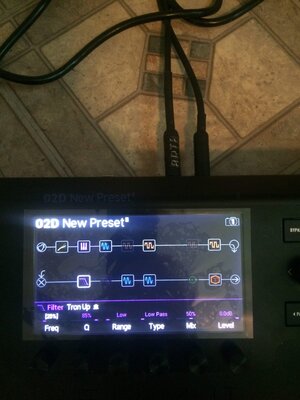
Thanks it was recorded through a phone also but this is the filter I’m using. Which control could I clean that up with? Thanks
 

Attachments

  • 00881A99-AC39-4FF5-834E-0FAC43B23E1E.jpeg
    00881A99-AC39-4FF5-834E-0FAC43B23E1E.jpeg
    387.1 KB · Views: 32
Think I'm getting somewhere building synth. Second go at trying to do the octave fuzz filter synth. Please be easy on me guys who know what their doing but will take constructive critism no problem haha.
Wow, very complex sound.

I've recorded a clip with my HxFx synth design:
Looper rec
Bass octaver On
FxLoop On
Chorus On
Chorus off
Clawthorn On
Clawthorn Off
Autofilter On
Chorus On

Signal flow view:
Bass --> Amp --> Loop effects send --> Hx --> Looper --> HPF 100Hz(only active when Bass octaver is active) --> Bass Octaver --> Clawthorn --> FXloop (with a Wolly Mammoth DIY) --> Autofilter (Sensitivity off, Exp pedal to Freq) --> Chorus
 

Attachments

Wow, very complex sound.

I've recorded a clip with my HxFx synth design:
Looper rec
Bass octaver On
FxLoop On
Chorus On
Chorus off
Clawthorn On
Clawthorn Off
Autofilter On
Chorus On

Signal flow view:
Bass --> Amp --> Loop effects send --> Hx --> Looper --> HPF 100Hz(only active when Bass octaver is active) --> Bass Octaver --> Clawthorn --> FXloop (with a Wolly Mammoth DIY) --> Autofilter (Sensitivity off, Exp pedal to Freq) --> Chorus
Cool man sounds great, I like just after the 1.min mark!
 
So this is potentially a dumb question but how do I access all 9 effect blocks that are possible on patch? I’ve got 6 set up so far and I’m not sure how to access the other 3

Go to the signal flow screen.

Yeah, signal flow (accessed via the button above the home button with the 3 lines) is your best friend on the HX.
 
  • Like
Reactions: Seanbassplayer
Sorry for all the posts in a row.

Here's the info for bypassing individual blocks via MIDI:

Block Bypass via MIDI
1. Press to open the Menu.
2. Press the SIGNAL FLOW switch.
3. Turn the Big Knob to select the block for which its bypass you want to assign to incoming MIDI.
4. Press and turn Knob 3 (MIDI Bypass) to assign an incoming MIDI CC message to turn the block on and off.

Incoming CC values 0-63 turn the block off; values 64-127 turn the block on. Note that some MIDI CCs are reserved for global functions and cannot be selected.
 
  • Like
Reactions: Seanbassplayer