It does not recognize my hx. Even when it’s plugged in the updated asks what device I want to update and then gives me no options. I downloaded both the driver and the updater and it doesn’t do anything.Make sure updater is the most recent. Does the computer recognize your HX?

Enjoy the benefits of a premium membership!
Upgrade Account
-
TalkBass has been independent since 1998. Add your voice.
Create a free account to reply to discussions, view embedded media, and browse with fewer display ads.
Join free Log in
Want zero display ads or expanded classifieds tools? Compare plans.
You are using an out of date browser. It may not display this or other websites correctly.
You should upgrade or use an alternative browser.
You should upgrade or use an alternative browser.
Line 6 HX Effects
- Thread starter ChubbyJerk
- Start date
More options
Who Replied?
2 things to try. First also make sure most resent version of HX Edit is installed as well. Although it’s not needed for update there are some files I think that are associated with updater. Once that’s done retry again. I’m 99% sure this will work. 2nd try a different USB cable but pretty sure install HX Edit and you’ll be good. I had the same situation. Make sure also when prompted to install files to uncheck the box to install Updater as you already have it and you will get an error while installing. Keep us posted!It does not recognize my hx. Even when it’s plugged in the updated asks what device I want to update and then gives me no options. I downloaded both the driver and the updater and it doesn’t do anything.

Will do. I’m using the usb cable that came with the hx. If I have to get a new one what kind is recommended?

My usb cable wouldn’t work for the update but it still recognized the unit. I grabbed the usb for my printer and it updated perfectly, so probably any other usb will work if yours seems to be having problems. But definitely need the HX edit or it doesn’t work properly with the updater.Will do. I’m using the usb cable that came with the hx. If I have to get a new one what kind is recommended?
Last edited:
Pretty sure any one will work with the same end. My LT was missing as it was a return so I used one that I found in my bag of wires lol. I’m pretty confident that the first option will work.. Just to simplify:Will do. I’m using the usb cable that came with the hx. If I have to get a new one what kind is recommended?
Install HX Edit.
Uncheck box to install updateras you already have installed.
Connect HX to computer via USB.
Open Updater.
Turn on HX
Computer should say choose device(HX) should be only one there.
Update HX to latest firmware..
You may lose presets when updating so take pics of settings or backup in HX Edit before updating. Maybe someone else can confirm the loss of presets or if HX Edit is working with HX atm. Thinking you can back up presets just can’t edit till software is available in spring but unsure as I have upgrade from HX to an LT version of Helix a few weeks ago and don’t remember. Hope this makes sense lol but you should be good to go once HX Edit is installed. Cheers!

Think I'm getting somewhere building synth. Second go at trying to do the octave fuzz filter synth. Please be easy on me guys who know what their doing but will take constructive critism no problem haha.
This sounds cool dude, nice job.
Would you mind sharing some of your settings? I wouldn't mind dialing something like this in for bass (thinking Muse-like tones here) that's a little less extreme, but I admit I don't know what I'm doing when it comes to looking for synth tones or building them
Wow, very complex sound.
I've recorded a clip with my HxFx synth design:
Looper rec
Bass octaver On
FxLoop On
Chorus On
Chorus off
Clawthorn On
Clawthorn Off
Autofilter On
Chorus On
Signal flow view:
Bass --> Amp --> Loop effects send --> Hx --> Looper --> HPF 100Hz(only active when Bass octaver is active) --> Bass Octaver --> Clawthorn --> FXloop (with a Wolly Mammoth DIY) --> Autofilter (Sensitivity off, Exp pedal to Freq) --> Chorus
I'd be curious to see what this would sound like with a well placed compressor too - right before the bass octave to improve the tracking and signal strength. I noticed it REALLY makes a difference to the bass octave and how it sounds.
While looking at the MIDI stuff in the HX manual, saw this classic tidbit:
CC# 128
Value:0-63: Guilt
Value: 64-127: Regret
The HX Effects hardware calls your family and informs them of every single poor life decision you've ever made
HAHA, holy sh*t...hadn't seen that. Nice little easter egg
It does not recognize my hx. Even when it’s plugged in the updated asks what device I want to update and then gives me no options. I downloaded both the driver and the updater and it doesn’t do anything.
*Edit I see its been addressed. But just extra fyi, When I first received my HX I had the exact same symptoms and trouble shot the cable, compatibility, a support ticket, etc. Then, I reinstalled the latest updater, the driver(s), and the HX Edit. After installing HX Edit it solved everything for some reason
Thanks man np..This sounds cool dude, nice job.
Would you mind sharing some of your settings? I wouldn't mind dialing something like this in for bass (thinking Muse-like tones here) that's a little less extreme, but I admit I don't know what I'm doing when it comes to looking for synth tones or building them
Deluxe comp:
-37, 6:1, 38ms, 200ms, 100%, +7 db
Bass octaver(legacy):
25%, 100%, 100%; 0.0 db
Dimension chorus (legacy):
S1-S4 off, 100%, 0.0 db
Tycoctavia evil fuzz: lol
6.6, 6.6
Fuzz pi (legacy):
85%, 85%, 20%, 85%, 90%
Tron Up Filter(legacy):
25%, 85%, Low, Low pass, 50%, 0.0 db
Phaser (legacy):
.2hz, 52%, 86%, Stage 16, 100%, 0.0db
70s Chorus :
3.9, Vibrato, 3.8, 6.6, 50%, +1.0
Cave reverb (legacy):
8.2, 50 ms, 59 Hz, 9.4 kHz, 30%, 0.0db
I run my Helix into 2 powered EV FRFR monitors so your sound may differ. There's a second page for each 70s Chorus and Cave reverb but not home to check, this is from the pics I have on my phone but will def get you there. I like it better with the reverb off but still have to experiment more with the reverbs.Lemme know how it works out!!
Last edited:
Thanks man np..
Deluxe comp:
-37, 6:1, 38ms, 200ms, 100%, +7 db
Bass octaver(legacy):
25%, 100%, 100%; 0.0 db
Dimension chorus (legacy):
S1-S4 off, 100%, 0.0 db
Tycoctavia evil fuzz: lol
6.6, 6.6
Fuzz pi (legacy):
85%, 85%, 20%, 85%, 90%
Tron Up Filter(legacy):
25%, 85%, Low, Low pass, 50%, 0.0 db
Phaser (legacy):
.2hz, 52%, 86%, Stage 16, 100%, 0.0db
70s Chorus :
3.9, Vibrato, 3.8, 6.6, 50%, +1.0
Cave reverb (legacy):
8.2, 50 ms, 59 Hz, 9.4 kHz, 30%, 0.0db
I run my Helix into 2 powered EV FRFR monitors so your sound may differ. There's a second page for each 70s Chorus and Cave reverb but not home to check, this is from the pics I have on my phone but will def get you there. I like it better with the reverb off but still have to experiment more with the reverbs.Lemme know how it works out!!
That's cool, this gives me a place to start at least and tweak to taste. I'd have to make changes anyway due to a different source (different bass, different player). Thanks heaps!
I was able to get the updater to recognize my hx unit and it starts the update process but I’ve tried to update it 3 times and it gives me error messages each timePretty sure any one will work with the same end. My LT was missing as it was a return so I used one that I found in my bag of wires lol. I’m pretty confident that the first option will work.. Just to simplify:
Install HX Edit.
Uncheck box to install updateras you already have installed.
Connect HX to computer via USB.
Open Updater.
Turn on HX
Computer should say choose device(HX) should be only one there.
Update HX to latest firmware..
You may lose presets when updating so take pics of settings or backup in HX Edit before updating. Maybe someone else can confirm the loss of presets or if HX Edit is working with HX atm. Thinking you can back up presets just can’t edit till software is available in spring but unsure as I have upgrade from HX to an LT version of Helix a few weeks ago and don’t remember. Hope this makes sense lol but you should be good to go once HX Edit is installed. Cheers!
A few things to try. A different USB port, a different cable also manually putting it in update mode I think by pressing the bottom right arrow when you turn the power on.I was able to get the updater to recognize my hx unit and it starts the update process but I’ve tried to update it 3 times and it gives me error messages each time
Edited cause of misinformation
Last edited:
I’ll buy a different cable and see if that works. I’ve made progress at the very least but still can’t get it to work totally right.
Sorry hold down the right arrow to put in update mode I got that wrong.I’ll buy a different cable and see if that works. I’ve made progress at the very least but still can’t get it to work totally right.
I’ll buy a different cable and see if that works. I’ve made progress at the very least but still can’t get it to work totally right.
As weird as this sounds, resetting the device to factory defaults can help too - hold down the two bottom-right buttons when you power the unit on. Make sure you've dumped any patches you've made to a PC using HX Edit first if you want to keep them.
Have you manually downloaded the firmware separately? Or are you trying to use the Line 6 Updater to automatically install the firmware (ie: run in online mode)?
Sorry hold down the right arrow to put in update mode I got that wrong.
If you do the update via the Line 6 Updater, it does this for you automatically.
If you keep getting an error it tells you to do this.If you do the update via the Line 6 Updater, it does this for you automatically.
I was able to get the updater to recognize my hx unit and it starts the update process but I’ve tried to update it 3 times and it gives me error messages each time
Hmmm interesting.. what does the error say? If you haven't already maybe uninstall everything off your computer and 're install from scratch. Other than that not sure man.I was able to get the updater to recognize my hx unit and it starts the update process but I’ve tried to update it 3 times and it gives me error messages each time

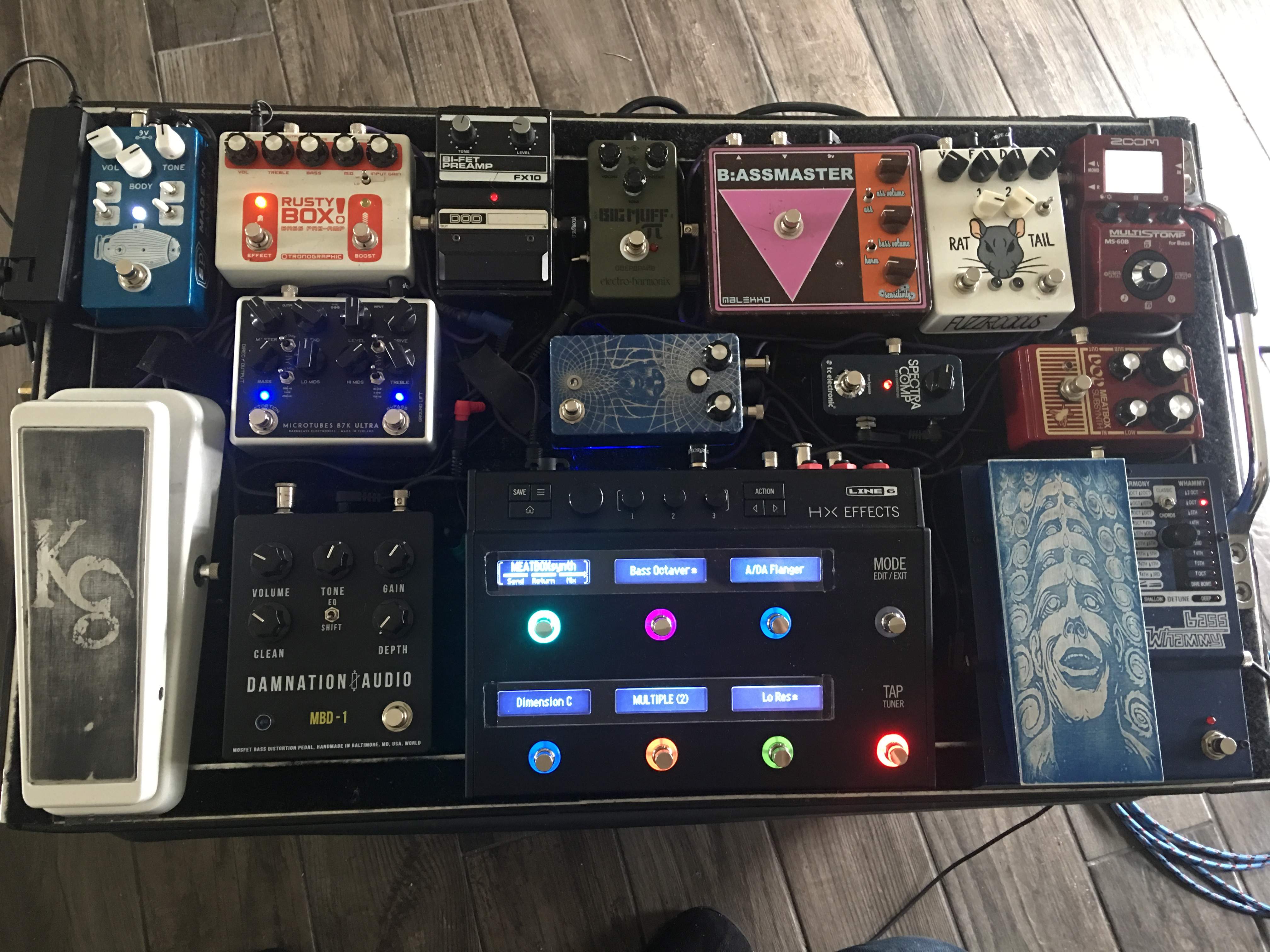
Got the Dunlop mini X exp/vol. works much better than the moog. Man it’s so hard to let go of some pedals haha (side note: the bassmaster is just filling the spot of the DG alpha omega ultra on the way  )
)
) 


