I get home in two days. Hope it's waiting!Cmon... ship it!

TalkBass has been independent since 1998. Add your voice.
Create a free account to reply to discussions, view embedded media, and browse with fewer display ads.
Join free Log in
Want zero display ads or expanded classifieds tools? Compare plans.
I get home in two days. Hope it's waiting!Cmon... ship it!


Hi. No, it can't be. The usb connection is only for updates. No usb-power and usb-soundcard capabilities.
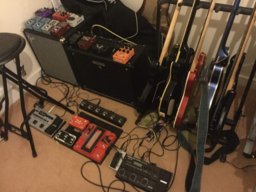
Another sweet floor rig built around the B3n!
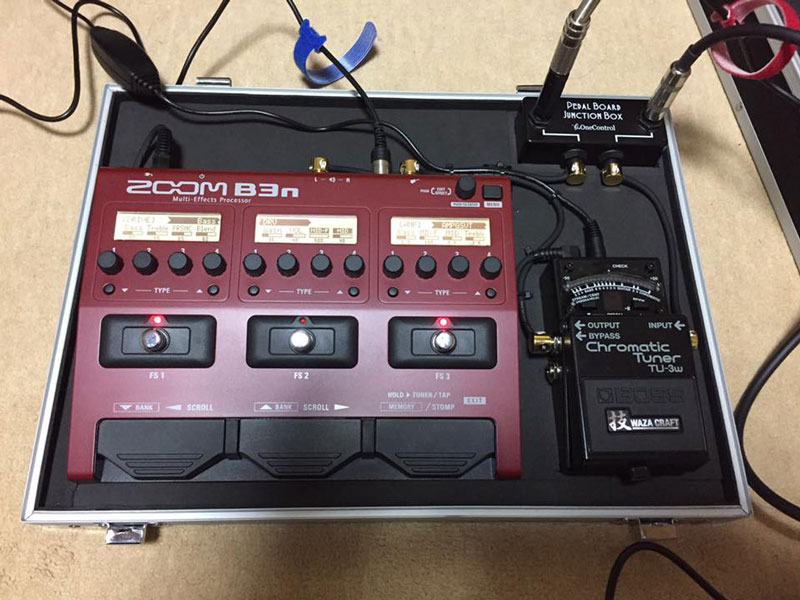
Charlie (or owner of above pedal board) --
Any info on the pearl board junction box on upper right? Like brand name, any other functionality besides being a "junction". Curious, have not seen one before.
Thanks!
OK, thanks! Will check that out.I sourced the picture from a Facebook search, but a Google search revealed that the same junction box can be purchased from Sweetwater.
One Control Junction Box
^^^
Sure. Just bypass everything. Or add effects from the Firehawk if you choose.Thank you so much for your response. So in order to record with this, I will have to run to through an audio interface right? i've been using the Line 6 Firehawk FX as an audio interface for my guitar stuff, wonder if I could do the same for the B3n

No, he really appreciates nursing your sick friends back to health. Chronic GAS is difficult to treat...This just in from my representative at Sweetwater:
Nxxxxxxx Wxxxxxr from Sweetwater Sound, looks like zoom is moving the pedal back again!
My fingers were crossed that it was coming in this week, but looks like towards the end of the month now.
I just got the updated today.
I appreciate your patients, Zoom just updated us today.Phoque I wish he would learn how to spell . . . ..

Yes, yes it is.No, he really appreciates nursing your sick friends back to health. Chronic GAS is difficult to treat...
No, he really appreciates nursing your sick friends back to health. Chronic GAS is difficult to treat...


Poop!AMS has removed the expected ship date altogether as has Sweetwater

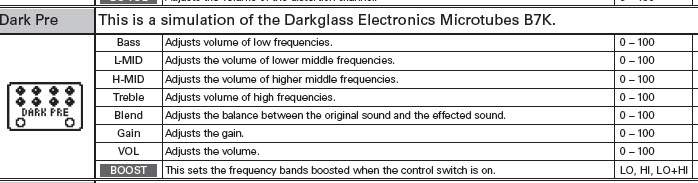
...That makes it sound like an effect with an on/off function consumes two of the three stomp switches. i.e. one stomp to turn the B7K effect on/off and a second stomp to turn the boost parameter on/off. That would be a big time bummer.]...