

Enjoy the benefits of a premium membership!
Upgrade Account
-
TalkBass has been independent since 1998. Add your voice.
Create a free account to reply to discussions, view embedded media, and browse with fewer display ads.
Join free Log in
Want zero display ads or expanded classifieds tools? Compare plans.
You are using an out of date browser. It may not display this or other websites correctly.
You should upgrade or use an alternative browser.
You should upgrade or use an alternative browser.
Source Audio Sorcerers Society (S.A.S.S) Part 3
- Thread starter gregmon79
- Start date
More options
Who Replied?


Is it like an hour long? Think I found it online. Unless he has 1 on just tracking. I do have my usb cable. Disappointed a bit in how the presets u save in ur library on ur phone aren't saved on computer in library as well. I wonder if there's a way to link it by username but other than that awesome first day w it
Maybe try signing out of your Neuro account and signing back in (on your app or computer or both). I don't really use the mobile app, but I did notice that sounds I saved to my library on my computer didn't show up on the app until I did this.
5sg.
can anyone explain the harmony to me
say I want it to play 7th chords based on the note I play how do i accomplish that?
Harmonization: Applies intelligent harmonization between the played note and the
intervals set in the Harmony module further down the Editing interface. Use the
Harmony module to select a key paired with any of over 20 different scales. Unlike
the Normal fixed pitch Interval, the Harmonization pitch intervals fluctuate to adhere
with the selected key and scale. Please note Interval 1 sets the interval for Voices
assigned to a Source labeled with a “1” (ex. Square 1, Sine 1, Saw 1). Interval 2 sets
the interval for Voices assigned to a source labeled with a “2” (ex. Square 2, Sine 2,
say I want it to play 7th chords based on the note I play how do i accomplish that?
Harmonization: Applies intelligent harmonization between the played note and the
intervals set in the Harmony module further down the Editing interface. Use the
Harmony module to select a key paired with any of over 20 different scales. Unlike
the Normal fixed pitch Interval, the Harmonization pitch intervals fluctuate to adhere
with the selected key and scale. Please note Interval 1 sets the interval for Voices
assigned to a Source labeled with a “1” (ex. Square 1, Sine 1, Saw 1). Interval 2 sets
the interval for Voices assigned to a source labeled with a “2” (ex. Square 2, Sine 2,

Assuming you want your 7th chords to change (major/minor) to fit the key you’re in when you change notes then use the harmonizer in that key set to the correct scale interval. If you want a static 7th (so only major or minor 7th regardless of the notes you playing and key you are in) then use the other non-harmonized semitone control and select either the major or minor intervalcan anyone explain the harmony to me
say I want it to play 7th chords based on the note I play how do i accomplish that?
Harmonization: Applies intelligent harmonization between the played note and the
intervals set in the Harmony module further down the Editing interface. Use the
Harmony module to select a key paired with any of over 20 different scales. Unlike
the Normal fixed pitch Interval, the Harmonization pitch intervals fluctuate to adhere
with the selected key and scale. Please note Interval 1 sets the interval for Voices
assigned to a Source labeled with a “1” (ex. Square 1, Sine 1, Saw 1). Interval 2 sets
the interval for Voices assigned to a source labeled with a “2” (ex. Square 2, Sine 2,

- May 16, 2007
- 3,395
- 4,869
- Disclosures
- Volunteer developer/beta tester with Source Audio, Morningstar Engineering & MORTRIX
If you just want oscillators to do this and no dry signal, set one oscillator to play the root, a second oscillator to play the 3rd (“interval 1”) and a third oscillator to play the 7ths (“interval 2”). Choose a key centre and scale type and voila. See my “bass & pad” patches in the cloud for a demonstration and study the settings.can anyone explain the harmony to me
say I want it to play 7th chords based on the note I play how do i accomplish that?
Harmonization: Applies intelligent harmonization between the played note and the
intervals set in the Harmony module further down the Editing interface. Use the
Harmony module to select a key paired with any of over 20 different scales. Unlike
the Normal fixed pitch Interval, the Harmonization pitch intervals fluctuate to adhere
with the selected key and scale. Please note Interval 1 sets the interval for Voices
assigned to a Source labeled with a “1” (ex. Square 1, Sine 1, Saw 1). Interval 2 sets
the interval for Voices assigned to a source labeled with a “2” (ex. Square 2, Sine 2,
What do you mean to fit the key? Doesn't the key change between songs? But is the preset only for a particular song?
where's the other option for static 7ths?
where's the other option for static 7ths?
A single harmonized preset can only be one key, which you have to select yourself. If you want a static 7th interval then just use the “semitone” option under the particular voice without utilizing the global harmonizerWhat do you mean to fit the key? Doesn't the key change between songs? But is the preset only for a particular song?
where's the other option for static 7ths?
- May 16, 2007
- 3,395
- 4,869
- Disclosures
- Volunteer developer/beta tester with Source Audio, Morningstar Engineering & MORTRIX
What do you mean to fit the key? Doesn't the key change between songs? But is the preset only for a particular song?
where's the other option for static 7ths?
A single harmonized preset can only be one key, which you have to select yourself. If you want a static 7th interval then just use the “semitone” option under the particular voice without utilizing the global harmonizer
If you have a midi controller then you can even program key centre and scale type changes on the fly in a single preset. Assign key centre and scale type to two midi CCs in the midi map of the editor and program your controller to manipulate them.
True, I guess I was assuming he was talking about what the particular harmonizer does- ie does it read the key you happen to be playing in? No not that intelligent. You have to select the key. You can however change that key (and most other parameters using MIDI commands from your computer or other outside controller while playing. If you are playing in a single key in a song it’s probably easier just to switch presets by song though!If you have a midi controller then you can even program key centre and scale type changes on the fly in a single preset. Assign key centre and scale type to two midi CCs in the midi map of the editor and program your controller to manipulate them.
Hey Folks, hope this is not against the rules to post here. I am selling a Nemesis in the classifieds if anyone is interested. Looking to make the switch to the Collider!
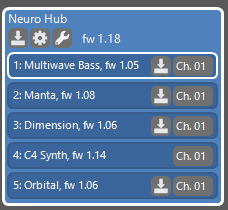
Having five SA pedals alreay and considering getting an Aftershock. At the moment all connectors of my neuro hub are used. How would I get that sixt pedal into my setup?
A second hub which I connect per midi to the first one? Or is there an option to chain the SA pedals one into the other?
A second hub which I connect per midi to the first one? Or is there an option to chain the SA pedals one into the other?
Last edited:
- May 16, 2007
- 3,395
- 4,869
- Disclosures
- Volunteer developer/beta tester with Source Audio, Morningstar Engineering & MORTRIX
Looks like you need to update the firmware on s few of your pedals.
I guess a second Hub is in order. (Or you could replicate your Manta patches on C4 and remove the Manta.
I guess a second Hub is in order. (Or you could replicate your Manta patches on C4 and remove the Manta.
Having five SA pedals alreay and considering getting an Aftershock. At the moment all connectors of my neuro hub are used. How would I get that sixt pedal into my setup?
A second hub which I connect per midi to the first one? Or is there an option to chain the SA pedals one into the other?
View attachment 3716208
Having five SA pedals alreay and considering getting an Aftershock. At the moment all connectors of my neuro hub are used. How would I get that sixt pedal into my setup?
A second hub which I connect per midi to the first one? Or is there an option to chain the SA pedals one into the other?
View attachment 3716208
Oh, I thought I'm running the latest versions. They are the latest versions the Hub Manager brought along. I will look into that.Looks like you need to update the firmware on s few of your pedals.
Then a second Hub it will be. I love the Manta and it's nice to stack it on top on a existing C4 patch. It's kind of lazy, I know.I guess a second Hub is in order. (Or you could replicate your Manta patches on C4 and remove the Manta.
 Oh, and thanks a lot all those nice patches you made for the C4.
Update: I just checked, the Neuro Desktop is bringing firmware updates along too. But they are the ones already installed. Any idea where to get the latest versions?
Last edited:
- May 16, 2007
- 3,395
- 4,869
- Disclosures
- Volunteer developer/beta tester with Source Audio, Morningstar Engineering & MORTRIX
Oh, I thought I'm running the latest versions. They are the latest versions the Hub Manager brought along. I will look into that.
Then a second Hub it will be. I love the Manta and it's nice to stack it on top on a existing C4 patch. It's kind of lazy, I know.
Update: I just checked, the Neuro Desktop is bringing firmware updates along too. But they are the ones already installed. Any idea where to get the latest versions?
I may have been wrong. I assumed firmware needed updating your C4 has no download symbol next to it but the others do, but that might be because C4 can only be updated via usb. If they don’t have yellow borders around the firmware update symbol then they are up to date. It confused me. As you were.
You’re welcome about the patches, nice to know people are using them. I’d like to hear the results some time.
The modern "One" pedal series (and I guess the big ones like the collider and such) get their updates via download by the Neuro Desktop software. In the folder for the "hardware updates" the Neuro Desktop software brings along for the C4 synth pedal the older version 1.071. Installed on my C4 is the latest version is 1.14 and the update was done on the same computer with the same software. The Soundblox2 pedals are listed as "legacy" so I guess they are not included in that online update service. The Neuro Desktop Software is giving you the option to update manually but it looks new firmware for those old legacy pedal are not developed any more. I know that the Neuro Desktop does not check automaticly that you are running the latest firmware on those old pedals. I just got a used orbital modulator with an old firmware. The Neuro Desktop software did not notice me, but I manually checked and updated the pedal.I may have been wrong. I assumed firmware needed updating your C4 has no download symbol next to it but the others do, but that might be because C4 can only be updated via usb. If they don’t have yellow borders around the firmware update symbol then they are up to date. It confused me. As you were.
Still learning, that will take some time, to get to the point presenting something worthwhile listening. But it's a lot of fun to learn and tinker with the C4.You’re welcome about the patches, nice to know people are using them. I’d like to hear the results some time.
Oh, and the solution I guessed and you confirmed is in the [Invalid or Expired Link Removed]:
"CAN MULTIPLE NEURO HUBS BE USED?
Multiple Neuro Hubs can be daisy chained together for simultaneous control over many Source Audio pedals. Connect the MIDI Out port of the first Neuro Hub to the MIDI In port of the second Neuro Hub, and so on. Power up a Neuro Hub and connect it to the [Invalid or Expired Link Removed] over USB.
In the left-hand margin, select the gear icon within the blue rectangle labeled, "Neuro Hub." In the following window, set "MIDI Out Mode," to "MIDI Thru." Do this for each Neuro Hub in the chain."
Sorry for bothering you folks and not reading the manual ... or the FAQ in that matter.
Last edited:

Gibs210
Commercial User
- Aug 31, 2019
- 850
- 875
- Disclosures
- Part time Tech Support for Source Audio effects
Make sure your running the latest version of the desktop editor for any new updates (7.22) you’ll probably have to uninstall the editor first before downloading the new, there’s been some patching issues with the latest version for some reason. You can the version under the help menu.Having five SA pedals alreay and considering getting an Aftershock. At the moment all connectors of my neuro hub are used. How would I get that sixt pedal into my setup?
A second hub which I connect per midi to the first one? Or is there an option to chain the SA pedals one into the other?
View attachment 3716208
alternatively, the c4 can be run from usb midi, if you have a gen3 disaster area controller, you won’t need a second hub, or you can get the disaster area micro ghost if you don’t want another hub.
in the c4 editor how does the routing work as far as processors 1 and 2, I sent voice 2 to processor 2 and put it on a bit crusher distortion and nothing happened, as soon as sent to processor 1 it worked


