• TalkBass has been independent since 1998. Add your voice.
    Create a free account to reply to discussions, view embedded media, and browse with fewer display ads.
    Join freeLog in
    Want zero display ads or expanded classifieds tools? Compare plans.

Source Audio Sorcerers Society (S.A.S.S) Part 3

Hi All

I'm looking for some advice on ways to manage the Source Audio pedal presets \ Neuro hub scenes \ MIDI controller (MC6). The pedals I have are the UltraWave Bass and the Gemini Chorus but I want to start to get organised for potentially adding a Collider and other pedals later.

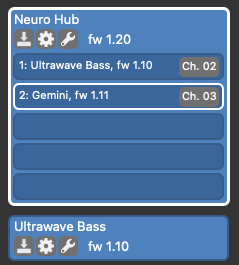
At the moment I have the Ultrawave and Gemini connected to the Neuro Hub and use the Neuro Desktop App to create scenes. I then call the scenes from the MC6. That would be great but the Ultrawave only has minimal configuration options via the hub so I’ve also got the Ultrawave connected to the Neuro Desktop via USB so that I can create an Ultrawave preset and add it into a Neuro Hub scene all within the Neuro Desktop editor.
SourceAudio.png.39bee2e30d22f35f00554f8e3c45a494.png


What alternative workflows do others use for managing presets and scenes? E.g. are there advantages to using the Neuro Hub just to hold presets for the Gemini (so that I can have more than 6) and then to use the MC6 to make a MIDI call to the:
  • UltraWave (MIDI CC 104 recall preset #)
  • And Gemini (MIDI PC scene # via the neuro hub)?
I'm trying to future proof my way of organising the presets and scenes in preparation for any future source audio pedal.

Thanks in advance for any suggestions \ help

Graham

 
Hi All

I'm looking for some advice on ways to manage the Source Audio pedal presets \ Neuro hub scenes \ MIDI controller (MC6). The pedals I have are the UltraWave Bass and the Gemini Chorus but I want to start to get organised for potentially adding a Collider and other pedals later.

At the moment I have the Ultrawave and Gemini connected to the Neuro Hub and use the Neuro Desktop App to create scenes. I then call the scenes from the MC6. That would be great but the Ultrawave only has minimal configuration options via the hub so I’ve also got the Ultrawave connected to the Neuro Desktop via USB so that I can create an Ultrawave preset and add it into a Neuro Hub scene all within the Neuro Desktop editor.

View attachment 4604554

What alternative workflows do others use for managing presets and scenes? E.g. are there advantages to using the Neuro Hub just to hold presets for the Gemini (so that I can have more than 6) and then to use the MC6 to make a MIDI call to the:
  • UltraWave (MIDI CC 104 recall preset #)
  • And Gemini (MIDI PC scene # via the neuro hub)?
I'm trying to future proof my way of organising the presets and scenes in preparation for any future source audio pedal.

Thanks in advance for any suggestions \ help

Graham

Hi Graham, yes both work that way with the Ultrawave. So It's up to you if you prefer to implement a scene or a direct CC message via midi. I have about 70 scenes on my Neuro Hub. But I generally use only about 6 or 7. These have my most common One Series "load outs" saves as a Scene. I then use my midi Controller to call up that particular scene. The Neuro hub can get a bit confused if you send out a Midi PC change (to call up a scene) and then apply a Midi CC change for one of the same pedals...it can freak out the hub and cause it to freeze.
Back in the day when my Aftershock was my only "older" One Series pedal (that can't receive PC or CC patch change messages) I seriously considered having my Neuro Hub as a dedicated Aftershock resource. leaving all of the 128 Scenes available to just my Aftershock. I also considered a 2nd Neuro Hub just for my Lunar too.

My use case scenario is to call up a general patch on my midi Controller....that calls up a PC change / specific scene. Then I use my 6 patch slots available vie the 3 way switch on my Lunar, Aftershock, Ultrawave, C4 and Spectrum as common patch swap outs. A bit like a fav 6 (and most used) settings on speed dial. So I can flick though them and over-ride the default scene patch. It's really flexible and works well for me.
 
The Neuro hub can get a bit confused if you send out a Midi PC change (to call up a scene) and then apply a Midi CC change for one of the same pedals...it can freak out the hub and cause it to freeze.

Thanks for the quick and detailed response and that info is great to know. Out of interest; how do you go about naming your scenes? I'm having horrid flashbacks of excel spreadsheets etc. to keep track of which presets make up each scene.

A bit like a fav 6 (and most used) settings on speed dial. So I can flick though them and over-ride the default scene patch. It's really flexible and works well for me.

That is a great idea. If I understand that correctly then the scene would only be overridden for the specific preset that you switched via the pedal itself? The rest of the scene would still apply to the other pedals? It is something I can test out .. (if I've made any sense with that question).

Thanks again and for the presets that you've been posting to the Cloud for the UltraWave.
 
  • Like
Reactions: GMC
You can access the 6 presets from the pedal itself. A midi controller would allow for access to the full 128 presets.

I appreciate that I can create 128 scenes on the hub but how can the MC6 access 128 presets on say a Gemini or Aftershock when the device itself only has 3 preset numbers (6 presets on the pedal)? What MIDI PC number would I give the MC6 to pass to the Gemini?
 
  • Like
Reactions: Derek Williams
Yes - see screenshot above where I have the pedals connected to the Neuro Desktop app both via the Neuro hub and directly via USB. But the Neuro Hub has scenes; not presets.

I can send MIDI PC to trigger a scene on the hub.

I can also send MIDI CC to trigger a preset on a device. But if the device only has 6 presets ... how does the hub suddenly expose 128 presets on that device?
 
  • Like
Reactions: Derek Williams
Yes - see screenshot above where I have the pedals connected to the Neuro Desktop app both via the Neuro hub and directly via USB. But the Neuro Hub has scenes; not presets.

I can send MIDI PC to trigger a scene on the hub.

I can also send MIDI CC to trigger a preset on a device. But if the device only has 6 presets ... how does the hub suddenly expose 128 presets on that device?
Connect the pedals individually to the desktop editor. You can populate 128 presets and save them. Each pedal should be assigned their own independent midi channel The hub can have its own channel as well. You can then recall presets via midi to the assigned channel or scene if using the assigned hub channel.
 
The Ultrawave does have 128 presets on the pedal itself which can be accessed via MIDI CC from the MC6 and configured in the Neuro Desktop Editor. I believe the C4 also has MIDI so that it can be access direct from the MC6 without the Neuro Hub.

However, the Aftershock and Gemini (and their peers) have only 6 presets on the pedal. I don't understand how attaching them to anything suddenly gives them 128 pedal presets? The pedal presets are specific to the pedal (not the neuro hub) and are accessed via MIDI CC.

I understand that I can have 128 Neuro Hub scenes (multi-pedal presets) which are called via MIDI PC but these are different from actual pedal presets. I can create 128 scenes just of the Gemini but they are still on the hub and not on the pedal.

Perhaps it is the way we are using terminology that is different. Thanks for trying to explain.
 
  • Like
Reactions: Derek Williams
Correct me if I am wrong, but the Hub stores the presets. When accessed, the Hub will send the information to the pedal to configure it according to the selected present. This has nothing to do with presets stored on the pedal itself.

I am not an expert. I am still learning this stuff myself. My words are not to be taken as gospel.
 
Connect the pedals individually to the desktop editor. You can populate 128 presets and save them. Each pedal should be assigned their own independent midi channel The hub can have its own channel as well. You can then recall presets via midi to the assigned channel or scene if using the assigned hub channel.

Not for the Gemini. It’s an older design and lacks midi access to the 6 onboard presets, hub is the only way to get to any sort of presets for the Gemini and the like.

Correct me if I am wrong, but the Hub stores the presets. When accessed, the Hub will send the information to the pedal to configure it according to the selected present. This has nothing to do with presets stored on the pedal itself.

I am not an expert. I am still learning this stuff myself. My words are not to be taken as gospel.

correct.
 
The Ultrawave does have 128 presets on the pedal itself which can be accessed via MIDI CC from the MC6 and configured in the Neuro Desktop Editor. I believe the C4 also has MIDI so that it can be access direct from the MC6 without the Neuro Hub.

However, the Aftershock and Gemini (and their peers) have only 6 presets on the pedal. I don't understand how attaching them to anything suddenly gives them 128 pedal presets? The pedal presets are specific to the pedal (not the neuro hub) and are accessed via MIDI CC.

I understand that I can have 128 Neuro Hub scenes (multi-pedal presets) which are called via MIDI PC but these are different from actual pedal presets. I can create 128 scenes just of the Gemini but they are still on the hub and not on the pedal.

Perhaps it is the way we are using terminology that is different. Thanks for trying to explain.

The Neuro Hub has 128 internal presets that SA call "Scenes". These Scenes contain settings for every attached device to the hub. If I have say 5 SA One series pedals attached to one port on the hub, I can create a a Scene on the hub that can have settings for any or all of those 5 devices. The numerical ID of this Scene is controllable via Midi PC. If I have my hub on Midi Ch1 and I send a midi PC Change to Midi Ch: 1 /PC: 2. I would be calling up Scene 2 on my Hub. However it doesn't stop me from independently calling up a specific internal patch from my newer SA One Series Pedals via Midi CC.

The Hub cannot access the internal 6 patches on the older One Series devices. It can access the 128 patches on newer pedals like the C4 and the first 6 patches on those devices can be selected using the 3 way hardware switch in either the green or red mode.

If you assign the same midi channel to both your Neuro hub and one device (like Lunar, Gemini or Aftershock) and only have that one device attached via the TRRS mini port, and you assign Scenes for that single device only, then the Hub effectively adds a further 128 patches (as Scenes).
At the moment there is no specific facility or button to copy patches from the device to the Hub Scenes or vice versa. You can get around this by loading up a patch on your Once Series device, then open the Neuro Desktop and create a new scene on your hub, add the pedal and select "read from pedal" and then save it as a new Scene. If you apply a scene in your hub, if you go back to your device in the Desktop editor...you will see a star next to the currently loaded patch number. This is the Hub's Scene data loaded into that patch bay. If you click "Save" this that data is now set to this patch switch bay. It's a settings only transfer, it doesn't copy over the Scene Title.

The layering of 3rd Party midi Controller patches, 6 on board device patches and then Hub Scenes, make interesting and useful layers of control. Certainly for me!

I think we are all waiting for the day when Source Audio bring out a new desktop editor that is more stable and offers reliable solutions to these workarounds. In the mean time...the current editor works, but it a bit clunky and confusing to use. It's way better than using the phone app, which is one way coms only....it's really easy to destroy your current settings / patch. So it's wise to have all of your most used patches saved in the community cloud...so you can quickly re-download them if you mess up your patch during a gig using your phone!
 
Can anyone help me understand how the stereo mode works on the One Series pedals? I’d like to put the bass signal through one channel (say the right) of a sequence of One Series pedals and then run an octave-up fake-guitar signal through the other channel (the left). Ideally, the two channels will operate independently and not interact with each other. One of the pedals in question is the Nemesis, which does some left/right interaction. (The others are the Aftershock and the Mercury.) Is there a setting I need to adjust to give me the desired behavior?

Thanks.
 
Can anyone help me understand how the stereo mode works on the One Series pedals? I’d like to put the bass signal through one channel (say the right) of a sequence of One Series pedals and then run an octave-up fake-guitar signal through the other channel (the left). Ideally, the two channels will operate independently and not interact with each other. One of the pedals in question is the Nemesis, which does some left/right interaction. (The others are the Aftershock and the Mercury.) Is there a setting I need to adjust to give me the desired behavior?

Thanks.
Can’t really get a fully independent sound if nemesis is in the mix, he relies on input 1 for some of the stuff happening on output 2. I think the same goes for the Mercury, the aftershock is the only thing that will run both channels independently.
 
Can anyone help me understand how the stereo mode works on the One Series pedals? I’d like to put the bass signal through one channel (say the right) of a sequence of One Series pedals and then run an octave-up fake-guitar signal through the other channel (the left). Ideally, the two channels will operate independently and not interact with each other. One of the pedals in question is the Nemesis, which does some left/right interaction. (The others are the Aftershock and the Mercury.) Is there a setting I need to adjust to give me the desired behavior?

Thanks.
Hi Skeeler, I think you are confusing Stereo with Dual independent Channels. Pedals like the EQ2, Ultrawave and Aftershock are designed with routing options that allow for stereo or seperate channels with different effects / engines / EQ’s assigned to each channel. Others are designed to be either mono, series, parallel mono or stereo.
 
Last edited: