• TalkBass has been independent since 1998. Add your voice.
    Create a free account to reply to discussions, view embedded media, and browse with fewer display ads.
    Join freeLog in
    Want zero display ads or expanded classifieds tools? Compare plans.

Source Audio Sorcerers Society (S.A.S.S) Part 3

This still doesn't work... I mean, would I have to somehow determine that the soleman most right switch sends midi clock, other than disabling the CC for tap tempo?
In the meantime, for panel mode I just made a macro for the 4th switch that sends CC93 to Channels 3 and 4 and that works, but for Scene mode I can't specify that.

So if you disable cc tap in the global settings at the far left of the editor, then enable midi clock for each panel/scene your using, set a tempo, then have switch 4 set for tap tempo, and have midi clock enabled on each pedal preset/scene your using, midi clock still doesn’t work? Even if you just pre program the tempo, and do the presets load sync up to midi clock? (The pedals should have their control input LEDs blinking in tempo constantly if recieving midi clock).

 
So if you disable cc tap in the global settings at the far left of the editor, then enable midi clock for each panel/scene your using, set a tempo, then have switch 4 set for tap tempo, and have midi clock enabled on each pedal preset/scene your using, midi clock still doesn’t work? Even if you just pre program the tempo, and do the presets load sync up to midi clock? (The pedals should have their control input LEDs blinking in tempo constantly if recieving midi clock).
Sorry Gibs, I think I missed a point in one of your earlier responses. I want to get my Tap Tempo going, not send Tempo through midi clock. My reasoning being that the latter makes constant changes to the tempo within up to 2bpm. I've found my "workaround" by simply avoiding clock and instead using a careful tap tempo as that is going steady once it's set.
My bad, now I understand that you were indeed saying it's impossible to send tap tempo on different channels.
 
  • Like
Reactions: Gibs210
Neuro Hub installed, wired and created some sample scenes, WooHoo! We'll see what happens when I add a foot controller, but only if I start gigging again.

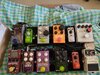
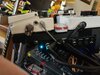
Synth Board 3-22-2022 top view.jpg synrh board 3-22-2022 underneath the beast.jpg Synth board input, power, usb 3-22-2022.jpg
 
I was chatting with a friend last night about how little my board changes these days. I'm very much into using the kit I have and digging deeper into it's sound exploration than I am concerned about flipping out pedals. My last big change was a stereo wiring layout for my top tier pedals (verbs, delays, mods etc) and I'm exploring sounds that I couldn't imagine a few years ago. There's not much new gear that is on my radar. innovation in the effects world is slow. But it seems to me that the three most innovative brands are EHX, Moog and Source Audio. The rest seem to be more interested in creating multi-fx and IR cab sims, which isn't important to me at all. The last big shake ups on my board came from Source Audio. The C4 literally rocked my world and then the Ultrawave shook it again and put a multiband tremolo cherry on the top. The Spectrum is just awesome and the EQ2 and Lunar are in a league of their own. I love my Nemesis too, simply one of the versatile and best delays I've used...period. I'm just waiting on Source Audio to "do it again". Leaving space in my account for beta placement!
 
  • Like
Reactions: bassbrad
I was chatting with a friend last night about how little my board changes these days. I'm very much into using the kit I have and digging deeper into it's sound exploration than I am concerned about flipping out pedals. My last big change was a stereo wiring layout for my top tier pedals (verbs, delays, mods etc) and I'm exploring sounds that I couldn't imagine a few years ago. There's not much new gear that is on my radar. innovation in the effects world is slow. But it seems to me that the three most innovative brands are EHX, Moog and Source Audio. The rest seem to be more interested in creating multi-fx and IR cab sims, which isn't important to me at all. The last big shake ups on my board came from Source Audio. The C4 literally rocked my world and then the Ultrawave shook it again and put a multiband tremolo cherry on the top. The Spectrum is just awesome and the EQ2 and Lunar are in a league of their own. I love my Nemesis too, simply one of the versatile and best delays I've used...period. I'm just waiting on Source Audio to "do it again". Leaving space in my account for beta placement!
I just shared this with the whole SA team. :) Thank you, @GMC !!
 
Can I note that @gregmon79 initiated SASS part 3 back in 2014? That was back when threads were limited in length. Thanks, @gregmon79 !! :)

SASS #1 was initiated by @chris.gotfunk who was a big fan and super nice guy. His wife had twins and poof. He has not been seen since. Chris, I hope you and the family are doing well. We miss you. :)
 
Can I note that @gregmon79 initiated SASS part 3 back in 2014? That was back when threads were limited in length. Thanks, @gregmon79 !! :)

SASS #1 was initiated by @chris.gotfunk who was a big fan and super nice guy. His wife had twins and poof. He has not been seen since. Chris, I hope you and the family are doing well. We miss you. :)

yeah I just passed the torch. All the heavy lifting for this thread has been all of y’all. Wish I had the extra scratch to make an all SA board. Maybe one day…. God that would be simply amazing!!!
 
  • Like
Reactions: rsmith601
Hello SASS!

I have a spectrum question. In the PC version of the Neuro app is there a way to blend or pan between Voice 1 and Voice 2 (or Processor 1 and Processor 2) to favor one or the other?

My want is to use the Twin Filter preset the way the Aguilar pedal works. Currently the preset has the control of one up filter and one down filter's speed (like the pedal), but the pedal also adds a way to blend or favor one of the filters more, use one or the other solo or use both at the same time 50/50. Can I do this with the app?

Thanks!
 
Hello SASS!

I have a spectrum question. In the PC version of the Neuro app is there a way to blend or pan between Voice 1 and Voice 2 (or Processor 1 and Processor 2) to favor one or the other?

My want is to use the Twin Filter preset the way the Aguilar pedal works. Currently the preset has the control of one up filter and one down filter's speed (like the pedal), but the pedal also adds a way to blend or favor one of the filters more, use one or the other solo or use both at the same time 50/50. Can I do this with the app?

Thanks!
I have a c4, not a spectrum, but looking at the editor it seems they share an awful lot. One thing I do is set the output balance to a knob and use that to blend between two filters. I did something similar with an OC2/Bass Octave Deluxe where it balances between two different octave down sounds.
 
I have a c4, not a spectrum, but looking at the editor it seems they share an awful lot. One thing I do is set the output balance to a knob and use that to blend between two filters. I did something similar with an OC2/Bass Octave Deluxe where it balances between two different octave down sounds.
That's a really smart idea. I've not thought about doing 2 different filters on the same pre-set and then dialling between them. Hmmm...food for thought!
 
I have a c4, not a spectrum, but looking at the editor it seems they share an awful lot. One thing I do is set the output balance to a knob and use that to blend between two filters. I did something similar with an OC2/Bass Octave Deluxe where it balances between two different octave down sounds.
I argued for having 2 separate envelopes in the C4/Spectrum. Paying off!!
 
I have a c4, not a spectrum, but looking at the editor it seems they share an awful lot. One thing I do is set the output balance to a knob and use that to blend between two filters. I did something similar with an OC2/Bass Octave Deluxe where it balances between two different octave down sounds.
Ok cool, so the output balance pans the two filters? I was playing with that but wasn't sure if I could trust my ear.
I really don't mind using the app and finding the blend I like between the filters and then using the knobs 1 and 2 for the different speeds of the filters like the original Aguilar pedal. I just wasn't sure I was doing it right.
As usual this forum is priceless!

Thanks!!
 
Ok cool, so the output balance pans the two filters? I was playing with that but wasn't sure if I could trust my ear.
I really don't mind using the app and finding the blend I like between the filters and then using the knobs 1 and 2 for the different speeds of the filters like the original Aguilar pedal. I just wasn't sure I was doing it right.
As usual this forum is priceless!

Thanks!!
Where the C4 wins here is that it is possible to set differing sensitivities on each of the two filters, which is sadly lacking in the Filter Twin and one of the reasons I sold mine.
 
Where the C4 wins here is that it is possible to set differing sensitivities on each of the two filters, which is sadly lacking in the Filter Twin and one of the reasons I sold mine.
In all of the "what is the best filter pedal" threads lots of little important details like this never see the light of day. Thank goodness for SASS! :)