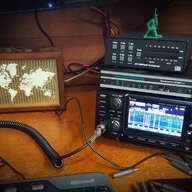
Well then. I guess the question really is, do I like Gold, Orange, or Purple.
Well: the answer is gold, Aftershock. It’s the best looking pedal on my board!

TalkBass has been independent since 1998. Add your voice.
Create a free account to reply to discussions, view embedded media, and browse with fewer display ads.
Join free Log in
Want zero display ads or expanded classifieds tools? Compare plans.
Well then. I guess the question really is, do I like Gold, Orange, or Purple.
YesAre you running the latest version of the firmware for C4?

Here it is. There are a few things disconnected at this point. I had a few Voodoo Labs splitters that were defective, hence the danglies underneath in the middle of the harness mayhem. My brother is bringing by a couple of fitted side caps that will have the instrument inputs and outputs, a volume pedal loop, expression pedal inputs for the SA stuff (one for each hub), and also the XLR input for my condenser mic that I use on the baritone sax. I fabbed up the power and instrument cables. Everything is attached with enough dual-lock to hold solidly without making a prybar necessary to remove components. The three switchers in the middle bottom are external switches for the BB, Soleman and Infinity to access more options. This is an experimental platform. The Aftershock will likely be swapped out for some other SA pedal when something new and wonderful hits the market. I opted for twin MXR compressors in series, using one for general playing and one to switch to for higher compression slap work. I'll tidy up the dangly business when the last of the components arrive, hopefully in the next week or so. Of note, the underside of the top shelf is a similar situation of cables to the exposed middle shelf. SA TRRS cables are of one length, long enough (thankfully) to reach everything, but long enough to make a bit of a bird's nest even with routing brackets and zip ties. One day, if feeling a bit froggy, I might give a go to making some custom TRRS cables, but at this point, I want to get to the playing part.
This project began a couple of years ago with the acquisition of some pieces to replace an 11 pedal MXR board that was smoked by a power surge when I lived a bit south of Death Valley. The two MXR compressors are the same from that dead board, but with factory PCB replacements. MXR was pretty good about making a repair option available outside of the warranty period. I sold the rest of the pedals and power supply for parts/projects to tinkers. This board is plugged into a power conditioner/surge suppressor rack unit that powers my amp...not the wall of a sub-standard dwelling's, sub-standard electrical system on a sub-standard electric grid...also on the east coast.
This board was designed to support 2 electric stringed instruments and one mic'ed input. I play both fretted and fretless 5 and six string bass (respectively), also baritone guitar, flute and baritone sax (I have recently picked up a metal bodied clarinet, but wouldn't say that I can play it effectively yet). I wanted something I could use for all or any of the options in a one man or duo situation. I still enjoy gigging with bands, but want the freedom to do so without the hassle of the logistics wrangling cats all of the time. This setup is mainly for the home studio, but I'm not against building it a road case and going out when I have it all figured out.
I am not a photographer by trade or even a marginally effective hobbyist. I have included perfunctory feets in one shot to keep with TB tradition. No banana for scale.View attachment 4855773 View attachment 4855774 View attachment 4855775

Ok, likely a bug then, I’ll put it on our list to address in the future.

 moment. Completely forgot there was more than 4 preset slots.



Another project took priority for a few weeks. We can only afford to work on Reflex 2 between projects. I have concerns about the economics at times.Any new updates on how the Reflex 2 development is going?

Another project took priority for a few weeks. We can only afford to work on Reflex 2 between projects. I have concerns about the economics at times.
Another project took priority for a few weeks. We can only afford to work on Reflex 2 between projects. I have concerns about the economics at times.

ONE Series MIDI AdapterAre we still thinking the MIDI host box thingy is coming out in a couple of weeks?
Am I right that it'll have 1/4" female TRS jacks for the MIDI Out and Thru, and the piece to connect it to the control input is either attached or a separate adapter that will come with the unit?
Do we have a name for it yet?


Depends on how you are changing presets on the Collider/Hub.Question regarding the Collider and MIDI - hopefully someone has a solution to this..
I use the DMC Micro, right now it's controlling the C4, UW and the Collider through the Hub. Everything regarding switching presets, editing, all seems to be good except for some reason only one side of the Collider shuts off when i change presets. Right now the Reverb side shuts off and the Delay is always on when i swap presets. I've tried saving presets with both sides disengaged, nothing is working. Is there any way around this? I'm trying to incoporate it into my live set and hitting a real snag...
Edit: spent some time with the manual and I think I followed the right steps. Unless I'm reading incorrectly, both sides should be able to be disengaged while swapping presets. Not sure what I'm doing wrong.
Depends on how you are changing presets on the Collider/Hub.
If you are recalling the Collider’s own internal presets (by sending CC’s) then there are separate CCs for recalling presets in the engaged or in the bypass state. My guess is you’re sending the engaged one.
If you are trying to recall a Hub scene (by sending a PC) and the Collider is part of that scene then you need to resave the scene on the Hub with both Collider engines bypassed.
If those things don’t work, it’s maybe also worth checking whether you’re inadvertently sending out the CC which switches on one side of the Collider.
Ok.. this kinda makes sense, lol. Still learning all the midi terminology. I am recalling the Collider's internal presets by using the P mode on the DMC for my "scenes", not saving to the actual hub. I have it set on the D bank in the Micro.
I am not sure about the CC messages you are referring to. I just followed what I thought was suggested in the manual as far as checking boxes and saving with the preset disengaged. I'm obviously missing something, lol..
If your using the nemesis driver on the dmc that’s probably the issue, that was designed for the nemesis and not collider, so there’s a compromise with the bypass engage with the collider having 2 bypassable dsps. Better off using the hub to handle this than P mode. Or getting into the cc mode of the dmc and programming custom controls just for collider.Ok.. this kinda makes sense, lol. Still learning all the midi terminology. I am recalling the Collider's internal presets by using the P mode on the DMC for my "scenes", not saving to the actual hub. I have it set on the D bank in the Micro.
I am not sure about the CC messages you are referring to. I just followed what I thought was suggested in the manual as far as checking boxes and saving with the preset disengaged. I'm obviously missing something, lol..

Anyone ever managed to make their own program switcher for a C4 with a ardunio or adafruit or equivalent (that can work as a usb midi host) ?
I think I’ve found a project…