
Yes, you can use any of the modulation presets interchangeably between those three.Thanks for the quick reply! Am I correct that those are the three pedals that I can use presets for? So not the reverb too?

Enjoy the benefits of a premium membership!
Upgrade Account
-
TalkBass has been independent since 1998. Add your voice.
Create a free account to reply to discussions, view embedded media, and browse with fewer display ads.
Join free Log in
Want zero display ads or expanded classifieds tools? Compare plans.
You are using an out of date browser. It may not display this or other websites correctly.
You should upgrade or use an alternative browser.
You should upgrade or use an alternative browser.
Source Audio Sorcerers Society (S.A.S.S) Part 3
- Thread starter gregmon79
- Start date
More options
Who Replied?
Thanks!Yes, you can use any of the modulation presets interchangeably between those three.
Understood. I have a Hub, so would incorporate into scenes.Those pedals have only 6 onboard presets. The reverb pedal (Ventris) has 128.
Hi All
I have been playing with my new Ultrawave and have created a couple of patches for general use (comp and light drive etc). I am finding more than with the C4 that these don't sound the same when I use them with my band so would like to tweak them on the fly with the onboard controls. Initially this would be just drive and EQ so no issue. My question is how can I then save these changes to the presents once I get them right in the mix? I don't want to take a laptop to a band practice for this and would it test the patience of my band mates if I did.
It there a quick way I am missing?
Cheers
Steve
I have been playing with my new Ultrawave and have created a couple of patches for general use (comp and light drive etc). I am finding more than with the C4 that these don't sound the same when I use them with my band so would like to tweak them on the fly with the onboard controls. Initially this would be just drive and EQ so no issue. My question is how can I then save these changes to the presents once I get them right in the mix? I don't want to take a laptop to a band practice for this and would it test the patience of my band mates if I did.
It there a quick way I am missing?
Cheers
Steve


Gibs210
Commercial User
- Aug 31, 2019
- 850
- 875
- Disclosures
- Part time Tech Support for Source Audio effects
Set the ultrawave to preset mode in the neuro app. If you make any changes the main LED will blink to show changes were made, then hold down the footswitch to save the changes.Hi All
I have been playing with my new Ultrawave and have created a couple of patches for general use (comp and light drive etc). I am finding more than with the C4 that these don't sound the same when I use them with my band so would like to tweak them on the fly with the onboard controls. Initially this would be just drive and EQ so no issue. My question is how can I then save these changes to the presents once I get them right in the mix? I don't want to take a laptop to a band practice for this and would it test the patience of my band mates if I did.
It there a quick way I am missing?
Cheers
Steve

Hi @Hugsonic there is a video on using a Bluetooth dongle with SA pedals and the phone Neuro app. Perhaps this is a solution.Hi All
I have been playing with my new Ultrawave and have created a couple of patches for general use (comp and light drive etc). I am finding more than with the C4 that these don't sound the same when I use them with my band so would like to tweak them on the fly with the onboard controls. Initially this would be just drive and EQ so no issue. My question is how can I then save these changes to the presents once I get them right in the mix? I don't want to take a laptop to a band practice for this and would it test the patience of my band mates if I did.
It there a quick way I am missing?
Cheers
Steve
 .
.Or a proper USB connection from your phone works ok for on the fly edits… e.g. for me a lightning to usb On The Go short cable / dongle thingy into the iPhone, and then the usual USB A to micro B cable

Re the new MIDI dongle/adapter on its way to UK....
Can anyone please recommend a compact idiot proof midi switch/display unit to work with it?
I am daunted by using midi, given the number of posts here with midi tech issues. So a reliable, simple to use unit, that clearly displays the preset name? I don't want to be cross referencing different midi numbers than the given preset number in the Neuro software.
Also, with such a footswitch, is stomping between presets seamless? I'm wanting to do it live with C4, during songs, say verse to chorus etc. Dont mind a tiny delay, but no noise/clicks.
Thanks guys!
Can anyone please recommend a compact idiot proof midi switch/display unit to work with it?
I am daunted by using midi, given the number of posts here with midi tech issues. So a reliable, simple to use unit, that clearly displays the preset name? I don't want to be cross referencing different midi numbers than the given preset number in the Neuro software.
Also, with such a footswitch, is stomping between presets seamless? I'm wanting to do it live with C4, during songs, say verse to chorus etc. Dont mind a tiny delay, but no noise/clicks.
Thanks guys!

If you want preset names displayed you’ll have to enter them yourself manually as MIDI doesn’t communicate that type of info. A couple good options with display and preset naming capabilities are the Morningstar MC3/6/8 or any of the Gen3 DMC MIDI controllers (if you use a DMC controller you actually won’t need the new SA MIDI box at all).Re the new MIDI dongle/adapter on its way to UK....
Can anyone please recommend a compact idiot proof midi switch/display unit to work with it?
I am daunted by using midi, given the number of posts here with midi tech issues. So a reliable, simple to use unit, that clearly displays the preset name? I don't want to be cross referencing different midi numbers than the given preset number in the Neuro software.
Also, with such a footswitch, is stomping between presets seamless? I'm wanting to do it live with C4, during songs, say verse to chorus etc. Dont mind a tiny delay, but no noise/clicks.
Thanks guys!

I also spoke with SA a couple days ago regarding the Matthews Futurist and the USB connection. SA felt there should be no issues and no need for the SA168 midi adapter. 

Hi all,
just some word of praise without any serious info content.
I bought my last pedal of any kind 3.5 (!) years ago, since I was mainly occupied playing flute and sax recently. Towards the end of my bass/guitar "career" (so far), I downgraded my pedalboard to a Nano+ and wanted a Reverb/Delay combo (because: PB real estate). I bought a Keeley Caverns, which is a very fine pedal, but 2 weeks ago I brought the board out of storage and suddenly it wasn't enough anymore.
Well, I thought I was over the whole pedal thing, but as of yesterday, I'm the proud owner of a Collider and I must say that this pedal is absolutely beautiful. I think Pete Thorn called the sounds "luxurious" in his demo and that's exactly how I feel. Just a huge amount of extremely pleasant spaces for tones to live in. Thanks SA, this one is all I hoped for it to be…and there's a lot more to explore!
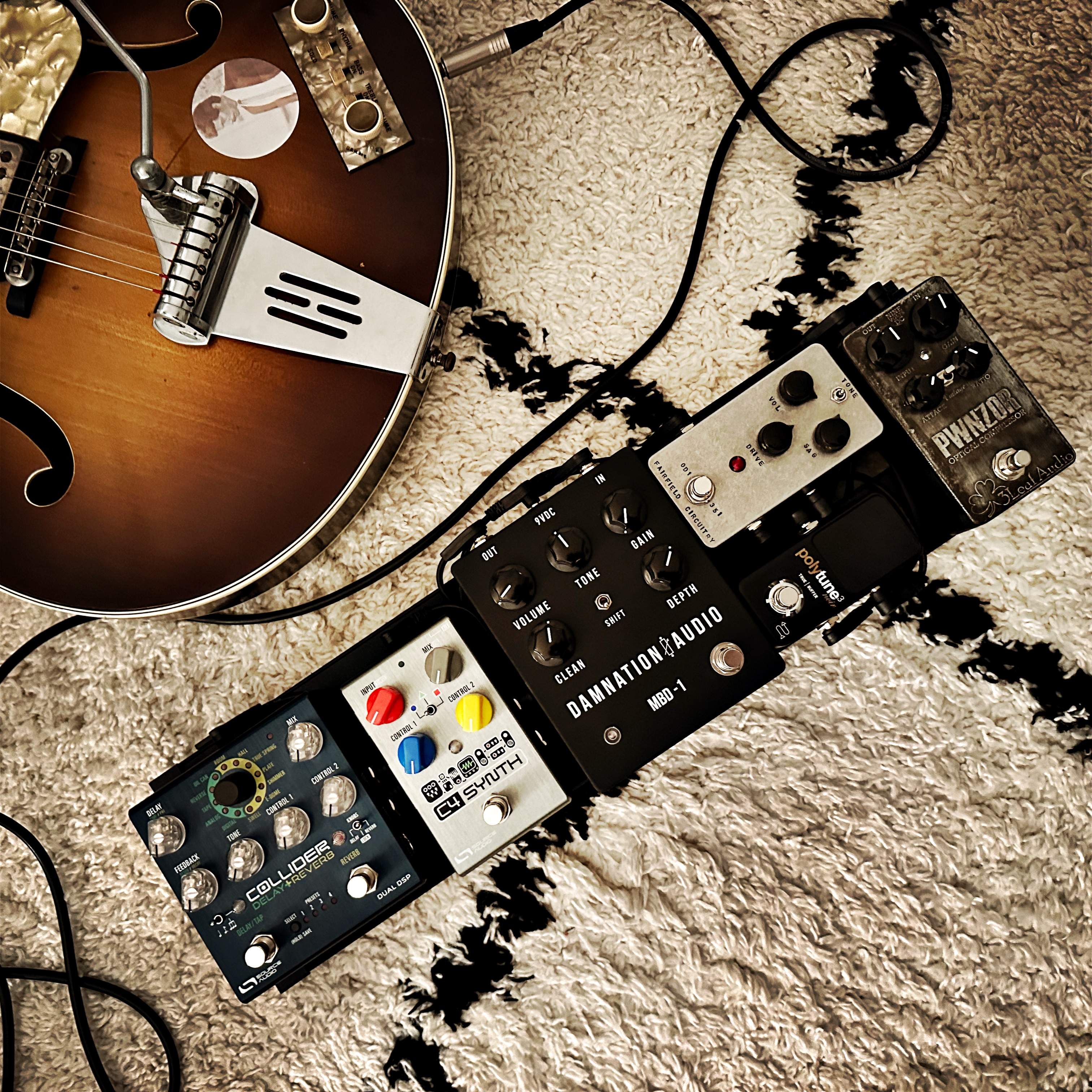
just some word of praise without any serious info content.
I bought my last pedal of any kind 3.5 (!) years ago, since I was mainly occupied playing flute and sax recently. Towards the end of my bass/guitar "career" (so far), I downgraded my pedalboard to a Nano+ and wanted a Reverb/Delay combo (because: PB real estate). I bought a Keeley Caverns, which is a very fine pedal, but 2 weeks ago I brought the board out of storage and suddenly it wasn't enough anymore.
Well, I thought I was over the whole pedal thing, but as of yesterday, I'm the proud owner of a Collider and I must say that this pedal is absolutely beautiful. I think Pete Thorn called the sounds "luxurious" in his demo and that's exactly how I feel. Just a huge amount of extremely pleasant spaces for tones to live in. Thanks SA, this one is all I hoped for it to be…and there's a lot more to explore!
If you want preset names displayed you’ll have to enter them yourself manually as MIDI doesn’t communicate that type of info. A couple good options with display and preset naming capabilities are the Morningstar MC3/6/8 or any of the Gen3 DMC MIDI controllers (if you use a DMC controller you actually won’t need the new SA MIDI box at all).
Hey thanks for this. I've heard those names mentioned here before, will check them out.
So when you say.... "if you use a DMC controller you actually won’t need the new SA MIDI box at all" ...... Are you referring to the new dongle/adapter?
So the DMC as a standalone?
Yes the DMC has built-in USB Host ability so you can use the USB jack for direct control, or you can use one of the DMC 1/4” control ports into the 1/8” C4 control port (they are the only controller that has this capability built-in as far as I know). Either the new MIDI dongle or a Neuro Hub will be required for most other pedal MIDI controllersHey thanks for this. I've heard those names mentioned here before, will check them out.
So when you say.... "if you use a DMC controller you actually won’t need the new SA MIDI box at all" ...... Are you referring to the new dongle/adapter?
So the DMC as a standalone?
Gratuitous pics for reference:

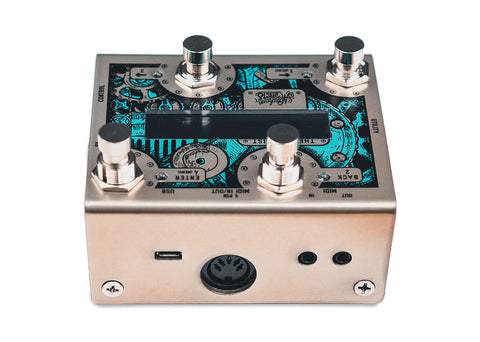
Not as small as the DMC, but appears to offer some expandability, advanced options and dual line read out. You can add an expression pedal and switch's such as Tap Tempo. $229 USD retail
Not as small as the DMC, but appears to offer some expandability, advanced options and dual line read out. You can add an expression pedal and switch's such as Tap Tempo. $229 USD retail
Thanks guys @PhatBottomBass1 @sunbeast
Although these units look pretty well equipped, they are approx £200 each. Is there a midi switch unit that is cheaper than those you quoted? I only need to connect the 1 C4 pedal. I understood the new midi adapter is around £40? So something for £100?
Thanks
@rsmith601 @NPappas
Although these units look pretty well equipped, they are approx £200 each. Is there a midi switch unit that is cheaper than those you quoted? I only need to connect the 1 C4 pedal. I understood the new midi adapter is around £40? So something for £100?
Thanks
@rsmith601 @NPappas
Last edited:
Not sure what the price is across the pond, but over here a DMC Micro is only $140 (or around $100 used) and doesn’t require the additional box. I’d guess that’s the cheapest option you will find with a screen and preset-naming capabilities.Thanks guys @PhatBottomBass1 @sunbeast
Although these units look pretty well equipped, they are approx £200 each. Is there a midi switch unit that is cheaper than those you quoted? I only need to connect the 1 C4 pedal. I understood the new midi adapter is around £40? So something for £100?
Thanks
@rsmith601 @NPappas
Not sure what the price is across the pond, but over here a DMC Micro is only $140 (or around $100 used) and doesn’t require the additional box. I’d guess that’s the cheapest option you will find with a screen and preset-naming capabilities.
Ok thanks. Cant remember which model I was looking at exactly! Thats a more attractive price.
My eyesight is weakening with a cataract and I need reading glasses, so I'm seeking a decent sized display if poss. Hence, I was looking at the larger units.
Disaster Area DMC-3XL Gen3 MIDI Controller for Guitar Pedals - Andertons Music Co.
Keep in mind that any of these smaller units will have a very limited visible character-count, so you'll most likely have to input some recognizable abbreviation. Not sure how much difference there is between screen-sizes with the two DMC models, the only one I had as the DMC-8 which I moved on when I grabbed a Morningstar MC-6. The Morningstar controllers are much more capable as far as complex control and have more characters available on the screen, but they do require a third device to communicate with the C4 and require more manual programming (the real attraction of the DMC units is that they don't require an extra box for MIDI communication and they are preprogrammed for ease of use for basic preset scrolling).Ok thanks. Cant remember which model I was looking at exactly! Thats a more attractive price.
My eyesight is weakening with a cataract and I need reading glasses, so I'm seeking a decent sized display if poss. Hence, I was looking at the larger units.
Disaster Area DMC-3XL Gen3 MIDI Controller for Guitar Pedals - Andertons Music Co.

rsmith601
Commercial User
- Apr 14, 2009
- 4,461
- 8,356
- Disclosures
- CEO and Co-Founder, Source Audio
Hi all,
just some word of praise without any serious info content.
I bought my last pedal of any kind 3.5 (!) years ago, since I was mainly occupied playing flute and sax recently. Towards the end of my bass/guitar "career" (so far), I downgraded my pedalboard to a Nano+ and wanted a Reverb/Delay combo (because: PB real estate). I bought a Keeley Caverns, which is a very fine pedal, but 2 weeks ago I brought the board out of storage and suddenly it wasn't enough anymore.
Well, I thought I was over the whole pedal thing, but as of yesterday, I'm the proud owner of a Collider and I must say that this pedal is absolutely beautiful. I think Pete Thorn called the sounds "luxurious" in his demo and that's exactly how I feel. Just a huge amount of extremely pleasant spaces for tones to live in. Thanks SA, this one is all I hoped for it to be…and there's a lot more to explore!
View attachment 4955206


