
Guilty, you should see my pedal board...I sense a theme......

Enjoy the benefits of a premium membership!
Upgrade Account
-
TalkBass has been independent since 1998. Add your voice.
Create a free account to reply to discussions, view embedded media, and browse with fewer display ads.
Join free Log in
Want zero display ads or expanded classifieds tools? Compare plans.
You are using an out of date browser. It may not display this or other websites correctly.
You should upgrade or use an alternative browser.
You should upgrade or use an alternative browser.
Boss GT 1000Core
- Thread starter Krisfield
- Start date
More options
Who Replied?

I’m a fan of those new Ibanez headless basses.
View attachment 4108592
Cannot beat the portability of this bad boy
I sold all but this and my first bass and from December 9th 2020 to December 9th 2021 will only use this one. I have a John East Uni-Pre in it and it handles everything.I’m a fan of those new Ibanez headless basses.

Has anyone been able to figure out if it is possible to run cab simulation without amp simulation? Seems like you need to keep the amp sim on, or or the cab sim is bypassed as well. I was able to approximate a transparent tone with the natural bass model, but I'd rather have had it off altogether.
I'm using a Q/Strip after the GTCore as my Global EQ. The Q/Strip does cab sim, and I use it as my DI. Can get some nice sounding super clean transparent tones. You can use the GTCore's Global EQ to do a type of cab sim like the Q/Strip. Set the low cut (HPF) to 40Hz, and high cut (LPF) to 3.15kHz. And set the mids to taste.
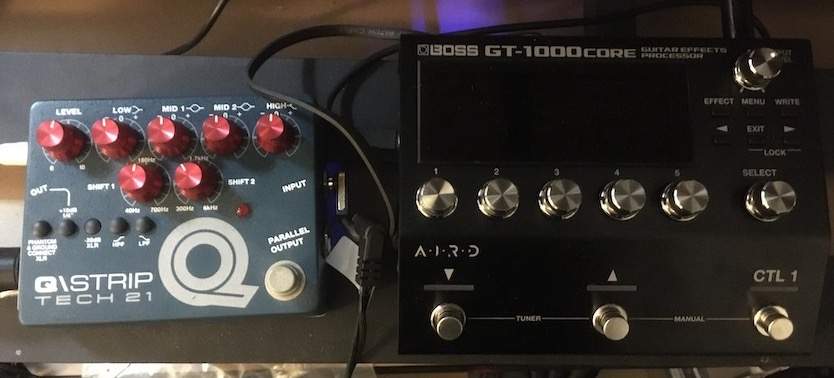
Has anyone been able to figure out if it is possible to run cab simulation without amp simulation? Seems like you need to keep the amp sim on, or or the cab sim is bypassed as well. I was able to approximate a transparent tone with the natural bass model, but I'd rather have had it off altogether.
Oooooo very niceI'm using a Q/Strip after the GTCore as my Global EQ. The Q/Strip does cab sim, and I use it as my DI. Can get some nice sounding super clean transparent tones. You can use the GTCore's Global EQ to do a type of cab sim like the Q/Strip. Set the low cut (HPF) to 40Hz, and high cut (LPF) to 3.15kHz. And set the mids to taste.
View attachment 4109058
I meant the on-board custom IRs. I've loaded up with my favourites, but I prefer running analogue dirt/amp simulationI'm using a Q/Strip after the GTCore as my Global EQ. The Q/Strip does cab sim, and I use it as my DI. Can get some nice sounding super clean transparent tones. You can use the GTCore's Global EQ to do a type of cab sim like the Q/Strip. Set the low cut (HPF) to 40Hz, and high cut (LPF) to 3.15kHz. And set the mids to taste.
View attachment 4109058

New GTCore System Program update available - Version 1.02.
Interesting Boss dosn't notify registered users of the update.
UPDATE HISTORY
[ Ver.1.02 ] NOV 2020
Bug Fixes
The following bugs were fixed.
Bug Fixes
The following bugs were fixed.
Interesting Boss dosn't notify registered users of the update.
UPDATE HISTORY
[ Ver.1.02 ] NOV 2020
Bug Fixes
The following bugs were fixed.
- Depending on compressor settings, noise sometimes occurs when switching patches.
- Under certain conditions, ROUTING of DIVIDER fails to work as desired when switching patches.
- When the [UP] and [DOWN] switches are pressed at the same time at the tuner screen to quit, then on next use, the tuner is set to "Monophonic Tuner."
Bug Fixes
The following bugs were fixed.
- Under certain conditions, VIBRATO fails to work as desired when switching patches.
- Behaviour is not as desired when the STEREO LINK parameter for SP.SIMULATOR is set to OFF.
- The effect level sometimes rises when CARRYOVER is active.
- Under particular conditions, the DUCK parameter for REVERB fails to operate as desired when patches are switched.
- Other minor bugs.
Last edited:
Something else that happened. Tone Studio on my MacBook stopped working...
I updated to the latest GT 1000Core Driver Ver. 1.0.1, and Tone Studio Ver. 3.1.3
Once I updated the three programs, everything is working normally again.
Might have to set up an alert on my calendar every month.
I updated to the latest GT 1000Core Driver Ver. 1.0.1, and Tone Studio Ver. 3.1.3
Once I updated the three programs, everything is working normally again.
Might have to set up an alert on my calendar every month.
Last edited:

I have a question about the output level knob. I don't know if mine is working right or not.
The knob at its lowest setting does not turn the output off and there is not much of a volume change between the min and max setting on the knob.
Is this how this is supposed to work, or is there something wrong with mine?
The knob at its lowest setting does not turn the output off and there is not much of a volume change between the min and max setting on the knob.
Is this how this is supposed to work, or is there something wrong with mine?
On mine the Out Level knob turns off the output volume. I leave it set at 50%.
Did you get yours brand new in an unopened box? If not, might be helpful to do a Factory Reset.
Did you get yours brand new in an unopened box? If not, might be helpful to do a Factory Reset.
I have a question about the output level knob. I don't know if mine is working right or not.
The knob at its lowest setting does not turn the output off and there is not much of a volume change between the min and max setting on the knob.
Is this how this is supposed to work, or is there something wrong with mine?
On mine the Out Level knob turns off the output volume. I leave it set at 50%.
Did you get yours brand new in an unopened box? If not, might be helpful to do a Factory Reset.
It is a demo model from Sweetwater. I did a factory reset when I received it, but I will try that again.
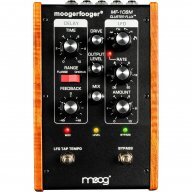
Well, I picked one of these up. Bit of a learning curve on this thing... 
My first dumb question: Boss says "only use official Boss power adapter." I assume that's just typical CYA, correct? I assume there won't be an issue hooking it up to the power supply on my pedal board, as long as the voltage is set correctly.
Second potentially less-dumb question: Any good sites with bass patches for this unit? Or recommendations for clean jazz/fusion tones?
My first dumb question: Boss says "only use official Boss power adapter." I assume that's just typical CYA, correct? I assume there won't be an issue hooking it up to the power supply on my pedal board, as long as the voltage is set correctly.
Second potentially less-dumb question: Any good sites with bass patches for this unit? Or recommendations for clean jazz/fusion tones?
The only Boss pedal i only use the correct Boss adapterfor is my gt1000core. I've used one spots, I use a voodoo for my board. Just make sure the power source matches what it's supposed to be powering.Well, I picked one of these up. Bit of a learning curve on this thing...
My first dumb question: Boss says "only use official Boss power adapter." I assume that's just typical CYA, correct? I assume there won't be an issue hooking it up to the power supply on my pedal board, as long as the voltage is set correctly.
Second potentially less-dumb question: Any good sites with bass patches for this unit? Or recommendations for clean jazz/fusion tones?
It's specced for 670 mA current draw, so even if you have the voltage you might not have the current. I think I'm either using a current combining cable or just running straight off of a 400 mA jack on a Voodoo Lab Pedal Power Mondo. Can't say I remember which, but it works. The included adapter is 2A. Quite hefty!Well, I picked one of these up. Bit of a learning curve on this thing...
My first dumb question: Boss says "only use official Boss power adapter." I assume that's just typical CYA, correct? I assume there won't be an issue hooking it up to the power supply on my pedal board, as long as the voltage is set correctly.
Second potentially less-dumb question: Any good sites with bass patches for this unit? Or recommendations for clean jazz/fusion tones?
There's two Live Sets for Bass available at Boss Tone Central, Andreas Oxholm Collection, and GT 1000 Extra Bass Collection 1.
Andreas Oxholm Collection
GT-1000 Extra Bass Collection 1
Hope the GTCore serves you well.
Andreas Oxholm Collection
GT-1000 Extra Bass Collection 1
Hope the GTCore serves you well.
Any good sites with bass patches for this unit? Or recommendations for clean jazz/fusion tones?


Hummergeist
Commercial User
- Jul 21, 2020
- 1,269
- 3,084
- Disclosures
- Tutorials, reviews, and interviews for Future Publishing.
Connect your iPad or drum machine to the returns on the back, and activate the send/return object in the editor. I've used it here with stereo sources like an Akai Force sampler and it's worked fine.Dumb question, how would I (if I can) add something to play along such as my ipad(drum machines)?
Sweet! I use a variety of drum machine on my ipad to practice and want to do it with this.Connect your iPad or drum machine to the returns on the back, and activate the send/return object in the editor. I've used it here with stereo sources like an Akai Force sampler and it's worked fine.
Thank you. Should get it tomorrow.


