• TalkBass has been independent since 1998. Add your voice.
    Create a free account to reply to discussions, view embedded media, and browse with fewer display ads.
    Join freeLog in
    Want zero display ads or expanded classifieds tools? Compare plans.

Fender Rumble LT25, Studio 40 & Stage 800

I believe it is the Fender MGT-4. I gave up on it right away. I do realize there may have been a software improvement. I could use bluetooth for gigs but I am already running a tablet to mix the band. I only change the sounds sparingly but might use them more if I the foot pedal was a bit more responsive.

I hear the GTX-7 is pretty solid. Maybe that’ll work better for you?
 
  • Like
Reactions: troy mcclure
I believe it is the Fender MGT-4. I gave up on it right away. I do realize there may have been a software improvement. I could use bluetooth for gigs but I am already running a tablet to mix the band. I only change the sounds sparingly but might use them more if I the foot pedal was a bit more responsive.

I have a MGT-4 and have no issues with it. Make sure your amp is up to the current firmware version. That may make a difference. But if I were to do it over again, I'd get a GTX-7.
 
Revision 2 of the Rumble LT25 presets decoder. This will likely be the final revision due to lack of community interest in this model.

Fender Rumble LT25 Presets Decoder Rev 2.jpg
 
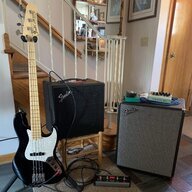
My new Studio 40 is in the house! I'm unable to connect to WiFi because the lady I'm renting the lower level of her house from never changed the password on her router and it's something like 23 characters long. I run out of space for characters on the 40. Any firmware update will have to wait until I'm in my new house sometime late summer.

It's pictured with my G&L Fullerton Deluxe Fallout and NI S61 Mk II MIDI controller. The GTX-7 footswitch is on the floor under the keyboard.

E5M0JlK.jpg
 
Last edited:
Woohoo! Congrats! And love the G&L! Most of the firmware updates won't be noticeable, however if you are having issues with pedal responsiveness or odd activity, then you should find a way to update the firmware as soon as possible.

Have fun and don't go too deep down the rabbit hole of tone chasing!
I can always take it over to my niece's house and connect to her WiFi. Is there any way to check the current version number/release date? The GTX-7 pedal seems to be a little wonky. Of course, it came with no instructions and its operator (moi) is plenty wonky, so who knows. :laugh:

Being a former engineer, I'm a master of rabbit holes. Plus, I performed in a theater version of Alice In Wonderland back in the electric kool-aid acid test days, so there's that, too. ;)
 
  • Like
Reactions: SoulReflection
The Wiki Page may have info on checking the firmware version (I don't recall if there's a way). And yes, I found the lack of instructions for my MGT-4 disappointing. The EXP-1 also doesn't have any and I have had some odd happenings when using the 2 of them, but haven't connected them both since updating my firmware. Maybe that will fix the issue I had.
 
My new Studio 40 is in the house! I'm unable to connect to WiFi because the lady I'm renting the lower level of her house from never changed the password on her router and it's something like 23 characters long. I run out of space for characters on the 40. Any firmware update will have to wait until I'm in my new house sometime late summer.

It's pictured with my G&L Fullerton Deluxe Fallout and NI S61 Mk II MIDI controller. The GTX-7 footswitch is on the floor under the keyboard.

View attachment 4629324

That password length seems a bit overkill. But, why not take your amp over to McDonald's and use their wifi? ;)
 
... .... Is there any way to check the current version number/release date? The GTX-7 pedal seems to be a little wonky. Of course, it came with no instructions and its operator (moi) is plenty wonky, so who knows. :laugh: ... ...

The Wiki Page may have info on checking the firmware version (I don't recall if there's a way). And yes, I found the lack of instructions for my MGT-4 disappointing. The EXP-1 also doesn't have any and I have had some odd happenings when using the 2 of them, but haven't connected them both since updating my firmware. Maybe that will fix the issue I had.


The bottom of the Settings page shows your current TONE App version.

The Rumble Stage & Studio manual, linked on your Club Wiki page, has a section on using the MGT-4 footswitch. Likewise, the Mustang GTX manual has a section on the GTX-7 footswitch. Those extracted footswitch sections are linked on your Club Wiki, too, in the Stage & Studio Links section.

The Fender website has a Invalid Link Removed page and a Invalid Link Removed page with links to a Pedal Quick Start and an Advanced Pedal Use doc.

Hope this helps.
.
 
The Rumble Stage & Studio manual, linked on your Club Wiki page, has a section on using the MGT-4 footswitch. Likewise, the Mustang GTX manual has a section on the GTX-7 footswitch. Those extracted footswitch sections are linked on your Club Wiki, too, in the Stage & Studio Links section.

The Fender website has a Invalid Link Removed page and a Invalid Link Removed page with links to a Pedal Quick Start and an Advanced Pedal Use doc.

Hope this helps.
.

Now you're gonna make me read ....
 
  • Like
Reactions: G-Dog
The bottom of the Settings page shows your current TONE App version.

The Rumble Stage & Studio manual, linked on your Club Wiki page, has a section on using the MGT-4 footswitch. Likewise, the Mustang GTX manual has a section on the GTX-7 footswitch. Those extracted footswitch sections are linked on your Club Wiki, too, in the Stage & Studio Links section.

The Fender website has a Invalid Link Removed page and a Invalid Link Removed page with links to a Pedal Quick Start and an Advanced Pedal Use doc.

Hope this helps.
.
I found the section in the 40/800 manual that details MGT-4 use (GTX-7 not included), but importantly, it showed the Menu option for selecting which footswitch was connected. My firmware is at least new enough to include the GTX-7! I'll have to spend some time with it tomorrow. Thanks for pointing me in the right direction.

I spent a lot of today dealing with one of my three dogs getting a paw infection that has now spread to two paws. He came home from the vet's wearing a cone of shame.
 
  • Like
Reactions: G-Dog
That password length seems a bit overkill. But, why not take your amp over to McDonald's and use their wifi? ;)
I don't know why I didn't think of it before, but I put my phone in Hotspot mode and connected through it. Studio 40 now updated to the latest version! [minor dot release (using my old versioning standard (version#.point#.dot#))]
 
Great solution...I haven't used the Hotspot since my days of camping in the RV!
I forgot to mention that then is when I discovered that the Studio 40 only supports the 2.4 GHz WiFi band. I had my phone initially set for 5 GHz and the Rumble failed to find it. Good thing I checked that instead of just assuming that the phone hotspot solution wouldn't work.
 
  • Like
Reactions: SoulReflection
I don't know why I didn't think of it before, but I put my phone in Hotspot mode and connected through it. Studio 40 now updated to the latest version! [minor dot release (using my old versioning standard (version#.point#.dot#))]


Excellent idea, Maarti! I admit to limiting my thinking to connecting my studio directly to my home wi-fi, usually carrying it into the router's room for the strongest signal. :rolleyes:

I forgot to mention that then is when I discovered that the Studio 40 only supports the 2.4 GHz WiFi band. I had my phone initially set for 5 GHz and the Rumble failed to find it. Good thing I checked that instead of just assuming that the phone hotspot solution wouldn't work.


Of course, I'm totes hep to the tech stuff, Maarti, but I didn't know the Studio (& Stage, I guess, too) can't use the 5Ghz wi-fi bandwidth!?! Waddup wif dat? o_O

And, like, you can control the wi-fi bandwidth of your hotspot? I mean, like, pshaw, I'm sure I used to do that all the time! But it's been, y'know, like, some years and, well, ... uh, nevermind ... ... ... :confused:
.