
Finally got it working. I had turned on midi thru in the FI which was creating a loop, but once I turned that off it worked. Thanks again.

Enjoy the benefits of a premium membership!
Upgrade Account
-
TalkBass has been independent since 1998. Add your voice.
Create a free account to reply to discussions, view embedded media, and browse with fewer display ads.
Join free Log in
Want zero display ads or expanded classifieds tools? Compare plans.
You are using an out of date browser. It may not display this or other websites correctly.
You should upgrade or use an alternative browser.
You should upgrade or use an alternative browser.
Future Impact now available!! WAS: deep impact reissue!!! interested?
- Thread starter lokki
- Start date
More options
Who Replied?
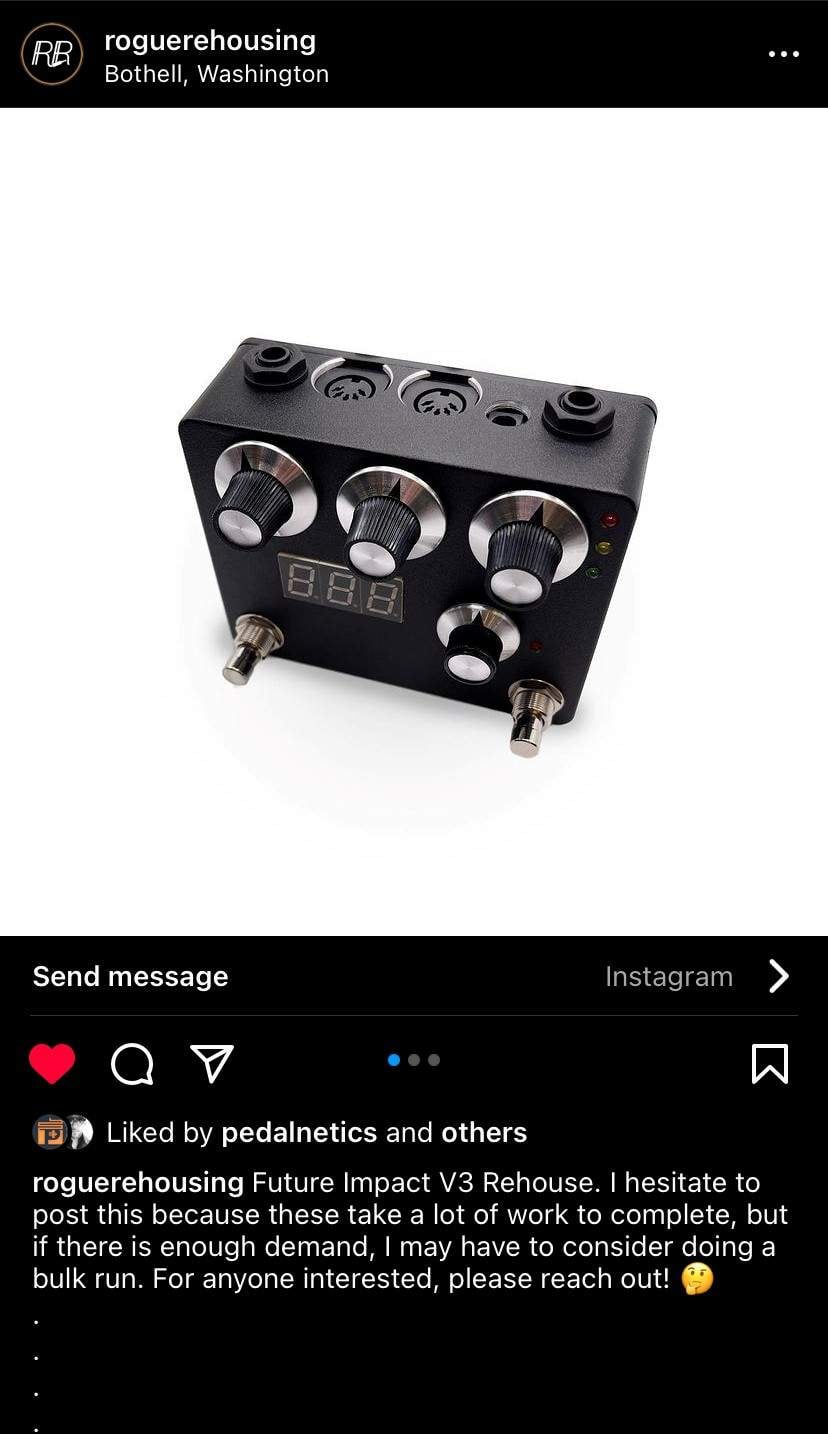
To anyone who like me was infuriated with the size, found a guy who rehoused it for me out of Washington. one imaged below is mine and he did a really good job!
Order form to fill is here:Future Impact
Order form to fill is here:Future Impact
Last edited:

- May 16, 2007
- 3,395
- 4,869
- Disclosures
- Volunteer developer/beta tester with Source Audio, Morningstar Engineering & MORTRIX
Damn that’s sexy.To anyone who like me was infuriated with the size, found a guy who rehoused it for me out of Washington. one imaged below is mine and he did a really good job!
Order form to fill is here:Future Impact
View attachment 5109285
@Charlie Tuna
Not used Stomp. I use my Morningstar controller as the interface. Works for everything except firmware updates.
any special Midi cables youre using? read in the manual a breakdown of cables that work but i read thats primarily for the editor. has this been updated, kind of annoying to buy separate cables for the editor and to control it on the board.
- May 16, 2007
- 3,395
- 4,869
- Disclosures
- Volunteer developer/beta tester with Source Audio, Morningstar Engineering & MORTRIX
Nope, standard 5-pin MIDI cables between the FI and MC6 Pro. Then a standard USB-C cable from the MC into the computer. This lets you do patch management, patch creation etc.any special Midi cables youre using? read in the manual a breakdown of cables that work but i read thats primarily for the editor. has this been updated, kind of annoying to buy separate cables for the editor and to control it on the board.
Bear in mind, this setup does not work for FI firmware updates though; for those I use the Roland UM-One Mk2. If you are on v3.61 then there won’t be any more updates.
Nope, standard 5-pin MIDI cables between the FI and MC6 Pro. Then a standard USB-C cable from the MC into the computer. This lets you do patch management, patch creation etc.
Bear in mind, this setup does not work for FI firmware updates though; for those I use the Roland UM-One Mk2. If you are on v3.61 then there won’t be any more updates.
amazing so this is primarily for firmware updates. awesome.
And don't do what I did and have midi thru turned on in the FI or you will create a midi loop and the editor will freak out and crash. I have the FI midi in connected via an omniport on the MC6-PRO using a TRS to 5-pin cable.Nope, standard 5-pin MIDI cables between the FI and MC6 Pro. Then a standard USB-C cable from the MC into the computer. This lets you do patch management, patch creation etc.
Bear in mind, this setup does not work for FI firmware updates though; for those I use the Roland UM-One Mk2. If you are on v3.61 then there won’t be any more updates.
hey dumb question. in the editor, i'm trying to adjust the speed of the LFO on the LFO syn variations patch and can't seem to figurte it out. is there not a way to map to a specific tempo or hz?
- May 16, 2007
- 3,395
- 4,869
- Disclosures
- Volunteer developer/beta tester with Source Audio, Morningstar Engineering & MORTRIX
Only the the VCO 4 LFO is syncable. The original LFO (the one that has dedicated sliders for pitch and filter) cannot be synced. You’ll need to map the syncable LFO to something via the mod matrix (flexis).
See page 65 of the manual.
See page 65 of the manual.
Last edited:

edwinhurwitz
Supporting Member
Can anyone recommend a patch for the bass line of Sledgehammer ?
It seems pretty straightforward from Tony's description: https://www.youtube.com/shorts/pbogVXlfbUs
I wonder what octaver he was using.

My understanding was that he used an OC-2 for all his classic octaver lines, but these days I believe he uses a few different newer options.It seems pretty straightforward from Tony's description: https://www.youtube.com/shorts/pbogVXlfbUs
I wonder what octaver he was using.
Lots of compression, a fretless bass, and an OC-2... The Future Impact doesn't have analog octaver emulation or compression, but probably a filtered square wave an octave down could get in the ballpark.
Last edited:
From what I read after posting, Tony is using an old EBS. I bought and sold one of those ages ago... I'm getting close with the B'Octaver in the HX stomp. HpF at about 140 and a pick, dry signal mixed low.
The EBS didn’t exist when Sledgehammer was recorded, though he may use one in that above video! The OC-2 was really the main one around for the dudes using octavers in the 80s (though the Mutron and a few others existed too, the OC-2 is what I’ve almost always heard claimed from anyone using an octaver til the late 90s). I think the guy from 3-Leaf also got Levin one of their octavers at one point too.From what I read after posting, Tony is using an old EBS. I bought and sold one of those ages ago... I'm getting close with the B'Octaver in the HX stomp. HpF at about 140 and a pick, dry signal mixed low.
edwinhurwitz
Supporting Member
OK, I'm sure I'm doing something stupid. I just got an MC6 Pro and am working on using it to control the FI (latest firmware). So far, it works fine for program changes, but I can't get it to toggle the on/off function. I'm using the dictionary and it comports with the documentation. Any ideas?
TIA
TIA
- May 16, 2007
- 3,395
- 4,869
- Disclosures
- Volunteer developer/beta tester with Source Audio, Morningstar Engineering & MORTRIX
Are you using the one that sends CC66 or the one that sends CC69? I’d use 66 and set your MC6 pro preset to use toggle positions: one toggle sends the “on” value of 127, the other toggle sends the “off” value of 0. You can then have the on/off state reflected on the screen. Remember that the FI always boots in the “on” state so factor that in to your programming.OK, I'm sure I'm doing something stupid. I just got an MC6 Pro and am working on using it to control the FI (latest firmware). So far, it works fine for program changes, but I can't get it to toggle the on/off function. I'm using the dictionary and it comports with the documentation. Any ideas?
TIA

- May 16, 2007
- 3,395
- 4,869
- Disclosures
- Volunteer developer/beta tester with Source Audio, Morningstar Engineering & MORTRIX
V3.61Random question - what is the latest FI firmware version?


