• TalkBass has been independent since 1998. Add your voice.
    Create a free account to reply to discussions, view embedded media, and browse with fewer display ads.
    Join freeLog in
    Want zero display ads or expanded classifieds tools? Compare plans.

source audio c4

C4 synth finally working with MVAVE chocolate midi controller + Source Audio midi adapter.šŸ™šŸ½šŸ˜…
I don't know exactly what made it work this time, but I believe it was the order in which the cables were connected. I first connected the 5-pin midi cable and then the TRS cable to the pedal (then it stopped flashing).
Video:
c4 synth pedal + chocolate midi Controller + midi adapter
 

Attachments

  • chocolate c4b.gif
    chocolate c4b.gif
    15 MB · Views: 40
Last edited:
C4 synth finally working with MVAVE chocolate midi controller + Source Audio midi adapter.šŸ™šŸ½šŸ˜…
I don't know exactly what made it work this time, but I believe it was the order in which the cables were connected. I first connected the 5-pin midi cable and then the TRS cable to the pedal (then it stopped flashing).
Video:
c4 synth pedal + chocolate midi Controller + midi adapter
Worried there is not enough power going to the C4

@Gibs210 ?
 
Hi there!

My official Source Audio midi adapter starts blinking as soon as I connect it to the C4 pedal, even without any midi controller connected on the other side of the cable. Is this normal?

In the demonstration video on YouTube, it doesn't blink unless it receives a midi command.
midi Adapter blinking

In any case, I couldn't get it to work with my midi controller(mvave chocolate). I checked all the details like channel and cc commands.
midi Adapter blinking
Looks like your connecting the midi thru port to the c4, it needs to connect to the to pedal port with the provided TRRS cable, then your midi controller connects to the midi in jack from the midi out of the controller.
 
Looks like your connecting the midi thru port to the c4, it needs to connect to the to pedal port with the provided TRRS cable, then your midi controller connects to the midi in jack from the midi out of the controller.
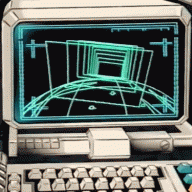
that's not what happened, I even sent a photo of the adapter connected to the pedal via TRS in the correct port (to pedalā¬‡ļø), note that the MIDI IN port is disconnected, anyway the pedal worked normally after other attempts, I just changed the connection order, connecting the 5-pin midi cable to the adapter first and then the TRS to the pedal.
Thanks anyway!
 

Attachments

  • Captura de Tela 2024-08-15 Ć s 20.43.41.png
    Captura de Tela 2024-08-15 Ć s 20.43.41.png
    2.1 MB · Views: 32
not had chance to fully set up my C4 synth, but had a quick question for anyone with more knowledge.


can I ignore where the external knobs are set completely once I dial in a patch using the app? for example, if the outside controls get moved during transit or between studio sessions, will the volumes etc default to how they were saved when powered up?
 
not had chance to fully set up my C4 synth, but had a quick question for anyone with more knowledge.


can I ignore where the external knobs are set completely once I dial in a patch using the app? for example, if the outside controls get moved during transit or between studio sessions, will the volumes etc default to how they were saved when powered up?
There are different modes for this, controlled in the app. I use ā€œPresetā€ mode. There is a ā€œWhat You See is What You Getā€ mode, where the position of the knobs always matter, I believe.
 
perfect cheers, I guess I just need to dig further.
And to expand on Dave's good answer, there are 3 modes: Standard (default), Preset, and WYSIWYG. Standard and Preset are similar in that when a patch is loaded, C4 uses the values from the saved patch, not the current knob positions. If a knob is moved after loading the patch, the parameter for that knob (but not any others - at least from my experience) changes. Preset mode allows you to resave the patch after making knob adjustments, while Standard does not.

The C4 manual gives further details on what happens after you make a knob adjustment and then the pedal is bypassed, or the toggle switch moved.
Three Different Preset Modes
Connecting the C4 Synth to the Neuro Desktop or Neuro Mobile App (See the Neuro Section for more
info) allows you to select between three different Preset Modes: Standard (Default), Preset, and
WYSIWYG (ā€œWhat You See Is What You Getā€). To select which mode your C4 operates under, go the
C4’s Hardware Options Menu (the C4 gear icon in the Connection section) and use the Preset /
WYSIWYG menu. Each mode is universal applies to all six presets available in the green and red
preset banks.

Standard (Default) Mode
In Standard Mode each preset engages with a pre-programmed preset, meaning the physical
positions of the knobs do not affect the sound of the preset. It is, however, possible to reach down
and make knob adjustments on the fly. If, after making a knob adjustment, the pedal is bypassed
then reengaged without moving the toggle switch, the sound will continue to reflect the new knob
positions. If the toggle switch is moved (regardless of whether the effect is engaged or engaged), the
pedal will revert to the parameter settings of the saved preset.

Preset Mode
Preset Mode works similar to the Standard (Default) Mode with one key difference, it allows you to
re-save the preset after making knob adjustments. So upon the initial engagement of a preset the
knob parameters will instantly jump to their saved values, regardless of the physical position of the
knobs. However, if you do make a knob adjustment, the center LED will start to blink, indicating that
edits have been made. After making an adjustment you can save the new settings by pressing and
holding the footswitch until the center LED stops blinking (around five seconds).

WYSIWYG (What You See Is What You Get) Mode
In WYSIWYG Mode the C4 functions much like a traditional effects pedal. It is aā€ What You See Is
What You Getā€ experience, meaning that the current physical positions of the knobs will indicate the
settings of the primary knob functions. Note: If you move the toggle switch to a new position all the
primary knob parameters will maintain the settings of the physical knob positions, but the secondary
knob functions (SENSITIVITY and VOL) will revert to their default settings.
 
And to expand on Dave's good answer, there are 3 modes: Standard (default), Preset, and WYSIWYG. Standard and Preset are similar in that when a patch is loaded, C4 uses the values from the saved patch, not the current knob positions. If a knob is moved after loading the patch, the parameter for that knob (but not any others - at least from my experience) changes. Preset mode allows you to resave the patch after making knob adjustments, while Standard does not.

The C4 manual gives further details on what happens after you make a knob adjustment and then the pedal is bypassed, or the toggle switch moved.
looks like preset mode is the one for me, thanks for this!
 
  • Like
Reactions: cfraz
Hi folks - I'm running a C4, and Ultrawave with a Neuro Hum through the effects loop of my Quad Cortex - which can send and control MIDI messages. Essencially I want to send a MIDI CC message from the Quad Cortex to change presets on my SA pedals - how would I do that?

I'm a noob to the MIDI world but trying to read as much as I can but still sort of lost
 
Hi folks - I'm running a C4, and Ultrawave with a Neuro Hum through the effects loop of my Quad Cortex - which can send and control MIDI messages. Essencially I want to send a MIDI CC message from the Quad Cortex to change presets on my SA pedals - how would I do that?

I'm a noob to the MIDI world but trying to read as much as I can but still sort of lost
There are many here who can guide you better than I can, and you have some options. I would suggest:

1) MIDI out of the Quad Cortex to MIDI in on the Hub.
2) Connect the Ultrawave and the C4 to your computer and set up some presets in slots above 6. Browse the C4 library of presets. Sort by popularity. There are thousands. Save them to your library and then burn them to the pedal (you can access less than 6 with the toggle switch or MIDI.). While connected to the computer, put the Ultrawave on one MIDI channel and put the C4 on another MIDI channel.
3) Connect the SA pedals to the Hub via the mini TRRS. Press the scan button on the hub.
4) Send a MIDI CC message on the channel you want for either the Ultrawave or the C4. The MIDI CC should be in the format of 104 and then the value of the preset you want to recall (see page 44 of the C4 user guide).

That is how I would go about it and learn about MIDI at the same time.
 
  • Like
Reactions: Mr123Clark
Aside of the source audio expression pedal, does anyone have know of other brands' expression pedals with compatibility with the C4?
I think most of them with TRS jacks will work. Tip power and middle expression, you’ll have to get a 1/4ā€ TRS to 1/8ā€ TRS adaptor though. I’ve used a Moog EP2 and Boss EV (can’t recall the number) and they both worked fine. The C4 automatically calibrates for different expression potentiometer values
 
My search abilities may be failing me but I can't find the answer I want to my question so here goes...

Is there an alternative to the disaster area micro.dmc? I just need a simple, tidy solution to access all of the presets on my C4 without wanting to get into scenes and big controllers or run millions of cables šŸ¤”
 
My search abilities may be failing me but I can't find the answer I want to my question so here goes...

Is there an alternative to the disaster area micro.dmc? I just need a simple, tidy solution to access all of the presets on my C4 without wanting to get into scenes and big controllers or run millions of cables šŸ¤”
In the early days there was only the Hub plus a MIDI controller. Then, we supported MIDI over USB, and any MIDI controller that supported USB "host mode" could be used with only one wire to the C4. Then we added the USB Adapter to our accessory options. This device allows the C4 to be used with ANY MIDI controller. Others should chime in here, but picking a really simple MIDI controller plus our USB adapter could be what you are looking for.
 
My search abilities may be failing me but I can't find the answer I want to my question so here goes...

Is there an alternative to the disaster area micro.dmc? I just need a simple, tidy solution to access all of the presets on my C4 without wanting to get into scenes and big controllers or run millions of cables šŸ¤”
i use a Doremidi FC-3 for switching C4. it's got midi I/O plus Usb device and host ports, and the default behavior is for increase/decrease PG numbers.