just downloaded protools Intro (free version). And yes, anagram is the input and output deviceWhich DAW are you using? Is the Anagram set as the Input and Output device?

Enjoy the benefits of a premium membership!
Upgrade Account
-
TalkBass has been independent since 1998. Add your voice.
Create a free account to reply to discussions, view embedded media, and browse with fewer display ads.
Join free Log in
Want zero display ads or expanded classifieds tools? Compare plans.
You are using an out of date browser. It may not display this or other websites correctly.
You should upgrade or use an alternative browser.
You should upgrade or use an alternative browser.
Darkglass Anagram Multi FX Announced
- Thread starter Elmstreet
- Start date
More options
Who Replied?If you are using Windows, make sure you have downloaded and installed the Anagram USB Audio Drivers from the Darkglass site (Darkglass Software - bottom of the page)just downloaded protools Intro (free version). And yes, anagram is the input and output device
Last edited:
someone recommended the West coast pedalboard cioks current tripler cable. This seems be a much more elegant and cheaper, but equally effective alternative to running a crux.
I figured someone must've made a commercially available cable to combine 3 inputs for high current devices (Don't know why Cioks themselves don't offer this)!!! Thanks for sharing!

Thanks for confirming your Cioks DC7 + Crux setup is working. I suspect a power stability issue might be causing DSP errors and freezes in the Anagram when using the Crux at 12V instead of 9V—or possibly there is a fault in my Cioks adaptor?Short quick review on the Anagram here. Two dozen gigs with it now on a very scaled down pedalboard. Coming from HX Stomp Xl board to Nano Cortex board to this one currently. Cioks DC7 and Crux power. Zero issues, been rock solid, super easy to tweak and added Broughton Messenger Jr. at the end since it’s been a favorite of mine for years due to quick dial access and adjustment after all the Anagram processing. It can do everything I need, compact and worry free. Looking forward to expected updates to include Phaser and possible metered compression. It’s a winner for me.
Have you tested the Crux at 12V setting with the Anagram to see if it changes anything?
Also, I noticed you're using a Cioks yellow type 3 (2.5 mm Helix-style) power cable instead of the usual black type 1 (2.1 mm barrel size) for connection to Anagram. I will try that setup to see if it resolves the issues I have reported to Darkglass support.
Last edited:
Figured I’d share my current setup…solid, no silliness, just small as I can make it and killer.
Voodoo Labs Small-EX & PedalPower3
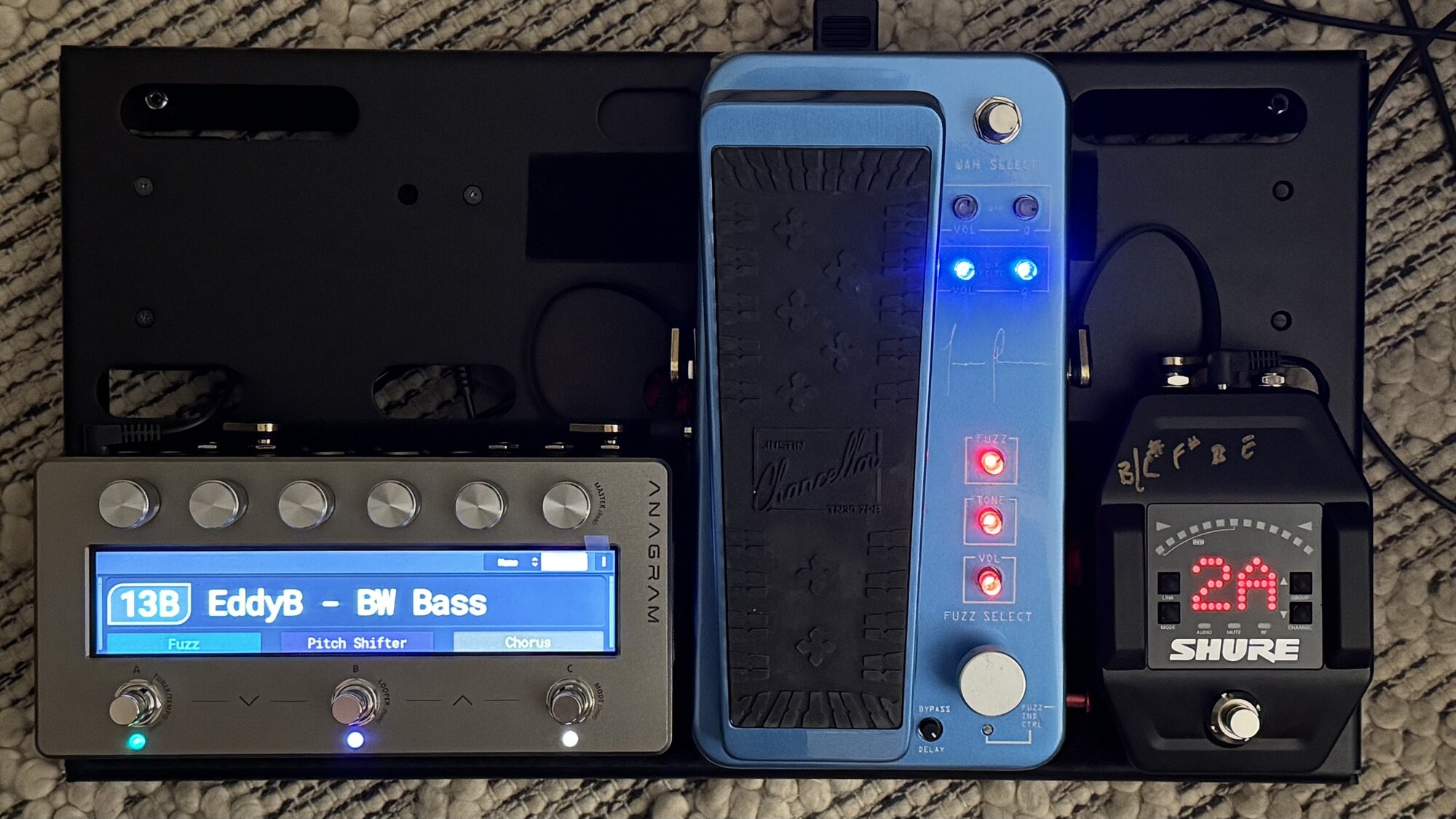
Voodoo Labs Small-EX & PedalPower3
Actually, your mention of my use of the yellow cable made me go back and rethink it. When I had one of my previous pedalboards using my HX Stomp XL, Cioks recommended using that yellow cord for it because the Stomp required a minimum of 900 mA plus the correct larger 2.5 mm jack that the Stomp uses. So it performed perfectly for over three years. When I changed to my Nano Cortex pedalboard I didn’t need the Crux since the Nano could be sufficiently powered by one single 660 mA output from the DC7 so eliminated the Crux on that board. That setup always worked perfectly as well. When I put together this current Anagram pedalboard I just used the yellow cord again since I put the Crux back in use for the higher power requirement of the Anagram and just put the yellow cable back on it without thinking anymore about it. It’s been working properly but your mention of me using it again made me realize the jack on the Anagram is the standard 2.1 mm size and the larger 2.5 mm inner diameter barrel could possibly at some point cause a less than ideal solid contact due to its larger bore size. So….I just went out on the workbench and changed over to the regular black cable and did indeed notice it had zero play if I wiggled it in the jack whereas the yellow one absolutely had a tiny bit of play due to the difference in pin-to-bore contact. So, thanks for bringing that to my attention. The yellow one would have more than likely never caused a problem but the black one is the correct one to use so I would suggest you stick with the black one and keep it on the 9v setting.Thanks for confirming your Cioks DC7 + Crux setup is working. I suspect a power stability issue might be causing DSP errors and freezes in the Anagram when using the Crux at 12V instead of 9V—or possibly there is a fault in my Cioks adaptor?
Have you tested the Crux at 12V setting with the Anagram to see if it changes anything?
Also, I noticed you're using a Cioks yellow type 3 (2.5 mm Helix-style) power cable instead of the usual black type 1 (2.1 mm barrel size) for connection to Anagram. I will try that setup to see if it resolves the issues I have reported to Darkglass support.
Last edited:

IvanBassist
Commercial User
- Jun 8, 2008
- 3,743
- 11,118
- Disclosures
- Content Manager at Darkglass Electronics, Dingwall Guitars Artist
This. They available at the bottom of the downloads page: Darkglass SoftwareIf you are using Windows, make sure you have downloaded and installed the Anagram USB Audio Drivers from the Darkglass site (Darkglass Software - bottom of the page)
I have the audio driver. And watched the nam video. I just can't figure the output 9. I should be getting audio sent back through the anagram right? I had to add the output 9 in the protools I/O section, but still not getting anything. I'll try reinstalling the audio driver and restarting everythingIf you are using Windows, make sure you have downloaded and installed the Anagram USB Audio Drivers from the Darkglass site (Darkglass Software - bottom of the page)
Yeah, I was going to say the exact same thing.The yellow one would have more than likely never caused a problem but the black one is the correct one to use so I would suggest you stick with the black one and keep it on the 9v setting.
At the end of the day, the Anagram power supply spec is stated as 9V 1.7A, and a 2.1mm inner power cord barrel diameter. As soon as we start deviating from this, we create the risk of introducing inconsistent performance and behaviour. So, by not deviating (unless in confirmed 'safe' ways such as higher current power supply), we hopefully run our devices in the most reliable and consistent way possible.
Sometimes I think the most important tool in my kit bag is my Dymo labeller, so that I can label cables, power supplies, inputs/outputs on devices, etc.

IvanBassist
Commercial User
- Jun 8, 2008
- 3,743
- 11,118
- Disclosures
- Content Manager at Darkglass Electronics, Dingwall Guitars Artist
Maybe this video on Pro Tools reamping helps:I have the audio driver. And watched the nam video. I just can't figure the output 9. I should be getting audio sent back through the anagram right? I had to add the output 9 in the protools I/O section, but still not getting anything. I'll try reinstalling the audio driver and restarting everything
KosmOS 1.7.0 is here
...and it brings a few highly requested features!New DSP blocks:
Tremora Tremolo: Transforms your sound into breathing textures.Pharos Phaser: Adds depth, dimension, and clarity to the art of phase modulation.
Vibralis Vibrato: Creates pitch fluctuations that feel fluid and alive.
Par.Eq: Shapes your tone without compromise.
Block tweaks:
Flamingo Flanger and Mint Chocolate Chorus rate has been extended to a new minimum of 0.1 Hz.Entropia “SOLO” mode transfers from one band to another when switching band view.
System additions:
Added “Reset to Default State” and “Restore Factory Default State” options to the Block Settings’ More Settings menu.You can now access the Tuner (long press footswitch A) even while inside the settings of a block.
Last edited:

IvanBassist
Commercial User
- Jun 8, 2008
- 3,743
- 11,118
- Disclosures
- Content Manager at Darkglass Electronics, Dingwall Guitars Artist
KosmOS 1.7.0 is here and it brings a few highly requested features!
New DSP blocks:
Tremora Tremolo: Transforms your sound into breathing textures.
Pharos Phaser: Adds depth, dimension, and clarity to the art of phase modulation.
Vibralis Vibrato: Creates pitch fluctuations that feel fluid and alive.
Par.Eq: Shapes your tone without compromise.
Block tweaks:
Flamingo Flanger and Mint Chocolate Chorus rate has been extended to a new minimum of 0.1 Hz.
Entropia “SOLO” mode transfers from one band to another when switching band view.
System additions:
Added “Reset to Default State” and “Restore Factory Default State” options to the Block Settings’ More Settings menu.
Hope you guys like the video
Curious what other effects or blocks people on here would like to see added?
A real bass synth plugin, like the MXR Bass Synth pedal.

A 'real' Synth plugin (i.e. equivalent of MXR Bass Synth)
I'm not talking about the so-so Synth patches available today based on some combo of Distortion, Octaver, Envelop Filter, and Chorus blocks. I mean, a REAL Synth plugin. By comparison - the MXR Bass Synth. Each sound starts with Oscillators just like a synth. The tracking is amazing. Ref...
 anagramanswers.com
And then I'm pretty much done!
Great video as always Ivan!Hope you guys like the video
Only feedback I have is that it is sometimes hard to see the Anagram screen clearly. I know it is more setup work, but a 2nd camera doing a close-up of the Anagram screen, that can then sit in the bottom corner of the main video, would be helpful.
IvanBassist
Commercial User
- Jun 8, 2008
- 3,743
- 11,118
- Disclosures
- Content Manager at Darkglass Electronics, Dingwall Guitars Artist
Thanks! I should be getting a stand for the Anagram soon. That will make things slightly easier.Great video as always Ivan!
Only feedback I have is that it is sometimes hard to see the Anagram screen clearly. I know it is more setup work, but a 2nd camera doing a close-up of the Anagram screen, that can then sit in the bottom corner of the main video, would be helpful.
Having to balance avoiding screen reflections, fingerprints, while keeping everything properly exposed including me on the background is not so easy haha


When the talent enhancer block will be available?

It's a special unlock. The only way to get it is to play 3-4 hours a day for a long timeWhen the talent enhancer block will be available?
I'm expecting mine to become available any time now.
Agreed, but hopefully with tracking and latency performance that is better than the MXR, which I found pretty underwhelming. At this point I’d even take an envelope filter with a downsweep option to build reasonable ARP tones.A real bass synth plugin, like the MXR Bass Synth pedal.
Hello Everyone!
I was thinking of starting my DG journey with a B7K, and possibly getting a VMT or AO down the road. Wow! nearly $500 CAD + tax (according to one our local shops, they just did a price hike which is slowly trickling down).
Anyway I'm thinking for just a little bit more might as well look into the Anagram. I've currently got an FM3 and LOVE it for headphone and recorded tones. I do not love it going into an amp or PA (still haven't figured it out yet).
How does the anagram do going straight into an amp? I would be splitting between an old Traynor SB115, as well as an EV Everse 8 speaker (depending on how much power I need).
Also curious how people are finding the Anagram compared to the standard DG pedals? I saw a few videos comparing them directly and they sound near identical, but it's hard to trust sponsored videos on YT.
Thanks.
BN~
I was thinking of starting my DG journey with a B7K, and possibly getting a VMT or AO down the road. Wow! nearly $500 CAD + tax (according to one our local shops, they just did a price hike which is slowly trickling down).
Anyway I'm thinking for just a little bit more might as well look into the Anagram. I've currently got an FM3 and LOVE it for headphone and recorded tones. I do not love it going into an amp or PA (still haven't figured it out yet).
How does the anagram do going straight into an amp? I would be splitting between an old Traynor SB115, as well as an EV Everse 8 speaker (depending on how much power I need).
Also curious how people are finding the Anagram compared to the standard DG pedals? I saw a few videos comparing them directly and they sound near identical, but it's hard to trust sponsored videos on YT.
Thanks.
BN~
Last edited:


