• TalkBass has been independent since 1998. Add your voice.
    Create a free account to reply to discussions, view embedded media, and browse with fewer display ads.
    Join freeLog in
    Want zero display ads or expanded classifieds tools? Compare plans.

Source Audio Sorcerers Society (S.A.S.S) Part 3

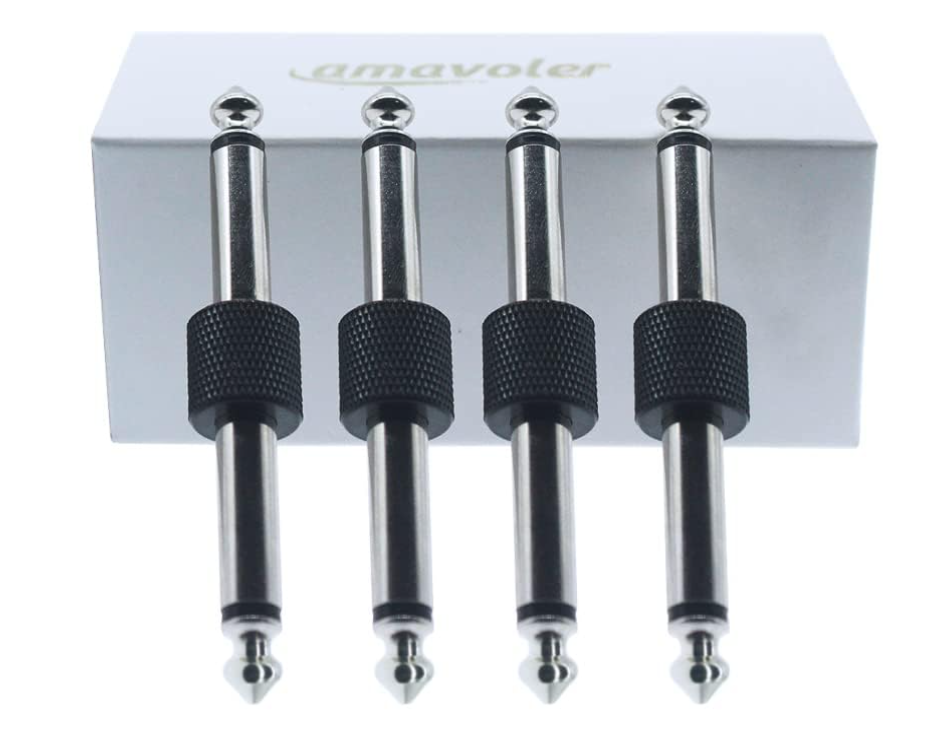
Thanks for responding. I am referring to "TRS/TS" from the SA store - i did not realize these were not both TR-TR connections until today, but I'm beginning to see why and what they enable.

My question seems to be answered, I hope this is correct in case anyone else were to attempt this:

I do not need these pairs of TR-TR and TRS-TRS connectors offered by SA to link all the pedals in stereo if I'm not connecting a phone via the included 1/4 to 1/8 TRS.


View attachment 5023050

upload_2023-4-6_5-7-40-png.5022849


View attachment 5023061
You only need TRS if you are using a phone TRS connection.
 
  • Like
Reactions: Trvbass
ive been easing into source audio pedals, the C4 really sold me last year, so picked up a ultrawave and collider+nuero hub.
Thinking of replacing the strymon mobius but it does still have a ton of usable modulations i use(phaser, chorus, pattern trem, destroyer(bitcrusher)
Looking at the nuero app i see the gemini chorus can actually use Source audio phaser+ other stuff??
not sure what other modulation pedal i can pair with gemini to do the mobius job and to max out the nuero hub
 
ive been easing into source audio pedals, the C4 really sold me last year, so picked up a ultrawave and collider+nuero hub.
Thinking of replacing the strymon mobius but it does still have a ton of usable modulations i use(phaser, chorus, pattern trem, destroyer(bitcrusher)
Looking at the nuero app i see the gemini chorus can actually use Source audio phaser+ other stuff??
not sure what other modulation pedal i can pair with gemini to do the mobius job and to max out the nuero hub
The Gemini can run all the same algorithms as the Lunar Phaser and Mercury Flanger.
 
  • Like
Reactions: bassjamn
I updated my original pedalboard by removing the pedals shown (DMC.micro upgraded to Pro version) and replaced with the Neuro Hub, UW Bass, Gemini and a USB Hub. This worked flawlessly over 3 rehearsals for 3 different bands and Friday nights gig. So great to have the song setlist go to the next song, send MIDI commands to reconfigure the pedalboard and automatically start scrolling the song. The band was never waiting for me to tap dance the pedals and now the guitarist is sometimes the long pole in the song transition time tent. Lol.

I don't need the USB Hub other than for developing new scenes so this will eventually be transitioned to a smaller pedalboard without it. Unless I find I want additional SA pedals? But these three are doing a fabulous job as it is.
20230409_120835.jpg
20230409_111726.jpg
 
could use some guidance on the source audio setup:
I just got my neurohub and c4, UW-bass, and collider connected.
I was only using a C4 in the past, and saved presets in "my library" via usb and neuro desktop and would activate them with the app open at all times, as this is a home studio board so always near a laptop with the neuro app.


looks like i still will need usb connections to all the pedals as i am editing patches instead of just the neurohub?
 
Last edited:
could use some guidance on the source audio setup:
I just got my neurohub and c4, UW-bass, and collider connected.
I was only using a C4 in the past, and saved presets in "my library" via usb and neuro desktop and would activate them with the app open at all times, as this is a home studio board so always near a laptop with the neuro app.


looks like i still will need usb connections to all the pedals as i am editing patches instead of just the neurohub?
With all pedals connected to the Hub, you can create and edit sounds by having the hub connected to your computer. There are a few caveats to be aware of:

You need a USB connection to an individual pedal in order to be able to fetch presets from the cloud and the pedal’s internal memory slots, and to be able to write to the internal slots.

Not all of Ultrawave’s parameters are accessible via the Hub as their number exceeds the memory of the Hub.

The Hub remembers parameter settings for all pedals; the exception is the Ultrawave where the Hub instead recalls an internal UW preset as part of the scene data.
 
How do folks like to run their C4 / Aftershock combos? I've been running the bass -> compressor -> AS -> C4 but it sorta feels like with the compressor on the signal from the AS isn't really pushing the filters very much. Pedal order on my board is very much up in the air right now so I'm interested in hearing how you might switch this around. As always, thanks!
 
How do folks like to run their C4 / Aftershock combos? I've been running the bass -> compressor -> AS -> C4 but it sorta feels like with the compressor on the signal from the AS isn't really pushing the filters very much. Pedal order on my board is very much up in the air right now so I'm interested in hearing how you might switch this around. As always, thanks!
This why I run my compressor last. yes you can decrease the ratio and threshold, but you're restricting every pedal in the line by the same amount. Personally I would do with low gain drives, foldover dist etc, AS, C4, Atlas. If using the AS as a traditional OD/dist Run C4, AS, Altas. It also sounds like using both channels would benefit you better.
 
Somewhere many pages back in this thread is someone who wired their atlas up to be both front end comp AND end of chain comp/limite, coz of course it has 2 i/o and internal routing options. That might be worth reading up on… especially with midi control, that would provide max flexibility for ordering

EDIT: speed read, not sure you have an atlas. FWIW my chain is: C4, Aftershock, Mercury, HPF, comp (Keeley bassist). Seems to all play nicely together to my ears!
 
Last edited:
I'm running an MXR comp, not an Atlas, so I can't mess around with something like that unfortunately. Historically, I've used comp at the very end but have been experimenting with it at the front... I guess I'll try moving it back again! And I've been running the AS into the C4 simply because of my ingrained synth pedal habit of fuzz -> filter -> octave but I suppose there's an argument to be made for moving the AS in front of the C4 since I can utilize the drive engines in that pedal.

I spent the last couple of years ignoring my pedal board so these are the early stages of me remembering how to use the software, finding new patches and applications for them, etc. One big part of that is moving on from my previous attempts at using an Iron Ether Xerograph Deluxe for funky envelope and instead tagging in the C4 while using the XD for slicing frequencies down the signal chain. I haven't spent a ton of time on that yet but I did recently discover two C4 patches that I really like, both 3Leaf Proton patches, that I think will serve as a great starting point for some serious fonk in my life.
 
EDIT: speed read, not sure you have an atlas. FWIW my chain is: C4, Aftershock, Mercury, HPF, comp (Keeley bassist). Seems to all play nicely together to my ears!

Correct, no Atlas, currently running a chain of: tuner, MXR comp (moving this to the back when I get home), AS, C4, Iron Ether Subterranea, IE Xerograph Deluxe, Source Audio Mercury, Broughton HPF, Shift Line Olympic Mk III.
 
Nice line up. MXR is a solid choice from what I’ve read/heard. The Atlas thing intrigues me. I love the idea of one pedal being able to selectively compress at the start and/or the end of the chain. Best of both worlds. Plus I have a few songs where I could do with some sort of dual band comp to help my notes cut through :laugh:. I’ve already got a Hub and a Morningstar midi controller so would be simple to add in. Hmmm
 
Correct, no Atlas, currently running a chain of: tuner, MXR comp (moving this to the back when I get home), AS, C4, Iron Ether Subterranea, IE Xerograph Deluxe, Source Audio Mercury, Broughton HPF, Shift Line Olympic Mk III.

It depends on your tuner, but my board is currently TU-3, Ultrawave, C4. The Ultrawave is always on with compressor as a core tone, but i run the parallel out from the tuner to the second in on the C4 just to to trigger the filters before the compressor but still use the compressed sound.
 
  • Like
Reactions: IronSpatula
Hi guys im having trouble in finding out online any info on this so thought i would ask here.

I've been using my Dual Expression pedal with my Ultrawave to go from clean sounds to dirty sounds. Works a treat but figured i would try and use my Tap Switch instead as more of a simple on/off.

Is it possible to have the Tap Switch latch on/off basically?
With mine it is either on or off, whereas i would like to use it like a normal stompbox pedal if possible.
 
Last edited:
Hello SA Sorcerers,

I am seriously considering Atlas as my future comp but I have a few doubts. I have found a few very cool reviews on YT, but couldn't find any real "demo" with all the knobs twisting etc. Propably all SA pedals have similar "knob system" so I assume they will behave the same.
1) How exactly the alt button work? Does it have to be pushed all the time while twisting the alternative knob (like "attack")
2) How the knobs behave after the alt is turned off? Pardon my poor English, but maybe I'll give an example to shed some light. I want to turn "attack" from 12pm to 3pm and I do. The alt button is off again. What happens with the "blend" on the same knob? It's now on the 3pm aswell. Does it keeps the previous 12pm before adjusting "attack", even if physically it's on the 3pm after adjusting "attack"?
3) Editing factory presets with the desktop interface. Can i adjust them slightly, overwrite and then still modify them on the fly with no computer/app (knobs only)?
4) Downloaded presets from different players - can I download them, set them as one of the 6 presets and then modify them on the fly with the knobs?

Please be forgiving, but I am not sure about those. I will propably end up buying the Atlas (and propably C4 after that :), but would like to know what I am getting before that. I'd love to experiment with all those deep settings on desktop/app, but the possibility to adjust everything with knobs after that is crucial for me.

Regards!
 
Hello SA Sorcerers,

I am seriously considering Atlas as my future comp but I have a few doubts. I have found a few very cool reviews on YT, but couldn't find any real "demo" with all the knobs twisting etc. Propably all SA pedals have similar "knob system" so I assume they will behave the same.
1) How exactly the alt button work? Does it have to be pushed all the time while twisting the alternative knob (like "attack")
2) How the knobs behave after the alt is turned off? Pardon my poor English, but maybe I'll give an example to shed some light. I want to turn "attack" from 12pm to 3pm and I do. The alt button is off again. What happens with the "blend" on the same knob? It's now on the 3pm aswell. Does it keeps the previous 12pm before adjusting "attack", even if physically it's on the 3pm after adjusting "attack"?
3) Editing factory presets with the desktop interface. Can i adjust them slightly, overwrite and then still modify them on the fly with no computer/app (knobs only)?
4) Downloaded presets from different players - can I download them, set them as one of the 6 presets and then modify them on the fly with the knobs?

Please be forgiving, but I am not sure about those. I will propably end up buying the Atlas (and propably C4 after that :), but would like to know what I am getting before that. I'd love to experiment with all those deep settings on desktop/app, but the possibility to adjust everything with knobs after that is crucial for me.

Regards!
Alt button is pressed once to go into alt mode. Led flashes. You don’t need to hold it down. It will stay in that mode for as long as you turn knobs. It times out after a short while if you stop turning the knobs.

Knobs only adjust the active layer. So putting pedal in alt mode and turning knob does not change the setting of the knob’s “normal” function.

Yes, you can modify and overwrite presets on the fly directly on the pedal by setting the pedal to “preset mode” in the global menu. Then you just long press the footswitch to save any changes made.

Yes, you can download presets by other users and then modify/save on the fly directly on the pedal as outlined above.
 
Alt button is pressed once to go into alt mode. Led flashes. You don’t need to hold it down. It will stay in that mode for as long as you turn knobs. It times out after a short while if you stop turning the knobs.

Knobs only adjust the active layer. So putting pedal in alt mode and turning knob does not change the setting of the knob’s “normal” function.

Yes, you can modify and overwrite presets on the fly directly on the pedal by setting the pedal to “preset mode” in the global menu. Then you just long press the footswitch to save any changes made.

Yes, you can download presets by other users and then modify/save on the fly directly on the pedal as outlined above.
Just in case it weren’t obvious, the controls available via the top-panel knobs are only a tiny subset of the controls available on the app. It is possible, by assigning up to 128 parameters to MIDI CCs, to control parameters using an external knob array such as those by FaderFox. I believe @GMC uses/has used this kind of setup.
 
  • Like
Reactions: Khaer
Brilliant, thank you for such extended response!

Just one more thing to specify:
Let's say that I've "enhanced" Diamond Fabric Preset (I believe it was Alt-2 according to online manual) via app, to have even more character. If I want to fiddle further with this preset using knobs, then my "base" created / enhanced by app is with all the knobs at 12pm be default? For instance, the "default" (set with the app) attack or release level is always at noon and I can increase or decrease it on the fly?

Atlas looks really intriguing, but I feel it's not truly intuitive for those who didn't had a chance to use it in person. Or maybe it's just me :P

Thanks again!