• TalkBass has been independent since 1998. Add your voice.
    Create a free account to reply to discussions, view embedded media, and browse with fewer display ads.
    Join freeLog in
    Want zero display ads or expanded classifieds tools? Compare plans.

Source Audio Sorcerers Society (S.A.S.S) Part 3

What's the concencus on the existing C4 presets? I've watched source Audio videos and I guarantee I'm one of those people who's never gonna figure out this import stuff.
But the German vid on the C4 looked fun and useable for my band.
Is this a user friendly pedal for a dinosaur like me?

Possibly. I'd recommend getting the app downloaded and have a look through what the c4 can do. Also have a look at the manual too.
 
  • Like
Reactions: Lance Bunyon
Maybe it's like this

Level 1
Use the 6 presets as they are. Move the switch, move the knobs.

1a: save the knob positions to the preset

Level 2
Use Neuro to choose and download presets to the 6 onboard slots.

2a: edits them before saving

Level 3
Use some of kind of midi controller to gain access to the full 128 patch slots.

3a: expression pedal

Level 4
Make your own patches in Neuro editor

Level 5
Make your midi controller control settings inside patches with macros or oscillators


That's probably over simplified but hey.
If you've logged into this website and managed to post I don't think you'd have any issues with level one and two. And that gets you access to a whole bunch of sounds that you'd never run out of really.


What's the concencus on the existing C4 presets? I've watched source Audio videos and I guarantee I'm one of those people who's never gonna figure out this import stuff.
But the German vid on the C4 looked fun and useable for my band.
Is this a user friendly pedal for a dinosaur like me?
Possibly. I'd recommend getting the app downloaded and have a look through what the c4 can do. Also have a look at the manual too.
 
Maybe it's like this

Level 1
Use the 6 presets as they are. Move the switch, move the knobs.

1a: save the knob positions to the preset

Level 2
Use Neuro to choose and download presets to the 6 onboard slots.

2a: edits them before saving

Level 3
Use some of kind of midi controller to gain access to the full 128 patch slots.

3a: expression pedal

Level 4
Make your own patches in Neuro editor

Level 5
Make your midi controller control settings inside patches with macros or oscillators


That's probably over simplified but hey.
If you've logged into this website and managed to post I don't think you'd have any issues with level one and two. And that gets you access to a whole bunch of sounds that you'd never run out of really.
Yup. I'm definitely a level 1 and 2 end-user.
My best friend is an advanced DAW end-user and retired software engineer so he could probably walk me through some of the other magic. Thanks!
My goal is really just to get three or four cool sounds I can stomp into existence when my GB band goes jam band a few times every show.
 
  • Like
Reactions: rsmith601
Maybe it's like this

Level 1
Use the 6 presets as they are. Move the switch, move the knobs.

1a: save the knob positions to the preset

Level 2
Use Neuro to choose and download presets to the 6 onboard slots.

2a: edits them before saving

Level 3
Use some of kind of midi controller to gain access to the full 128 patch slots.

3a: expression pedal

Level 4
Make your own patches in Neuro editor

Level 5
Make your midi controller control settings inside patches with macros or oscillators


That's probably over simplified but hey.
If you've logged into this website and managed to post I don't think you'd have any issues with level one and two. And that gets you access to a whole bunch of sounds that you'd never run out of really.

Personally I had a midi controller to access all 128 patches (DMC micro) but sold it as I only really need the 6 accessable patches when using the C4 live.
 
  • Like
Reactions: odarellmc
What's the concencus on the existing C4 presets? I've watched source Audio videos and I guarantee I'm one of those people who's never gonna figure out this import stuff.
But the German vid on the C4 looked fun and useable for my band.
Is this a user friendly pedal for a dinosaur like me?
Downloading and using the library of presets if not that difficult. Creating your own presets is much more challenging. You created an account on TB with an avatar!! :)
 
And these 6 accessable patches are notches on a potentiometer?

You have a 3 way switch in the middle which selects the patch 1,2,3 (green) but then on the top side of the pedal there is a little button you can press which then changes the 3 way switch to 4,5,6 (red)

Alternatively you can hold down the footswitch and that will then toggle to the second (red) section of presets and vice versa.
 
  • Like
Reactions: Lance Bunyon
You have a 3 way switch in the middle which selects the patch 1,2,3 (green) but then on the top side of the pedal there is a little button you can press which then changes the 3 way switch to 4,5,6 (red)

Alternatively you can hold down the footswitch and that will then toggle to the second (red) section of presets and vice versa.
Perfect!
That's what my zero technology 57 year old brain can work with thanks.
 
Afternoon SA users! I’ve got what’s probably a simple question for most but the answer has evaded me a bit:

For my Aftershock, I’ve downloaded three presets and burned them to slots 1-3 (can see them in the Neuro desktop), but when I toggle through on the pedal using the switch, they don’t seem to load. Still seems to be the stock three presets. What am I missing?

(Yes, pedal is on current firmware)
 
If the main light on the pedal is red, the switch switches between slots 1-3; if it's green, the switch switches between slots 4-6. Hold down the stomp button for a few seconds to switch between green and red. You can toggle "Quick Change to Preset Mode" in the global hardware settings to make this faster.

Other way round isn't it?
1 - 3 is green
4 - 6 is red
 
  • Like
Reactions: s_wood and GMC
If the main light on the pedal is red, the switch switches between slots 1-3; if it's green, the switch switches between slots 4-6. Hold down the stomp button for a few seconds to switch between green and red. You can toggle "Quick Change to Preset Mode" in the global hardware settings to make this faster.

Other way round isn't it?
1 - 3 is green
4 - 6 is red

I had a 50% chance of getting it right :roflmao:
In any case, the suggestion still stands - if you can't find your presets, try the other mode.

Much appreciated. Was a bit of an uneducated question. Didn't realize the AS was unlike the C4 and Atlas where the Alt switch changes to 'red mode.' Good to go now!
 
If the main light on the pedal is red, the switch switches between slots 1-3; if it's green, the switch switches between slots 4-6. Hold down the stomp button for a few seconds to switch between green and red. You can toggle "Quick Change to Preset Mode" in the global hardware settings to make this faster.
So, I have changed the global settings several times from the neuro app. Whenever I go back to that screen, it is all on the original default settings, as if I had not changed it. So, I put it in preset mode, so that my 6 stored patches retain the changes I’ve made with the knobs, and it does but once I leave that patch, it acts like it was in default mode. I’d rather tweak it for the gig and it stays for the whole gig. Is there some way to save the settings permanently so every time I turn a knob it stays that way for just that patch?
 
So, I have changed the global settings several times from the neuro app. Whenever I go back to that screen, it is all on the original default settings, as if I had not changed it. So, I put it in preset mode, so that my 6 stored patches retain the changes I’ve made with the knobs, and it does but once I leave that patch, it acts like it was in default mode. I’d rather tweak it for the gig and it stays for the whole gig. Is there some way to save the settings permanently so every time I turn a knob it stays that way for just that patch?
Put it in “preset mode” via the global menu (cog icon).

Make your changes with the knobs, then long press the footswitch to save the edits.
 
So, I have changed the global settings several times from the neuro app. Whenever I go back to that screen, it is all on the original default settings, as if I had not changed it. So, I put it in preset mode, so that my 6 stored patches retain the changes I’ve made with the knobs, and it does but once I leave that patch, it acts like it was in default mode. I’d rather tweak it for the gig and it stays for the whole gig. Is there some way to save the settings permanently so every time I turn a knob it stays that way for just that patch?
Are you using the mobile app with the trs cable? If so, the app is then one way communication, meaning that it can tell the pedal what to do, but it has no way of knowing what the pedal is set to.
 
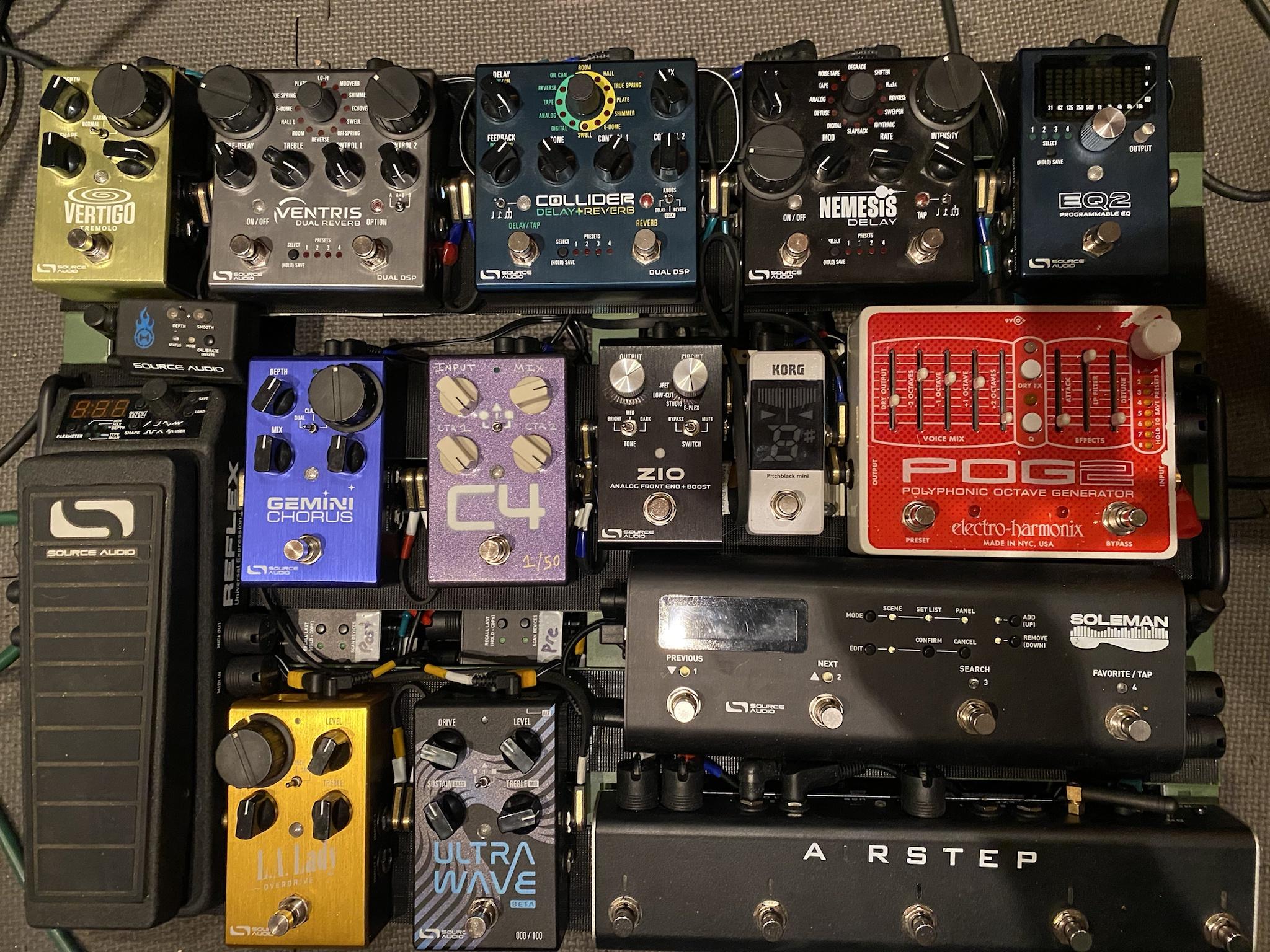
The Pog2 is a placeholder for an eventual EQ2 and I'll pull the Atlas from my main board, but it's as complete as it's ever been...

20231008_103855.jpg


Now I have to finish programming it.
 
The Pog2 is a placeholder for an eventual EQ2 and I'll pull the Atlas from my main board, but it's as complete as it's ever been...

View attachment 5213479

Now I have to finish programming it.

our boards have a lot in common. Though I’d say that’s probably the first time I’ve seen a ventris into a nemesis and not the other way around.
M64BXuO.jpg