• TalkBass has been independent since 1998. Add your voice.
    Create a free account to reply to discussions, view embedded media, and browse with fewer display ads.
    Join freeLog in
    Want zero display ads or expanded classifieds tools? Compare plans.

NPD: SA Aftershock

Hey guys,

what would be the best way to control the amounts of clean lows mixed in the signal (like the new Darkglass X7 low pass or Damnation Audio loop blender)? Is it the clean high cut I should be using? For example, if I use two highly distorted engines and set the clean cut to 200 is everything under 200 hz clean?

Also, is there a way to run another distortion pedal into the Aftershock and still maintain a clean low end?
For mixing in clean lows, I suggest using the following process:
1. Set Left (Channel 1) Controls // Clean Mix to 100%.
2. Under the "Noise Gate and Additional Filters" section, use the Clean High Cut parameter to set the cutoff point; anywhere between 20 kHz and 47 Hz is available.
3. Dial back the Left (Channel 1) Controls // Clean Mix to find your preferred distortion/clean mix.
4. Use the "Parametric Equalizer" section controls to tune the Bass, Mid A, Mid B, and Treble bands, and select your preferred Bass Filter and Treble Filter controls.
5. Use the Left (Channel 1) Controls // Bass, Mid A, Mid A, and Treble parameters to set levels.

Regarding your second and third questions... Clean High Cut is only applied to the dry signal. There would still be distorted signals under 200 Hz from both distorted engines. To remove it:
Parametric Equalizer // Bass Freq: 200 Hz
Parametric Equalizer // Bass Filter Controls // Type (cut only): High Pass
Parametric Equalizer // Bass Filter Controls // Shelving Slope: High
Left (Channel 1) Controls // Bass: -20 dB
Right (Channel 2) Controls // Bass: -20 dB
 
Any news on updates for the Aftershock?
Like asigning one knob to "blend" between two chosen drive engines? :)

Still working on it. Thank you for your patience.

I don't think you can assign a knob to "blend". You could do it with an expression pedal by assigning output A and output B in opposite directions perhaps?

Is this still a thing or is it a general "can´t do and never will do" for the Aftershock?
Would be awesome since this would absolutely slay the Alpha-Omega given the versatility of the Aftershock!
*crossing fingers* ;-)
 
  • Like
Reactions: DizzySalt and fasto
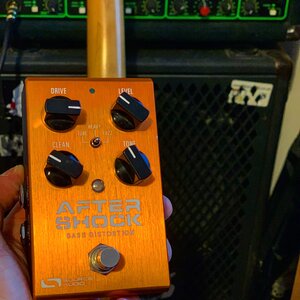
Just picked up one these to replace my Muff Nano. Hopefully it’ll arrive tomorrow for rehearsal! I’m excited!!

Ok so it’s arrived, and first impression... amazing!!! Can’t wait to try it out tonight.
C29860BF-FA8A-4055-8038-0353BA60BC56.jpeg
 
Finally getting around to revamping my pedalboard and I'm looking to cut down on the number of pedals. I'm eyeing the SA Aftershock to handle the majority of my dirt needs but I have a couple questions before I pull the trigger.

#1 The Aftershock was released in May of 2016, with 2019 quickly approaching, is there any indication that Source Audio is going to release a new version of the One Series pedals or some sort of succesor to them soon? Am I safe to buy an Aftershock or is there something better right around the corner?

#2 Does anyone know if the Aftershock can come close to hitting the sounds of the TC Electronic Mojomojo and the Darkglass Alpha Omega? I imagine in theory some tweaking of one of the tube drive engines could get you close to the mojomojo, and possibly doing a parallel patch with two distortions and some EQ could get you close to the Alpha Omega. I was curious if anyone had tried to emulate these two pedals with any luck?
 
Finally getting around to revamping my pedalboard and I'm looking to cut down on the number of pedals. I'm eyeing the SA Aftershock to handle the majority of my dirt needs but I have a couple questions before I pull the trigger.

#1 The Aftershock was released in May of 2016, with 2019 quickly approaching, is there any indication that Source Audio is going to release a new version of the One Series pedals or some sort of succesor to them soon? Am I safe to buy an Aftershock or is there something better right around the corner?

#2 Does anyone know if the Aftershock can come close to hitting the sounds of the TC Electronic Mojomojo and the Darkglass Alpha Omega? I imagine in theory some tweaking of one of the tube drive engines could get you close to the mojomojo, and possibly doing a parallel patch with two distortions and some EQ could get you close to the Alpha Omega. I was curious if anyone had tried to emulate these two pedals with any luck?
No plans to change the hardware. Its solid. The Hub is still the best means to give MIDI via a small connector.
 
  • Like
Reactions: Ens0r and Robertron
So rehearsal on Friday night I was having some issues dialling in the Aftershock. I'm after some real filth but also looking for that Muse tone from my buzz. I assumed that a blender was really going to be the only way to get the sound in my head as when I get filthy I was losing all the bottom end. I set the pedal with everything at 12, then nudged the level to suit, clean blend to 11 and drive at 1pm. Sounded amazing, so happy with this!
 
So I just watched a demo vid for the EHX Deluxe Sovtek Big Muff that showed sweeping it's mid control with an expression pedal. I don't know why I never thought about that before, but I went right to my Aftershock to try some things. And now the questions:

- There doesn't seem to be a way to assign any parameter other than Drive control to the expression input (using the Reflex connected to the Hub). Am I missing something or is it not possible (yet)? Is this maybe coming in a future update? I did get some pretty cool effects, though, by sweeping the drive on various engines, will have to explore that some more. :D

- And an editor question, will the Hub Manager software ever be incorporated into Neuro Desktop? The look and controls in Neuro are better than Hub Manager (which is an unnofficial beta version I think?) but I primarily use Hub Manager to save presets (Aftershock, Manta and Gemini) to the hub to be recalled via midi with my OC-10. It is really clunky to use Neuro to create and save a preset on the pedal and then get it into the Hub Manager where I can work with it and the other pedals connected to the hub. Having Hub support in Neuro would be super awesome. Is that out there yet? Or coming soon? If I have missed something, could someone let me know? I am using a windows laptop, fwiw.
 
So I just watched a demo vid for the EHX Deluxe Sovtek Big Muff that showed sweeping it's mid control with an expression pedal. I don't know why I never thought about that before, but I went right to my Aftershock to try some things. And now the questions:

- There doesn't seem to be a way to assign any parameter other than Drive control to the expression input (using the Reflex connected to the Hub). Am I missing something or is it not possible (yet)? Is this maybe coming in a future update? I did get some pretty cool effects, though, by sweeping the drive on various engines, will have to explore that some more. :D

- And an editor question, will the Hub Manager software ever be incorporated into Neuro Desktop? The look and controls in Neuro are better than Hub Manager (which is an unnofficial beta version I think?) but I primarily use Hub Manager to save presets (Aftershock, Manta and Gemini) to the hub to be recalled via midi with my OC-10. It is really clunky to use Neuro to create and save a preset on the pedal and then get it into the Hub Manager where I can work with it and the other pedals connected to the hub. Having Hub support in Neuro would be super awesome. Is that out there yet? Or coming soon? If I have missed something, could someone let me know? I am using a windows laptop, fwiw.
Integration of the Hub Manager intro the Neuro Desktop is very close.
You should be able to do more than drive control with EXP
 
  • Like
Reactions: dieselbass42
Integration of the Hub Manager intro the Neuro Desktop is very close.
That's awesome! Looking forward to it. And the question you know is always coming, any idea when? :D Thank you for the continued support!

You should be able to do more than drive control with EXP
I couldn't find anywhere to assign other parameters to exp. I think all my stuff is up to date but I'll check for updates and play with it some more. :thumbsup:
 
That's awesome! Looking forward to it. And the question you know is always coming, any idea when? :D Thank you for the continued support!


I couldn't find anywhere to assign other parameters to exp. I think all my stuff is up to date but I'll check for updates and play with it some more. :thumbsup:
Sorry I am not being more helpful. Busy family times! Check the manual on exp assignment. Not using app,
 
That's awesome! Looking forward to it. And the question you know is always coming, any idea when? :D Thank you for the continued support!


I couldn't find anywhere to assign other parameters to exp. I think all my stuff is up to date but I'll check for updates and play with it some more. :thumbsup:
To assign parameters to expression via the Hub, use the Neuro Desktop Editor to access the AfterShock Sound Editor menu. Towards the bottom of the menu, under External Control, select Control Source // Hub Expression Input, and Control Destination // Mapped To Knobs. Control Range and Control Minimum can be set as desired, and the range and direction for each knob parameter are set using the digital knobs' Min and Max values. The Bass/Clean and Treble knobs can be reassigned to a list other parameters, including Mid A Frequency and Mid B Frequency. Controls for this are located under the I/O Routing and Control Options portion of the Sound Editor menu. Please feel free to reach out to us at contact(at)sourceaudio.net if you have any questions. :)
 
Finally joining the SA bunch as just purchased an Aftershock from a TBer with Christmas cash and it's on the way, so i may have a bunch of questions. I am hoping I can tune in 2-3 or more choices for my short board for flyaway gigs this year and have plenty of time before festival season to Taz-tune my sounds. I also have a TCE Sub n Up Mini coming to which I will add a Mooer Sweeper and Zoom MS60B (or be lazy and keep using the B2.1u)
 
To assign parameters to expression via the Hub, use the Neuro Desktop Editor to access the AfterShock Sound Editor menu. Towards the bottom of the menu, under External Control, select Control Source // Hub Expression Input, and Control Destination // Mapped To Knobs. Control Range and Control Minimum can be set as desired, and the range and direction for each knob parameter are set using the digital knobs' Min and Max values. The Bass/Clean and Treble knobs can be reassigned to a list other parameters, including Mid A Frequency and Mid B Frequency. Controls for this are located under the I/O Routing and Control Options portion of the Sound Editor menu. Please feel free to reach out to us at contact(at)sourceaudio.net if you have any questions. :)
Got it, thanks @nnavarro. I missed the "mapped to knobs" part. Now I just have to wait to get back home and try it out. Still away on Christmas vaca. :) As always, love and appreciate the fact that you guys, the creators, are here to help us out. Thanks again! :thumbsup::thumbsup::thumbsup::thumbsup::thumbsup::thumbsup::thumbsup: