
Enjoy the benefits of a premium membership!
Upgrade Account
-
TalkBass has been independent since 1998. Add your voice.
Create a free account to reply to discussions, view embedded media, and browse with fewer display ads.
Join free Log in
Want zero display ads or expanded classifieds tools? Compare plans.
You are using an out of date browser. It may not display this or other websites correctly.
You should upgrade or use an alternative browser.
You should upgrade or use an alternative browser.
Source Audio Sorcerers Society (S.A.S.S) Part 3
- Thread starter gregmon79
- Start date
More options
Who Replied?
Thanks for the tips everyone!! It might be a little while before I get any SA pedals now, I thought I'd be able sooner...
I think I'm gonna start with the OFD and manta, then get the others....
excuse me for my possibly dumb question, I found scattered info via search engine, but I'm trying to understand this "hub" thing, from what I'm gathering you can save numerous presets, do you need a PC to for this or some kind of midi system??
please forgive my ignorance as I'm not the most tech savvy!! though I'm pretty into analog gear, these newer SA pedals are the closest thing I can find to a truly amazing multi-FX unit!!
I think I'm gonna start with the OFD and manta, then get the others....
excuse me for my possibly dumb question, I found scattered info via search engine, but I'm trying to understand this "hub" thing, from what I'm gathering you can save numerous presets, do you need a PC to for this or some kind of midi system??
please forgive my ignorance as I'm not the most tech savvy!! though I'm pretty into analog gear, these newer SA pedals are the closest thing I can find to a truly amazing multi-FX unit!!

- Apr 19, 2001
- 2,302
- 3,047
- Disclosures
- Beta tester Source Audio, demos/reviews of many others
Thanks for the tips everyone!! It might be a little while before I get any SA pedals now, I thought I'd be able sooner...
I think I'm gonna start with the OFD and manta, then get the others....
excuse me for my possibly dumb question, I found scattered info via search engine, but I'm trying to understand this "hub" thing, from what I'm gathering you can save numerous presets, do you need a PC to for this or some kind of midi system??
please forgive my ignorance as I'm not the most tech savvy!! though I'm pretty into analog gear, these newer SA pedals are the closest thing I can find to a truly amazing multi-FX unit!!
It saves 'scenes' or presets in the Hub memory. You'll need a midi controller to select a midi PC message (any number of 128 presets) then tweak your pedals to your liking, then press and hold save on the hub. Now every time you select that midi preset it will tell the hub to load that particular scene.
It's really neat, I've used this system for a while now. I rarely ever use the built in presets or switches on the pedals anymore, everything on my board is midi controlled.


You need a MIDI controller pedal like a MIDI Mouse connected to the Hub to select MIDI program number, then you tweak the settings on the pedals, and finally press a button on the Hub. It will then read all settings from the pedals and store those for the MIDI program number you have selected. The next time you choose that number by selecting it from the MIDI controller the Hub loads all the settings into the pedals....
excuse me for my possibly dumb question, I found scattered info via search engine, but I'm trying to understand this "hub" thing, from what I'm gathering you can save numerous presets, do you need a PC to for this or some kind of midi system??
...
EDIT: I'm too slow.

Whoa. I think Talkbass's notifications system screwed up. I haven't gotten a single notification about this thread for nearly two weeks and I was wondering why it was so inactive. Looks like I missed a whole lot of really important updates!
This sounds pretty confusing to me at the moment... is there a manual or something that explains exactly how this works? Reading later posts suggests that what it does is lets you assign different channels to different pedals so you don't control all at once? But can you also assign different channels to different MIDI controllers or something like that? And can you assign the hothand/expression pedal to different MIDI CC numbers? I've been wanting to be able to expression control the manta's blend knob while simultaneously using the hothand to control the filter.
I haven't tried it yet and I won't be able to do any firmware updating soon, but I'm assuming it's simply ignoring bypassed pedals in the scene. Until they've done an update, would it help if you put multiple engaged instances of the pedal? So it runs through the two presets on the scene and saves them to the pedal, and leaves it with one particular preset on? Or perhaps if you have three presets you can order it so it saves preset 1 then preset 2 then sets the pedal to bypass.
I'm using a Zoom MS60B to compress, noise gate and EQ. The noise gate isn't actually necessary since the SA pedals have noise gates too, but since I've a vacant slot I decided I might as well. The reason why I'm using this EQ (over the SA PEQ) is that the PEQ doesn't have a parametric, which I find useful to scan and cut problematic frequencies.
I find it helps a lot when doing wobbles, though. Makes the note a lot more consistent. Well, it also boils down to insufficiently consistent technique on my part, but it certainly helps a lot.
Also, I've found a pretty nice trick; if you have very high gain octave foldback distortion with lows cut, and blend between the two, playing very lightly gives only the octave up, and as you increase playing volume, the low note comes back in gradually. The compressor helps to even out the volume differences between the two so you can get a pretty useful effect with that.
Great! That's in time for MY birthday
You can now have separate channels per pedal so it won't interfere with other gear you might have. Keep in mind that the Channel ID must match the channel in the scene you are using. Or if you had 2 of the same pedal, you could separate them individually by MIDI channel instead of the CC# sending it to both pedals simultaneously.

Adamixoye
A PT Pro is cool for worship, right?
- Apr 9, 2012
- 18,158
- 69,338
- Disclosures
- Occasional Beta Tester for Confusion Studios, Singular Sound, and Source Audio
You can now have separate channels per pedal so it won't interfere with other gear you might have. Keep in mind that the Channel ID must match the channel in the scene you are using. Or if you had 2 of the same pedal, you could separate them individually by MIDI channel instead of the CC# sending it to both pedals simultaneously.
So I want to know how these interact with the primary Hub channel. Does the Hub need to be in Omni mode for this to work as you describe?
For example, right now I've got my Hub and a Line6 M5 on the same MIDI Channel, Channel 6, so that the Hub will output HH3 and expression data to the Line6 in addition to (depending on the scene) the SB2 pedals. So everything is on Channel 6 right now---Hub input, Hub output, and both my SB2 pedals.
I absolutely want to put the Hub and Line6 on different channels (I don't want the PC messages to be linked), but I really want to maintain the option to send HH3 data to the Hub. I guess I can't do this yet?
Just trying to wrap my head around this.
Whoa. I think Talkbass's notifications system screwed up. I haven't gotten a single notification about this thread for nearly two weeks and I was wondering why it was so inactive. Looks like I missed a whole lot of really important updates!
I have had the same problem a couple of times in the past.
It saves 'scenes' or presets in the Hub memory. You'll need a midi controller to select a midi PC message (any number of 128 presets) then tweak your pedals to your liking, then press and hold save on the hub. Now every time you select that midi preset it will tell the hub to load that particular scene.
It's really neat, I've used this system for a while now. I rarely ever use the built in presets or switches on the pedals anymore, everything on my board is midi controlled.
You need a MIDI controller pedal like a MIDI Mouse connected to the Hub to select MIDI program number, then you tweak the settings on the pedals, and finally press a button on the Hub. It will then read all settings from the pedals and store those for the MIDI program number you have selected. The next time you choose that number by selecting it from the MIDI controller the Hub loads all the settings into the pedals.
EDIT: I'm too slow.
thanks so much for your time!!!! Though I plan on keeping my mostly analog pedal board, this whole hub system sounds like it could be the answer to alot of problems I've encountered, I can only begin to fathom the possibilities with this setup!!
- Apr 19, 2001
- 2,302
- 3,047
- Disclosures
- Beta tester Source Audio, demos/reviews of many others
thanks so much for your time!!!! Though I plan on keeping my mostly analog pedal board, this whole hub system sounds like it could be the answer to alot of problems I've encountered, I can only begin to fathom the possibilities with this setup!!
They are also coming out with a product that hooks up to your analog pedal and essentially makes it a loop that can be turned on and off via the Hub control as well. Good for those like you that have analog pedals but want to have better control.

Has this been posted yet?
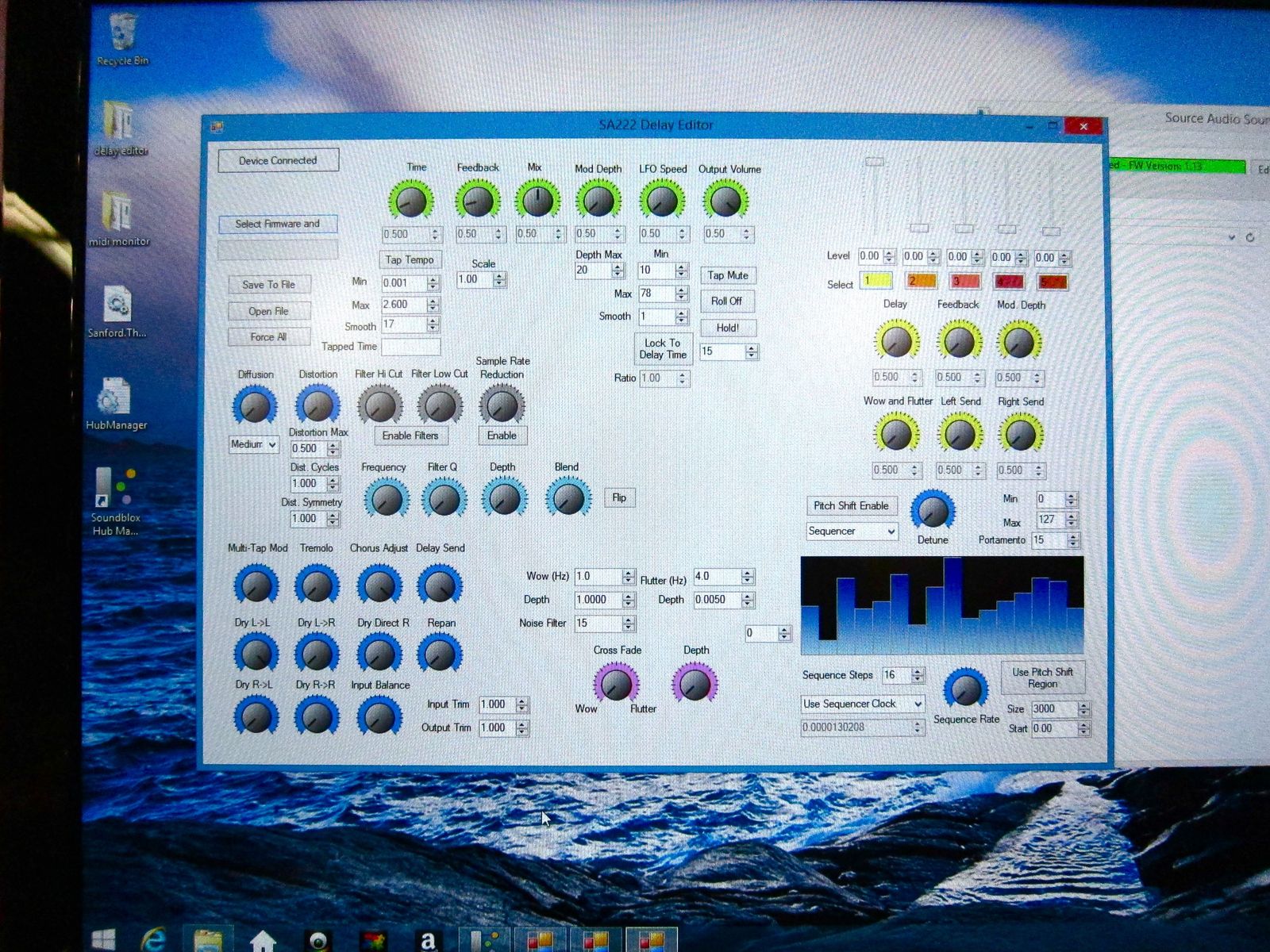
From this article:
Invalid Link Removed
Holy baloney. That's a LOT of parameters.
OFD + Manta sounds like a pretty cool combo! Have you checked out the differences between the OFD and MWBD yet? And are you intending to get an expression pedal to control the OFD distortion?Thanks for the tips everyone!! It might be a little while before I get any SA pedals now, I thought I'd be able sooner...
I think I'm gonna start with the OFD and manta, then get the others....
excuse me for my possibly dumb question, I found scattered info via search engine, but I'm trying to understand this "hub" thing, from what I'm gathering you can save numerous presets, do you need a PC to for this or some kind of midi system??
please forgive my ignorance as I'm not the most tech savvy!! though I'm pretty into analog gear, these newer SA pedals are the closest thing I can find to a truly amazing multi-FX unit!!
And you don't really need a PC, as adamaarts and FretNoMore mentioned, but it makes it a lot faster and easier IMO. A large part of this is because when you're tweaking the parameters on the pedal, you've a few parameters to each knob, but if you're tweaking on a computer, you can see everything and tweak it with your mouse. Also, you can save all your spare patches so you have 'backups' (in case you mess up the patch and can't remember how to revert it back). I found it especially useful when recording. Bringing a computer to lives is less convenient, but ideally you shouldn't have to change patches live, so knobs will have to do.
You can now have separate channels per pedal so it won't interfere with other gear you might have. Keep in mind that the Channel ID must match the channel in the scene you are using. Or if you had 2 of the same pedal, you could separate them individually by MIDI channel instead of the CC# sending it to both pedals simultaneously.
Oh right, I forgot about using the SA stuff with other MIDI-controlled equipment. That makes a lot of sense then.
They are also coming out with a product that hooks up to your analog pedal and essentially makes it a loop that can be turned on and off via the Hub control as well. Good for those like you that have analog pedals but want to have better control.
wow, that's really cool, I'll have to keep an eye out for this
QUOTE="Nic., post: 17011594, member: 152766"]
OFD + Manta sounds like a pretty cool combo! Have you checked out the differences between the OFD and MWBD yet? And are you intending to get an expression pedal to control the OFD distortion?
And you don't really need a PC, as adamaarts and FretNoMore mentioned, but it makes it a lot faster and easier IMO. A large part of this is because when you're tweaking the parameters on the pedal, you've a few parameters to each knob, but if you're tweaking on a computer, you can see everything and tweak it with your mouse. Also, you can save all your spare patches so you have 'backups' (in case you mess up the patch and can't remember how to revert it back). I found it especially useful when recording. Bringing a computer to lives is less convenient, but ideally you shouldn't have to change patches live, so knobs will have to do.
.[/QUOTE]
yes, I checked them both out and plan on using the multiwave for a more synth sound, so I'm thinking the expression might be better for that or maybe the manta!! I plan on using the OFD more straightforward, I really dig the tubescreamer tone, but also many other sounds, so that's 1st on my list.. I'm gonna try to copy the tones I have with my analog pedals first then go from there, I'm really curious how johnk matched the sound of the OCD, maybe its somewhere in this thread, but I'm getting ahead of myself!!
in short I really dig the possibilities I can get with these, I am guilty of being weary of digital FX due to past experiences, but some of these newer pedals are changing my mind
Yes the first four tube settings are really awesome for always-on crunch! The fuzz is surprisingly nice too. Good luck with that!
And yeah new technology is pretty amazing. SA is probably leading the way IMO, but I think Zoom is currently doing quite a good job too. I don't dig their distortions as much as SA, but their compressor and delay/reverb/etc are pretty good. Software effects are great too... except when they run out of processing power.
And yeah new technology is pretty amazing. SA is probably leading the way IMO, but I think Zoom is currently doing quite a good job too. I don't dig their distortions as much as SA, but their compressor and delay/reverb/etc are pretty good. Software effects are great too... except when they run out of processing power.
- May 7, 2014
- 242
- 357
- 32
- Disclosures
- Endorsing Artist for Bergantino Audio Systems and Payson Fanned Bass Strings
I have a question about the Lunar Phaser. I'm currently using one preset on my Manta to get a really slow sine LFO (soundcloud below), and while it sounds awesome I would really love to have two different envelope sounds on tap. My question is: can the Lunar Phaser replicate this sound? If yes I'm 100% buying it when it comes out.
0:00 is just the Phaser. 0:16 adds the TC Corona Chorus.
Full chain is MXR Bass Compressor -> Wren & Cuff Phat Phuk B -> Source Audio Manta -> (TC Corona Chorus) -> Darkglass B7K
0:00 is just the Phaser. 0:16 adds the TC Corona Chorus.
Full chain is MXR Bass Compressor -> Wren & Cuff Phat Phuk B -> Source Audio Manta -> (TC Corona Chorus) -> Darkglass B7K
So, after seeing the Aftershock video SA posted yesterday I have to say that thing is begging for a DI version with cabinet simulation on the DI output. Lacking those features I would still use the aftershock instead of my ValveDrive.
Now, during rehearsal yesterday I found myself in a kind of messy situation where I needed to adjust the HH sensitivity to control the Manta and ended up having to borrow the mac we use for samples to connect to the HUB by USB and make the change. I started to think that if I wanted to do that live I would not be able to. So I went into the manual and, maybe I am just that dumb, but I could not find a way tho make that adjustment in the pedal. Is there a way to do that?
Now, during rehearsal yesterday I found myself in a kind of messy situation where I needed to adjust the HH sensitivity to control the Manta and ended up having to borrow the mac we use for samples to connect to the HUB by USB and make the change. I started to think that if I wanted to do that live I would not be able to. So I went into the manual and, maybe I am just that dumb, but I could not find a way tho make that adjustment in the pedal. Is there a way to do that?
Would the depth/smooth knobs on the HH3 help?So, after seeing the Aftershock video SA posted yesterday I have to say that thing is begging for a DI version with cabinet simulation on the DI output. Lacking those features I would still use the aftershock instead of my ValveDrive.
Now, during rehearsal yesterday I found myself in a kind of messy situation where I needed to adjust the HH sensitivity to control the Manta and ended up having to borrow the mac we use for samples to connect to the HUB by USB and make the change. I started to think that if I wanted to do that live I would not be able to. So I went into the manual and, maybe I am just that dumb, but I could not find a way tho make that adjustment in the pedal. Is there a way to do that?
Nop, no effect. I might be wrong but I think those only affect the EXP Out on the HH3, not the "SourceAudio out"Would the depth/smooth knobs on the HH3 help?
I realized I'm not entirely sure, when you say "sensitivity" what do you mean? Do you refer to the expression range?
No, for me sensitivity is the opposite of the smooth(ness).I realized I'm not entirely sure, when you say "sensitivity" what do you mean? Do you refer to the expression range?
In practical terms, I suffer a bit from shaking hands, specially when I'm playing and if the smooth value is too low (say 100) the ring captures all that vibration and not just the large hand movements. I had to set the smooth to 250 (I think...) to get the effect I wanted.
No, for me sensitivity is the opposite of the smooth(ness).
In practical terms, I suffer a bit from shaking hands, specially when I'm playing and if the smooth value is too low (say 100) the ring captures all that vibration and not just the large hand movements. I had to set the smooth to 250 (I think...) to get the effect I wanted.
Ah! That's tough. Okay... so you want to find a setting that makes it more or less smooth? I think the speed knob does that when you're in hothand control mode.


