• TalkBass has been independent since 1998. Add your voice.
    Create a free account to reply to discussions, view embedded media, and browse with fewer display ads.
    Join freeLog in
    Want zero display ads or expanded classifieds tools? Compare plans.

Source Audio Sorcerers Society (S.A.S.S) Part 3

I agree! I'm actually planning to swap the Ventris in for the RV-500 in the near future. I went with the RV first because I got it for about half the price of the Ventris and I wasn't 100% confident I needed such an elaborate Reverb unit at the time. Sort of testing the waters. I know I need one now so the Ventris is in the plans for the future.

Oh you already have the RV-500. Haha, sorry!
 
@rsmith601 would you be willing to share the development road map. Totally understand if not but it would be of real interest to the SA fanboys (such as myself).
1) Spectrum - August
2) Cant say - September
3) Cant say - November?
4) Multiwave - January?
 
Spent some time earlier today trying to recreate the synth bass tone on "I Wanna Dance with Somebody" (Whitney Houston). I used the patch that I have been using on the FI as a starting point, but it became clear pretty quickly that there's a lot of translation necessary to do that. But I learned a lot about the Neuro editor in the process. Haven't shared the preset yet, but here's a sample. Excuse the playing, I just did a quick take right before I stopped working on it.

 
Last edited:
My C4 should be arriving Saturday!

I gather that with just the pedal I can access 6 presets. If I add the DMC.micro and its cable (and no other hardware), I can access all 128 presets. Is that correct?

correct! You do need to make a setting in the Editor to have the hardware set for USB Host. Very simple.
Correct me if I am wrong but we can access the 128 presets and edit sounds using the Neuro app on our phones with the cable attached as well. That might be cumbersome for performance but would be a workable solution for the meanwhile.
 
Correct me if I am wrong but we can access the 128 presets and edit sounds using the Neuro app on our phones with the cable attached as well. That might be cumbersome for performance but would be a workable solution for the meanwhile.
Yes, you can! I think the Desktop is a bit better for this, but certainly doable on the Mobile. The only issue is you will need to remember what you put where. The Mobile is only one way communications, while the desktop is back and forth.
 
  • Like
Reactions: bassbrad
Wrong MIDI channel? This does work. We have tested many times. Also, note that the presets in the editor start at 1, but the MIDI address is one less than that.

I checked the midi channel, both Hub and C4 are on the same channel. I think the issue is getting my controller to send the right CC value. As I have it now, when I step on the controller to select a preset, I see the little green led on the C4 blink, but nothing happens. I am using a One Control OC-10 with Croc Eye midi expander to send midi PCs to the Hub (and other pedals), I have the C4 connected to the hub via multi function/control input cable. I can send CCs with it along with PCs, on channel 2, but nothing seems to work for values. The Croc Eye has settings for two values. I tried 104 as the CC in value 1 and the preset number in value 2, but it doesn't work. Tried it the other way, same result. I'm not super versed in midi by any means. Anyone using this set-up, can you give me some more details on your set-up/connections? Thanks in advance.

And thanks to all who have contributed patches thus far. A lot of really cool stuff!!! Once I get my set-up figured out, I'll start creating and contributing as well.
 
Wanted to learn how each of the different Filters sounded. I'm just now realizing that it's basically the Soundblox Bass Envelope Filter in a drop down menu.

Quickly threw this together. Tone based off "She's Creeping" by Royal Blood. Can definitely be tweaked to get closer but it's getting late.

First half is with the first 2 saw voices turned off. I re-engage them after the little pause because well no MIDI controller yet. :thumbsup:


She'sCreeping.jpg
 
I checked the midi channel, both Hub and C4 are on the same channel. I think the issue is getting my controller to send the right CC value. As I have it now, when I step on the controller to select a preset, I see the little green led on the C4 blink, but nothing happens. I am using a One Control OC-10 with Croc Eye midi expander to send midi PCs to the Hub (and other pedals), I have the C4 connected to the hub via multi function/control input cable. I can send CCs with it along with PCs, on channel 2, but nothing seems to work for values. The Croc Eye has settings for two values. I tried 104 as the CC in value 1 and the preset number in value 2, but it doesn't work. Tried it the other way, same result. I'm not super versed in midi by any means. Anyone using this set-up, can you give me some more details on your set-up/connections? Thanks in advance.

And thanks to all who have contributed patches thus far. A lot of really cool stuff!!! Once I get my set-up figured out, I'll start creating and contributing as well.
I am not the one to ask (sorry), but I do not think you want the Hub and the C4 on the same MIDI channel. Perhaps send a message to [email protected] or perhaps a Hub fluent person here can comment. This should be solved really easily.
 
My C-4 is here, which is the good news. The bad news is that I can't get the Neuro iOS mobile app to work.
I am using a iPhone 8 with a dongle, the latest available iOS and the supplied cable to connect to the C-4. NO matter what I do. I can't send presets to the C-4. The function LED doesn't flash, and I don't hear any changes when I select a preset, or even if I select "burn" and send it to a toggle position.

Also, when the Neuro connecting cable is plugged in (to input 2, as specified) there is no synth output at all in toggle position 2 (either red or green bank). With the cable removed, the toggle 2 presets in either bank work normally. I've tried flipping the audio output channel and inverting the audio output phase, but neither change makes a difference. When I plug my headphones into the app I do hear white noise.

UPDATE: PROBLEM SOLVED!
I was playing around with the C-4 and Neuro app again trying some trouble shooting steps suggested by the kind folks at Source Audio when I realized that both of the dongles that I had tried previously were the sort that allows the iPhone’s Lightning jack to be used for simultaneously by an 1/8” audio plug and a Lightning connector for charging simultaneously. I didn’t have a charger cable plugged in during my previous attempts, but on a whim a tried a 3rd dongle that has only an 1/8” jack - no second lightning connector for charging. And it worked perfectly!

Should you be having similar problems I suggest trying an 1/8” plug only dongle if you haven’t already. It worked for me!
 
I checked the midi channel, both Hub and C4 are on the same channel. I think the issue is getting my controller to send the right CC value. As I have it now, when I step on the controller to select a preset, I see the little green led on the C4 blink, but nothing happens. I am using a One Control OC-10 with Croc Eye midi expander to send midi PCs to the Hub (and other pedals), I have the C4 connected to the hub via multi function/control input cable. I can send CCs with it along with PCs, on channel 2, but nothing seems to work for values. The Croc Eye has settings for two values. I tried 104 as the CC in value 1 and the preset number in value 2, but it doesn't work. Tried it the other way, same result.

I’ve got my C4 working through the hub with midi perhaps I can help!

I saw in another post that you had your hub and C4 on Midi channel 2. The default is midi channel 1 on the hub and it is recommended to keep it on that in the neuro manual. So double check that and change it back to channel 1 in the desktop app if you want to. All the other source audio pedals use 1 as the default. Once the hub is updated to handle the C4 in scene saving you’ll want it on 1 with the rest of the SA stuff anyhow.

Rodger mentioned not having them on the same midi channel. I think this came up in the TGP thread because the hub blocks MIDI PC messages on its channel and doesn’t pass them on. However at this stage in the game the only way you need to change presets is with MIDI CC messages. So you don’t need to send midi PC messages like you said you were doing on channel 2. The hub will block them. I have both my hub and C4 on the same midi channel 1.

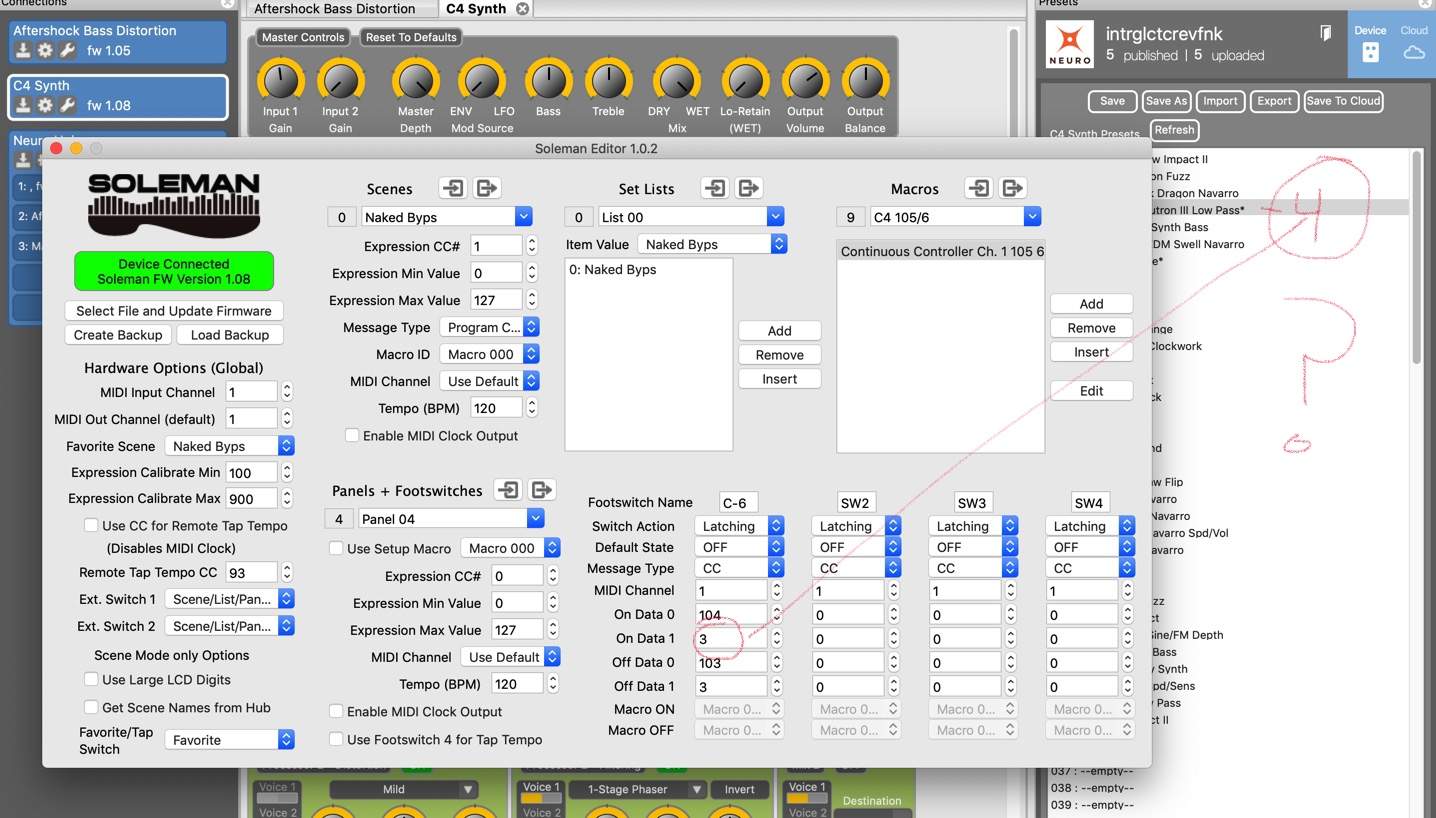
I am sending CC104 - 3 on midi channel 1 to engage preset 4, it works. Note that [On Data 1]=104 (the midi CC# we want to send in midi channel 1) and [On Data 2]=3 (the value of the midi CC we want to send to pick the preset, 0-127).
Also remember you’ll be one off from the preset number you actually want to engage. So if your favorite preset is 012 you’d have to send CC#104 011 to activate it.


Never used the one controller pedal - does it always send PC messages at the same time as CC? It could be sending the data incorrectly.
 
I’ve got my C4 working through the hub with midi perhaps I can help!

I saw in another post that you had your hub and C4 on Midi channel 2. The default is midi channel 1 on the hub and it is recommended to keep it on that in the neuro manual. So double check that and change it back to channel 1 in the desktop app if you want to. All the other source audio pedals use 1 as the default. Once the hub is updated to handle the C4 in scene saving you’ll want it on 1 with the rest of the SA stuff anyhow.

Rodger mentioned not having them on the same midi channel. I think this came up in the TGP thread because the hub blocks MIDI PC messages on its channel and doesn’t pass them on. However at this stage in the game the only way you need to change presets is with MIDI CC messages. So you don’t need to send midi PC messages like you said you were doing on channel 2. The hub will block them. I have both my hub and C4 on the same midi channel 1.

I am sending CC104 - 3 on midi channel 1 to engage preset 4, it works. Note that [On Data 1]=104 (the midi CC# we want to send in midi channel 1) and [On Data 2]=3 (the value of the midi CC we want to send to pick the preset, 0-127).
Also remember you’ll be one off from the preset number you actually want to engage. So if your favorite preset is 012 you’d have to send CC#104 011 to activate it.


Never used the one controller pedal - does it always send PC messages at the same time as CC? It could be sending the data incorrectly.

My midi chain is One Control > Reflex > Hub > Future Impact > H9_1 > H9_2. One Control sends omni, pedals read on ch. 1-5 in above order, with omni through from one to the next. No real reason to use ch.2 other than that just happened to be the physical order of the chain. How do you have your C4 connected to the hub? Or, how do you send it midi info? It sounds like I have the One Control sending the right info, just have to get the C4 to see it. Thanks for the help. :thumbsup:
 

Latest posts